Onyx: A POSIX-like OS That Builds with GN and Ninja, Not Autotools
UNIX-like operating system written in C and C++
At a glance
- What is it?
- Onyx is a young UNIX-like operating system for x86_64 and riscv64, written in C and C++. It aims for POSIX compliance and System V ABI adherence, but its build system and documentation are still thin.
- Who is it for?
- Onyx is for hobbyist OS developers and students who want to study a POSIX-like kernel written in C and C++, especially those comfortable with GN and Ninja. It is not for production use, nor for anyone expecting a stable API or a complete userland.
- Can I use it commercially?
- Check first. The repository uses a licence we do not classify automatically, so read its LICENSE file before any commercial use.
- Is it still maintained?
- Yes. The repository last received commits 26 days ago.
- What is it written in?
- Mainly C, according to GitHub's language statistics.
Answers come from the project's GitHub data, last synced on October 4, 2026, and from our analysis. They are not legal advice.
Star history
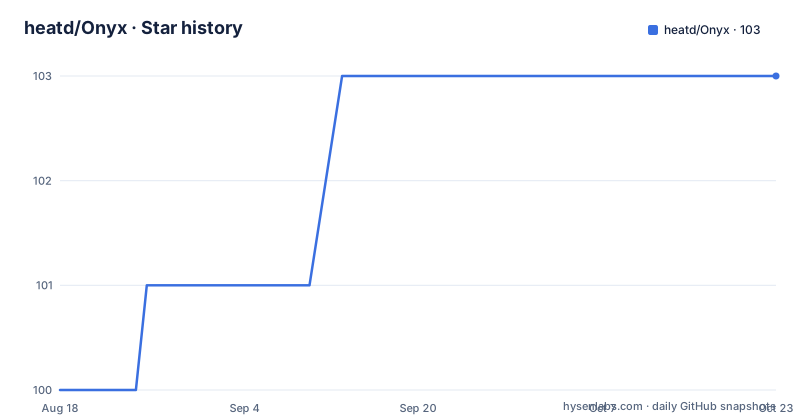
- heatd/Onyx103 ★ · +3
| Repository | 2026-08-18 | 2026-10-04 |
|---|---|---|
| heatd/Onyx | 100 | 103 |
3 Stars in the last 47 days, measured from the daily GitHub snapshot. Compare with other projects
Editorial analysis
What Onyx Actually Is
Onyx is a POSIX-like operating system written in C and C++. The README states that the only supported architectures are x86_64 and riscv64. It is designed to comply with the POSIX standard and to implement some standard Unix APIs, while learning from mistakes of past POSIX OSes. It follows the System V ABI. This is a from-scratch kernel and OS project, not a Linux distribution or a BSD variant. The intended audience is developers and hobbyists interested in OS internals, not everyday users. The README's joke about GNU/Onyx, echoing the famous GNU/Linux interjection, suggests the author is aware of the kernel-versus-OS distinction. The project is still young, with no releases listed and no homepage. The last push is unknown, so activity is uncertain.
Build System: GN and Ninja, Not Make
The build system is unusual for an OS project. The README lists build dependencies: mtools, genisoimage, libfl2, clang-tidy, and ninja-build. It also requires gn, the generate-ninja tool from Chromium. If your distribution has a gn package, use it; otherwise download from gn's upstream, extract, and add to PATH. This is a notable departure from the typical Makefile-based OS kernels. Using GN means the build is described in GN files, which generate Ninja files. This can be more expressive for large projects, but it adds a dependency that many OS developers might not have. The README points to doc/building.md for detailed instructions, but that file is not included in the material. So the exact build commands are unknown. You will need to consult the repository's documentation yourself.
Architecture and Design Goals
Onyx targets x86_64 and riscv64, two modern architectures. The README says it follows the System V ABI, which is the calling convention and binary interface used on most Unix-like systems. This is important for interoperability with existing compilers and toolchains. The project aims to implement standard Unix APIs, but it does not claim full POSIX certification. It says 'POSIX-like' and 'comply to the POSIX standard' in the same breath, which is a common ambiguity. The design philosophy is to learn from mistakes of past POSIX OSes, which suggests a focus on simplifying or correcting legacy interfaces. However, no specific mistakes are named. The kernel is the core, but the README does not describe its structure, memory management, or driver model. The material is too thin to evaluate the architecture in depth.
Getting It Running: What We Know
The README gives no direct commands to build or run Onyx. It points to doc/building.md and doc/getting_started.md, which are not in the provided material. The only concrete instructions are about installing build dependencies. You need mtools, genisoimage, libfl2, clang-tidy, ninja-build, and gn. mtools and genisoimage are common for creating disk images and ISO files. libfl2 is a flex library, likely for generating lexers. clang-tidy is a static analysis tool, so it is probably used for code quality checks. The presence of genisoimage suggests the build produces an ISO image. To get started, you would clone the repository, install the dependencies, ensure gn is in PATH, and then follow doc/building.md. Without that file, you are on your own. This is a significant barrier for newcomers.
Limitations and Wrong-Tool Cases
The most obvious limitation is the lack of documentation in the README. The build process is opaque without the doc files. Another limitation is the architecture support: only x86_64 and riscv64. If you want to run it on ARM or i386, you cannot. The project is also early-stage, with no releases, so the API and behavior can change at any time. This makes it unsuitable for any production or even serious experimental use that requires stability. It is also not a complete OS: the README does not mention a userland, a package manager, or a network stack. The GNU/Onyx joke implies that Onyx alone is just a kernel, useless without the GNU tools. So if you need a usable system, this is the wrong tool. The license is NOASSERTION, which means the license is not declared. This is a legal risk for anyone wanting to redistribute or build upon it.
Alternatives: Other Hobby OSes
A real alternative is SerenityOS, a from-scratch UNIX-like OS for x86_64, written in C++. Unlike Onyx, SerenityOS has a large userland, a GUI, and extensive documentation. It uses CMake and Ninja, which is more conventional than GN. Another alternative is Redox OS, written in Rust, which uses a microkernel design and has a package manager. Onyx is closer to a traditional monolithic kernel, but the material does not confirm that. The key difference is that SerenityOS and Redox have active communities and release cycles, while Onyx appears to be a solo project with no releases. If you want a learning OS with more support, those are better choices. If you specifically want to explore GN-based build systems in an OS context, Onyx is unique.
Maintenance and Upgrade Cost
The README does not describe a release process, a changelog, or a versioning scheme. There are no recent releases retrieved, and the last push is unknown. This makes maintenance cost unpredictable. The build system depends on external tools like gn, which can change their interface. Upgrading Onyx likely means pulling the latest commit and rebuilding, but without release notes, you cannot know what changed. The project is on GitHub, so you can watch the issue tracker for known bugs. However, the README says 'try fixing issues on GitHub's issue tracker' for development, which implies the project is open to contributions. The license is NOASSERTION, so you cannot assume it is open source. You should contact the author or check the repository for a license file before contributing or using it.
Editorial conclusion
Onyx is for hobbyist OS developers and students who want to study a POSIX-like kernel written in C and C++, especially those comfortable with GN and Ninja. It is not for production use, nor for anyone expecting a stable API or a complete userland. Before adopting it, verify that the build tools (mtools, genisoimage, libfl2, clang-tidy, ninja-build, and gn) are available on your distribution, and check doc/building.md for the exact steps, since the README gives no commands. Also note the license is NOASSERTION, so clarify licensing before any serious use. Onyx is a learning project, not a deployable OS.
Frequently asked questions
What can Onyx do?
Onyx is a POSIX-like operating system written in C and C++, supporting x86_64 and riscv64, designed to comply with the POSIX standard, implement some of the standard Unix APIs, and follow the System V ABI. The maintainer describes it as a kernel that is useful in combination with GNU rather than a complete system on its own.
What build dependencies does Onyx need?
The stated list is mtools genisoimage libfl2 clang-tidy ninja-build. You also need gn to generate the build files, either from your distribution's gn package or downloaded from gn's upstream listing and placed on your PATH.
How does the Onyx Makefile choose a compiler?
It branches on CLANG_PATH. When set, it derives CLANG_ARGUMENTS from scripts/target-triplet-to-arch.sh suffixed -unknown-onyx and uses the LLVM tools from that tree, including llvm-ar and ld. When unset, it uses host-prefixed GNU tools such as $(HOST)-gcc, $(HOST)-g++ and $(HOST)-ld.bfd.
Which architectures does Onyx support?
Only x86_64 and riscv64. A riscv64 build using Clang adds -mno-relax to the default CFLAGS of -O2 -g, while riscv64 with GCC and x86_64 on either toolchain do not set that extra flag.
Where does Onyx install files?
The Makefile exports PREFIX as /usr, BOOTDIR as /boot, MANDIR as /usr/share/man and PKGDIR as /pkg, with DESTDIR and SYSROOT both pointing at $(PWD)/sysroot during the build. Packages land under /pkg rather than being merged into /usr.
Does Onyx have userland and a libc in the repository?
The tree carries a usystem/ directory whose Makefile is included by the root Makefile, plus a musl directory, a photon/ and a libtest/ source package, and buildpkg/ for packaging. The kernel directory is named in PROJECTS, while photon and libtest are the SOURCE_PACKAGES.
Official sources
Add this badge to your README
If you maintain this project, the badge below links readers to this analysis and shows its maintenance status from the daily GitHub snapshot. Paste the markdown into your README; add ?metric=license or ?metric=stars to the image URL for a different field.

[](https://hysenlabs.com/projects/heatd-onyx)Star history chart for your README
[](https://hysenlabs.com/projects/heatd-onyx)