pyodide's three newest releases sort in reverse, and its two linters target different Python versions
Pyodide is a Python distribution for the browser and Node.js based on WebAssembly
At a glance
- What is it?
- Pyodide is CPython compiled to WebAssembly, with a JavaScript and Python foreign function interface, an in-browser package installer, and a set of ports for the scientific stack. It is Mozilla Public License 2.0, its default branch was pushed to on 2026-11-02, and it grew out of a Mozilla project that no longer exists. Two things in its build files are worth reading. The three most recent releases use two unrelated version schemes and sort in the opposite order to their dates, and its type checker and its linter are configured against different Python versions.
- Who is it for?
- This is the right tool if you want Python in the browser with no server, because the whole distribution, including the scientific stack, runs in the page and the front page says Python has full access to the web APIs when it is running inside a browser. Being a real CPython rather than a transpiler means the semantics you already know hold.
- Can I use it commercially?
- Yes, with conditions. MPL-2.0 is a weak copyleft licence: you can use it inside commercial and closed-source software, but if you distribute changes to its own files, you must publish those changes under the same licence.
- Is it still maintained?
- Yes. The repository received new commits within the last day.
- What is it written in?
- Mainly Python, according to GitHub's language statistics.
Answers come from the project's GitHub data, last synced on November 13, 2026, and from our analysis. They are not legal advice.
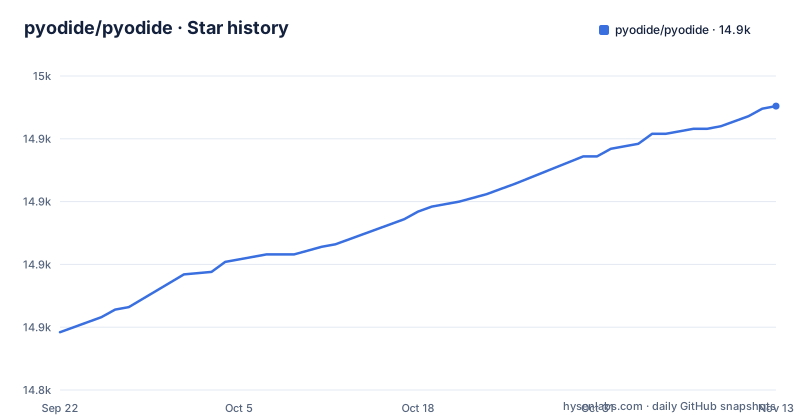
Star history
- pyodide/pyodide14,938 ★ · +90
| Repository | 2026-09-22 | 2026-11-13 |
|---|---|---|
| pyodide/pyodide | 14.8k | 14.9k |
90 Stars in the last 52 days, measured from the daily GitHub snapshot. Compare with other projects
Editorial analysis
The three newest releases use two version schemes and sort backwards
Read the three most recent releases with their dates and the ordering is impossible to guess from the numbers.
The newest by date is a release in the twenty-seventh series. The one published five hours earlier is in the twenty-ninth series. The one published two days before that has a three-digit major version.
So the highest minor number is not the newest release, and the three-digit major version is the oldest of the three while being numerically the largest by a wide margin.
There are two version schemes in play, and they are not the same scheme incrementing. Something in this project's release process produces a three-digit major version on one track and a zero-point series on another, and the front page does not explain the split.
The practical consequence is immediate for anything that resolves a release mechanically. A tool that sorts version strings numerically will conclude that the oldest of the three is the newest. A tool that sorts by date will do the right thing. And a pin written as a version range has to match one scheme or the other, not both.
The default branch was pushed to on 2026-11-02, about seven weeks after all three of these, so the work continues on top of whichever track is current.
So the consequence is that you must read the release dates rather than the numbers, and if you script a pin against this project, test that your resolver does not get it wrong.
The type checker targets Python 3.14 and the linter targets 3.13
Two static analysis tools are configured in this repository and they disagree about which Python they are checking.
The type checker configuration names the Python version it assumes, and it is three point fourteen. The linter configuration has its own target version and it is three point thirteen.
So the type checker is reasoning about a language version one release ahead of the one the linter's rules are calibrated for.
The type checker configuration is otherwise unusually strict, and worth noting because most projects are not. It disallows implicit optional parameters, requires untyped decorators to be typed, warns about redundant casts, warns about unused ignores, and turns on the check that an ignore comment must carry an error code. It also disallows implicit re-export, which is the rule that makes your public API explicit rather than accidental.
And then there is the override block. Nineteen modules are listed with missing imports ignored, and they are the ones whose types are not installed. A plotting library, an imaging library, a documentation toolkit, a terminal colour library, the project's own test helper modules, a few standard library shims, a build tool, and the audit wheel for the WebAssembly target.
So the strictness has a documented exemption list, which is the right way to do it.
The consequence is that a syntax or typing change in the newer Python version may pass the type checker and be flagged by the linter, or the reverse. If you hit a disagreement between the two, that configuration difference is the first place to look.
A native extension must be recompiled against this project's compiler, which is the real constraint
The front page states the supported boundary plainly, and it is worth understanding exactly where the line sits.
Any pure Python package with a wheel available on the index is supported. That is a clean rule, because a pure Python wheel does not care what compiled it.
Packages with native extensions are a different matter. The front page says many have been ported, and it names general-purpose ones including a regular expression engine, a YAML parser and a cryptography library, then the scientific stack: an array library, a dataframe library, a scientific library, a plotting library and a machine learning library.
So those work. A compiled extension that has not been ported is the hard case, and the reason is component four of the project.
That component is described as a choice of compiler platform, consisting of a version, ABI-sensitive flags, and static libraries to link. The word that matters is ABI-sensitive.
A compiled Python extension links against a specific interpreter ABI. This project's interpreter is built with a specific compiler at a specific version with a specific set of flags. An extension compiled for CPython on a normal platform is not loadable here, and an extension compiled against a different build of this project may not be either.
The consequence is that a native dependency is a porting project, not an install. The front page's rule tells you in one sentence whether you can use a package or need to build it, and the answer for anything with a compiled extension is usually that you need to build it.
The build comment explains a compiler workaround for vendored JavaScript nobody controls
There is a long comment in the build file explaining a workaround, and it is the most revealing thing in this repository about what building a Python distribution for the web actually involves.
The project needs to get a chunk of generated JavaScript into the WebAssembly build. The compiler facility intended for that, the one that injects a JavaScript function by embedding it as a string, is unsuitable.
The reason given is specific. The C preprocessor modifies strings, and there is no raw string feature. In particular it appears to choke on regular expressions in the JavaScript code.
The reason that cannot be worked around locally is better. The bundle includes vendored packages from a package manager that the project does not control, so it is not simple to rewrite the code to use syntax that is legal inside that facility.
So the workaround is to use an array initializer instead of a string initializer, with a data-embedding directive.
The comment goes on to describe what the injected content looks like, that it must start with a function block and that extra content can be injected after the block ends, and it links to the compiler's own source for how the argspec and body are parsed.
So the consequence is that anyone vendoring a JavaScript package into this build inherits the constraint, whether or not they know about it. The comment is there precisely so the next person does not spend a week rediscovering that the obvious facility will not accept their regular expression.
The build produces seventeen artefacts including two different consoles
The default build target lists what a distribution of this project actually is, and the list is more informative than the word distribution suggests.
Among the outputs are a lock file, a TypeScript declaration file, and a snapshot binary.
Then the runtime: a compiled assembly module, a loader script, a package manifest, a `python` launcher and its batch counterpart for Windows, and a module entry script.
Then a standard library archive, and four HTML files. One is a test page, one is a console, one is a second console, one is a module test page.
Two console files in one release is the detail worth asking about. They have different names and different versions implied, which suggests the newer one is being rolled out alongside the older rather than replacing it.
The build target lists the outputs, including both consoles:
all-but-packages: \
	check \
	check-emcc \
	$(CPYTHONINSTALL)/.installed-pyodide \
	dist/pyodide.asm.mjs \
	dist/console.html \
	dist/console-v2.html \
	dist/python_stdlib.zip
So a Pyodide release is not one file. It is a directory of coordinated artefacts that must be served together and version-matched, which is why the front page's self-hosting instructions say to download the release and serve it with a web server rather than pointing a script tag at a single asset.
The consequence is that deploying it yourself means serving a set of files with correct relative paths, and updating means replacing the whole set.
The test container downloads whichever browser version is newest at build time
The container build for the browser test suite resolves its browsers and drivers over the network at build time, and every version input defaults to the word latest.
The process is: fetch a helper release binary, use it to resolve the current browser and driver for each of two browsers, move the resulting directories into fixed locations, and do it again for the second browser. The version arguments for both browsers and for the helper all default to latest, with a conditional that maps latest onto the stable channel.
So a container built today gets the browsers that are stable today, and a container built next month gets different ones, from the same Dockerfile.
The intent is reasonable. A browser test suite that pins browser versions goes stale and stops testing what users run. Floating to the stable channel keeps it current.
The cost is that the container is not reproducible, and a test failure on a rebuilt image is ambiguous: it might be your change, or it might be a browser that shipped three days ago.
There is also a dependency chain here worth noticing. The build resolves a version by querying a repository's release API over the network, then downloads from a second host, so the Dockerfile depends on two third-party services being up and on their naming conventions holding.
The consequence is that when a browser test fails after an unrelated change, check whether the base image was rebuilt before you look at your own diff.
The project began inside a Mozilla experiment that no longer exists
The history section is short and it explains more about the project's character than the feature list does.
It was created in 2018 by one person at Mozilla, as part of a larger project. That parent project was an experimental web-based notebook environment for scientific computing, aimed at literate scientific computing and communication.
The parent project is no longer maintained, and the front page says so, then points to a page listing notebook environments that can host this one instead.
So the lineage is: a browser notebook experiment that died, leaving behind a Python distribution that outlived it by years and is now an independent community project.
That origin explains a structural feature you can see in the current repository. The project is not one codebase. The front page lists five components, and the fifth, the toolchain, is three separate repositories: one for cross-compiling packages, one for testing, and the package installer. The patched interpreter, the foreign function interface, the JavaScript code for managing interpreters and the Emscripten platform definition live here.
The project is community-governed, with a project governance page and a code of conduct at the top level, and a sponsorship page listing both large sponsors and a large number of small donors.
So the consequence is that this is an infrastructure project with a long tail of sibling repositories. Reading the front page's component list before you clone saves you from assuming everything is in this tree.
Editorial conclusion
This is the right tool if you want Python in the browser with no server, because the whole distribution, including the scientific stack, runs in the page and the front page says Python has full access to the web APIs when it is running inside a browser. Being a real CPython rather than a transpiler means the semantics you already know hold. Two things to plan around. That a native extension has to be recompiled against this project's specific compiler and ABI, so the supported boundary is any pure-Python package with a wheel, and a compiled dependency is a porting project rather than an install. And that pinning needs care, because comparing versions by number here gives you the wrong answer.
Frequently asked questions
What is Pyodide used for?
It is a Python distribution for the browser and for Node.js, built by compiling CPython to WebAssembly with a cross-compilation toolchain. It lets you install and run Python packages in the browser through a package installer, supports any pure Python package with a wheel on the package index, and has ports for many packages with native extensions including a regular expression engine, a YAML parser, a cryptography library, an array library, a dataframe library, a scientific library, a plotting library and a machine learning library.
how to use pyodide
There is an interactive console you can open in a browser with nothing to install. Otherwise the front page splits the routes by audience: use a hosted distribution and follow the quickstart; self-host by downloading the release and serving it with a web server; use a bundler and follow that documentation; or, if you maintain a Python package, follow the documentation for building and testing packages against it. When running inside a browser, the front page says Python has full access to the web APIs.
how to install pyodide
It is published on the JavaScript package registry and on the Python package index under a related name. If you are self-hosting, the front page says to download the distribution from the releases page and serve it with a web server, because a release is a set of coordinated files rather than one script. If you use a bundler there is separate documentation for that, and a development container is provided at the top of the repository.
what does pyodide do
It compiles CPython, with a few patches, to WebAssembly, and provides a JavaScript and Python foreign function interface so the two languages can be mixed in one piece of code. That interface supports error handling and async and await. On top of it sits JavaScript for creating and managing interpreters, a package installer, and a separate toolchain for cross-compiling and testing packages for this target. The project is licensed under the Mozilla Public License 2.0.
is pyodide secure
The front page does not make a security claim. What it does say is architectural: when running inside a browser, Python has full access to the web APIs, which is the reason people want it there and also the reason a page embedding it should treat the Python code as privileged. The licence is the Mozilla Public License 2.0, and the project has a code of conduct at the top of the repository.
Official sources
Add this badge to your README
If you maintain this project, the badge below links readers to this analysis and shows its maintenance status from the daily GitHub snapshot. Paste the markdown into your README; add ?metric=license or ?metric=stars to the image URL for a different field.

[](https://hysenlabs.com/projects/pyodide-pyodide)Star history chart for your README
[](https://hysenlabs.com/projects/pyodide-pyodide)Was this useful?