helm mapkubeapis, rewriting the release record so an old chart can be upgraded
This is a Helm plugin which map deprecated or removed Kubernetes APIs in a release to supported APIs
At a glance
- What is it?
- The mapkubeapis Helm plugin edits the stored metadata of an existing Helm release in place, replacing API versions that Kubernetes has deprecated or removed with their supported equivalents, and it writes the result as a new release version. It is a repair tool for release history, not a chart upgrade tool, and the distinction is the whole design.
- Who is it for?
- helm mapkubeapis suits an operator whose Helm release history contains a chart version pinned to an API that the target cluster has removed, since the plugin fixes the stored record so a later helm upgrade can proceed.
- Can I use it commercially?
- Yes. Apache-2.0 is a permissive licence: you can use, modify and sell software built on it, as long as you keep its copyright and licence notices.
- Is it still maintained?
- Yes. The repository last received commits 18 days ago.
- What is it written in?
- Mainly Go, according to GitHub's language statistics.
Answers come from the project's GitHub data, last synced on November 7, 2026, and from our analysis. They are not legal advice.
Star history
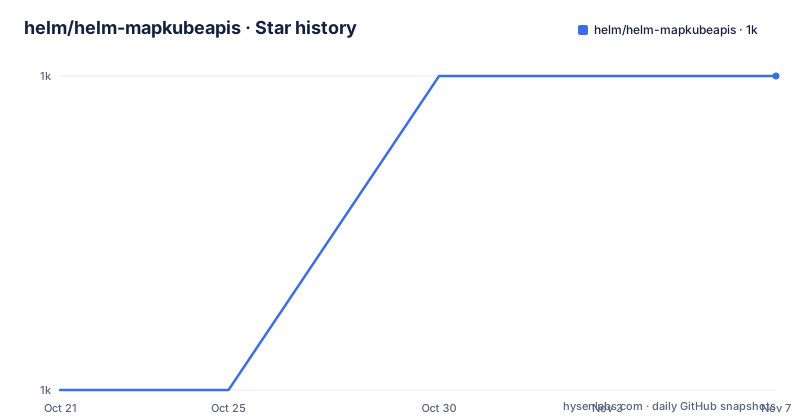
- helm/helm-mapkubeapis1,038 ★ · +1
| Repository | 2026-10-21 | 2026-11-07 |
|---|---|---|
| helm/helm-mapkubeapis | 1k | 1k |
1 Stars in the last 17 days, measured from the daily GitHub snapshot. Compare with other projects
Editorial analysis
The problem is in the release record, not in the running cluster
The plugin addresses a specific failure mode in Helm v3. A chart that was released against an old Kubernetes API is still sitting in the release history, and when the cluster no longer serves that API, the upgrade fails. The README is upfront that if you try to upgrade a release with unsupported APIs, the upgrade will fail, and adds that this is acceptable in Helm v3 because it will not generate a failed release for Helm.
The resource in the cluster is often still fine. The problem is the copy of the manifest that Helm stored when it installed the release. Helm keeps that manifest in a Secret or a ConfigMap, and on upgrade it re-renders and reapplies, and the old apiVersion in the stored manifest is what the API server rejects.
So mapkubeapis is not a chart upgrade tool. It updates in-place Helm release metadata that contains deprecated or removed Kubernetes APIs to a new instance with supported Kubernetes APIs, or entirely removes references to resources that use APIs that were removed and do not have a successor. That second half matters: an API with no successor, such as the old beta versions of things that were never promoted, cannot be rewritten, so the reference is removed instead.
The README also draws the boundary that is most likely to cause confusion. Charts need to be updated also to supported Kubernetes APIs to avoid failure during deployment in a Kubernetes version, and this is a separate task to the plugin. Fixing the release history does not fix the chart, and if the chart still renders extensions/v1beta1 Deployment objects, the next upgrade will write them back.
The plugin is a Helm v3 plugin, hosted under the helm organisation, and it is licensed Apache 2.0.
How the rewrite is written into the release history
The example output in the README shows the mechanics, and they matter because this is a write operation on your release metadata.
The plugin fetches the latest release version, checks it for deprecated or removed APIs, and reports each instance it found together with the supported API equivalent. For a ClusterRole on rbac.authorization.k8s.io/v1beta1 it prints the apiVersion and kind of the offending entry and the apiVersion and kind of the supported one.
Then the write happens in two steps. The plugin sets the status of the existing release version to superseded, and then adds a new release version with the updated supported APIs. The output says so directly: Set status of release version to superseded, then Add release version with updated supported APIs, then the final line confirms the release was updated successfully to a new version.
So the operation is additive and visible rather than a silent edit. helm history will show the old version as superseded and a new version as the current one. That is the right behaviour for an auditable tool, and it also means the plugin is not a no-op you can run twice, because the second run would act on the version it just created.
The requirement that the latest release version should be in a deployed state follows from this. You want to update a successful deployment, and the README says that if it is not, you need to delete the latest release version first, giving the Helm v3 command:
kubectl delete configmap/secret sh.helm.release.v1.<release_name>.v<latest_version_number> --namespace <release_namespace>The name is sh.helm.release.v1.<release_name>.v<version>, and it is stored as a ConfigMap or a Secret depending on your Helm configuration. That command deletes Helm's record of a release version, so it is not something to run casually.
The mapping file, and the line ending trap
The mapping between old and new APIs lives in a YAML file, config/Map.yaml by default, and the --mapfile flag points at a different one if you need it. The entries look like this:
 - deprecatedAPI: "apiVersion: extensions/v1beta1\nkind: Deployment"
    newAPI: "apiVersion: apps/v1\nkind: Deployment"
    deprecatedInVersion: "v1.9"
    removedInVersion: "v1.16"
Each entry is the original API group and version, the new API group and version, the Kubernetes version in which the old one was deprecated and the version in which it was removed. The deprecatedInVersion and removedInVersion fields let you reason about which mapping applies to which cluster, rather than applying every rule blindly.
The order matters: the strings are matched in order with apiVersion first and then kind, and the README notes this should be changed if the Helm release metadata is rendered with different search and replace strings.
Then there is the detail that has probably cost people an afternoon. The strings in the mapping file contain UNIX and Linux line feeds, which means that \n is used to signify line separation between properties in the strings. If your Helm release metadata is rendered on Windows or Mac with different line endings, the literal \n will not match, and the plugin will find nothing. The README says this should be changed if the release metadata is rendered in Windows or Mac, and the same caveat appears in the prerequisites.
The reason the mapping is plain text search and replace rather than structured parsing is that Helm release metadata is a YAML manifest blob, and a literal multi-line string match is a blunt but predictable instrument. It also means the mapping file is where you add support for a new API removal, without touching Go code.
Installing and running it
The plugin installs like any other Helm plugin, and the binary is downloaded from GitHub based on the version in plugin.yaml:
$ helm plugin install https://github.com/helm/helm-mapkubeapis
Downloading and installing helm-mapkubeapis v0.1.0 ...
https://github.com/helm/helm-mapkubeapis/releases/download/v0.1.0/helm-mapkubeapis_0.1.0_darwin_amd64.tar.gz
Installed plugin: mapkubeapis
Windows needs a workaround, because Helm's plugin install hook system relies on /bin/sh regardless of the operating system present. The README points Windows users at WSL, and the manual steps there are to download the Linux Helm tarball with wget, extract it with tar, and run the plugin install from the extracted directory.
The command itself takes a release name and a set of flags:
$ helm mapkubeapis [flags] RELEASE

Flags:
      --dry-run                  simulate a command
  -h, --help                     help for mapkubeapis
      --kube-context string      name of the kubeconfig context to use
      --kubeconfig string        path to the kubeconfig file
      --mapfile string           path to the API mapping file (default "config/Map.yaml")
      --namespace string         namespace scope of the release
--dry-run is the one to reach for first, and the README's own prerequisite section frames the rest. You need a Helm client with the plugin installed, and access to the clusters Helm manages, which the README says is similar to kubectl access using kubeconfig files. The --kubeconfig, --kube-context and --namespace flags override the environment configuration.
The project is a Go module, github.com/helm/helm-mapkubeapis, on go 1.24.0, depending on helm.sh/helm/v3 v3.18.0, client-go v0.33.1, cobra for the command line, ginkgo and gomega for the tests, and yaml.v3 for the mapping file. The Makefile builds the binary with CGO_ENABLED=0 and stamps the version into it with ldflags, which is what makes a statically linked plugin possible.
Where this plugin stops, and what you do instead
The limits are structural, and the README is candid about the main one. This tool repairs the record of a release that was installed in the past. It does not change the chart, it does not change what a future helm upgrade will render, and it does not touch the resources already running in the cluster.
That last point is worth thinking through. If a cluster has already removed an API, the resources using it are either already gone or were migrated by something else. The plugin does not migrate anything. What it does is make Helm's stored manifest acceptable again, so that a subsequent upgrade can be applied.
The realistic workflow is therefore three steps in order. Run helm mapkubeapis with --dry-run to see which entries in the release match your mapping file. Update the chart to render supported APIs, which the README calls a separate task, so the next upgrade does not reintroduce the old versions. Then run helm upgrade and let Helm do its job, with the corrected history making it possible in the first place.
Doing only the first step leaves you in a strange state, where the history is clean but the chart is not. Doing the third without the second undoes the work.
The comparison to the alternative is doing the migration by hand. Because the release metadata is a Secret or a ConfigMap containing a YAML manifest, you can edit it directly and tell Helm what changed, which is what a lot of people did before this plugin existed. The plugin's value is that it does the search and replace consistently across the release, using a mapping file that others can also use, and it handles the superseded plus new version bookkeeping that Helm expects.
On maintenance, the last push was on 2026-09-25 and the release tags are v0.6.1 and v0.6.0 from 2025-05-21, plus v0.5.2 from 2024-09-04. The repository is not archived, and it is a small plugin with a straightforward dependency on Helm itself, so the interesting question is whether your Helm v3 version is close enough to the v3.18.0 the plugin builds against.
Editorial conclusion
helm mapkubeapis suits an operator whose Helm release history contains a chart version pinned to an API that the target cluster has removed, since the plugin fixes the stored record so a later helm upgrade can proceed. It is the wrong tool if the chart itself still renders the old API, because the README says charts need to be updated to supported APIs as a separate task, and it is the wrong tool for a cluster where the release is not in a deployed state, since the plugin updates the latest release version and expects it to be a successful deployment. Before running it, back up the release secrets, read the Map.yaml file to check that the mappings match your cluster's API removals, and remember it writes a new release version and marks the previous one superseded, so the change is visible in helm history rather than silent.
Frequently asked questions
What does the helm mapkubeapis plugin actually change?
It updates Helm release metadata in place, replacing deprecated or removed Kubernetes APIs with supported equivalents, or removing references to APIs that were removed and have no successor. It does not change the chart itself.
How do I install the mapkubeapis Helm plugin?
Run helm plugin install https://github.com/helm/helm-mapkubeapis, which downloads the release binary from GitHub based on the version in plugin.yaml. On Windows, Helm's plugin install hooks need /bin/sh, so the README points to using Helm under WSL.
Where is the API mapping configured?
In config/Map.yaml by default, with the --mapfile flag pointing at a different file. Each entry gives the deprecatedAPI and newAPI strings plus deprecatedInVersion and removedInVersion, and the strings use \n for line separation, which must be changed if your release metadata uses Windows or Mac line endings.
What happens to my Helm release history when the plugin runs?
The plugin sets the status of the latest release version to superseded and adds a new release version with the updated supported APIs, so the change is visible in helm history rather than silent. The latest release version must be in a deployed state for this to work.
Do I still need to update my chart after running mapkubeapis?
Yes. The README states that charts need to be updated to supported Kubernetes APIs to avoid failure during deployment, and calls that a separate task to the plugin. Fixing the release history does not stop the next upgrade rendering the old API again.
Official sources
Add this badge to your README
If you maintain this project, the badge below links readers to this analysis and shows its maintenance status from the daily GitHub snapshot. Paste the markdown into your README; add ?metric=license or ?metric=stars to the image URL for a different field.

[](https://hysenlabs.com/projects/helm-helm-mapkubeapis)Star history chart for your README
[](https://hysenlabs.com/projects/helm-helm-mapkubeapis)Was this useful?