kuroshiro and the analyzer plugin it depends on
Japanese language library for converting Japanese sentence to Hiragana, Katakana or Romaji with furigana and okurigana modes supported.
At a glance
- What is it?
- kuroshiro converts Japanese text to hiragana, katakana or romaji, with furigana and okurigana output, but the conversion quality comes from a separate analyzer plugin rather than from the library itself. Version 2 is still a beta, and one of its plugins has stalled.
- Who is it for?
- kuroshiro suits developers building Japanese text tooling who can accept a plugin in the loop and who want furigana or okurigana output rather than plain transliteration. It does not suit projects that need a stable, non beta release, that must run on Internet Explorer, or that depend on browser parsing of arbitrary text with only the core library.
- Can I use it commercially?
- Yes. MIT is a permissive licence: you can use, modify and sell software built on it, as long as you keep its copyright and licence notices.
- Is it still maintained?
- Yes. The repository last received commits 18 days ago.
- What is it written in?
- Mainly JavaScript, according to GitHub's language statistics.
Answers come from the project's GitHub data, last synced on November 7, 2026, and from our analysis. They are not legal advice.
Star history
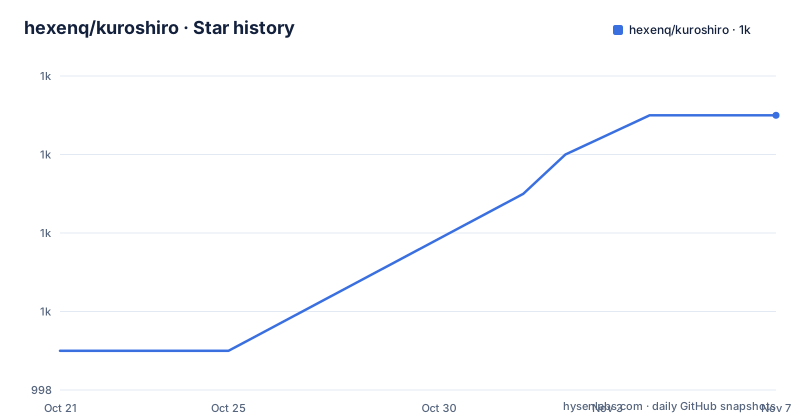
- hexenq/kuroshiro1,005 ★ · +6
| Repository | 2026-10-21 | 2026-11-07 |
|---|---|---|
| hexenq/kuroshiro | 999 | 1k |
6 Stars in the last 17 days, measured from the daily GitHub snapshot. Compare with other projects
Editorial analysis
What kuroshiro converts, and who asks for it
kuroshiro is a Japanese language library that converts a Japanese sentence to hiragana, katakana or romaji, with furigana and okurigana modes supported. The feature list is short: a sentence in, one of three syllabaries out, plus a set of Japanese utility helpers. That sounds small, and it is the point. The library exists for people writing software that has to show Japanese text in a form a specific reader can follow, such as a reading aid that prints furigana above kanji, a search index that matches a typed romanized word against kana spellings, or a study tool that needs okurigana split out from the base text. The project is a JavaScript library published to npm, with a browser build, and its homepage hosts a demo. Everything the library knows about Japanese words comes from a plugin, which is the single fact that decides whether it is a good fit for your project.
The analyzer plugin does the linguistic work, not kuroshiro
The library core is a converter, and the hard part is delegated. You pass an instance of an analyzer to init(analyzer), and the plugin supplies a morphological analysis that lets the converter decide where a word ends and where the next one begins. The ready-made plugins are listed in a table with support matrices. Kuromoji works in Node.js and in the browser. Mecab works in Node.js but not in a browser. The Yahoo Web API analyzer is marked paused, and the paragraph under the table explains why: its API migration is incomplete, maintenance is paused, and the project says it is not recommended for new projects, with a maintenance status page kept in that plugin's own repository. A plugin that calls a web API also carries a different operational profile from a local analyzer with a bundled dictionary. Because the analyzer is injected rather than bundled, you can also write a custom analyzer, and the TypeScript declarations in version 2 cover custom analyzers as well as the built-in helpers. Choosing kuroshiro means choosing a plugin, and the plugin decides the deployment targets, the dictionary handling and the licensing of the underlying data.
convert() options decide the shape of the output
The conversion call takes a string and an optional options object, and the documented defaults decide most behaviour on their own. The to option selects the target syllabary from hiragana, katakana and romaji, defaulting to hiragana. The mode option chooses between normal, spaced, okurigana and furigana, and defaults to normal, so a plain call does not produce ruby annotations unless you ask for them. The romajiSystem option selects nippon, passport or hepburn and defaults to hepburn, which matters as soon as you convert to romaji, because the three systems disagree about consonant handling. Two more options, delimiter_start and delimiter_end, default to an opening parenthesis and a closing parenthesis, and they are what wrap the readings that furigana and okurigana modes add. The static Kuroshiro.Util helpers cover the simpler conversions on their own, including the kana to kana form that the 2.x release renamed.
Installing in Node and running the first conversion
The Node.js path is the shortest route to a working setup, and the project documentation walks through it in three steps. You install the library and a plugin, the plugin being the Kuromoji analyzer in the documented example:
npm install kuroshiro@beta kuroshiro-analyzer-kuromoji@betaThe documented install command uses the beta tag for the 2.x line, whose two most recent releases are 2.0.0-beta.3 on 2026-10-17 and 2.0.0-beta.2 on 2026-10-05; a 1.2.1 release is dated 2026-10-05 as well. After installing, you import the library, construct it, initialize it with an analyzer instance, and convert a string. The documented ES module form looks like this:
import Kuroshiro from "kuroshiro";
import KuromojiAnalyzer from "kuroshiro-analyzer-kuromoji";
const kuroshiro = new Kuroshiro();
await kuroshiro.init(new KuromojiAnalyzer());
const result = await kuroshiro.convert("感じ取れたら手を繋ごう、重なるのは人生のライン and レミリア最高!", { to: "hiragana" });
A CommonJS version exists too, using require and a promise chain, and the README states that CommonJS require, ES module default imports, the Kuroshiro browser global and the asynchronous init() and convert() API all remain supported. Version 2 needs Node.js 22 or newer, or a browser with native ES2015 support including Promises, and Internet Explorer is not supported.
Browser use means shipping a dictionary, not just a script
The browser path has a catch that the Node.js path does not. The documentation points you at dist/kuroshiro.min.js from the installed npm package, to be included in your HTML, along with the matching analyzer bundle, kuroshiro-analyzer-kuromoji.min.js, obtained from the plugin repository. The script tag is the easy part:
<script src="url/to/kuroshiro.min.js"></script>The harder part is the dictionary. You copy the dictionary files from node_modules/kuromoji/dict/ into a public directory such as public/dict/, then set dictPath to the URL those files are served from. The documented example uses a trailing slash:
kuroshiro.init(new KuromojiAnalyzer({ dictPath: "/dict/" }))
    .then(function () {
        return kuroshiro.convert("感じ取れたら手を繋ごう、重なるのは人生のライン and レミリア最高!", { to: "hiragana" });
    })
    .then(function(result){
        console.log(result);
    })
    .catch(function (error) {
        console.error(error);
    });
Two things follow from that. The browser build only works for a plugin whose table row has a browser tick, which rules out Mecab. And the dictionary has to be copied into your own asset pipeline, so the size and refresh of that data become your operational concern rather than the library's.
Version 2 renamed a public helper and raised the runtime floor
Upgrading from 1.x is not a drop in change. The migration notes list a specific rename: Kuroshiro.Util.kanaToHiragna(...) becomes Kuroshiro.Util.kanaToHiragana(...), and the old spelling has been removed rather than kept as an alias. Any code that called the misspelled helper stops compiling, and the TypeScript declarations included in version 2 make that a compile time failure rather than a runtime surprise. The runtime requirement moved too, to Node.js 22 or newer, and the analyzer's own additional requirements have to be checked separately, which is worth doing before assuming the library is the only moving part. TypeScript users get declarations for the package entry, custom analyzers, conversion options and the static Kuroshiro.Util helpers, so no separate @types package is needed for the library, and the Kuromoji 2.0 beta carries its own declarations. For CommonJS output compiled by tsc, the documentation asks you to enable esModuleInterop for default imports, or to write import Kuroshiro = require("kuroshiro").
When you do not need an analyzer at all
There is a cheaper approach for part of what kuroshiro does, and it is worth knowing where the line falls. The static Kuroshiro.Util helpers are pure kana level conversions that need no morphological analysis, no dictionary and no plugin, and the TypeScript example in the README shows a conversion of a katakana string to hiragana through them. A project that only needs kana transliteration and script conversion can call those helpers and skip the plugin entirely, which removes the dictionary problem, the browser asset pipeline and the analyzer's own licence questions in one move. What the plugin buys you is segmentation, and segmentation is what makes furigana and okurigana possible, because the reading of a word and its okurigana are only known once you know where the word ends. If you need ruby annotations, you need the analyzer. If you only need to turn katakana into hiragana, the plugin is dead weight.
How the package is built and what ships in the box
The package manifest shows a library that builds three ways. The build script runs a clean step and then produces a CommonJS output with Babel, a UMD bundle with Vite, and a minified UMD bundle with a second Vite pass under a minify mode, and a prepack hook runs the build before publishing. The published files list includes index.js, index.d.ts, the lib and dist directories and src, with src/index.js declared as the module entry and index.js as the main entry, which is how the CommonJS require form and the ES module import form can coexist. The repository root holds index.d.ts, src/, test/, tsconfig.json, vite.config.mjs, eslint.config.mjs and a .babelrc, and the scripts cover linting, Jest runs with a watch and a coverage variant, a package smoke test, a type test that compiles the project with tsc and runs a script, and an aggregate test script that chains linting, tests, the build, the smoke test and the type test. The licence is MIT, and the author is Hexen Qi. Version 2 ships type declarations, so the project no longer asks consumers to maintain a separate types package.
Editorial conclusion
kuroshiro suits developers building Japanese text tooling who can accept a plugin in the loop and who want furigana or okurigana output rather than plain transliteration. It does not suit projects that need a stable, non beta release, that must run on Internet Explorer, or that depend on browser parsing of arbitrary text with only the core library. Before adopting it, check three things: which analyzer plugin you can actually operate, because Kuromoji and Mecab need their own setup and the Yahoo Web API plugin is paused with an incomplete API migration; whether the 1.x to 2.x rename of Kuroshiro.Util.kanaToHiragna to Kuroshiro.Util.kanaToHiragana touches your code; and, for browser use, how the dictionary files under node_modules/kuromoji/dict/ are served and pointed at through dictPath. The most recent release, 2.0.0-beta.3, was published on 2026-10-17.
Frequently asked questions
How do I install kuroshiro and get a first conversion working?
Install the library and an analyzer plugin, for example kuroshiro@beta with kuroshiro-analyzer-kuromoji@beta, then create a Kuroshiro instance, call init() with an analyzer instance, and call convert() with a string and an options object. The initialization and conversion calls are asynchronous, so the documented examples use await or promise chains.
Which kuroshiro analyzer plugin works in a browser?
The plugin table marks Kuromoji as supported in Node.js and in a browser, while Mecab is marked as Node.js only and the Yahoo Web API plugin is paused. For browser use you also have to copy the dictionary files from node_modules/kuromoji/dict/ into a public directory and point dictPath at the URL where they are served.
How do I get furigana or okurigana output from kuroshiro?
Pass the mode option to convert() with the value furigana or okurigana, since the default mode is normal. The mode option accepts normal, spaced, okurigana and furigana, and the delimiter_start and delimiter_end options, which default to a parenthesis pair, wrap the added readings.
What changed between kuroshiro 1.x and 2.x?
Version 2 requires Node.js 22 or newer, or a browser with native ES2015 support, and Internet Explorer is not supported. The helper Kuroshiro.Util.kanaToHiragna was renamed to Kuroshiro.Util.kanaToHiragana and the old spelling was removed, and TypeScript declarations are now included in the package.
Is the kuroshiro Yahoo Web API analyzer still usable?
The plugin table marks it as paused, and the documentation states that its API migration is incomplete, that maintenance is paused, and that it is not recommended for new projects. The maintenance status is kept in that plugin's own repository.
Official sources
Add this badge to your README
If you maintain this project, the badge below links readers to this analysis and shows its maintenance status from the daily GitHub snapshot. Paste the markdown into your README; add ?metric=license or ?metric=stars to the image URL for a different field.

[](https://hysenlabs.com/projects/hexenq-kuroshiro)Star history chart for your README
[](https://hysenlabs.com/projects/hexenq-kuroshiro)Was this useful?