MCP-Reborn: A Decompilation Workbench for Modded Minecraft Clients
MCP-Reborn is an MCP (Mod Coder Pack) for Minecraft for making modded clients and researching its code. (1.13-26.2)
At a glance
- What is it?
- MCP-Reborn rebuilds the Mod Coder Pack for Minecraft versions 1.13 through 26.1, letting you decompile, edit and repackage the game client. The catch is in the README's own warning: you cannot publish anything the tool generates.
- Who is it for?
- Adopt MCP-Reborn if you are doing private client research or client-side modding on Minecraft 1.13 through 26.1 and you accept that the output stays unpublished. Skip it if you need a distributable mod, a server-side mod, or a version older than 1.13; for those, MinecraftForge or Fabric is the right layer.
- Can I use it commercially?
- Check first. The repository uses a licence we do not classify automatically, so read its LICENSE file before any commercial use.
- Is it still maintained?
- Yes. The repository last received commits 33 days ago.
- What is it written in?
- GitHub does not report a main language for this repository.
Answers come from the project's GitHub data, last synced on November 25, 2026, and from our analysis. They are not legal advice.
Star history
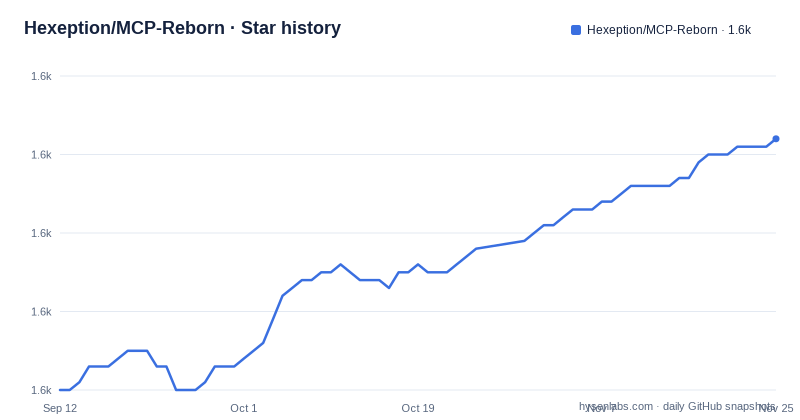
- Hexeption/MCP-Reborn1,582 ★ · +32
| Repository | 2026-09-12 | 2026-11-25 |
|---|---|---|
| Hexeption/MCP-Reborn | 1.6k | 1.6k |
32 Stars in the last 74 days, measured from the daily GitHub snapshot. Compare with other projects
Editorial analysis
The problem: reading Minecraft's client without a mapping pipeline
Minecraft ships as an obfuscated JAR. Class names, method names and field names carry no meaning, so reading the client to understand how a mechanic works, or to change it, means you first need a mapping from obfuscated identifiers to readable ones, plus a decompiler that can consume those mappings. MCP-Reborn packages that pipeline. Its README describes it as an MCP (Mod Coder Pack) for Minecraft, built for two jobs: making modded clients and researching the game's code. It is derived from MCPConfig and ForgeGradle, both from the MinecraftForge team, which is stated in the README and repeated in the credits. The audience is narrow and specific: people who want the client source in front of them, not people who want a mod loader. If your goal is a mod that other players install, this is the wrong layer, because the README's own warning states that you cannot publish any code generated by the tool. That single sentence defines the project's boundary more sharply than any feature list.
How the Gradle pipeline turns a game JAR into editable source
The mechanism is a Gradle build with a task named setup. Running it generates decompiled source code that lands in the src folder of the project, according to the README's step-by-step instructions. From that point the workflow is ordinary Java work: edit the source, then run the runclient task to compile the modified game and launch it for testing. The README notes that an autogenerated run configuration named Minecraft does the same thing, which matters because it means you do not have to go back to the Gradle task list every time. Producing a distributable artifact is a separate task: the build task under the build folder generates an executable JAR in build/libs/. The README does not describe the mapping format, the decompiler used, or how remapping is applied, so the intermediate stages of the pipeline are not documented. What is documented is the shape of the pipeline: setup produces source, runclient produces a running client, build produces a JAR.
JDK versions are pinned per Minecraft release
The README gives a version table rather than a single requirement, and getting it wrong is the most likely reason a first build fails. Versions below 1.17 need JDK 16. Versions 1.18 and above need JDK 17. Versions 1.21 and above need JDK 21. Versions 26.1 and above need JDK 25. The supported range is stated as 1.13 through 26.1 in the README, while the repository description extends it to 1.13 through 26.2 and the topic list includes 1-14-3, 1-15, 1-16-1, 1-17, 1-18, 1-19, 1-20, 26-1 and 26-2 among others. The default branch is named 26.2. That mismatch between the README's stated upper bound and the repository's own metadata is worth checking against the branch you intend to use, because the README appears to lag the branch layout. Note also that the version table is written with inequality signs, so the boundaries between adjacent requirements are only as precise as the table itself.
Getting a modified client into the launcher is manual work
The README spends most of its length on repackaging, and the reason is that the launcher expects a specific directory shape. You duplicate the vanilla version folder under versions (on Linux, ~/.minecraft/versions; on Windows, AppData/Roaming/.minecraft/versions), rename it, delete the original Minecraft JAR inside, and rename the JSON file to match the folder. Then you edit that JSON: remove the downloads block, including the client, server and server_mappings headers, leaving an assets and complianceLevel and id section, and set the id field to the new folder name. You copy the JAR from build/libs/ into the folder under the same new name. Using an archive manager, you copy four items from the base version's JAR into yours: the assets folder, the data folder, pack.png and pack.mcmeta. Finally you delete the META-INF folder from your JAR, because a signed JAR will not load after modification. Only then does the launcher accept a new installation pointing at that version. None of this is automated by the Gradle tasks described in the README, and each step is a place where a wrong name or a missed folder produces a launch failure rather than a clear error.
The no-publish restriction and the unclear licence
The README carries a warning in bold: you cannot publish any code generated by this tool. That is a distribution restriction on the decompiled output, not a statement about the repository's own source. The repository's licence field reads NOASSERTION, meaning GitHub could not identify a standard licence from the files present. The README does not name a licence, does not link to one, and does not explain the basis for the no-publish rule. If you intend to use this for anything beyond private study, the licence question is unresolved, and the practical consequence is that the tool is aimed at local research and private client builds. I am not giving legal advice, and the README's warning is worth reading literally: the output is not for publication. Treat the absence of a named licence as a reason to look at the repository's licence file directly before building anything you care about.
Where MCP-Reborn is the wrong tool
Three cases stand out. First, distribution: if your goal is a mod other people install, the no-publish rule blocks the path this tool produces, and a loader such as MinecraftForge or Fabric is the appropriate layer. The README itself credits the MinecraftForge team for MCPConfig and ForgeGradle, which is a fair pointer to where the modding ecosystem actually lives. Second, version range: the README states support from 1.13 upward, so anything older is out of scope, and the topic list confirms the emphasis on 1.13 and later. Third, server-side work: the README describes making modded clients and researching the game's code, and the repackaging procedure is entirely client-side, involving the versions folder and the launcher. Nothing in the README describes server modification. A fourth, softer limitation is documentation depth. The README explains the user-facing steps well and says nothing about how mappings are produced, how to update to a new Minecraft release, or what the build does internally. If you need to maintain a fork across versions, that gap is the real cost.
Maintenance cost and what an upgrade actually involves
The repository shows a release tagged simply release with the note Just use the branch, dated alongside the most recent push, and the default branch is 26.2. Earlier tags include 1.21.4-official and 1.20.2-official, which suggests the project tracks Minecraft releases as branches rather than shipping versioned artifacts. For anyone maintaining a fork, that means upgrades are branch switches plus a JDK change, not a dependency bump. The JDK table makes this concrete: moving from a 1.20 target to a 1.21 target means moving from JDK 17 to JDK 21, and moving to a 26.1 target means JDK 25. Each Minecraft release also changes the decompiled source you have edited, so local patches need to be reapplied against a fresh setup run. The README does not describe a patch-management mechanism, and none is implied by the task list (setup, runclient, build). Budget for reapplication by hand. The upside is that the toolchain has no runtime dependency to keep in sync, since it is a Gradle build producing a local client JAR.
Alternatives and the actual difference in approach
The nearest alternative named in the README is the MinecraftForge toolchain, since MCP-Reborn is based on MCPConfig and ForgeGradle, both from the MinecraftForge team. The difference is in what each produces. MCP-Reborn decompiles the client into an editable src tree and repackages it as a replacement game JAR that you install through a duplicated version folder in the launcher, as the README's twelve-step procedure describes. ForgeGradle, by contrast, is the build layer for mods that load into an existing game through the Forge loader, which is why the README's no-publish warning does not apply to it. Choosing between them is a question of whether you want to change the client itself or extend it. If you want to read and alter the client internals, MCP-Reborn is the direct route. If you want something players can install alongside vanilla, the loader approach is the one the ecosystem supports, and MCP-Reborn's own credits point there. A second alternative, Fabric, is not mentioned anywhere in the README, so I will not describe how it differs beyond noting that it occupies the same loader role.
Editorial conclusion
Adopt MCP-Reborn if you are doing private client research or client-side modding on Minecraft 1.13 through 26.1 and you accept that the output stays unpublished. Skip it if you need a distributable mod, a server-side mod, or a version older than 1.13; for those, MinecraftForge or Fabric is the right layer. Before you invest time, open build.gradle and confirm a Gradle task named setup exists in the mcp folder, check that your installed JDK matches the version table for your target release, and read the licence file, since the repository is marked NOASSERTION and the README only states the no-publish rule without naming a licence.
Frequently asked questions
What is MCP-Reborn?
An MCP, a Mod Coder Pack for Minecraft, used to make modded clients and to research the game's code. It is based on MCPConfig and ForgeGradle by the MinecraftForge team, and the README states support from 1.13 to 26.1.
How do I use MCP-Reborn to build a modded client?
Import build.gradle into IntelliJ, run the setup task in the mcp folder so the decompiled source appears in src, edit it, then run the runclient task to launch a modified game or the build task to write a JAR into build/libs.
Can I publish code generated with MCP-Reborn?
No. A warning at the top of the README says you cannot publish any code generated by this tool, and a file named MCP-License sits at the repository root. The tool is built on MCPConfig and ForgeGradle from the MinecraftForge team.
Which Java version does MCP-Reborn need?
Four thresholds are given: 1.17 and below need JDK 16, 1.18 and above need JDK 17, 1.21 and above need JDK 21, and 26.1 and above need JDK 25. Nothing is stated for 1.13 through 1.16.
Which Minecraft version does MCP-Reborn support?
The README states 1.13 to 26.1, while the default branch is named 26.2 and the newest release is titled Just use the branch. The two older official tags are 1.20.2-official from November 2023 and 1.21.4-official from February 2025.
What happens to the JSON file after MCP-Reborn builds a JAR?
The downloads section is deleted by hand so Minecraft does not fetch the vanilla JAR, and the id field is changed to match the new folder and file names. Then assets, data, pack.png and pack.mcmeta are copied from the base JAR and META-INF is deleted from the new one.
Official sources
Add this badge to your README
If you maintain this project, the badge below links readers to this analysis and shows its maintenance status from the daily GitHub snapshot. Paste the markdown into your README; add ?metric=license or ?metric=stars to the image URL for a different field.

[](https://hysenlabs.com/projects/hexeption-mcp-reborn)Star history chart for your README
[](https://hysenlabs.com/projects/hexeption-mcp-reborn)Was this useful?