LocalGPT: four local models, a stdlib RAG core, and defaults trimmed by ablation
Chat with your documents on your local device using GPT models. No data leaves your device and 100% private.
At a glance
- What is it?
- PromtEngineer/localGPT is an on-premise document chat platform that keeps inference on your own hardware through Ollama. It fuses dense vectors with LanceDB full-text search behind a cross-encoder reranker, and it ships several of its own features switched off after measuring them.
- Who is it for?
- LocalGPT fits teams that need document queries to stay on their own hardware and that can afford a machine with 8GB of RAM or more, ideally 16GB, because the generation, enrichment, embedding, and reranking models are separate downloads. Walk away if you need a scanned-PDF workflow with no OCR engine preinstalled, or if you depend on release tags to pin a version, since the repository publishes none.
- Can I use it commercially?
- Yes. MIT is a permissive licence: you can use, modify and sell software built on it, as long as you keep its copyright and licence notices.
- Is it still maintained?
- Yes. The repository last received commits 80 days ago.
- What is it written in?
- Mainly Python, according to GitHub's language statistics.
Answers come from the project's GitHub data, last synced on November 13, 2026, and from our analysis. They are not legal advice.
Star history
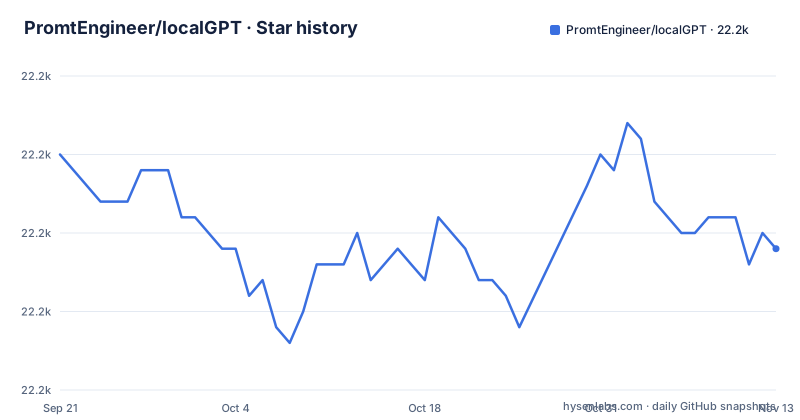
- PromtEngineer/localGPT22,194 ★ · -6
| Repository | 2026-09-21 | 2026-11-13 |
|---|---|---|
| PromtEngineer/localGPT | 22.2k | 22.2k |
-6 Stars in the last 53 days, measured from the daily GitHub snapshot. Compare with other projects
Editorial analysis
Four models get pulled before the first question is answered
The docker-compose service names four separate model slots, and the defaults show what a working setup actually costs you. GENERATION_MODEL defaults to qwen3.5:9b, ENRICHMENT_MODEL to qwen3.5:4b, EMBEDDING_MODEL to microsoft/harrier-oss-v1-0.6b, and RERANKER_MODEL to Qwen/Qwen3-Reranker-4B. Chunk enrichment and the answer itself are therefore generated by two different Ollama models, which means the small one is doing steady work on every indexing pass even when you never chat. Prerequisites call for 8GB+ RAM with 16GB+ recommended. If you are sizing a machine, budget for the reranker as well, since it is on by default rather than optional.
Late chunking is off because its removal measured at the noise floor
The most interesting switch in the project is one that is turned off. Late chunking runs a second, document-level embedding pass whose vectors land in a companion table named after the original with an _lc suffix. A component ablation dated 2026-08-18 measured the effect of removing it at the noise floor for single-turn quality while it doubles the number of vectors written per index, so it ships disabled. One flag, retrieval.latechunk.enabled, re-enables both the index-time build and the query-time leg, which matters because an index built without it will not have the companion table waiting. The stated place it earns its cost is multi-turn conversation with drifting phrasing. The practical consequence: turning it on later means re-indexing, not just flipping a toggle.
Answer verification appends a percentage without changing the verdict
Answer verification is a second pass that appends [Confidence: N%] to a reply, and it is disabled by default under verification.enabled. The stated reason is unusually candid: the ablation measured zero verdict flips from disabling it, meaning the pass annotates answers rather than correcting them. So the number tells you the same answer with a figure attached, and the figure is not produced by a step that can reject anything. Treat it as a display feature, not a calibration layer, and do not build a threshold on it that blocks low-confidence replies, because the pipeline will not have acted differently at any threshold. The same measured-then-disabled logic explains why the default configuration contains exactly the components that passed evaluation, with the reasoning recorded under eval/decisions/ and eval/DECISIONS.md.
Reciprocal rank fusion removes the weights the two retrievers would need
Hybrid search here means dense vector search fused with LanceDB native full-text search, and the fusion is Reciprocal Rank Fusion, described as having no weights to tune. Reranking is separate and on by default: a cross-encoder pass over the fused candidate set with calibrated score-based selection. Query decomposition works alongside this, splitting a complex question into sub-questions, retrieving for each, then pooling every candidate into a single rerank and a single synthesis pass, with per-sub-answer composition left as an option rather than the default. For a reader building their own pipeline, the takeaway is that the retrieval breadth comes from the sub-question fan-out while the answer coherence comes from doing synthesis once. Tuning pointwise blend weights between the two retrievers is not part of this design, so if your corpus has a vocabulary the embedding model handles poorly, full-text recall is the lever, not the fusion.
The RAG core runs on the standard library's HTTP server
There is no web framework and no agent framework between you and the pipeline. The RAG core is plain Python built on the standard library's HTTP server, which keeps the dependency surface small and explains why the install story is mostly Ollama rather than a framework. Around that core sit a REST gateway on port 8000 and the RAG API on port 8001, and every UI action is a documented HTTP call, so an external client is a first-class path rather than an afterthought. Pipeline progress reaches the browser as Server-Sent Events, one event per stage, so retrieval, reranking, and synthesis are separately visible. Requests can override models, chunk size, retrieval mode, and individual toggles, while rag_system/main.py holds the defaults that everything else falls back to.
Scanned PDFs only work if you already installed an OCR engine
Parsing is handled by Docling across PDF, DOCX, HTML/HTM, Markdown, and TXT. A PDF with no text layer is re-run through Docling's OCR pipeline, and here is the catch: the OCR engine is chosen from whatever happens to be installed on the machine. The documented preference order is OcrMac on macOS, then EasyOCR, RapidOCR, tesserocr, or the tesseract CLI. None of these are in requirements.txt, which carries requests, python-dotenv, PyMuPDF, Pillow, transformers, torch, lancedb, docling, rerankers, and the rest, but no OCR package. Check which OCR engine is installed before ingesting an archive of scanned documents.
start-docker.sh probes port 11434 before it decides where Ollama lives
The launcher inspects the default Ollama port and branches. With no argument, ./start-docker.sh uses your local Ollama, and if nothing is listening on port 11434 it offers to switch to a containerized Ollama instead. That prompt is the trap for automation: adding -y, or setting NONINTERACTIVE=1, takes the fallback without asking. Either way you end up pulling both model weights, and on the host that is Ollama serving two pulled models; in a container it is compose exec against the ollama service:
./start-docker.sh container
docker compose --profile with-ollama exec ollama ollama pull qwen3.5:9b
docker compose --profile with-ollama exec ollama ollama pull qwen3.5:4b
The ollama service is optional by design, sits behind a with-ollama profile, and persists weights in a named volume mounted at /root/.ollama, so removing the container does not re-download your models. The app itself then comes up on http://localhost:3000.
Frontend URLs are frozen at build time, not at request time
Copy the environment template before anything else:
cp .env.example .env
OLLAMA_HOST=http://localhost:11434
RAG_API_URL=http://localhost:8001
NEXT_PUBLIC_API_URL=http://localhost:8000
NEXT_PUBLIC_RAG_API_URL=http://localhost:8001
The trap is in the naming convention. NEXT_PUBLIC_* values are inlined at build time by the Next.js frontend, so changing them after npm run build has no effect on the shipped bundle; the change has to happen before the build. Two further defaults matter for where state lands: DB_PATH defaults to backend/chat_data.db locally and to /app/backend/chat_data.db in Docker, and the compose file mounts ./backend into both the backend and rag-api services precisely so sessions and messages stay in one shared SQLite file. LANCEDB_PATH follows the storage.lancedb_uri of the active pipeline config, defaulting to ./lancedb. Docker users get a separate docker.env passed with --env-file.
Editorial conclusion
LocalGPT fits teams that need document queries to stay on their own hardware and that can afford a machine with 8GB of RAM or more, ideally 16GB, because the generation, enrichment, embedding, and reranking models are separate downloads. Walk away if you need a scanned-PDF workflow with no OCR engine preinstalled, or if you depend on release tags to pin a version, since the repository publishes none. Before deploying, verify your Python is 3.10 or newer with 3.11 recommended, put your variables in .env before any frontend build, and expect the Next.js layer and the RAG API to live on two different ports.
Frequently asked questions
how to install localgpt
Clone the repository, install Ollama with curl -fsSL https://ollama.ai/install.sh | sh, pull qwen3.5:9b and qwen3.5:4b, run ollama serve, then launch ./start-docker.sh and open http://localhost:3000. Prerequisites are Python 3.10+ with 3.11 recommended, Node.js 20+ and npm, Docker optional, 8GB+ RAM, and Ollama required.
what is local gpt
LocalGPT is a fully private, on-premise document intelligence platform for asking questions over your own files. Its retrieval fuses dense vector search with LanceDB native full-text search using Reciprocal Rank Fusion, then reranks with a calibrated cross-encoder, and a smart router picks between RAG and a direct LLM answer per query.
local gpt vs ollama
Ollama is a prerequisite rather than an alternative: it is required for both deployment approaches, supplying generation and embedding, and it can run either on your host or as a compose service behind the with-ollama profile. LocalGPT adds the document pipeline, hybrid retrieval, reranking, and the web interface on top of it.
Which AI is best to use locally?
LocalGPT ships defaults rather than a ranking: qwen3.5:9b for generation, qwen3.5:4b for enrichment, microsoft/harrier-oss-v1-0.6b for embeddings, and Qwen/Qwen3-Reranker-4B for reranking. Generation models are swapped through Ollama, and embeddings can be HuggingFace models such as harrier-oss-v1 or the Qwen3-Embedding family or any Ollama embedding tag. Embedding and reranking pick CUDA, then Apple MPS, then CPU automatically.
how to use local gpt in obsidian
No Obsidian integration appears among the documented features or the repository's top-level entries. The supported integration paths are the web interface on port 3000, a REST gateway on port 8000, and the RAG API on port 8001, with every UI action exposed as a documented HTTP call and pipeline stages streamed as Server-Sent Events.
Official sources
Add this badge to your README
If you maintain this project, the badge below links readers to this analysis and shows its maintenance status from the daily GitHub snapshot. Paste the markdown into your README; add ?metric=license or ?metric=stars to the image URL for a different field.

[](https://hysenlabs.com/projects/promtengineer-localgpt)Star history chart for your README
[](https://hysenlabs.com/projects/promtengineer-localgpt)Was this useful?