Microsoft UNILM: A Monorepo of Pre-trained Models for Language, Vision, and Document AI
Large-scale Self-supervised Pre-training Across Tasks, Languages, and Modalities
At a glance
- What is it?
- Microsoft's UNILM repository is a collection of over 30 pre-trained models and architectures spanning text, vision, speech, and document understanding. This review maps the landscape, explains how to navigate it, and points out where the sheer breadth becomes a challenge.
- Who is it for?
- Adopt UNILM if you need a proven, MIT-licensed starting point for document AI (LayoutLM, TrOCR), text embeddings (E5), or small efficient models (MiniLM), and you are comfortable navigating a monorepo where each subproject has its own setup. Do not adopt it if you want a single unified API or a maintained release pipeline; many components are research code with sparse updates.
- Can I use it commercially?
- Yes. MIT is a permissive licence: you can use, modify and sell software built on it, as long as you keep its copyright and licence notices.
- Is it still maintained?
- Yes. The repository last received commits 54 days ago.
- What is it written in?
- Mainly Python, according to GitHub's language statistics.
Answers come from the project's GitHub data, last synced on November 14, 2026, and from our analysis. They are not legal advice.
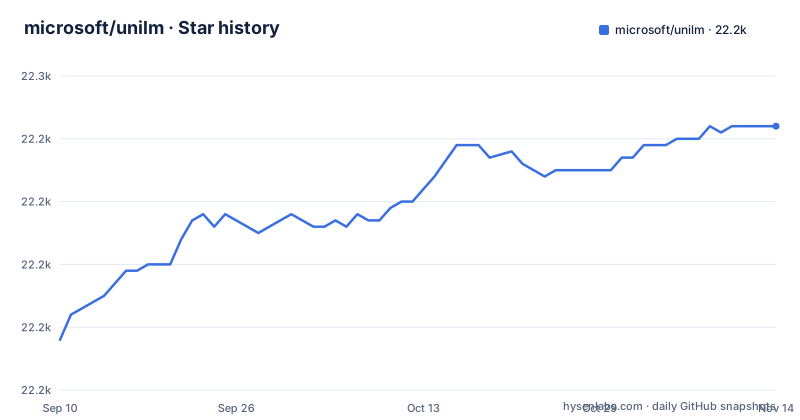
Star history
- microsoft/unilm22,242 ★ · +34
| Repository | 2026-09-10 | 2026-11-14 |
|---|---|---|
| microsoft/unilm | 22.2k | 22.2k |
34 Stars in the last 65 days, measured from the daily GitHub snapshot. Compare with other projects
Editorial analysis
A Repository That Is Really Many Projects
The UNILM repository is not a single library. It is a collection of dozens of research projects, each with its own folder, paper, and often its own codebase. The README lists foundation models, toolkits, and applications across language, vision, speech, and multimodal domains. For an engineer, this means you are not adopting one tool; you are browsing a catalog. The value is that you can find state-of-the-art models like LayoutLMv3 for document understanding, BEiT-3 for multimodal tasks, or E5 for text embeddings, all under a single MIT license. The challenge is that each project may have different dependencies, entry points, and levels of maintenance. The repository's last push was in September 2026, so there is recent activity, but individual subprojects vary. The README itself is a long list of links, each pointing to a subfolder or an arXiv paper. There is no central installation or unified API. You must decide which model you need and then drill into its specific documentation.
The Big Convergence: What Problem It Solves
The core thesis, stated in the README, is 'The Big Convergence': large-scale self-supervised pre-training across tasks, languages, and modalities. Historically, models were built for one task, one language, or one input type. UNILM collects models that push toward generality. For example, BEiT-3 is described as 'a general-purpose multimodal foundation model', and MetaLM posits that language models can act as general-purpose interfaces. If you are building an application that needs to understand scanned documents, extract text from images, or handle multiple languages, this repository offers pre-trained weights and fine-tuning code that you can adapt. The intended user is a researcher or engineer who wants to start from a published architecture rather than train from scratch. The breadth is the point: you can compare approaches for similar problems, like LayoutLM versus MarkupLM for document understanding, or choose between MiniLM for efficiency and Kosmos for multimodal generation. The problem it solves is the time and expertise needed to implement and pre-train such models from scratch.
How the Architecture and Data Flow Fit Together
Because UNILM is a monorepo, there is no single data flow. Each model has its own architecture. However, the README highlights several shared directions. One is the TorchScale library, which provides foundation architectures like DeepNet for scaling to 1,000 layers and X-MoE for sparse mixture-of-experts. Another direction is what the README calls the revolution of model architecture: BitNet (1-bit Transformers), RetNet (a successor to Transformer) and LongNet (scaling Transformers to 1,000,000,000 tokens). If you are selecting a model, you need to understand its input and output. For example, LayoutLM takes text plus layout and image information for document AI. TrOCR is a transformer-based OCR model that converts image text into sequences. Kosmos-2.5 is a multimodal literate model. The repository does not provide a unified inference engine. You will likely clone the subfolder, install its requirements, and use its training or inference scripts. The data flow depends on the model's pre-training objective, such as generative self-supervised (BERT-style) pre-training for BEiT or sequence-to-sequence fine-tuning for s2s-ft.
Getting Started: Commands and Configuration
The README does not give a single install command. Instead, it points to subfolders. To use a model, you navigate to its directory. For example, the LayoutLM folder likely contains a README with instructions for fine-tuning on your own documents. The s2s-ft toolkit has a released version (v0.3) with a tag, suggesting that you can clone the repository and check out that tag for a stable sequence-to-sequence fine-tuning setup. The repository is written in Python, so you will need a Python environment, PyTorch, and probably Hugging Face Transformers for many models. The configuration keys vary by model. Given the lack of central documentation, the first step is to read the README inside the specific subfolder. For some projects, like Kosmos-1, the README links only to a paper even though a kosmos-1/ folder exists at the top level, so check the folder itself before adopting any model.
Where the Repository Falls Short
The biggest limitation is that UNILM is not a product. It is a research archive. Many entries are papers with a link, not code. For example, Kosmos-1, MiniLLM, and SpeechT5 are listed in the README with arXiv links rather than folder links, although kosmos-1/ and speecht5/ folders exist at the top level. Even for projects with code, maintenance is inconsistent. The release history shows a gap: s2s-ft v0.3 was released in April 2020, and the next release, YOCO v0, came in May 2024. That gap suggests that many subprojects are not actively versioned. Another limitation is the lack of a unified API. If you want to compare LayoutLMv3 and BEiT-3 on the same task, you must learn two different codebases. Also, the repository is huge; cloning it pulls in every model, which may be unnecessary and slow. Finally, the README includes a hiring pitch, which indicates that the primary audience is researchers, not production engineers. For a production deployment, you may need to extract the model code and adapt it heavily.
Alternatives and How They Differ
The most direct alternative is Hugging Face Transformers, which hosts many of the same models, such as LayoutLM, BEiT, and TrOCR, with a unified API and consistent installation. The difference is that Hugging Face provides a single library with model classes and pipelines, whereas UNILM requires you to use each project's own scripts. If you want to fine-tune a model quickly, Hugging Face is often easier. Another alternative is the specific model's own repository. For example, Microsoft has separate repos for TorchScale and some models, but UNILM consolidates them. For document AI specifically, you might use a commercial OCR service or a dedicated library like Tesseract, but those lack the deep layout understanding of LayoutLM. The choice depends on whether you need open weights and control versus convenience and support. UNILM gives you the research code, but you trade away the polish of a maintained library.
Maintenance and License Considerations
The repository is licensed under MIT, which is permissive for commercial use, though you should check each subproject for its own license if it differs. The repository also carries a NOTICE.md at the top level. However, some models may have usage restrictions based on the underlying data or the paper. The maintenance situation is mixed. The repository has recent pushes as of September 2026, but that could be due to one active subproject. The releases are infrequent and sparse. If you adopt a model, you are essentially forking it. Upgrading to a newer version of a model or a fix may require monitoring the subfolder manually. There is no central changelog. The maintenance cost is therefore on you: you must track the specific model's repository, read its commits, and test compatibility with your stack. For a long-term project, this can be a burden. But for a one-off research experiment or a proof of concept, the MIT license and the availability of pre-trained weights make it a low-cost starting point.
Final Verdict: Who Should Browse This Catalog
UNILM is a valuable resource if you know exactly which model you need. For example, if you are building a document information extraction system, LayoutLMv3 or TrOCR are proven choices with code and papers. If you need text embeddings, E5 is a strong candidate. The repository saves you from implementing these models from scratch. However, if you are looking for a single, maintained framework with a unified API, this is not it. You will spend time navigating different codebases and adapting them to your pipeline. Before you adopt, check the subfolder for a README, a requirements file, and recent commits. If the subfolder only links to a paper, look for an official implementation elsewhere. The repository's strength is its breadth, but that breadth comes with fragmentation. Use it as a starting point, not as a dependency.
Editorial conclusion
Adopt UNILM if you need a proven, MIT-licensed starting point for document AI (LayoutLM, TrOCR), text embeddings (E5), or small efficient models (MiniLM), and you are comfortable navigating a monorepo where each subproject has its own setup. Do not adopt it if you want a single unified API or a maintained release pipeline; many components are research code with sparse updates. Before committing, verify the specific subfolder you need: check its README for dependencies, recent commits, and whether it points to a separate repository or a paper-only reference. Choose UNILM for breadth and reproducibility of published results, but treat each model as an independent package, not as one integrated framework.
Frequently asked questions
What counts as a pre-trained model in microsoft/unilm?
The repository is an index of separate pre-training projects, each linked to its own directory or paper. Its language line alone covers UniLM, InfoXLM/XLM-E, DeltaLM/mT6, MiniLM, AdaLM, EdgeLM, SimLM, E5, and MiniLLM, under one MIT license on the master branch.
Is the pre-training in microsoft/unilm unsupervised?
The project describes itself as large-scale self-supervised pre-training across tasks, languages, and modalities, and it lists tasks as both predictive and generative. The description applies to the collection, so it is not a single answer for every subproject inside it.
Which NLP models does microsoft/unilm gather?
The language and multilingual section lists UniLM for unified understanding and generation, InfoXLM/XLM-E and DeltaLM/mT6 for 100 or more languages, MiniLM for small and fast models, AdaLM for adaptation, EdgeLM for edge and client devices, SimLM for similarity matching, and E5 for text embeddings. Speech models WavLM and VALL-E are listed under a separate section.
Official sources
Add this badge to your README
If you maintain this project, the badge below links readers to this analysis and shows its maintenance status from the daily GitHub snapshot. Paste the markdown into your README; add ?metric=license or ?metric=stars to the image URL for a different field.

[](https://hysenlabs.com/projects/microsoft-unilm)Star history chart for your README
[](https://hysenlabs.com/projects/microsoft-unilm)Was this useful?