kphtools: Generating KPH Offsets for SystemInformer from Microsoft Symbol Server
Toolkits for KPH (KSystemInformer) Dynamic Data .
At a glance
- What is it?
- kphtools is a set of Python scripts that download Windows PE and PDB files, dump per-symbol YAML artifacts, and export them back into SystemInformer's kphdyn.xml. It targets developers who maintain KPH dynamic data offsets and need a repeatable, customizable pipeline.
- Who is it for?
- Adopt kphtools if you maintain KPH dynamic data for SystemInformer and need a scripted way to refresh struct_offset or func_offset entries from Microsoft Symbol Server. Do not use it if you are not working with kphdyn.xml or if you cannot tolerate multi-hour initial downloads.
- Can I use it commercially?
- Not without permission. GitHub finds no licence file in the repository, and without a licence all rights are reserved by default: you may read the code but not reuse it. Check the README, or ask the authors, before using it.
- Is it still maintained?
- Yes. The repository last received commits 12 days ago.
- What is it written in?
- Mainly Python, according to GitHub's language statistics.
Answers come from the project's GitHub data, last synced on October 22, 2026, and from our analysis. They are not legal advice.
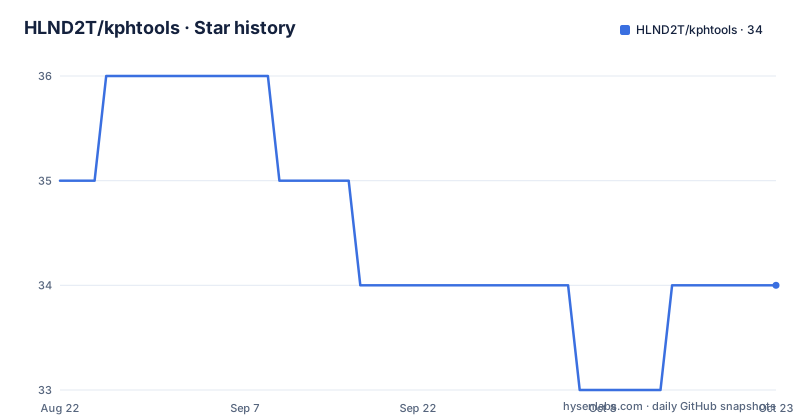
Star history
- HLND2T/kphtools34 ★ · -1
| Repository | 2026-08-22 | 2026-10-22 |
|---|---|---|
| HLND2T/kphtools | 35 | 34 |
-1 Stars in the last 61 days, measured from the daily GitHub snapshot. Compare with other projects
Editorial analysis
The Problem: Keeping KPH Offsets in Sync
SystemInformer, a system monitoring and administration tool, relies on KPH dynamic data to access kernel structures across Windows versions. The kphdyn.xml file stores offsets for structures and functions, and these offsets change with each Windows update. Manually tracking those changes is error-prone and time-consuming. kphtools solves this by automating the entire offset regeneration process. It is built for maintainers of SystemInformer forks or distributions who need to update kphdyn.xml regularly. The README explicitly positions it as a toolkit to add your own struct_offset or func_offset entries, meaning it is not a one-click solution but a customizable pipeline. If you are not involved in maintaining kphdyn.xml, this project has little to offer you.
How the Pipeline Works: From Symbol Server to XML
The workflow is a three-stage pipeline. First, download_symbols.py fetches PE files and matching PDB symbols from Microsoft Symbol Server. The README notes that the first download can take hours, which is a direct consequence of pulling full symbol sets. Second, dump_symbols.py analyzes each binary and writes per-symbol YAML artifacts plus an artifacts.yaml manifest next to each binary. This intermediate YAML format is a deliberate design choice: it decouples the raw symbol data from the final XML format. Third, update_symbols.py exports those YAML artifacts back into kphdyn.xml. The separation means you can inspect or modify the YAML before committing to the XML output. The default symbol layout is symbols/<arch>/<file>.<version>/<sha256>/, which organizes artifacts by architecture, file, version, and hash. That layout supports incremental runs: the README says later runs can reuse the PE, PDB, and YAML artifacts already stored under symbols/.
Getting It Running: Commands and Configuration
The quick start is straightforward. After installing the requirements from docs/en/requirements.md, you fetch the upstream kphdyn.xml, then run three commands. The README shows: curl -O https://raw.githubusercontent.com/winsiderss/systeminformer/refs/heads/master/kphlib/kphdyn.xml, then uv run download_symbols.py -fast, uv run dump_symbols.py, and uv run update_symbols.py. The -fast flag on download_symbols.py suggests a mode that skips something, likely verification or full metadata, but the documentation does not specify what it skips. All scripts default to using the symbols directory under the current working directory. You can override that with the KPHTOOLS_SYMBOLDIR environment variable, which takes precedence over the -symboldir command-line option. This dual override mechanism is useful for CI environments where you want a fixed symbol cache. The use of uv run implies the project expects the uv package manager, though the requirements file may also work with pip.
Customization Through config.yaml and Reference YAML
The README states that the symbol inventory and analysis workflow can be customized through config.yaml. This is where you likely define which files, architectures, or symbol patterns to process. The exact keys are not documented in the README, so you must inspect the repository or the docs to learn them. There is also a dedicated doc for generating reference YAML for LLM_DECOMPILE. That suggests the project supports feeding symbols to a language model for decompilation or offset inference. The reference YAML is a separate artifact from the per-symbol YAML, and it is likely used to provide context for automated analysis. This is an advanced feature that goes beyond simple offset dumping. If you do not need LLM-assisted decompilation, you can ignore that part, but its presence indicates the project is designed for a semi-automated workflow where a model can help interpret complex kernel changes.
The Multi-Hour Download: A Real Constraint
The README warns that the first download may take hours. That is a genuine limitation for anyone evaluating this tool. The pipeline is not a quick fix; it is a batch process that requires significant time and bandwidth. The -fast flag might reduce the time, but it is not a guarantee. For a single Windows version, you could probably limit the scope via config.yaml, but the default behavior appears to pull a broad set of symbols. This makes kphtools a poor fit for ad-hoc offset lookups. It is designed for scheduled or periodic regeneration, not for interactive use. If you need a single offset quickly, you are better off manually inspecting a PDB with a tool like WinDbg. The caching mechanism helps after the first run, but the initial cost is unavoidable. Also, the pipeline depends on Microsoft Symbol Server availability and network reliability; a flaky connection could interrupt the download and force a restart.
Alternatives: Manual PDB Inspection and Other Offset Tools
The obvious alternative is to manually inspect PDB files using debugger tools like WinDbg or dumpbin to find structure offsets. That approach gives you direct control over each offset but is slow and requires deep knowledge of kernel internals. kphtools automates that inspection and produces a standardized YAML format, which is a significant advantage for repeatability. Another alternative is to use SystemInformer's own build process, which may already include some offset generation. However, the existence of kphtools suggests that the upstream process is either not automated or not customizable enough. The key difference is that kphtools externalizes the symbol analysis into a configurable pipeline, whereas manual inspection is a one-off effort. For a project that tracks Windows updates frequently, the automation wins. For a one-time fix, manual inspection is simpler and has no dependency on a third-party script.
Maintenance and Licensing Caveats
The repository has no declared license, which is a red flag for any commercial or redistribution scenario. You need to contact the author or check the repository for a LICENSE file before using it in a product. The project is actively maintained, with releases in July and August 2026, suggesting ongoing fixes. The documentation includes a Jenkins workflow for Windows, which indicates the maintainers use CI to run the pipeline. That is a good sign for reliability. However, the maintenance cost is on you: you must keep up with changes in kphdyn.xml format, Python dependencies, and Microsoft Symbol Server behavior. The docs list an OSS sync and an upload server, which are extra components for sharing symbol caches across machines. Those are optional but add complexity. Before adopting, verify that the Python version and dependencies in docs/en/requirements.md match your environment, and test the pipeline on a single symbol file to ensure the YAML output is what you expect.
Editorial conclusion
Adopt kphtools if you maintain KPH dynamic data for SystemInformer and need a scripted way to refresh struct_offset or func_offset entries from Microsoft Symbol Server. Do not use it if you are not working with kphdyn.xml or if you cannot tolerate multi-hour initial downloads. Before adopting, verify the exact Python version and dependencies in docs/en/requirements.md, and test the pipeline against a single symbol file to confirm the YAML artifacts match your expectations. The project has no declared license, so clarify that before redistribution.
Frequently asked questions
What does kphtools do?
It generates offsets for SystemInformer's kphdyn.xml, adding your own struct_offset or func_offset entries. The symbol inventory and the analysis workflow are both customised through config.yaml at the repository root.
What are the three steps of the kphtools pipeline?
download_symbols.py pulls PE files and matching PDB symbols from Microsoft Symbol Server, dump_symbols.py analyzes each binary and writes per-symbol YAML plus an artifacts.yaml manifest, and update_symbols.py exports those artifacts back into kphdyn.xml.
How long does the first kphtools symbol download take?
It may take hours. Later runs reuse the PE, PDB and YAML artifacts already stored under the symbols directory, whose default layout is symbols/<arch>/<file>.<version>/<sha256>/.
How do I change where kphtools stores its symbols?
Set KPHTOOLS_SYMBOLDIR. By default the scripts use a symbols directory under the current working directory, and the environment variable overrides that and takes precedence over the -symboldir flag.
What Python version and package layout does kphtools use?
Python 3.10 or later, with tool.uv set to package = false. The scripts are run with uv run rather than installed as a library, and the releases are date-stamped tags such as v20260901a rather than the 0.1.0 version in pyproject.toml.
Official sources
Add this badge to your README
If you maintain this project, the badge below links readers to this analysis and shows its maintenance status from the daily GitHub snapshot. Paste the markdown into your README; add ?metric=license or ?metric=stars to the image URL for a different field.

[](https://hysenlabs.com/projects/hlnd2t-kphtools)Star history chart for your README
[](https://hysenlabs.com/projects/hlnd2t-kphtools)