openai/skills is a deprecated catalog of folders, not a dependency
Skills Catalog for Codex
At a glance
- What is it?
- openai/skills was a catalog of Agent Skills for Codex, where a skill is a folder of instructions, scripts and resources that an agent discovers, installed in three tiers with the $skill-installer. The README's first line declares the repository deprecated and points at the OpenAI Plugins repository, which is where Codex skill and plugin examples now live, and each skill carries its own LICENSE.txt rather than a repository-wide licence.
- Who is it for?
- The catalog is still readable as a set of worked examples of what a Codex skill folder contains, and the agentskills.io standard it points at is the durable part. It is not a place to install from today, because the repository declares itself deprecated and directs current work to the OpenAI Plugins repository and the Build plugins guide, which covers a skill-only plugin.
- Can I use it commercially?
- Not without permission. GitHub finds no licence file in the repository, and without a licence all rights are reserved by default: you may read the code but not reuse it. Check the README, or ask the authors, before using it.
- Is it still maintained?
- Yes. The repository last received commits 16 days ago.
- What is it written in?
- Mainly Python, according to GitHub's language statistics.
Answers come from the project's GitHub data, last synced on November 13, 2026, and from our analysis. They are not legal advice.
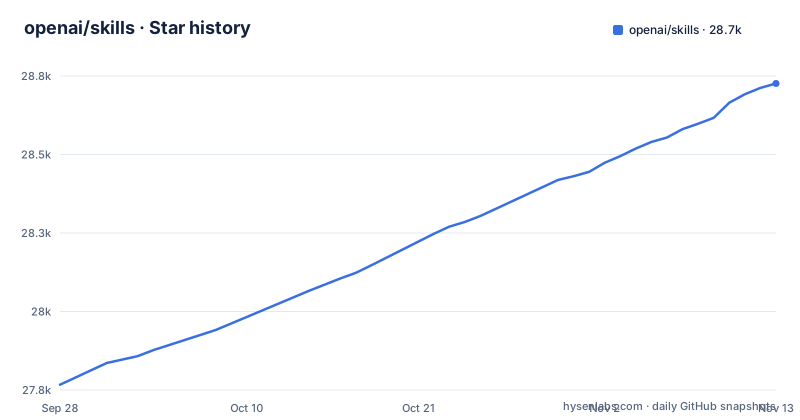
Star history
- openai/skills28,726 ★ · +959
| Repository | 2026-09-28 | 2026-11-13 |
|---|---|---|
| openai/skills | 27.8k | 28.7k |
959 Stars in the last 46 days, measured from the daily GitHub snapshot. Compare with other projects
Editorial analysis
The first line of the README is a deprecation notice
Before anything else, the README carries an IMPORTANT block that says the repository is deprecated. It directs anyone looking for current Codex skill and plugin examples to the OpenAI Plugins repository, and anyone who wants to add their own skills to Codex to the Build plugins guide, which includes instructions for creating a skill-only plugin.
That changes what this repository is for. It is no longer a place to install from or contribute to, and the pointers it gives are the real instruction. A reader who arrives from a search result and installs a skill from here is following a catalog its own maintainers have retired, on a platform where the supported route is the plugins repository.
What survives is the shape. The rest of this article describes the mechanism the catalog demonstrated, because that part is what a team copying the pattern needs, and because the two destinations the notice names cover both halves of the problem, current examples and how to build your own.
Three tiers, and only one installs itself
The catalog was organised in three directories under `skills/`, and the difference between them is who does the installing.
Skills in `.system` are automatically installed in the latest version of Codex. Nothing is fetched, nothing is confirmed, and a Codex upgrade brings them along. That tier is for capabilities the tool considers part of itself.
The other two are opt-in. Curated skills live in `skills/.curated` and experimental ones in `skills/.experimental`, and both are installed with the `$skill-installer` from inside Codex rather than dropped into a directory by hand.
The practical consequence for anyone reading the old catalog is that upgrading Codex and installing a skill are two different operations with two different failure modes, and only the first one is automatic.
A skill is a folder, and its licence is inside it
The definition in the README is short and worth keeping: Agent Skills are folders of instructions, scripts, and resources that AI agents can discover and use to perform at specific tasks. Write once, use everywhere is the stated goal, and Codex uses skills to package capabilities that teams and individuals can use to complete specific tasks in a repeatable way.
The licensing is the part that surprises people. There is no repository-wide licence statement; instead, the licence of an individual skill is found directly inside that skill's directory, in a `LICENSE.txt` file. The repository metadata reflects that, since no single licence is declared for the project as a whole.
So a team installing a skill from a catalog like this one inherits a per-skill licence question every time, and the file to read is inside the folder you are about to trust. That habit is worth keeping whichever catalog you install from.
$skill-installer takes a name, a folder, or a directory URL
The three install forms are all you need, and each covers a different case:
$skill-installer gh-address-comments
$skill-installer install the create-plan skill from the .experimental folder
$skill-installer install https://github.com/openai/skills/tree/main/skills/.experimental/create-plan
A curated skill is installed by name, with `skills/.curated` as the default location. An experimental skill needs its folder spelled out, because there is no default for that tier. A GitHub directory URL is the third form, and it is the one that generalises, since it points at a tree path rather than at a name in a list.
One step after all three: restart Codex to pick up new skills. That is the instruction the README gives, and it is worth internalising before diagnosing an install that appears to have done nothing.
agentskills.io is the part that outlives the catalog
Alongside the two Codex documentation pages on using skills and creating custom ones, the README links the Agent Skills open standard at agentskills.io. That link is the most durable thing in the file.
The distinction it draws is between a vendor's packaging conventions and a portable format. A skill is a folder of instructions, scripts and resources; the catalog was one implementation of how Codex discovers and installs such folders, and the standard is the description of the folder itself. A team that adopts the folder shape is working against the standard whether or not it uses this repository's installer.
So the practical takeaway from a deprecated catalog is narrow and useful: keep the format, follow the standard reference, and take current examples from the repository the deprecation notice names.
The repository is a folder of folders, with nothing to build
The top level says everything about the scope: `.gitignore`, `README.md`, `contributing.md` and `skills/`. There is no build configuration, no test suite, no continuous integration file and no release history. GitHub reports no releases for the repository.
The last push was on 2026-10-28 and the repository is not archived, so the tree is still there to read. It is not archived in the sense of being read-only, and it is not a package in the sense of being something you depend on. Nothing here is installed by a package manager; a skill is copied or fetched by name, and there is no version pinning story to reason about because there are no versions.
That shape is normal for a catalog and worth recognising early. If you are evaluating it as infrastructure, there is nothing to pin, and if you are evaluating it as a reference, the two example names in the README are your entry points.
gh-address-comments and create-plan are the two names to start from
The README names exactly two skills, and between them they show both tiers. `gh-address-comments` is the curated example, the one that can be installed by name alone, and its name says what it does: work on GitHub pull request comments. `create-plan` is the experimental example, and it is referenced twice, once as a folder to name in the `.experimental` directory and once as a GitHub tree URL.
For a reader starting from this repository today, those two are the fastest way to see what a skill folder contains, since the format is a directory of instructions, scripts and resources and nothing about it is hidden in a build step. Everything else in the catalog is only visible by walking the `skills/` tree, and the plugin examples the deprecation notice points at are where new material belongs.
Editorial conclusion
The catalog is still readable as a set of worked examples of what a Codex skill folder contains, and the agentskills.io standard it points at is the durable part. It is not a place to install from today, because the repository declares itself deprecated and directs current work to the OpenAI Plugins repository and the Build plugins guide, which covers a skill-only plugin. If you adopt the pattern, take the folder shape and the per-skill licence habit from here and get the current examples from there.
Frequently asked questions
How do I install skills in Codex?
Skills in the .system directory are installed automatically in the latest version of Codex. Curated skills in skills/.curated and experimental ones in skills/.experimental are installed from inside Codex with the $skill-installer, either by name, by naming the folder, or by giving a GitHub directory URL, and then you restart Codex to pick up the new skills.
How do I use skills in Codex?
Agent Skills are folders of instructions, scripts and resources that AI agents can discover and use to perform specific tasks, and Codex uses them to package capabilities that teams can repeat. The README links the Codex documentation on using and creating custom skills, and the Agent Skills open standard at agentskills.io.
Is the openai/skills repository still the place to get Codex skills?
No, the README declares the repository deprecated and points to the OpenAI Plugins repository for current Codex skill and plugin examples, and to the Build plugins guide for creating your own, including a skill-only plugin. The last push recorded for the repository is 2026-10-28.
What licence applies to a skill in the openai/skills catalog?
There is no single licence for the repository. The licence of an individual skill is found directly inside that skill's own directory, in a LICENSE.txt file, so the terms have to be read per skill rather than once for the catalog.
Official sources
Add this badge to your README
If you maintain this project, the badge below links readers to this analysis and shows its maintenance status from the daily GitHub snapshot. Paste the markdown into your README; add ?metric=license or ?metric=stars to the image URL for a different field.

[](https://hysenlabs.com/projects/openai-skills)Star history chart for your README
[](https://hysenlabs.com/projects/openai-skills)Was this useful?