ai-hands-on: a notebook track whose root requirements file leaves PyTorch commented out
A group of notebooks and other files which can help you learn AI from scratch.
At a glance
- What is it?
- A seven stage AI engineering curriculum in Jupyter notebooks, from math to RAG to OCR, where the one-line install does not install PyTorch, the folder guide and the usage guide spell the same folder two ways, and a hosted LLM provider is wired in as the RAG default.
- Who is it for?
- ai-hands-on is a study track rather than a library, and it is honest about its shape: seven numbered stages, a separate group of projects that run outside the notebook flow, and a stated order to work through. It suits someone who wants the arithmetic before the framework and has the patience to fix their own environment along the way.
- Can I use it commercially?
- Yes. MIT is a permissive licence: you can use, modify and sell software built on it, as long as you keep its copyright and licence notices.
- Is it still maintained?
- Yes. The repository last received commits 43 days ago.
- What is it written in?
- Mainly Jupyter Notebook, according to GitHub's language statistics.
Answers come from the project's GitHub data, last synced on November 15, 2026, and from our analysis. They are not legal advice.
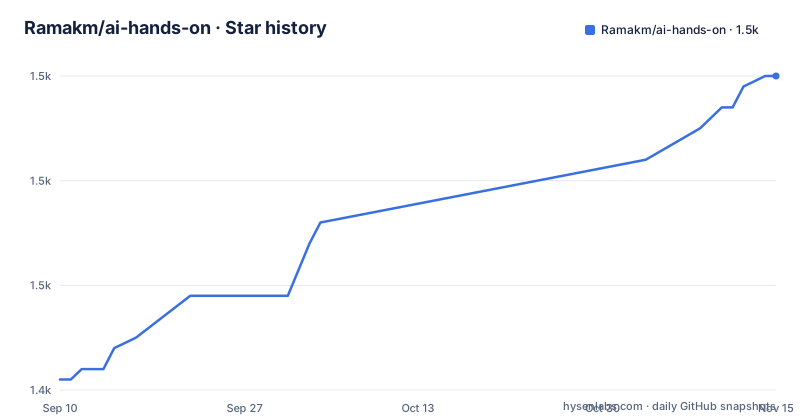
Star history
- Ramakm/ai-hands-on1,470 ★ · +29
| Repository | 2026-09-10 | 2026-11-15 |
|---|---|---|
| Ramakm/ai-hands-on | 1.4k | 1.5k |
29 Stars in the last 66 days, measured from the daily GitHub snapshot. Compare with other projects
Editorial analysis
The root requirements file leaves PyTorch commented out
The stated install is one command:
pip install -r requirements.txtWhat that file contains is three lines:
numpy>=1.20.0
matplotlib>=3.3.0
# torch>=2.0.0
The third line is a comment. So the one install step in the documentation does not install PyTorch, even though stages two and three of the track are tensor work and building networks from scratch. Anyone following the instructions in order installs the science stack, launches Jupyter, and only discovers the missing dependency when an import fails inside the first PyTorch notebook.
The pattern continues rather than stopping. The requirements note says some subfolders, naming the RAG project and the OCR project as examples, carry their own requirements files with additional dependencies, and the usage section says each of the deep learning production folders has its own README and its own requirements. The root file is a starting point, not an environment, and it does not claim to be one.
One folder is spelled two ways in the same file
The learning track is numbered, and the numbering does not line up cleanly across the sections. The overview lists seven stages, ending with an additional modules section that is a description rather than a directory. The folder guide starts earlier, at a zero point one folder of quick explainers on neural networks and efficient Pandas iteration, and then continues with the numbered folders.
The casing drifts in the middle. The folder guide names the tensor stage `2.Pytorch/`, and the usage workflow tells you to work through `2.PyTorch/`. On a case-insensitive filesystem that is invisible; on Linux it is a path that does not exist, and it is the kind of mismatch that gets reported as a missing file rather than a typo.
The usage workflow itself has a hole. It numbers four notebooks to work through in order, then four folders to run separately, then a step called Resources with nothing under it, then a fifth item that is the basic machine learning folder containing four numbered notebooks: linear regression, logistic regression, a decision tree model and Naive Bayes classification. The folder guide for that same folder also promises support vector machines and unsupervised learning, which the usage list does not mention.
A hosted provider is the RAG default, and the link carries campaign parameters
The retrieval stage is the one project in the track built as a project rather than a notebook exercise: a FAISS based pipeline with pluggable LLM providers and tests. The provider list is where the commercial surface sits. Cloud answer generation is offered through a hosted service whose default model is named in the text as DeepSeek-V3-0324, alongside a second hosted provider, OpenAI, and then a catch-all for any OpenAI compatible API. The first entry's link carries three tracking parameters for source, medium and campaign, which is a small detail that tells you the link was added as a partnership rather than as a neutral recommendation.
The root directory holds a markdown file whose own description is notes on that provider integration in the RAG folder, so the integration is documented rather than implied. Set against that, the folder guide describes the OCR project as having preprocessing utilities and a Render deployment, so one project in the track is built to be hosted on a platform as a service from the start.
The reading for a learner is that the RAG stage is the one part of this repository that reaches a paid API by default, and it is also the part with the most configuration surface.
Four projects are meant to be run outside the notebook flow
The usage section splits the repository into a linear track and a set of projects. The linear part is four notebook folders to work through in order, starting with math and ending with the transformer stage. The project part is separate and each entry has its own README and requirements: the RAG project, the OCR project, and three deep learning production folders covering convolutional networks, recurrent networks with long short term memory, and recurrent networks with gated recurrent units.
One project has a stricter floor than the rest. The YouTube MCP server, a minimal server that fetches transcripts, requires Python 3.12 or later and the uv package manager, while everything else in the repository is driven by a plain pip install. The repeated folders under it ship a FastAPI or Streamlit surface, which is why they are called production folders and why they carry their own dependency files.
Both notebook launchers are supported from the project root, either the lab interface or the classic notebook interface, and the difference matters if you want one cell at a time.
`Books/` is described as reference PDFs while the reading list is marked not included
The reading list names six books, from a practical AI engineering title through the scikit-learn handbook, the deep learning textbook, the statistical learning text, a neural networks book and a SQL cookbook. The heading above that list marks them as recommended reading and, in the same line, marks them as not included. Those are pointers to buy or borrow, not files.
The folder guide describes a different thing. Books is typed as a resource and its contents are given as reference PDFs. The repository map printed in the documentation stops partway through its listing and never reaches that directory, so nothing in the pages on view states which documents are actually inside it, who holds the rights, or whether they are freely redistributable titles.
There is also a second repository, linked for further AI and machine learning book references, with a note that more will be added over the coming months. If you plan to use this repository as a self-contained study library, open the Books directory and look at what is in it before you rely on it.
The repository map stops mid-line, and three root files sit outside any stage
The project structure block in the documentation is meant to be the map of the whole repository, and it ends abruptly: the last visible line describes the recommended step by step learning path and cuts off in the middle of the word. So the map never reaches the majority of the folders, and the folder guide table is the more complete source.
Three files at the root sit outside the numbered stages. One notebook is described as an ANN versus CNN comparison on Fashion-MNIST and, in the same breath, as a root copy, which means the same exercise exists elsewhere in the tree and the root holds the duplicate. A plain text file is described as sample network intrusion CSV data, which is the kind of artefact that gets committed for a demonstration and then forgotten. And the provider review file discussed earlier is a third root file that belongs to no stage.
None of these are defects on their own. They are the residue you get when a teaching repository grows faster than its own table of contents, and they are the first place to look when a path in the documentation does not resolve.
The extra modules are where the track stops being a curriculum
Beyond the numbered stages sit folders that behave like a resource shelf rather than a sequence. One covers LLM fundamentals, tokens and token embeddings. One covers fine tuning with LoRA, QLoRA and Unsloth. One covers classical supervised and unsupervised machine learning. One is an exploratory analysis of the Olist e-commerce dataset, broken down by customers, geolocation, orders, payments, reviews, products and sellers.
Two supporting folders complete it. Data holds sample datasets, and Interview Prep is typed as a resource and described as an AI engineering interview topics checklist. A start folder holds the recommended step by step path through everything else, which is the file the truncated map was describing when it stopped.
The surrounding metadata is small and worth stating plainly. The project is MIT licensed with the licence file at the root, it has no GitHub releases at all, and its last push is dated 30 September 2026. Its homepage field points at a Substack newsletter rather than at documentation, the repository carries a sponsorship configuration file for GitHub funding, and the documentation opens with a request to star the repository if it proves useful.
Editorial conclusion
ai-hands-on is a study track rather than a library, and it is honest about its shape: seven numbered stages, a separate group of projects that run outside the notebook flow, and a stated order to work through. It suits someone who wants the arithmetic before the framework and has the patience to fix their own environment along the way.
Three things to sort out before the first cell runs. The root requirements file does not install PyTorch, so install it yourself before stage two or you will find out inside a notebook. The RAG stage ships with a hosted provider selected by default and a link that carries campaign parameters, so read the provider review file in the root and decide whether that default is what you want for a paid API. And the Books directory is described as holding reference PDFs while the recommended titles are explicitly marked as not included, so look at what is actually in that folder rather than assuming.
The smaller frictions are naming and numbering. One folder is spelled two ways across two sections of the same file, the numbered track runs to seven while the folder guide starts at zero point one, and one usage step is empty. None of that blocks you, and all of it costs a minute to notice before you file a bug about the wrong path.
Frequently asked questions
Does installing ai-hands-on requirements give you PyTorch?
No. The root requirements file lists numpy and matplotlib and keeps the torch line commented out. Stage two is tensor work and stage three builds networks, so PyTorch has to be installed separately.
Which LLM provider does the ai-hands-on RAG project use by default?
The hosted service named in the RAG section, with DeepSeek-V3-0324 named as its default model. MiniMax, OpenAI and any OpenAI compatible API are the listed alternatives, and the project is FAISS based with pluggable providers.
What does the ai-hands-on YouTube MCP server require?
Python 3.12 or later and the uv package manager, which is stricter than the rest of the repository. It is a minimal MCP server that fetches YouTube transcripts.
Are the recommended books included in the ai-hands-on repository?
The six listed titles are marked as not included, so they are pointers. A separate Books folder is described in the folder guide as holding reference PDFs, though the repository map never reaches that directory to say which documents it holds.
Official sources
Add this badge to your README
If you maintain this project, the badge below links readers to this analysis and shows its maintenance status from the daily GitHub snapshot. Paste the markdown into your README; add ?metric=license or ?metric=stars to the image URL for a different field.

[](https://hysenlabs.com/projects/ramakm-ai-hands-on)Star history chart for your README
[](https://hysenlabs.com/projects/ramakm-ai-hands-on)Was this useful?