hneemann/Digital: a Java logic designer and circuit simulator for teaching
A digital logic designer and circuit simulator.
At a glance
- What is it?
- Digital is an open source logic designer and simulator aimed at education, distributed as a zip file that runs on a JRE 8 or newer. Its FSM editor, 74xx library and HDL integration make it a practical classroom tool, but the GPL-3.0 licence and the documentation gaps are worth weighing before you adopt it.
- Who is it for?
- Adopt Digital if you teach digital logic, need a Logisim successor with an FSM editor and 74xx parts, or want to export a design to VHDL, Verilog or JEDEC for a GAL or ATF150x chip. Do not adopt it if you need a vendor-supported commercial flow, a documented remote API contract, or a simulator whose documentation covers every feature.
- Can I use it commercially?
- Yes, with conditions. GPL-3.0 is a copyleft licence: if you distribute software that includes it, you must release that software's source code under the same licence. Running it internally without distributing it does not trigger that obligation.
- Is it still maintained?
- Yes. The repository last received commits 38 days ago.
- What is it written in?
- Mainly Java, according to GitHub's language statistics.
Answers come from the project's GitHub data, last synced on November 14, 2026, and from our analysis. They are not legal advice.
Star history
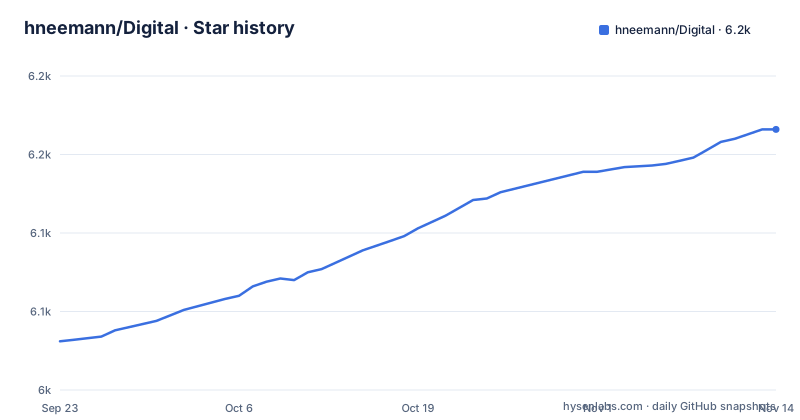
- hneemann/Digital6,166 ★ · +135
| Repository | 2026-09-23 | 2026-11-14 |
|---|---|---|
| hneemann/Digital | 6k | 6.2k |
135 Stars in the last 52 days, measured from the daily GitHub snapshot. Compare with other projects
Editorial analysis
What Digital solves, and who it is for
Digital is a digital logic designer and circuit simulator written in Java and released under GPL-3.0. The README states it is designed for educational purposes. That framing matters: this is not a synthesis tool for production silicon, and it is not trying to be one. It is a tool for drawing gates, wiring them together, watching signal states change, and checking that a design behaves the way a student or instructor expects.
The audience the README describes is narrow and consistent. Someone teaching a first course on combinational and sequential logic. Someone who wants students to build a D-flip-flop from transmission gates before they trust a library part. Someone who needs a finite state machine drawn, converted to a state transition table, and turned into a circuit. The examples folder goes as far as a simple MIPS-like single cycle CPU, which suggests the tool scales past toy exercises.
The motivation section is candid about lineage. The author used Logisim, developed by Carl Burch, and says Logisim was actively developed until 2011. Burch started a successor called Toves in 2013 and discontinued Logisim in 2014. Digital sits in that gap. If you recognise Logisim's wire colour scheme, that is deliberate.
How the simulator is put together
The repository is a Maven project. The top level holds pom.xml, src/, distribution/ and a set of CI configuration files (.travis.yml, bitbucket-pipelines.yml). The distribution folder holds ReleaseNotes.txt. That layout tells you the build is a standard Java one: compile with Maven, package the jar, ship it inside a zip alongside a shell script for Linux.
The simulator supports analysis and synthesis of both combinational and sequential circuits. Signal states are visualised with measurement graphs, and there is a single gate mode intended for analysing oscillations, which is the situation where feedback makes a circuit never settle. Test cases can be created and executed to verify a design, and the README claims almost all examples contain test cases.
Two integration paths stand out. Components can be described in VHDL or Verilog; simulating those requires the external ghdl or Icarus Verilog tools to be installed. Separately, a circuit can be exported to VHDL or Verilog, and there is direct support for the BASYS3 board and the TinyFPGA BX. JEDEC export targets GAL16v8, GAL22v10 and ATF150x parts. There is also a simple remote TCP interface, described as allowing an assembler IDE to control the simulator; the README links to the interface source in a separate repository rather than documenting the protocol here.
Generic circuits are the feature that most affects how you structure a design. A circuit can be parameterised when used, so a barrel shifter can be created with a selectable bit width instead of being copied for each width. That is the difference between a library of parts and a pile of near-duplicate schematics.
Installing Digital and running a first circuit
There is no installation. The README says to download Digital.zip, unpack it, and start it. On Linux you run the shell script inside the unpacked folder; on Windows and macOS the JAR file can be started directly. A Java Runtime Environment of at least JRE 8 is required. On Windows the README points to the Eclipse Temurin binaries as the easiest way to get Java.
If the graphical start fails, the README gives a command-line fallback. Run it from inside the Digital folder so the relative paths resolve:
java -jar Digital.jarFrom there the documentation's "First Steps" chapter is the intended entry point; the README notes that chapter explains basic usage and that the documentation is available in English, German, Spanish, Portuguese, French, Italian and simplified Chinese.
For a first real exercise, the examples folder is the better starting point than a blank sheet. The README states the examples range from a transmission gate D-flip-flop up to a simple MIPS-like single cycle CPU, and that almost all of them contain test cases. Open an example, run its test case, and you have verified that your JRE, the packaged jar and the simulator's test harness all work together before you draw anything yourself.
If you want to simulate a component written in Verilog or VHDL, install Icarus Verilog or ghdl respectively first. Digital does not bundle either simulator; the README is explicit that the external tool needs to be installed for that path to work.
Where Digital is the wrong tool
The README's own framing is the first limitation: this is a simulator for educational purposes, not a synthesis and place-and-route flow. Exporting to VHDL or Verilog gives you a description to take elsewhere, but Digital is not the thing that maps your design onto a device. The board support for BASYS3 and TinyFPGA BX is direct export, not a full toolchain.
The documentation is thin, and the project says so. The README describes it as "still very incomplete" while noting it contains a First Steps chapter, a list of 74xx chips and a list of keyboard shortcuts. That means features you can see in the UI may have no written reference. The remote TCP interface is a concrete example: the README links to a Java source file in a different repository rather than specifying the protocol, so anyone building against it is reading code, not a specification.
External HDL simulation depends on tools the project does not control. If ghdl or Icarus Verilog is missing or behaves differently on your platform, that integration path fails.
Finally, the release cadence is worth noting. v0.31 shipped on 2024-09-03, v0.30 on 2023-02-03, and v0.29 on 2022-02-11. The release titles for v0.31 and v0.30 both read "Lots of small improvements", which tells you little about whether a specific feature changed. If your course depends on exact behaviour, read distribution/ReleaseNotes.txt rather than the release titles. The repository's last push was on 2026-10-08, so work continues between releases, but the tagged versions are the stable reference points.
Digital compared with Logisim and its forks
The honest comparison is the one the README makes itself. Logisim was the reference tool for this kind of teaching, actively developed until 2011, discontinued in 2014, and forked a number of times after that. Digital's author used Logisim, and Logisim users will recognise Digital's wire colour scheme; Digital is a replacement rather than a fork.
The difference in approach is architectural. The README quotes Carl Burch's reasoning for starting Toves instead of improving Logisim: in his opinion there were weaknesses in Logisim's architecture that were too difficult to overcome. Digital's README lists "No legacy code" as a feature, which is the same argument from the other side. A fork inherits the original data model and the constraints that come with it; a rewrite can choose a different one.
What Digital adds beyond a Logisim-style editor is the surrounding workflow: an FSM editor that converts to a state transition table and then to a circuit, a 74xx library, generic parameterised circuits, HDL import and export, JEDEC export for GAL and ATF150x parts, and SVG export including a LaTeX/Inkscape compatible variant. If your course already uses Logisim files, that compatibility question is the first thing to check.
Licence, maintenance and upgrade cost
Digital is GPL-3.0. That is a copyleft licence. If you distribute a modified Digital, or distribute a work based on it, the licence's terms apply to that distribution. For classroom use where you hand students an unmodified zip, this is unremarkable. For anyone embedding Digital in a product, or shipping a modified build, the obligations need to be read against your distribution model. This is not legal advice; read the LICENSE file in the repository.
Custom components are a separate consideration. The README describes implementing components in Java and packing them in a jar, with a linked example repository. Whether a custom component jar is a derivative work is a question for your own legal reading, not something the README settles.
Upgrade cost is low in mechanical terms. There is no installer and no package manager step; you replace the unpacked folder with a newer one. The risk is behavioural. Releases are infrequent and the release titles for v0.31 and v0.30 both read only "Lots of small improvements", so check distribution/ReleaseNotes.txt for details. If you maintain course materials with expected outputs, pin the version you teach with and re-run the example test cases after any upgrade. The README states almost all examples contain test cases, which gives you a ready-made regression check.
Contributions are accepted through the GitHub issue tracker and GitHub Discussions, and translations are handled through a separate translation file rather than the resource files in src/main/resources/lang. That translation workflow is deliberately low-friction for non-programmers, which is a reasonable design choice for a project with seven language variants.
Editorial conclusion
Adopt Digital if you teach digital logic, need a Logisim successor with an FSM editor and 74xx parts, or want to export a design to VHDL, Verilog or JEDEC for a GAL or ATF150x chip. Do not adopt it if you need a vendor-supported commercial flow, a documented remote API contract, or a simulator whose documentation covers every feature. Before committing, verify the GPL-3.0 obligations for your distribution model, check that your JRE is version 8 or newer, and read the release notes for v0.31 to see whether the features you depend on changed since v0.30.
Frequently asked questions
How do I install hneemann/Digital?
There is no installation. Download Digital.zip, unpack it, start the shell script on Linux or the JAR file on Windows and macOS, and make sure a Java Runtime Environment of at least JRE 8 is present.
Does hneemann/Digital need Java installed?
Yes. The README states a Java Runtime Environment of at least JRE 8 is required, and on Windows it points to the Eclipse Temurin binaries as the easiest way to get Java.
What can I export a hneemann/Digital circuit to?
The README lists VHDL and Verilog export, direct support for the BASYS3 board and the TinyFPGA BX, JEDEC files for GAL16v8, GAL22v10 and ATF150x chips, and SVG export including a LaTeX/Inkscape compatible version.
Can hneemann/Digital simulate VHDL or Verilog components?
Yes, but the external simulators must be installed first. The README states ghdl is needed for a VHDL defined component and Icarus Verilog is required for a Verilog defined component.
Is hneemann/Digital a fork of Logisim?
No. The README's motivation section says the author used Logisim before developing Digital, and that Logisim's development was discontinued in 2014. Digital is a separate project that reuses the familiar wire colour scheme.
What licence does hneemann/Digital use?
The repository is licensed under GPL-3.0, and the LICENSE file is at the top level of the repository.
Official sources
Add this badge to your README
If you maintain this project, the badge below links readers to this analysis and shows its maintenance status from the daily GitHub snapshot. Paste the markdown into your README; add ?metric=license or ?metric=stars to the image URL for a different field.

[](https://hysenlabs.com/projects/hneemann-digital)Star history chart for your README
[](https://hysenlabs.com/projects/hneemann-digital)Was this useful?