Godogen: publish a thin game repo and let Claude Code or Codex build the Godot, Bevy or Babylon.js game
Autonomous game development for Godot, Bevy, and Babylon.js with Claude Code and Codex
At a glance
- What is it?
- Godogen is not a game engine or a game. It generates a small game repository for Godot, Bevy or Babylon.js in which Claude Code or Codex builds the game, generates its assets and proves it runs with a live build or a recorded clip.
- Who is it for?
- Try Godogen if you want to see how far an agent can take a small game in Godot, Bevy or Babylon.js, and you have either godogen_assets on an NVIDIA GPU or the optional Gemini, xAI and Tripo keys for asset generation. Publish with ./publish.sh into an empty directory, start with Babylon.js for the fastest feedback through a live URL, and run long generations on a GPU server inside tmux.
- Can I use it commercially?
- Yes. MIT is a permissive licence: you can use, modify and sell software built on it, as long as you keep its copyright and licence notices.
- Is it still maintained?
- Yes. The repository last received commits 29 days ago.
- What is it written in?
- Mainly Python, according to GitHub's language statistics.
Answers come from the project's GitHub data, last synced on November 14, 2026, and from our analysis. They are not legal advice.
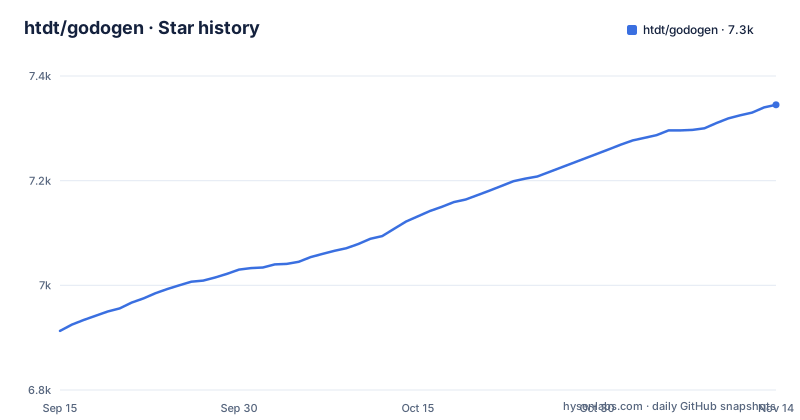
Star history
- htdt/godogen7,345 ★ · +432
| Repository | 2026-09-15 | 2026-11-14 |
|---|---|---|
| htdt/godogen | 6.9k | 7.3k |
432 Stars in the last 60 days, measured from the daily GitHub snapshot. Compare with other projects
Editorial analysis
What Godogen generates, and what it does not
The README describes the flow in one line: godogen, then a game repository, then a game. You describe a game, and an agent builds it, generates the assets, runs the engine and proves the result. This repository holds the generator. You publish from it into a fresh game repository, choosing the engine and the host agent, and the agent then works inside that new repository from a short engine guide.
That design decides who it suits. It is for people curious about autonomous game building who already use Claude Code or Codex and want a structured starting point rather than an empty folder. It is not an engine plugin, not an editor extension and not a template game you can open and play. The README is explicit that this repository is not a game.
A thin published repo, recreated from the guide
A published repository is intentionally small. The README lists what goes into it: a runtime manifest, a one-page engine guide and the asset-generation skill. The agent recreates the rest, including the project scaffold and the capture tooling, from the guide. In the source tree those parts live in prompts/runtime.md, the asset-gen/ skill and five engine guides: engines/godot.md, engines/godot-gdscript.md, engines/bevy.md, engines/babylon.md and engines/threejs.md. The publish.sh script renders the runtime layout for the engine and host agent you pick, and the README notes that engine and host are render choices at publish time, not separate source trees.
The engines get different treatment. Godot 4 projects are C# or statically typed GDScript with build-time scene generation, runtime scripts and Jolt physics. Bevy projects are Rust with code-first ECS scenes and offscreen capture. Babylon.js and three.js games are TypeScript with Vite, served at a live URL. Keeping the published repo thin means the guide carries the method and the agent writes the project, which is also why a run is long: very little is handed to it ready-made.
Publishing a Godogen game repo
Publishing takes one command per game, with the engine and the agent as flags:
./publish.sh --engine godot   --agent claude --out ~/my-game
./publish.sh --engine babylon --agent codex  --out ~/my-game
./publish.sh --engine bevy    --agent claude --out ~/my-game
For Claude the published repo gets a CLAUDE.md and a .claude/skills/ directory; for Codex it gets AGENTS.md and .agents/skills/. Passing --force wipes whatever is already at the target before publishing again, so point --out at an empty directory unless you mean to start over.
The prerequisites are the real setup work. Godot projects need Godot 4 on PATH (the .NET build for C#, either build for GDScript), Bevy needs Rust and Cargo, and Babylon.js needs Node.js 22.12 or newer plus Chrome or Chromium with hardware WebGL2 for browser capture. Every run needs Python 3 with pip, system packages listed in setup.md such as vulkan-tools, xvfb, ffmpeg and imagemagick, and either godogen_assets (local asset generation on an NVIDIA GPU) or API keys, which are optional and cover what the local tools cannot make: GOOGLE_API_KEY for Gemini images, Gemini TTS and Lyria music, XAI_API_KEY for xAI Grok images and animated-sprite video, and TRIPO_API_KEY for Tripo 3D generation. The README says it is tested on Ubuntu, Debian and macOS.
Asset generation across three providers
Asset generation is local and free by default with godogen_assets: images with real transparency, textured 3D models, rigged humanoids with generated moves and lip-sync, sound effects and voice lines. Paid APIs fill what it cannot make: Gemini or xAI Grok images, animated sprites from Grok video, Tripo3D, Gemini TTS voice acting and Lyria music.
That split sets the cost and the failure points of a run: without godogen_assets, or for assets it cannot make, paid services enter the loop, each with its own key. When an asset comes back wrong, the agent has to notice it in the running game and regenerate it, which is where the next idea in the project comes in.
Proof from the running game, and choosing your involvement
The README's principle is proof over claims: the agent judges results from the running game, either a live URL or a recorded clip, not from a clean compile, so visible defects drive the next iteration. That is the right standard for games, where code that builds can still render a black screen or a character sliding through the floor.
You decide how involved you are by how you frame the task. You can watch the live game, a Babylon.js URL or a Godot or Bevy project you run yourself, and steer at decision points. Or you leave the run unattended and receive a 15 to 20 second proof recording at the end. The agent reads the situation and picks between the two modes during the run. For a first attempt, the live Babylon.js mode gives the quickest feedback, because you see each change in a browser without building anything locally.
Long runs, servers and what is not documented
The README warns that a full generation run can take hours and suggests a server, ideally a GPU instance, because engine rendering and video capture are much faster with hardware acceleration. It recommends tmux or screen to survive SSH drops and the official remote-control interfaces of Claude Code and Codex to check in and steer from any device.
There are no tagged releases in the repository, the last push was on 2026-10-16, and changes are tracked in CHANGELOG.md. The project is MIT licensed, and the demo prompts in docs/demo_prompts.md are the best way to see what kind of game descriptions it was built around.
Editorial conclusion
Try Godogen if you want to see how far an agent can take a small game in Godot, Bevy or Babylon.js, and you have either godogen_assets on an NVIDIA GPU or the optional Gemini, xAI and Tripo keys for asset generation. Publish with ./publish.sh into an empty directory, start with Babylon.js for the fastest feedback through a live URL, and run long generations on a GPU server inside tmux.
Frequently asked questions
What coding language does Godogen use for Godot games?
Godogen's Godot 4 projects are written in C# (on the .NET build of Godot) or in statically typed GDScript (--engine godot-gdscript), with build-time scene generation and Jolt physics. Bevy projects use Rust, and Babylon.js games use TypeScript with Vite.
How do I start a game with Godogen?
Run ./publish.sh with an engine (godot, godot-gdscript, bevy, babylon or threejs), an agent (claude or codex) and an output directory, then open Claude Code or Codex inside the published repository and describe the game you want.
Which API keys does Godogen need?
None are strictly required: asset generation is local by default with godogen_assets, and optional keys set as environment variables cover what it cannot make (or everything, without godogen_assets): GOOGLE_API_KEY for Gemini images, Gemini TTS and Lyria music, XAI_API_KEY for xAI Grok images and animated-sprite video, and TRIPO_API_KEY for Tripo 3D generation.
Official sources
Add this badge to your README
If you maintain this project, the badge below links readers to this analysis and shows its maintenance status from the daily GitHub snapshot. Paste the markdown into your README; add ?metric=license or ?metric=stars to the image URL for a different field.

[](https://hysenlabs.com/projects/htdt-godogen)Star history chart for your README
[](https://hysenlabs.com/projects/htdt-godogen)Was this useful?