AutoCorrect for CJK and English source files
A linter and formatter to help you to improve copywriting, correct spaces, words, and punctuations between CJK (Chinese, Japanese, Korean).
At a glance
- What is it?
- AutoCorrect is a Rust linter and formatter for mixed Chinese, Japanese, Korean, and English content. It supports CLI checks, automatic fixes, CI integration, LSP, and language SDKs, with AST-aware handling for more than 28 file types.
- Who is it for?
- AutoCorrect suits maintainers of documentation, localized content, and mixed-language source repositories that want a consistent CJK typography policy in local checks and CI. It is a poor fit for prose editing that requires contextual grammar judgment, or for projects whose languages are unsupported.
- Can I use it commercially?
- Yes. MIT is a permissive licence: you can use, modify and sell software built on it, as long as you keep its copyright and licence notices.
- Is it still maintained?
- Yes. The repository last received commits 10 days ago.
- What is it written in?
- Mainly Rust, according to GitHub's language statistics.
Answers come from the project's GitHub data, last synced on October 23, 2026, and from our analysis. They are not legal advice.
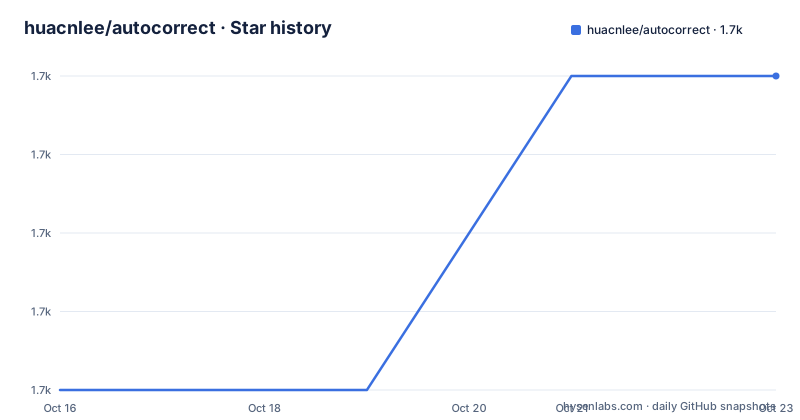
Star history
- huacnlee/autocorrect1,659 ★ · +4
| Repository | 2026-10-16 | 2026-10-23 |
|---|---|---|
| huacnlee/autocorrect | 1.7k | 1.7k |
4 Stars in the last 7 days, measured from the daily GitHub snapshot. Compare with other projects
Editorial analysis
Where AutoCorrect fits in a CJK publishing workflow
AutoCorrect addresses a narrow but recurring problem in mixed CJK copy: spacing, word corrections, and punctuation near Latin text. The README specifically describes adding spaces between Chinese, Japanese, Korean, and English words, changing punctuation to full-width forms near CJK, and changing punctuation to half-width forms in English content. That makes it relevant to book chapters, translated documentation, news copy, static sites, YAML, source comments, and application content.
The intended users are teams that already have language-specific content but lack one enforceable rule set. A documentation team can check Markdown before publishing. A source-code project can inspect comments and string literals without treating every source file as plain prose. A web service can use one of the language SDKs when content is stored or rendered.
This is not a general-purpose writing assistant. Its core unit is typography and text normalization between scripts. Experimental spellchecking is available, but the README marks it as experimental. The project also distinguishes spellchecking available through the LSP from the general formatting behavior, so an editor experience can include more than the basic linter.
AutoCorrect is useful when inconsistent spacing is a review burden. It is less suitable when every correction requires an understanding of sentence intent, genre, translation context, or house style that cannot be expressed as a deterministic text rule.
AutoCorrect's file parsing and correction pipeline
The repository is organized as a Rust workspace containing the core `autocorrect` crate, `autocorrect-cli`, `autocorrect-lsp`, WebAssembly support, derivation support, and bindings for Node.js, Python, Ruby, and Java. The Cargo workspace also includes native extension crates for the language packages. This layout allows one correction core to serve a command-line tool and several integration surfaces.
For supported files, AutoCorrect recognizes the filename and uses an AST parser to locate strings and comments. The README states support for more than 28 file types, including Markdown, JSON, YAML, JavaScript, and HTML. That distinction matters. A plain-text formatter would see every character as copy, while an AST-aware path can restrict processing to text-bearing portions that the grammar recognizes.
The CLI has two visible modes. Running it against a file displays corrected text, while `--lint` reports diagnostics. `--format json` changes the lint result into JSON for other programs. With `--fix`, it writes corrected output back to files. When invoked without a path, the documentation shows that it can operate across the project.
Ignore behavior is configurable through `.gitignore` and `.autocorrectignore`. The latter gives a repository an AutoCorrect-specific exclusion list without adding entries to Git's general ignore rules. This makes the tool suitable for a mixed repository that contains prose, fixtures, generated assets, and source code.
Installing AutoCorrect and checking a first file
On macOS, the README documents Homebrew as the installation route. The command installs the `autocorrect` executable; the subsequent version command is a quick way to confirm that the executable is available.
$ brew install autocorrect
$ autocorrect -V
On Windows, the documented package manager is Scoop. This produces the same command-line interface described in the macOS and Unix examples.
$ scoop install autocorrect
$ autocorrect -V
For Unix-like systems without one of those package managers, the README provides an installer script. Its expected result is an available `autocorrect` command, which can then be verified with the same version flag.
$ curl -sSL https://git.io/JcGER | sh
$ autocorrect -V
A first useful check can start with standard input. The documented input contains no space between English and CJK, and the corrected output inserts one. The `--stdin` mode is a good choice for scripts because it avoids modifying a file during an initial inspection.
$ echo "hello世界" | autocorrect --stdin
hello 世界
For lint output that can be reviewed or consumed by CI, request JSON explicitly. The exact file name is part of the command, so replace `text.txt` with a file in the project.
$ autocorrect --lint --format json text.txtAfter confirming the diff, apply formatting to that file. The command shown in the README uses `--fix` with an explicit path.
$ autocorrect --fix text.txtCI checks, bulk formatting, and upgrade behavior
AutoCorrect is designed to fit existing quality gates. The README names GitLab CI, GitHub Actions, Travis CI, VS Code, Vim, and Emacs as integration contexts. The common interface is the lint result: human-facing diffs are useful in a terminal, while JSON can carry the same findings into another tool.
A repository-wide lint does not require listing every supported file in the command. The documented invocation is simply:
$ autocorrect --lintFor incremental checks, the README pipes changed filenames from Git into AutoCorrect. This restricts work to files reported by `git diff --name-only`, although it does not show how rename, quoting, or deleted-file edge cases are handled.
$ git diff --name-only | xargs autocorrect --lintFormatting is similarly file-oriented. The README shows explicit files and an invocation without a path, indicating both targeted and repository-wide forms. Bulk rewriting deserves a clean working tree and review of the resulting diff, especially because punctuation and spacing changes can touch many generated documentation files.
AutoCorrect also supports self-upgrade since version 1.9.0:
$ autocorrect updateThe README warns that this command requests a password because it installs the binary under `/usr/local/bin`. The upgrade therefore has an operating-system permission and installation-path cost, not just a binary download. Container or managed CI images may make package-manager or image updates easier to control.
The repository is not archived, and its last push was on 2026-10-13. The latest listed release is v2.16.3 from 2026-01-03. That status indicates recent repository activity, but adopting an upgrade policy still requires checking CLI behavior against the project's existing lint configuration.
Configuration, language bindings, and editor integration
The root repository contains `.autocorrectrc.template`, `.autocorrectignore`, and `.gitignore`, so configuration is treated as repository data rather than as a hidden CLI convention. A team should inspect the actual `.autocorrectrc` format before copying settings into its own repository.
The CLI can check or format files, but AutoCorrect also exposes an LSP server and native SDKs for Node.js, JavaScript browsers, Ruby, Python, and Java. The Rust workspace confirms that these surfaces are developed as related crates or packages rather than separate products with unrelated implementations.
The LSP is significant for editor integration because it can provide diagnostics and formatting assistance as content changes. The README also says the LSP includes spellchecking based on `typos`. It labels basic dictionary-based spellchecking as experimental, so editor users should distinguish typography corrections, which are the stated core feature, from spelling suggestions.
AutoCorrect is also published through language-specific package channels. The README shows an NPM workflow using the `autocorrect-node` package, which exposes a project-local `yarn autocorrect` command. The root `package.json` is a private workspace with `autocorrect-node`, `autocorrect-website`, and `tests/node-cli-test` workspaces, indicating that the Node package is part of the repository's managed build surface.
For native application use, the README points to Ruby, Python, Java, and WebAssembly packages. The practical advantage is consistent behavior at content ingestion or output time. The cost is that an application must choose when formatting runs and how to handle persistence, review, and rollback.
AutoCorrect versus generic source formatting
The clearest alternative is a generic formatter or editor spellchecker that treats text as strings but has no CJK-aware rules. A formatter can normalize indentation and syntax in a programming language, while AutoCorrect focuses on copy inside supported files. An editor may provide ad hoc whitespace cleanup, but AutoCorrect applies the same rule set through CLI, CI, LSP, and SDK entry points.
Another practical alternative is a hand-written regex or small script that inserts spaces at CJK and Latin boundaries. That approach can work for one narrow rule, but it does not provide AutoCorrect's documented punctuation conversion, file-type recognition, AST filtering, ignore files, JSON lint output, or language bindings. The trade-off is that AutoCorrect centralizes policy across applications at the cost of adopting its rules as project policy.
AutoCorrect is the wrong tool when the requirement is natural-language rewriting. The documentation does not claim contextual grammar analysis, translation review, or authorial style suggestions. It is also the wrong tool when a project contains many files outside the documented grammar set and needs every byte formatted. A generic formatter may cover more syntax-defined files, while AutoCorrect is designed to inspect recognized strings and comments.
Its automated edits should still be reviewed. The README describes safe, attempted punctuation correction, but it does not define a universal guarantee that every transformation preserves meaning. A diff before committing is the appropriate boundary between deterministic normalization and editorial approval.
Editorial conclusion
AutoCorrect suits maintainers of documentation, localized content, and mixed-language source repositories that want a consistent CJK typography policy in local checks and CI. It is a poor fit for prose editing that requires contextual grammar judgment, or for projects whose languages are unsupported. Before adoption, verify the relevant rules against representative files, review the documented spellchecking limit, and confirm that AST-based correction leaves identifiers and syntax intact.
Frequently asked questions
What is AutoCorrect used for?
AutoCorrect is a linter and formatter for mixed CJK and English copy. Its documented rules cover spacing between scripts, punctuation width, and dictionary-based word correction.
How do I install AutoCorrect?
The README documents Homebrew on macOS, Scoop on Windows, and a shell installer for Unix-like systems. It also documents the `autocorrect-node` package for Node.js projects.
Does AutoCorrect support CI and editors?
Yes. The README documents lint and JSON output for CI integration, an LSP server, and integrations for environments including VS Code and Intellij Platform. Vim and Emacs are listed as pending implementations.
Official sources
Add this badge to your README
If you maintain this project, the badge below links readers to this analysis and shows its maintenance status from the daily GitHub snapshot. Paste the markdown into your README; add ?metric=license or ?metric=stars to the image URL for a different field.

[](https://hysenlabs.com/projects/huacnlee-autocorrect)Star history chart for your README
[](https://hysenlabs.com/projects/huacnlee-autocorrect)Was this useful?