gpg-tui: Interactive GnuPG Key Management
Manage your GnuPG keys with ease! 🔐
At a glance
- What is it?
- gpg-tui is a Rust terminal application for common GnuPG key operations. It adds interactive screens for listing, exporting, signing, editing, importing, generating, deleting, and refreshing keys while leaving complex work to gpg.
- Who is it for?
- gpg-tui suits terminal users who want common GnuPG key operations in an interactive interface, including people working over remote shells or in controlled containers. It is a poor replacement for advanced gpg automation.
- Can I use it commercially?
- Yes. MIT is a permissive licence: you can use, modify and sell software built on it, as long as you keep its copyright and licence notices.
- Is it still maintained?
- Yes. The repository last received commits 4 days ago.
- What is it written in?
- Mainly Rust, according to GitHub's language statistics.
Answers come from the project's GitHub data, last synced on October 23, 2026, and from our analysis. They are not legal advice.
Star history
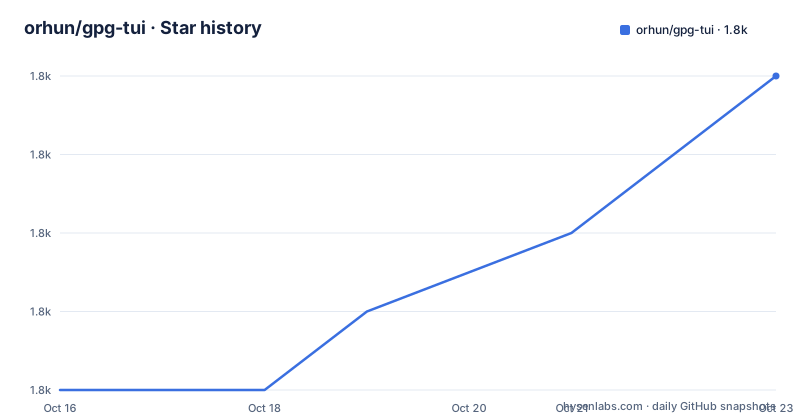
- orhun/gpg-tui1,776 ★ · +4
| Repository | 2026-10-16 | 2026-10-23 |
|---|---|---|
| orhun/gpg-tui | 1.8k | 1.8k |
4 Stars in the last 7 days, measured from the daily GitHub snapshot. Compare with other projects
Editorial analysis
gpg-tui scope for terminal-based GnuPG work
gpg-tui addresses a specific problem: GnuPG supports many key operations, but listing, inspecting, and modifying keys through individual shell commands can be cumbersome. The project places common workflows in a Terminal User Interface while retaining the command line for operations that do not fit its screens. It is intended for people who already use GnuPG for signing or key distribution and want a keyboard-driven way to navigate a key collection.
The feature set covers list, export, sign, edit, import or receive, send, generate, delete, and refresh. The interface also documents scrolling, an options menu, copy and paste, selection mode, detailed views, search, a file explorer, logs, and command execution. These controls indicate an emphasis on inspecting keys and completing a task rather than editing arbitrary GnuPG configuration.
The project does not present itself as a complete replacement for `gpg`. The README specifically says it is not trying to expose all GnuPG features. This boundary is important for adoption. Users who automate trust decisions, manipulate low-level OpenPGP data, or depend on rarely used gpg options may still need the command-line program. gpg-tui is more appropriate when an interactive interface improves ordinary key maintenance while direct gpg access remains available.
How gpg-tui connects the TUI to GnuPG
gpg-tui is a Rust binary whose terminal presentation is built around `ratatui`, with `crossterm` handling terminal interaction. Its GnuPG integration depends on `gpgme` and `libgpg-error`. The repository also depends on X11-related libraries for clipboard support through `arboard`. This is a native application design: the user runs a terminal program, selects a workflow through the interface, and the application performs the operation through the linked GnuPG libraries.
The `Cargo.toml` file declares `gpg-tui` version `0.11.2` and Rust edition 2021. It also defines a `gpg-tui-completions` binary and optional features named `tui-tests` and `gpg-tests`. These declarations identify testing and shell-completion support as separate concerns from the main binary. The repository's source tree is under `src`, while `COMMANDS.md` and the `man` directory provide command and documentation assets.
The README describes a command-line fallback, but it does not document the internal request flow, key data structures, or exact command templates used between the interface and GnuPG. It also does not specify passphrase prompts, batch-mode behavior, or what happens when a selected key is expired, revoked, or otherwise unusable. Those are integration points to verify before assigning the application responsibility for unattended key operations.
Installing gpg-tui with Cargo on Linux
The Cargo installation is the most direct documented route, but gpg-tui is not a pure Rust binary. The project requires Rust `>=1.87.0`, GnuPG integration libraries, and other native dependencies. On Debian or Ubuntu, install the libraries listed by the README first:
apt-get install libgpgme-dev libx11-dev libxcb-shape0-dev libxcb-xfixes0-dev libxkbcommon-devWith the toolchain and native libraries present, install the published crate:
cargo install gpg-tuiThe README also lists commands for other package managers and platforms. On Arch Linux, the community package is installed with:
pacman -S gpg-tuiFedora users can install the build dependencies with:
dnf install gpgme-devel libX11-develVoid Linux has a separate dependency command in the README:
xbps-install -S gpgme-devel libxcb-devel libgpg-error-devel gnupgPackage names can vary by distribution. A failure during compilation is therefore not necessarily a Rust problem. It may indicate a missing development package or a GnuPG library that does not match the host environment. Binary releases, AUR, Alpine Edge, Homebrew, FreeBSD, NetBSD, Docker, and manual installation are also documented, but their availability depends on the platform.
Starting gpg-tui and selecting a key workflow
The README demonstrates startup with a color style, splash screen, and explicit GnuPG home directory:
gpg-tui --style colored --splash --homedir /etc/pacman.d/gnupgThe `/etc/pacman.d/gnupg` value belongs to the README's example environment. A user should supply the directory that contains the intended GPG configuration and keyring. Pointing `--homedir` at the wrong location would make the interface operate on a different set of keys.
A practical first session starts with the key list, followed by selection mode and the detailed view. Those screens let a user identify the intended key before invoking export, signing, editing, or deletion. Search can reduce the amount of scrolling in a larger collection. The detailed view and selection controls are more consequential than decorative: destructive operations require choosing the correct key, while export and sign operations require understanding which identity or subkey is active.
The README's key-binding documentation defines the navigation and action keys. It does not provide a complete recorded interaction for each workflow, so the exact prompts, output paths, and confirmation behavior should be learned from the help menu and `COMMANDS.md`. Users should also verify whether clipboard-dependent actions work in their terminal and display environment.
Docker deployment and GnuPG home directory constraints
The repository contains a multi-stage Dockerfile. The builder is based on `rust:1.87.0-slim-bullseye`, installs the required development libraries, and builds the `gpg-tui` binary. The runtime stage is based on Debian Bullseye, creates a non-login user named `gpg-user`, assigns `/app` as that user's home directory, copies the binary into `/app`, and sets it as the container entry point.
The included compose service is named `app` and uses `orhunp/gpg-tui:${IMAGE_TAG:-latest}`:
services:
  app:
    image: orhunp/gpg-tui:${IMAGE_TAG:-latest}
    build: .
The compose file does not define a volume mount, environment variable, host GnuPG path, or terminal allocation setting. It therefore does not explain how a user's existing keyring reaches the container. The README documents Docker as an installation option, but it does not give a complete compose procedure for mounting or backing up a GnuPG home directory.
Running as `gpg-user` is also relevant. The container process cannot freely write another user's home unless permissions and mounts permit it. A deployment must establish ownership, persistence, and access to the correct GnuPG data before using the image for important keys. The documented compose file alone is insufficient to define that arrangement.
gpg-tui limitations, alternatives, and release considerations
The clearest limitation is scope. gpg-tui does not claim to cover every `gpg` feature, and the README describes a command-line fallback for more complex operations. That makes it complementary to GnuPG rather than an independent key system. The lack of documented unattended behavior is another constraint. The README does not define how passphrase caching, unattended signing, confirmation prompts, or failures from external key servers are handled.
The direct alternative is `gpg`. Its approach is command-oriented, which makes it more suitable for scripts, remote administration, and exact option control. gpg-tui instead emphasizes interactive inspection and repeated key operations in a terminal. A user can choose per task, using the TUI for common management and gpg for advanced or automated work. The fallback mentioned by the README preserves that division.
Maintenance appears recent. The repository is not archived, and its last push was on 2026-10-13. The latest listed release is `v0.11.2`, published on 2026-04-23. An upgrade may require a new binary or a Cargo rebuild, plus compatibility checks for Rust, GnuPG, gpgme, and the platform's development libraries. The MIT license permits use and modification under its terms, but it does not remove operational responsibility for private keys or keyrings. The README does not document a rollback procedure, dependency update policy, or migration notes for configuration files, so those details remain unverified.
Editorial conclusion
gpg-tui suits terminal users who want common GnuPG key operations in an interactive interface, including people working over remote shells or in controlled containers. It is a poor replacement for advanced gpg automation. Before adopting it, verify Rust 1.87.0 or newer, the required native libraries, and access to the intended GnuPG home directory.
Frequently asked questions
What is gpg-tui used for?
gpg-tui provides a terminal interface for common GnuPG key-management operations such as listing, exporting, signing, editing, importing, generating, deleting, and refreshing keys. It is not a complete interface for every gpg feature.
How do I install gpg-tui with Cargo?
Install the required native libraries and use Rust 1.87.0 or newer, then run `cargo install gpg-tui`. The package is published on crates.io.
Can gpg-tui replace the gpg command-line tool?
No. The README says gpg-tui is not a full-fledged interface for all features provided by gpg. It offers interactive management for common tasks and retains a command-line fallback for more complex operations.
Official sources
Add this badge to your README
If you maintain this project, the badge below links readers to this analysis and shows its maintenance status from the daily GitHub snapshot. Paste the markdown into your README; add ?metric=license or ?metric=stars to the image URL for a different field.

[](https://hysenlabs.com/projects/orhun-gpg-tui)Star history chart for your README
[](https://hysenlabs.com/projects/orhun-gpg-tui)Was this useful?