weather-forecast: A Go tool that turns your README into a live weather dashboard
This project uses GitLab Actions to collect the weather then update to README.md
At a glance
- What is it?
- huantt/weather-forecast is a small Go CLI and GitHub Action that fetches weather from weatherapi.com and rewrites your README.md from a Go template. It is useful for profile or project READMEs that want fresh data without a server, but it has real limits around API keys, cron timing, and template debugging.
- Who is it for?
- Adopt huantt/weather-forecast if you maintain a personal profile or a small project README and want weather data refreshed hourly without hosting anything. Skip it if you need multiple cities in one README, if you cannot tolerate a broken table when the API key expires, or if you prefer a more maintained action.
- Can I use it commercially?
- Not without permission. GitHub finds no licence file in the repository, and without a licence all rights are reserved by default: you may read the code but not reuse it. Check the README, or ask the authors, before using it.
- Is it still maintained?
- Yes. The repository received new commits within the last day.
- What is it written in?
- Mainly Go, according to GitHub's language statistics.
Answers come from the project's GitHub data, last synced on October 23, 2026, and from our analysis. They are not legal advice.
Star history
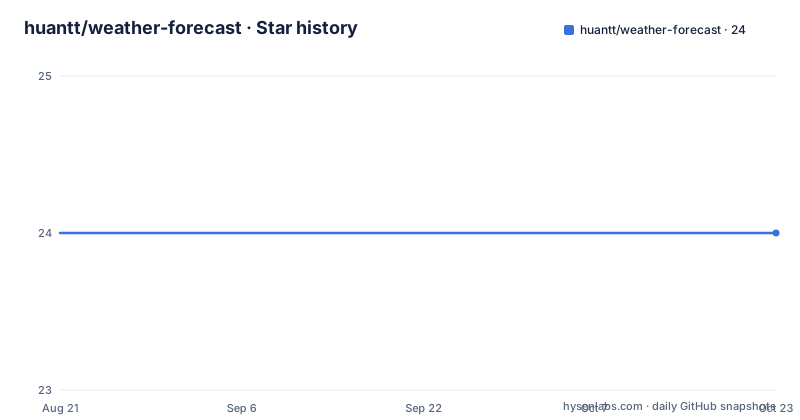
- huantt/weather-forecast24 ★ · +0
| Repository | 2026-08-21 | 2026-10-23 |
|---|---|---|
| huantt/weather-forecast | 24 | 24 |
0 Stars in the last 63 days, measured from the daily GitHub snapshot. Compare with other projects
Editorial analysis
What this tool actually does
Most README badges show static images or build status. This project takes a different approach. It reads a Go template file, fills it with weather data from weatherapi.com, and writes the result over your README.md. The repository itself demonstrates the output: a table of hourly conditions, temperatures, and wind speeds for Hanoi, plus a three-day forecast and a timestamp. The tool is a Go binary that you can run locally or as a GitHub Action. It solves a narrow problem: keeping weather information in a text file fresh without a backend. The intended user is someone who wants a profile README or a project README to show current weather, and who is comfortable editing a template and adding a secret to their repository settings.
The mechanism: templates, data, and a cron job
The core flow is straightforward. You create a file named README.md.template. Inside it you can use Go template syntax. The README lists three built-in template functions. The first, {{ template "hourly-table" $.TodayWeather.HourlyWeathers }}, renders the hourly table. The second, {{ template "daily-table" .Weathers }}, renders the daily forecast. The third, {{ formatTime .UpdatedAt }}, prints the update time. The root variable exposes two fields: Weathers, an array of daily weather objects defined in model/weather.go, and UpdatedAt, a time.Date value. The GitHub Action workflow runs on a cron schedule. The example uses cron: '15 * * * *', which means the action fires every hour at minute 15. The action checks out the repo, runs the weather-forecast action with inputs like city, days, weather-api-key, template-file, and out-file, then commits any changes. The commit step uses git diff to detect changes, though the README shows a truncated command. The data flow is: cron triggers the action, the action calls weatherapi.com with your key, the Go binary parses the response into the Weather structs, the template renders, and the file is committed back to the repository.
Getting it running: local CLI and GitHub Action
You can run the tool locally. The install command is go install https://github.com/huantt/weather-forecast. The CLI has a single subcommand, update-weather, with flags: --city, --days, --out-file, --template-file, and --weather-api-key. The default for days is 7. A sample command shows the full invocation with a WEATHER_API_KEY environment variable. For the GitHub Action, you create a workflow file at .github/workflows/update-weather.yml. The example uses actions/checkout@v3, then the huantt/[email protected] action with inputs. You must set the weather-api-key input to ${{ secrets.WEATHER_API_KEY }} and create that secret in your repository settings. The action requires permissions: write-all so it can commit back to the repo. The README also shows a Docker usage: build the image with docker build -t weather-forecast ., then run it with a volume mount to ./:/app/data. The container takes the same flags. One detail to note: the README references v1.0.5 in the workflow, but the repository has a v1.0.6 release that fixes a bug. You should use the latest tag, but the README has not been updated to reflect that.
A real limitation: the template is all or nothing
The tool only supports one template file and one output file. If your README has dynamic sections beyond weather, you must include them in the template. That means you maintain a separate template file that duplicates the rest of your README content. Any change to your static README text must be made in the template, or the next cron run will overwrite it. This is a significant maintenance burden for a project README that changes often. The README's own example shows a full README with weather tables, but it does not show how to mix static and dynamic content beyond the template. Another limitation is the API key. The tool requires a weatherapi.com key, and the free tier may have rate limits. If the key expires or the quota is exceeded, the action will fail, and your README will not update. The README does not mention error handling or fallback behavior. The commit step in the workflow checks git diff, but if the API call fails, the action likely fails before the commit step, leaving the old README in place. That is acceptable, but it means you get no warning in the README itself.
Where it is the wrong tool
This tool is not for a README that needs multiple cities. The action takes a single city input. If you want weather for several locations, you would need to run the action multiple times with different templates and output files, which is clunky. It is also not for a README that must be generated from other data sources. The tool only fetches weather. It does not combine weather with, say, GitHub stats or recent commits. For that, you would need a more general templating action. The cron schedule is fixed at the workflow level. You can change the cron expression, but the action itself has no retry logic. If the API is down at the scheduled minute, you wait until the next hour. For a personal profile, that is fine. For a production-facing README, it is not. The project also has no license field in the repository metadata. The README does not state a license. That is a legal ambiguity. If you plan to vendor this code or build on it, you should check the repository for a LICENSE file or contact the author.
Alternatives and how they differ
The most direct alternative is to write your own GitHub Action using a generic templating tool like j2cli or a shell script with curl and sed. That approach gives you full control over the data source and the output format, but you lose the pre-built weather parsing and the hourly table template. Another alternative is to use a badge service like shields.io with a weather endpoint, but that would not produce a table in your README; it would only show a single number or icon. A more complete alternative is a static site generator like Hugo or Jekyll, which can pull data from an API at build time, but that requires a separate build step and a hosting service. The key difference with huantt/weather-forecast is that it writes directly to the repository file, so the README is always up to date on the default branch without a separate build or deployment. The trade-off is that you are tied to a specific project's maintenance schedule. The last release was in October 2023, and the repository has no active development since then.
Maintenance and upgrade cost
The maintenance cost is low if you never change your README structure. You set up the template once, and the cron job handles updates. The cost rises when you edit your README. Every edit must be mirrored in the template file, or the next run will overwrite your changes. The README does not provide a way to include external files or partials beyond the built-in tables. Upgrading the action is a matter of changing the tag in the workflow file. The release notes for v1.0.6 say "Fix bug" but do not specify what bug. The v1.0.5 release added TodayWeather to template data, which is a breaking change if you used the old structure. That means you need to read the release notes before bumping the version. The Docker usage is a second deployment path, but it requires you to build the image yourself. There is no published Docker image on Docker Hub mentioned in the README. The project has no license, which complicates any redistribution or modification. You should treat this as a personal tool that happens to be public, not as a library with a support contract.
What to verify before adopting
Before you add this action to your repository, test the local CLI first. The README shows the exact command. Run it with a real API key and a sample template to confirm the output matches your expectations. Check the model/weather.go file to understand the exact fields available in the template. The README only lists two fields, but the struct may have more. The template functions are not documented beyond the three examples. If you want a custom layout, you may need to read the Go source to see what other helpers exist. Also verify that your repository's default branch is main, since the action commits to the checked-out branch. If your default branch is master, the workflow may need adjustment. Finally, confirm the cron schedule. The example runs every hour, but you can change it. Keep in mind that GitHub Actions has a minimum interval for scheduled workflows on free plans, so check the current limits. The project's last push was in 2023, so the action may not be compatible with future changes to GitHub Actions or weatherapi.com's API. A quick test run will reveal any breakage.
Editorial conclusion
Adopt huantt/weather-forecast if you maintain a personal profile or a small project README and want weather data refreshed hourly without hosting anything. Skip it if you need multiple cities in one README, if you cannot tolerate a broken table when the API key expires, or if you prefer a more maintained action. Before using it, verify the current version tag (the README references v1.0.5 but v1.0.6 exists), confirm that weatherapi.com still offers a free tier, and test the template with the local CLI before committing the workflow. The project is a single-purpose tool that works, but it has not been updated since October 2023, so treat it as a stable snapshot rather than an actively evolving project.
Frequently asked questions
how to install weather forecast from huantt/weather-forecast
Install the binary with go install pointed at the repository URL, or build a container with docker build using the Dockerfile in the repository root. The container starts inside the update-weather subcommand already, so a run passes only flags after the image name.
how to add weather forecast to a README with this tool
Create a file named README.md.template, put any of the three template calls inside it, then register a workflow at .github/workflows/update-weather.yml that checks out the repository and runs the action with city, days, template-file, out-file, and weather-api-key. The sample schedule is a cron expression firing at minute 15 of every hour.
what is weather forecast in huantt/weather-forecast
It is a Go program and GitHub Action that collects the forecast for one city and writes it into a README file rendered from a Go template. The generated output contains an hourly table with twenty-four hour columns, a shorter daily table, and a last updated timestamp.
how to add weather forecast on my website with this tool
The documented output target is a markdown file, either a README or a file you name with the out-file flag, and the only rendering helpers exposed to the template are the hourly table, the daily table, and a timestamp formatter. A web page is not described as an output target anywhere in this repository.
Official sources
Add this badge to your README
If you maintain this project, the badge below links readers to this analysis and shows its maintenance status from the daily GitHub snapshot. Paste the markdown into your README; add ?metric=license or ?metric=stars to the image URL for a different field.

[](https://hysenlabs.com/projects/huantt-weather-forecast)Star history chart for your README
[](https://hysenlabs.com/projects/huantt-weather-forecast)Was this useful?