Doltgres: A Postgres Wire-Compatible Database with Git-Style Versioning
DoltgreSQL - Version Controlled PostgreSQL. We use these same Sysbench tests to benchmark DoltgreSQL and compare the results to PostgreSQL.
At a glance
- What is it?
- Doltgres brings Dolt's table-level version control to the PostgreSQL wire protocol. It is beta software with real limitations, but its SQL-native branching and merging make it a candidate for development databases and test data workflows.
- Who is it for?
- Adopt Doltgres if you need Postgres wire compatibility and want Git-like versioning for schema and data, especially in development, testing, or CI environments where rollback and branching are valuable. Do not adopt it for production workloads that require full Postgres feature parity, extension support, or mature backup and replication, as these are explicitly incomplete.
- Can I use it commercially?
- Yes. Apache-2.0 is a permissive licence: you can use, modify and sell software built on it, as long as you keep its copyright and licence notices.
- Is it still maintained?
- Yes. The repository received new commits within the last day.
- What is it written in?
- Mainly Go, according to GitHub's language statistics.
Answers come from the project's GitHub data, last synced on November 13, 2026, and from our analysis. They are not legal advice.
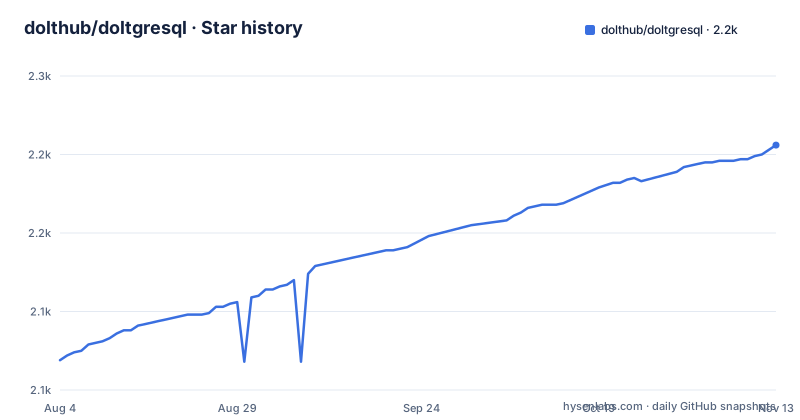
Star history
- dolthub/doltgresql2,206 ★ · +137
| Repository | 2026-08-04 | 2026-11-13 |
|---|---|---|
| dolthub/doltgresql | 2.1k | 2.2k |
137 Stars in the last 101 days, measured from the daily GitHub snapshot. Compare with other projects
Editorial analysis
The Problem: Databases Lack Version Control
Version control for code is standard, but databases have no native equivalent. You can dump and restore, but you cannot branch, merge, or review changes to schema and data as you would with Git. Doltgres addresses this by treating tables as versioned entities. It is built by the creators of Dolt, a version-controlled SQL database, and it reimplements that concept for the PostgreSQL wire protocol. The target user is a developer or DBA who wants to experiment with schema changes, roll back bad migrations, or share a consistent database state with a team, all without abandoning Postgres tooling.
How Doltgres Versions Tables: The Mechanism
Doltgres stores table versions in a structure similar to Git's object model. Each commit captures the state of all tables, and branches point to specific commits. The version control operations are exposed as SQL functions and system tables. You can stage changes with dolt_add, commit with dolt_commit, and view history with dolt_log. The README shows a workflow: after creating tables, you query dolt.status to see new tables, stage them with dolt_add, and then inspect dolt.log to see the commit history. This is not a wrapper around Postgres; it is a separate database engine that speaks the Postgres protocol. This means your existing psql client works, but the underlying storage and transaction logic are Dolt's, not Postgres's.
Getting Started: Install and First Commit
Installation is straightforward on Linux and macOS with a curl pipe to bash: sudo bash -c 'curl -L https://github.com/dolthub/doltgresql/releases/latest/download/install.sh | bash'. Windows users can download an .msi from the releases page. A Docker image is published as dolthub/doltgresql, run with docker run -e DOLTGRES_PASSWORD=myPassword -p 5432:5432 dolthub/doltgresql:latest. After starting the doltgres binary, it creates a postgres user and database with the default password 'password'. You connect with psql: PGPASSWORD=password psql -h localhost -U postgres. Then you create a database, define tables, and run select dolt_add('teams', 'employees', 'employees_teams') to stage changes. The version control state is visible in dolt.status and dolt.log. The README also mentions a config.yaml file and the DOLTGRES_DATA_DIR environment variable for changing the data directory.
Limitations: What Is Missing or Incomplete
Doltgres is in beta, and the README lists several explicit limitations. There is no Git-style CLI for version control; all operations happen through SQL. You cannot push to DoltHub or DoltLab, so remote collaboration is limited to custom remotes like filesystem or S3. Backup and replication are a work in progress, which is a serious concern for any production use. There is no GSSAPI support, which may matter in enterprise environments. Extension support is absent, so you cannot use Postgres extensions like PostGIS or pgcrypto. Finally, not all Postgres syntax, types, and functions are implemented. If you rely on an obscure feature, you may hit a wall. The README encourages filing issues for missing features, which implies the team expects gaps to surface.
Performance: Benchmarks and the Missing Details
The README states that Dolt is 1.1 times slower than MySQL on Sysbench latency tests, and that the same tests are used to benchmark Doltgres against PostgreSQL. The README does not claim any specific performance parity or regression for Doltgres. If performance is a deciding factor, you will need to run your own benchmarks against your own data and queries. The lack of published figures in the visible material is a gap that the project should address.
Alternatives: Dolt and Standard Postgres
The most direct alternative is Dolt itself, which is the MySQL-flavored version of the same versioning concept. Dolt has a Git-style CLI for version control, which Doltgres lacks. If you prefer command-line workflows or need to push to DoltHub or DoltLab, Dolt is the better fit. The trade-off is that Dolt speaks the MySQL protocol, not Postgres. If you must stay in the Postgres ecosystem, Doltgres is the only option from this family. Another alternative is plain PostgreSQL with manual dump and restore workflows, or tools like Flyway or Liquibase for schema migrations. Those tools handle schema versioning but not data versioning, and they do not give you branching or merging. Doltgres's approach is fundamentally different: it versions the entire database state, not just migrations.
Maintenance and Upgrade Cost
Doltgres is actively developed, with recent releases v1.1.0, v1.2.0, and v1.3.0 in August 2026. The project is not archived, and the README promises 24-hour bug fixes for filed issues, though that is a service commitment, not a guarantee. The license is Apache-2.0, which permits commercial use and modification without requiring you to open-source your changes. That is a permissive license, but it does not come with warranty or support obligations. The upgrade cost depends on how the project handles schema evolution of its system tables and functions. The README does not document migration paths between releases. You should check the release notes for breaking changes before upgrading. Given the beta status, expect occasional API or behavior changes.
Editorial conclusion
Adopt Doltgres if you need Postgres wire compatibility and want Git-like versioning for schema and data, especially in development, testing, or CI environments where rollback and branching are valuable. Do not adopt it for production workloads that require full Postgres feature parity, extension support, or mature backup and replication, as these are explicitly incomplete. Before adopting, verify that your critical Postgres syntax, types, and functions are implemented by checking the documentation and filing issues for gaps. Also confirm that your workflow can tolerate the lack of a Git-style CLI and the absence of DoltHub/DoltLab integration. If those constraints are acceptable, Doltgres offers a concrete way to version your database state entirely through SQL.
Frequently asked questions
What is Doltgres?
It is the Postgres-flavoured version of Dolt, a SQL database you can branch and merge, fork and clone, push and pull like a Git repository. Version control is exposed through SQL via system tables, functions and procedures, and you connect to it like any Postgres database to read or modify schema and data.
How do I install Doltgres?
On Linux and macOS a single command fetches an install script from the release page and pipes it to a shell with elevated privileges, placing the binary in your local bin directory. Windows uses a downloaded installer package, Docker uses the published image, and a shell script produces a binary from source.
What is the default password for Doltgres?
Running the binary creates a superuser and a database named after the default Postgres user, and the default password is the same one Postgres uses by default. You can set the user and password through environment variables before the first run, or point the data directory elsewhere with a config file or a second variable.
Does Doltgres have a command line interface for version control?
No. The limitations section states there is no Git-style command line interface for version control as in Dolt, only a SQL interface. You stage changes by calling functions and inspect state and history by querying system tables, so a workflow built around shelling out to a version control command line has no equivalent here.
How does Doltgres compare to Postgres on read performance?
Its own published table, benchmarked against one specific release, shows most read tests between roughly two and three times the median latency of Postgres, with index scans among the slowest and a random-point read the worst. One covering index scan test is reported as ten times faster, which the table does not explain, and the numbers describe release one point zero rather than the current one.
Official sources
Add this badge to your README
If you maintain this project, the badge below links readers to this analysis and shows its maintenance status from the daily GitHub snapshot. Paste the markdown into your README; add ?metric=license or ?metric=stars to the image URL for a different field.

[](https://hysenlabs.com/projects/dolthub-doltgresql)Star history chart for your README
[](https://hysenlabs.com/projects/dolthub-doltgresql)Was this useful?