huggingface/datasets: A Data Loading and Preprocessing Layer for the Hugging Face Hub
🤗 The largest hub of ready-to-use datasets for AI models with fast, easy-to-use and efficient data manipulation tools
At a glance
- What is it?
- This review covers the huggingface/datasets library, which provides one-line loaders for Hub datasets and efficient local preprocessing. The core judgment: it is a practical choice for teams already tied to the Hugging Face ecosystem, but its value drops sharply outside that context.
- Who is it for?
- Adopt huggingface/datasets if your data lives on the Hub or if you need a reproducible, cache-friendly preprocessing layer that feeds PyTorch, TensorFlow, or JAX. Local CSV, JSON, Parquet and other supported files can be loaded without publishing them to the Hub; check support for your formats and offline deployment requirements.
- Can I use it commercially?
- Yes. Apache-2.0 is a permissive licence: you can use, modify and sell software built on it, as long as you keep its copyright and licence notices.
- Is it still maintained?
- Yes. The repository last received commits 3 days ago.
- What is it written in?
- Mainly Python, according to GitHub's language statistics.
Answers come from the project's GitHub data, last synced on November 15, 2026, and from our analysis. They are not legal advice.
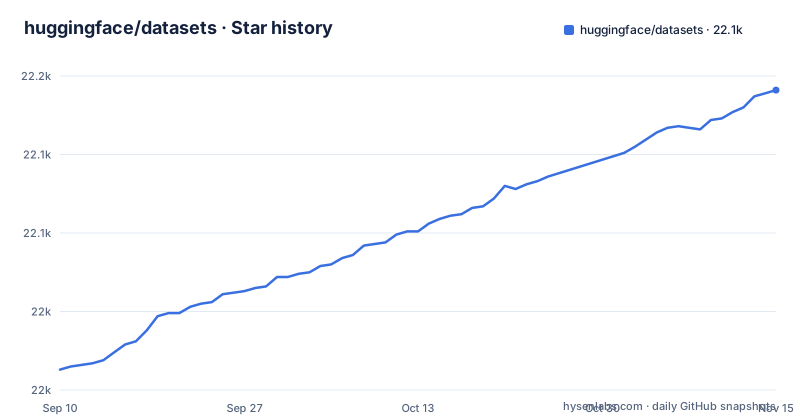
Star history
- huggingface/datasets22,141 ★ · +178
| Repository | 2026-09-10 | 2026-11-15 |
|---|---|---|
| huggingface/datasets | 22k | 22.1k |
178 Stars in the last 66 days, measured from the daily GitHub snapshot. Compare with other projects
Editorial analysis
What It Solves and Who It Serves
The library attacks two pain points. First, it removes the boilerplate of downloading and parsing public datasets. A single call to load_dataset('rajpurkar/squad') downloads the dataset and gets it ready to use in a dataloader for training or evaluating a model. Second, it provides a unified preprocessing API that works across local files and Hub datasets. The intended user is a Python developer building or fine-tuning machine learning models, especially in natural language processing, computer vision, or audio. The README lists support for text in 467 languages, images, audio, video, 3D medical images, and agent traces. That breadth is the main selling point: one API for many data shapes. If you work outside the Hugging Face Hub, the first feature loses meaning, but the local file handling still applies.
The Arrow Backend and Memory Behavior
The documentation emphasizes an Apache Arrow backend with zero-copy memory-mapped storage. The claim is that datasets naturally free you from RAM limitations. The mechanism is that data is stored on disk in Arrow format and accessed via memory mapping, so the operating system pages data in and out as needed. This differs from loading everything into a pandas DataFrame in RAM. For large datasets, this design avoids out-of-memory crashes. However, the README does not specify what happens when you convert to pandas or NumPy: those conversions likely materialize data in memory. The memory benefit applies while you stay in the Arrow-native representation. For users who need random access to a dataset larger than RAM, this is the core architectural advantage.
Getting Started: Real Commands and Configuration
Installation is standard. The README shows pip install datasets, or conda install -c huggingface -c conda-forge datasets. Optional extras are available: datasets[audio] for torchcodec, datasets[vision] for Pillow and torchcodec, datasets[pdfs,nibabel] for PDF and NIfTI support, and datasets[torch,tensorflow,jax] for framework integrations. The quick start is equally direct. Load a dataset with squad_dataset = load_dataset('rajpurkar/squad'), then access examples via squad_dataset['train'][0]. Preprocessing uses the map function: squad_dataset.map(lambda x: {'length': len(x['context'])}) adds a column. For tokenization, you pass a tokenizer from the Transformers library and set batched=True. The README also mentions streaming mode via streaming=True, which iterates over data without downloading the full set. The README recommends installing in a virtual environment (venv or conda).
Streaming, Caching, and the Xet Backend
Streaming mode is a notable feature for very large datasets. The README claims that with the Xet backend, streaming is up to 100 times faster. Caching is another built-in feature. The README states that cached results are automatically reused, so map operations run once and subsequent calls skip recomputation. This is a practical time-saver during iterative development. The combination of streaming and caching is useful: you can inspect a dataset without downloading it fully, then cache only the processed view. The trade-off is that streaming may not support all operations that require random access, such as shuffling or repeated iteration, though the README does not specify these limits.
Multi-Framework Interoperability and Search
The library provides native conversion to and from NumPy, Pandas, Polars, Arrow, PyTorch, TensorFlow, JAX, and Spark. That is a wide net. For practitioners, this means you can load a dataset once and feed it into whichever training loop you use. The README also lists built-in FAISS and Elasticsearch index support for similarity search. That is less common in dataset libraries and could be useful for retrieval tasks. The presence of these integrations suggests the library is not just a loader but a small data platform. The breadth is real, but verify the depth per integration.
Support for Local and Multi-Modal Files
Beyond Hub datasets, the library handles local files in many formats: CSV, JSON, JSONL, Parquet, HDF5, XML, text, PNG, JPEG, WAV, MP3, PDF, and NIfTI. The README also mentions Arrow and Webdataset. This is a genuine advantage over libraries that only read tabular data. For example, you can process a folder of medical images in NIfTI format with the same map and caching machinery. The optional dependencies for pdfs and nibabel indicate that these formats require extra packages. The library also supports a Json() feature type for flexible structured data. The practical implication is that you can use one tool for mixed-modal projects, which is common in modern AI work. The README shows load_dataset('csv', data_files='my_data.csv') for specific files and load_dataset('./path/to/data') for a local directory with the format auto-detected.
Limitations and Wrong Use Cases
The Hub is one source, not a requirement for every dataset: `load_dataset()` can also load local files, for example `load_dataset("csv", data_files="my_data.csv")`. Check the dependencies and caching behavior of the exact offline workflow you deploy. Another limitation is the dependency on optional extras. Audio, vision, and PDF support require separate installs, which complicates deployment. For datasets bigger than your disk, the README points to streaming mode with streaming=True. The library is also Python-only, so it is not an option for teams working in R or Julia. Finally, the 100x faster streaming claim is unverified, and the Xet backend is not explained.
Alternative Approaches and Maintenance
A direct alternative is the combination of pandas or Polars for data manipulation and direct download scripts for public datasets. That approach gives you more control but requires manual handling of formats and caching. Another alternative is TensorFlow Datasets or PyTorch's Dataset classes, which tie data loading to a specific framework. huggingface/datasets sits above those, offering framework-agnostic loading. The actual difference is that huggingface/datasets centralizes the data source (the Hub) and provides a consistent API, while pandas alone requires you to write parsing logic for each dataset. Regarding maintenance, the repository is active, with the latest release 5.1.0 from October 2026, after 5.0.1 from July 2026 and 5.0.0 from June 2026. The license is Apache-2.0, which permits commercial use and modification. The release cadence suggests ongoing development and bug fixes, but major version changes may introduce breaking API changes. You should check the release notes before upgrading from 4.x.
Editorial conclusion
Adopt huggingface/datasets if your data lives on the Hub or if you need a reproducible, cache-friendly preprocessing layer that feeds PyTorch, TensorFlow, or JAX. Local CSV, JSON, Parquet and other supported files can be loaded without publishing them to the Hub; check support for your formats and offline deployment requirements. Before committing, verify that your target datasets are available on the Hub and that the optional extras (audio, vision, pdfs) cover your modalities. The library uses Apache-2.0, which permits commercial use subject to its terms; review the separate licences and access terms for any datasets you use. The 5.x release series, most recently 5.1.0, shows active maintenance, but check the changelog for breaking changes if you upgrade from 4.x.
Frequently asked questions
how to install datasets
Install it from PyPI inside a virtual environment with pip install datasets, or use conda with conda install -c huggingface -c conda-forge datasets. There is also a development install straight from the git repository, pip install "datasets @ git+https://github.com/huggingface/datasets.git", which follows the main branch rather than a release.
how to install datasets package in python
Beyond the base package there are extras per modality: datasets[audio] for audio with torchcodec, datasets[vision] for image and video with Pillow and torchcodec, datasets[pdfs,nibabel] for PDF and 3D medical data, and datasets[torch,tensorflow,jax] for framework integration. The base install does not pull those codecs.
how to use datasets in python
The API centers on a single function, load_dataset, which takes a dataset name plus keyword arguments and returns a dataset you pre-process with map. In-memory data can come from Python objects instead, with Dataset.from_dict, Dataset.from_list, or construction from a Pandas DataFrame, and local files are loaded by passing a format such as csv or parquet with data_files.
how to access datasets
Public datasets come from the Hugging Face Datasets Hub with a one-liner such as load_dataset("rajpurkar/squad"), and local data is loaded from files or a directory with load_dataset('./path/to/data'), which detects the format. Datasets too large to download can be iterated instead with streaming=True.
Official sources
Add this badge to your README
If you maintain this project, the badge below links readers to this analysis and shows its maintenance status from the daily GitHub snapshot. Paste the markdown into your README; add ?metric=license or ?metric=stars to the image URL for a different field.

[](https://hysenlabs.com/projects/huggingface-datasets)Star history chart for your README
[](https://hysenlabs.com/projects/huggingface-datasets)Was this useful?