Sugar High syntax highlighting for JavaScript runtimes and browsers
Super lightweight code syntax highlighter solution
At a glance
- What is it?
- Sugar High is a lightweight TypeScript syntax highlighter that returns HTML without a DOM and supports React, Remark, custom token styling, and direct language configurations. It fits small browser and JavaScript runtime bundles, but its documented language model and customization hooks require care during upgrades.
- Who is it for?
- Sugar High is appropriate for browser code viewers, Markdown pipelines, React interfaces, and JavaScript runtimes where generated HTML and a small dependency are priorities. It is a poor fit if you need server-side terminal rendering, unrestricted language aliases, or a larger highlighter with more detailed grammar behavior.
- Can I use it commercially?
- Not without permission. GitHub finds no licence file in the repository, and without a licence all rights are reserved by default: you may read the code but not reuse it. Check the README, or ask the authors, before using it.
- Is it still maintained?
- Yes. The repository last received commits 12 days ago.
- What is it written in?
- Mainly TypeScript, according to GitHub's language statistics.
Answers come from the project's GitHub data, last synced on November 6, 2026, and from our analysis. They are not legal advice.
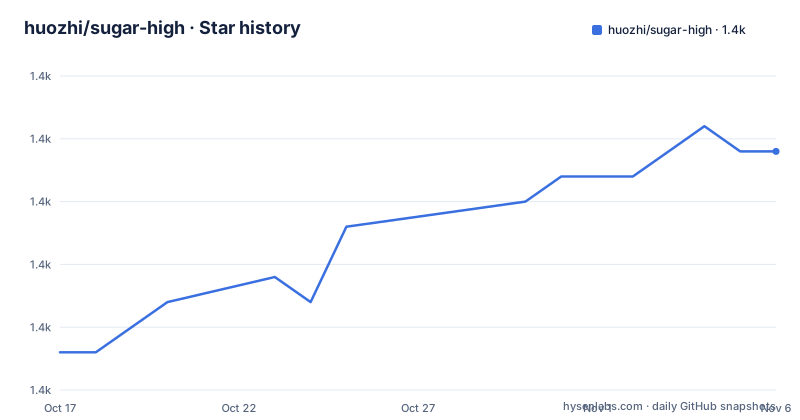
Star history
- huozhi/sugar-high1,387 ★ · +8
| Repository | 2026-10-17 | 2026-11-06 |
|---|---|---|
| huozhi/sugar-high | 1.4k | 1.4k |
8 Stars in the last 20 days, measured from the daily GitHub snapshot. Compare with other projects
Editorial analysis
Why Sugar High targets small browser and runtime bundles
Sugar High solves code formatting when an application needs colored HTML but does not want to introduce a browser DOM dependency. It is aimed at developers building code blocks, documentation interfaces, Markdown processing, React components, and tools that run in a JavaScript runtime. The core API is small: the README shows a direct import of `highlight`, a source string, and an HTML result.
The project describes itself as lightweight, and its README reports bundle and timing measurements for generated TypeScript compared with PrismJS and highlight.js. Those measurements are repository documentation, not an independent verification. They also have stated boundaries: they cover TypeScript, use explicit language selection, exclude theme CSS, and exclude loading and initialization. The results should therefore inform an initial comparison rather than serve as a universal performance guarantee.
Sugar High supports JavaScript by default, including JSX, plus TypeScript, CSS, Python, C, Go, GLSL, Java, Rust, JSON, diff, shell, C++, C#, SQL, HTML, Vue, Svelte, YAML, Markdown, plaintext, Ruby, Kotlin, Swift, PHP, TOML, PowerShell, Dockerfile, GraphQL, HCL, Zig, and Lua. Related dialects share implementations. JavaScript includes JSX, TypeScript includes TSX, JSON includes JSONC comments, Shell covers sh, Bash, and Zsh, and HTML supplies the current base highlighting for Vue and Svelte. This is useful breadth for a compact viewer, although it is not the same as claiming independent grammars for every dialect.
Sugar High parsing, rendering, and token customization
The default `highlight()` function combines configurable parsing and HTML rendering, then returns HTML. The lower-level `sugar-high/core` entry separates those operations. This gives integrations control over language configuration before rendering. The README's SQL example supplies a set of keywords to `parse()`, then passes the parsed result to `render()` with a class map.
Token customization has two stages. `cx` provides a map from semantic token types to class names, which can feed utility CSS, CSS Modules, or global styles. `mark(token)` runs afterward and receives the token after `cx` has composed its class name. That callback can mutate `className` or add properties. The documented example checks comment tokens, adds a class when the value contains `TODO`, and sets `data-todo`.
Line decoration is separate from token decoration. `markLine(line)` receives a zero-based `line.index`, allowing an integration to append a class to a selected line. The React package exposes one-based `highlightLines={[1, [4, 7]]}`, while the Remark plugin accepts ranges from fence metadata such as `{2,5-7}`. The differing indexing conventions are deliberate in the documented APIs, but they are an integration detail worth checking. A custom renderer can preserve semantic token classes while still adding application-specific attributes.
For projects that need only a few languages, the README recommends importing configuration modules from `sugar-high/lang/css` and `sugar-high/lang/python` rather than loading the complete registry. That approach places the language-selection responsibility on the application. The example stores the imported modules in a `languages` object and calls `render(parse(code, languages[language]))`. It avoids the built-in registry, but it also means missing names and invalid values need handling at the integration boundary.
Installing Sugar High and highlighting the first source string
The README gives npm as the installation path. This installs the main `sugar-high` package, whose default export path exposes `highlight()` and the built-in language registry.
npm install sugar-highThe first call treats JavaScript as the default language and returns an HTML string rather than inserting content into the page:
import { highlight } from 'sugar-high'

const html = highlight('const ready = true')
For another built-in language, pass a canonical name through the `lang` option. The README states that `lang` is typed and accepts canonical names only.
highlight('print("hi")', { lang: 'python' })
highlight('{"ready": true}', { lang: 'json' })
highlight('+ added', { lang: 'diff' })
When input comes from a filename extension, Markdown fence, or another integration, use `lang()` to normalize aliases. The documented mapping includes `py` to `python`, `bash` to `shell`, `jsonc` to `json`, and `.yml` to `yaml`.
import { lang } from 'sugar-high/lang'

lang('py')
lang('bash')
lang('jsonc')
lang('.yml')
The API reference is the source for the complete mapping and normalization behavior. If an integration already has a canonical name, the README says that calling `lang()` is unnecessary.
React and Remark integrations for code blocks
Sugar High publishes a separate `@sugar-high/react` package with two composable exports: `Code`, a highlighted code block, and `Editor`, a textarea-overlay editor. The documented usage is direct and does not require wrapping the components in a provider.
import { Code, Editor } from '@sugar-high/react'

<Editor lang="typescript" value={source} onChange={setSource} />
<Code lang="typescript" lineNumbers>{source}</Code>
This design suits applications that need editing and display as separate interface pieces. The `value` and `onChange` names make the React component controlled by the surrounding application.
For Markdown, the separate `@sugar-high/remark` package highlights fenced code blocks while processing Markdown. It uses the same `lang()` mapping for fence aliases. That shared normalization is useful because an application can accept a Markdown fence such as `bash` and pass it through the same normalization path used for filenames. The README does not show a complete Remark configuration snippet in this section, so it would be inappropriate to invent one.
The HTML structure also affects styling. Every line uses `.sh__line`, and token colors are exposed through CSS custom properties. A host application can add line numbers and highlight selected lines with ordinary CSS. This makes the output suitable for a custom design, but it also means the integration owns presentation details rather than receiving a fully themed component.
Language aliases, HTML output, and security boundaries
The `lang` option is narrower than a general-purpose highlighter configuration. It accepts canonical names only, so aliases such as `py`, `bash`, `jsonc`, and `.yml` need normalization through `sugar-high/lang` before they are passed to `highlight()`. That behavior is useful for predictable integration code, but it can create an error path when a caller sends an unknown extension or fence value. The README points to the API reference for the complete mapping; it does not state what result callers should expect for every unsupported input.
Sugar High returns HTML. Applications that accept source code from users must still decide whether to insert the result with an HTML API, sanitize it, or apply it in a context where markup is permitted. The README describes token customization and class names, but it does not document an HTML sanitization contract or a security policy for untrusted input. The custom `mark(token)` hook can also add arbitrary token properties, which means application code should decide what attributes are appropriate before exposing highlighted HTML.
The language set is broad enough for common documentation and editor surfaces, but related dialects intentionally share implementations. Vue and Svelte currently use the base HTML highlighting, while HCL includes Terraform. Projects needing specialized rules beyond those documented behaviors can copy a built-in configuration and extend it. The GLSL example adds a project-specific `myVector` type to `typeKeywords`, which is a clear path for local grammar extension. It does not establish a general plugin system or guarantee that arbitrary language customization works without understanding the configuration shape.
Maintenance, licensing, and upgrade implications
The repository is not archived, and the last push was on 2026-10-08. Recent release entries include `[email protected]`, `@sugar-high/[email protected]`, and `[email protected]`. The root `package.json` identifies the repository as a pnpm monorepo, uses `[email protected]`, and provides workspace scripts including `build`, `test`, `dev`, `clean`, and `release`. These facts describe the repository layout and maintenance record, but they do not guarantee compatibility for every integration.
The root package declares `MIT` as its license. The repository license is listed as unknown, while the root `package.json` declares MIT. Reviewing the license files and each package's package metadata remains necessary before redistribution or embedding in a commercial product. This is a licensing check, not legal advice.
Upgrading can affect more than the core package. The repository includes separate React and Remark packages, a v2 migration guide, and a changesets release workflow. Consumers that depend on generated line markup, CSS custom properties, semantic token classes, or line-selection behavior should review the migration guide and package changes before moving versions. The documented customization surface is broad, but maintaining custom classes and configuration extensions remains application work after an upgrade.
Editorial conclusion
Sugar High is appropriate for browser code viewers, Markdown pipelines, React interfaces, and JavaScript runtimes where generated HTML and a small dependency are priorities. It is a poor fit if you need server-side terminal rendering, unrestricted language aliases, or a larger highlighter with more detailed grammar behavior. Before adopting it, verify that the required languages are built in, confirm whether your integration passes canonical names or file extensions, and inspect the generated `.sh__line` markup against your security and styling requirements. For the current repository, the last push was on 2026-10-08, and the root package declares the MIT license.
Frequently asked questions
How do I install Sugar High?
The README lists `npm install sugar-high` as the installation command. The package can then be imported with `import { highlight } from 'sugar-high'`.
Does Sugar High require a DOM?
No. The README says Sugar High runs in browsers and JavaScript runtimes and returns HTML without requiring a DOM. The caller is responsible for deciding how to render that HTML.
How do I use a filename extension such as .yml with Sugar High?
Use the `lang()` helper from `sugar-high/lang` to normalize the extension. The README gives `lang('.yml')` with the result `yaml`, after which the canonical name can be passed to `highlight()`.
Can I customize Sugar High token classes?
Yes. The `cx` option maps semantic token types to class names, and `mark(token)` runs afterward for conditional classes, inline styles, or custom attributes. The README notes that `cx` runs before `mark`.
Does Sugar High support React and Remark?
The README documents separate `@sugar-high/react` and `@sugar-high/remark` packages. React provides `Code` and `Editor`, while Remark highlights fenced code blocks and normalizes fence aliases through `lang()`.
Official sources
Add this badge to your README
If you maintain this project, the badge below links readers to this analysis and shows its maintenance status from the daily GitHub snapshot. Paste the markdown into your README; add ?metric=license or ?metric=stars to the image URL for a different field.

[](https://hysenlabs.com/projects/huozhi-sugar-high)Star history chart for your README
[](https://hysenlabs.com/projects/huozhi-sugar-high)Was this useful?