hyparquet: reading Parquet files without a server
parquet file parser for javascript
At a glance
- What is it?
- hyparquet is a pure JavaScript Parquet reader that runs in a browser and in Node, with no dependencies at all. The trick that makes it work over the network is an abstraction called AsyncBuffer, which behaves like an ArrayBuffer except that slicing it may return a promise, so a file in cloud storage becomes an object the reader can pull bytes from as it needs them.
- Who is it for?
- hyparquet suits a browser application or a small tool that needs to look inside a Parquet file without a server, and its zero dependency design means it will not drag a native module into a frontend build. It is a poor fit if you need to write Parquet, since that is a separate package, and a poor fit if you need the full type and codec matrix of a mature implementation, though the readme claims all of it.
- Can I use it commercially?
- Yes. MIT is a permissive licence: you can use, modify and sell software built on it, as long as you keep its copyright and licence notices.
- Is it still maintained?
- Yes. The repository last received commits 10 days ago.
- What is it written in?
- Mainly JavaScript, according to GitHub's language statistics.
Answers come from the project's GitHub data, last synced on November 7, 2026, and from our analysis. They are not legal advice.
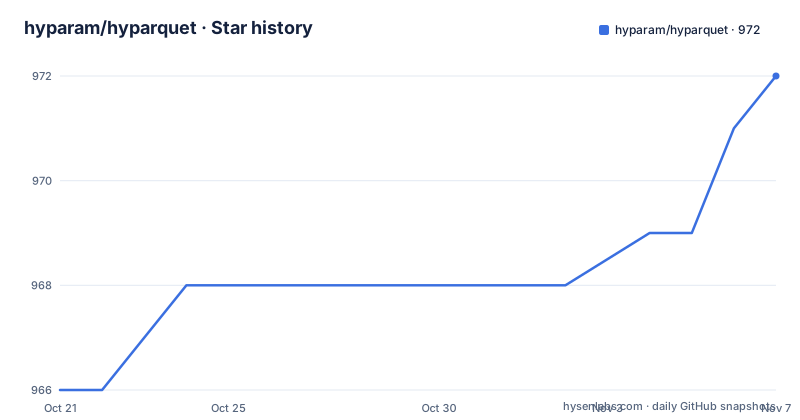
Star history
- hyparam/hyparquet972 ★ · +6
| Repository | 2026-10-21 | 2026-11-07 |
|---|---|---|
| hyparam/hyparquet | 966 | 972 |
6 Stars in the last 17 days, measured from the daily GitHub snapshot. Compare with other projects
Editorial analysis
The pitch: query cloud storage from a browser
The description is short and the ambition is clear: a JavaScript library for parsing Apache Parquet files in the browser.
Parquet is described in the readme as a popular columnar storage format widely used in data engineering, data science and machine learning applications for storing large datasets. That context matters, because Parquet is usually the output of a pipeline that runs somewhere else, on data you did not produce, and getting at it usually means a server.
Hyparquet is designed to read Parquet files efficiently over http, so that Parquet files in cloud storage can be queried directly from the browser without needing a server. That is the whole product in one sentence, and it is a genuinely useful capability: a data explorer that loads a table from object storage with no backend at all.
The feature list backs it up. It works in browsers and in Node.js. It is pure JavaScript with no dependencies, and the readme is proud enough of that to date it, saying the library has been dependency free since 2023. It supports all Parquet types, encodings and compression codecs. It minimises data fetching using HTTP range requests. And it includes TypeScript definitions.
The project is used by a product, and the readme says so: it powers HypAware, described as the improvement loop for all your agents. That is worth knowing, because a library with a real consumer is a library whose edge cases get found.
AsyncBuffer, the abstraction that makes remote files work
The advanced usage section explains the one type you need to understand, and it is a small one.
Hyparquet requires an argument of type AsyncBuffer. An AsyncBuffer is similar to a JavaScript ArrayBuffer, but the slice method can return an asynchronous promise of an ArrayBuffer. The readme explains the consequence: this makes it a useful way to represent a remote file.
type Awaitable<T> = T | Promise<T>
interface AsyncBuffer {
  byteLength: number
  slice(start: number, end?: number): Awaitable<ArrayBuffer>
}
So the reader asks for a byte range, and the buffer either has it or goes and gets it. For a local file that is a read, and for a remote file that is an HTTP range request, and the reader above does not have to know which.
Two constructors cover the common cases. The URL constructor wraps an http URL using range requests, and it takes two options worth knowing. A request initialisation option lets you pass extra fetch headers, which is how you authenticate against a private bucket, and a byte length option lets you skip the request the library would otherwise make to discover the file size.
const url = 'https://s3.hyperparam.app/wiki_en.parquet'
const requestInit = { headers: { Authorization: 'Bearer my_token' } } // auth header
const byteLength = 415958713 // optional
The file constructor wraps a local file for Node environments. And a plain ArrayBuffer can be provided anywhere an AsyncBuffer is expected, which is the case where you already have the whole file in memory.
Two read functions, and one of them is the base
There are two ways to read a file, and the readme is clear about which one to reach for.
The convenience function returns the complete rows as a promise of an array of records, and it is described as the simplest way to read Parquet files.
parquetReadObjects({ file }): Promise<Record<string, any>[]>The base function is the other one, and its design is unusual enough to be worth explaining. It returns a promise of void that resolves when the file has been read, and the data comes back through callbacks passed as arguments, one for completion, one for chunks and one for pages. The readme explains the reason for that design, and its shape is clear from the callback list.
The point of a callback design is that you do not have to hold the whole file in memory at once. For a browser that is the difference between reading a table and reading a data set.
There is one more feature in the convenience function worth noting, because it is the kind of detail that saves an argument later. You can ask for each object's absolute, zero-based physical row position with the includeRowIndex option, and read it through an exported symbol. The readme is precise about the semantics: the positions stay relative to the original file when you use a row start, filters, or page and row group pruning, and the symbol property is non-enumerable and read-only, so JSON serialisation, object key enumeration, object spread and object assignment all omit it. The option also works with the base function when you ask for object output, and array output does not support it.
Metadata only, when you do not need the data
Reading the metadata without reading the data is a separate capability, and it is the one you want in most user interface situations.
The metadata function gives you the schema and the data statistics, and the readme says this is useful for getting the schema, the number of rows and the column names without reading the entire file.
import { parquetMetadataAsync, parquetSchema } from 'hyparquet'

const file = await asyncBufferFromUrl({ url })
const metadata = await parquetMetadataAsync(file)
// Get total number of rows (convert bigint to number)
const numRows = Number(metadata.num_rows)
// Get nested table schema
const schema = parquetSchema(metadata)
// Get top-level column header names
const columnNames = schema.children.map(e => e.element.name)
Two details in that snippet are worth pointing out. The row count comes back as a bigint, so it has to be converted before it can be used as a number, which is a small thing that will otherwise surface as a confusing type error. And the schema is a tree, so the top-level column names come from walking one level of children and reading the element name of each.
There is also a synchronous variant, for the case where the file, or at least its footer, is already in memory. It parses from an ArrayBuffer or a Uint8Array, such as a Node buffer, without any promise in the way.
For a table browser, the metadata is the first call you make, and it is the one that tells the user what they are looking at before you have transferred a single row of data.
The quick start, and the advice to filter
The quick start has one example for the browser and one for Node, and they differ in the constructor plus the extra column and row filters in the browser example.
The browser example uses a dynamic import from a content delivery network, wraps a URL with the asynchronous buffer constructor, and then reads objects. The advice attached to it is the important part: it is recommended that you filter by row and column to limit the fetch size, and the example does exactly that with a column list and a row range.
const url = 'https://hyperparam-public.s3.amazonaws.com/bunnies.parquet'That recommendation is really the point of the whole library. Because the file is read by range, the cost of a query is proportional to the data you asked for, not to the size of the file, and without the filter you would pull the whole thing over the network to show ten rows.
The Node example is the same shape with the local file constructor, and there is a note about the module format: hyparquet is published as an ES module, so a dynamic import may be required for old versions of Node.
There is also a Parquet viewer you can try without writing any code, at a hosted address, where you drag and drop a Parquet file onto the page. The readme says the service is powered by hyparquet's in-browser capabilities, which is a nice way to check the library against a file you already have before you commit to it.
The project state, and the writing half lives elsewhere
The licence is MIT, the default branch is master, and the repository is not archived with the last push on 2026-10-19.
The package manifest is worth reading, because it is a well made modern package. It ships as an ES module with no side effects, and the exports map has a browser condition and a default condition that point at different entry files, with separate type declarations for each. The published files are only the source and the types, with the types built by a separate script that runs on prepare.
The development dependencies are small and tell you what the project does not need: a compression package for the codec tests, Vitest for the tests, the linter with a documentation plugin, and TypeScript. The runtime dependency count is zero, and the readme advertises that with a badge.
The version in the manifest is 1.31.5, and the repository has no GitHub releases, so the npm version is the thing to track. The coverage badge reads 92 percent, which is a useful number for a parser: the uncovered eighth is presumably the less common encodings and codec paths.
Writing is a separate package, the hyparquet writer, which is the sensible split for a project whose focus is reading. And the repository carries a benchmark file at the root, a changelog, a lint configuration and a build script for the types.
So the ecosystem around it is small and deliberate: the reader, the writer, the compression helpers used in testing, and a hosted viewer that proves the whole thing works in a browser without a server.
Editorial conclusion
hyparquet suits a browser application or a small tool that needs to look inside a Parquet file without a server, and its zero dependency design means it will not drag a native module into a frontend build. It is a poor fit if you need to write Parquet, since that is a separate package, and a poor fit if you need the full type and codec matrix of a mature implementation, though the readme claims all of it. Before you build on it, check the coverage figure and the changelog, and test it against the files you actually have, because a Parquet reader that silently mis-decodes a column is worse than one that fails loudly.
Frequently asked questions
What is hyparquet and what does it do?
It is a pure JavaScript library for parsing Apache Parquet files in the browser and in Node.js, with no dependencies. It is designed to read Parquet files efficiently over http so that files in cloud storage can be queried directly from a browser without a server, using HTTP range requests to fetch only the data you ask for.
What is an AsyncBuffer in hyparquet?
The type the reader requires. It is like an ArrayBuffer except that its slice method may return a promise of an ArrayBuffer, which is what makes it a good way to represent a remote file. You normally create one with the URL constructor, which uses range requests and can take extra fetch headers and a known byte length, or the file constructor for a local file, and a plain ArrayBuffer works anywhere one is expected.
How do I read only the schema of a Parquet file?
Use the metadata function, which returns the schema and data statistics without reading the entire file, and the schema helper to turn that into a tree you can walk for the column names. The row count comes back as a bigint, so it needs converting to a number. A synchronous variant exists for when the file or its footer is already in memory.
Can hyparquet write Parquet files?
No. Writing is handled by a separate package, the hyparquet writer, which the readme points to. The reader itself also supports a callback based base function for streaming data page by page rather than returning the whole file at once.
Official sources
Add this badge to your README
If you maintain this project, the badge below links readers to this analysis and shows its maintenance status from the daily GitHub snapshot. Paste the markdown into your README; add ?metric=license or ?metric=stars to the image URL for a different field.

[](https://hysenlabs.com/projects/hyparam-hyparquet)Star history chart for your README
[](https://hysenlabs.com/projects/hyparam-hyparquet)Was this useful?