Hyperbrowser Example Web Apps: Repository Guide and Adoption Limits
This repo contains fully functional Hyperbrowser powered web apps
At a glance
- What is it?
- hyperbrowser-app-examples is a collection of full-stack TypeScript applications built around Hyperbrowser, with examples for research, extraction, automation, and browser-based tasks. Its directory-based structure is useful for study, but the root README does not document a shared architecture, exact environment variables, or enough setup detail to run every application.
- Who is it for?
- Adopt this repository as a source of application patterns when you already use Hyperbrowser and want to compare several concrete implementations. Do not treat it as a turnkey framework until the selected example documents its dependencies, environment variables, startup command, tests, and deployment requirements.
- Can I use it commercially?
- Not without permission. GitHub finds no licence file in the repository, and without a licence all rights are reserved by default: you may read the code but not reuse it. Check the README, or ask the authors, before using it.
- Is it still maintained?
- Yes. The repository last received commits 24 days ago.
- What is it written in?
- Mainly TypeScript, according to GitHub's language statistics.
Answers come from the project's GitHub data, last synced on November 7, 2026, and from our analysis. They are not legal advice.
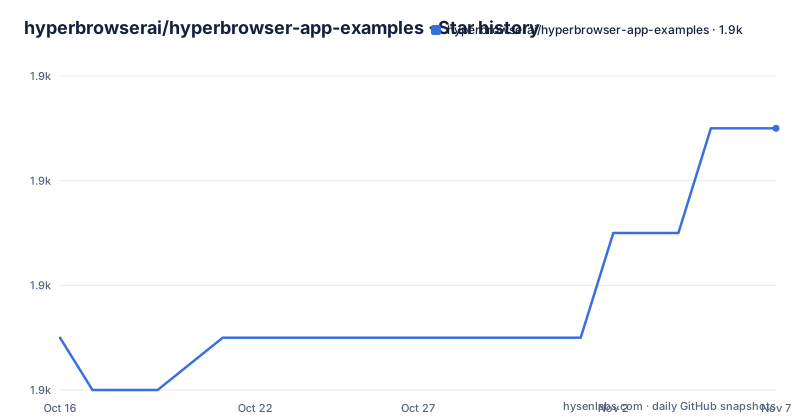
Star history
- hyperbrowserai/hyperbrowser-app-examples1,947 ★ · +4
| Repository | 2026-10-16 | 2026-11-07 |
|---|---|---|
| hyperbrowserai/hyperbrowser-app-examples | 1.9k | 1.9k |
4 Stars in the last 22 days, measured from the daily GitHub snapshot. Compare with other projects
Editorial analysis
What hyperbrowser-app-examples Contains
hyperbrowser-app-examples addresses a practical problem: turning Hyperbrowser capabilities into complete applications rather than isolated automation snippets. The repository describes its contents as full-stack web applications built with Hyperbrowser, a platform for browser automation, web scraping, and browser-based software. That makes the collection relevant to developers who already have Hyperbrowser credentials and want an application structure to inspect or adapt.
The repository is not a narrow tutorial with one demonstration flow. Its top level contains many separate directories, including `deep-crawler-bot`, `competitor-tracker`, `deep-job-researcher`, `deep-reddit-researcher`, `browserbrain`, `browserswarm`, `hyperfetch`, `hypergraph`, `hypervision`, `scrape-to-api`, and `site-to-dataset`. The directory names indicate a range of browser and data-oriented application concepts, but the root README does not describe each example's implementation or behavior. Their names alone are not sufficient evidence of feature maturity.
Each directory is presented as a self-contained project containing source code, its own README, configuration and deployment guidance, and tests. That organization lets an engineer select by application type rather than learn one abstract API from the root document. It also creates a maintenance burden for adopters, because each example can have its own dependency set and setup contract even though they share the Hyperbrowser service.
The root README uses the phrase "production-ready," but it does not provide deployment records, supported infrastructure, compatibility tables, or example-by-example release history. There are also no GitHub releases. For an engineering review, the collection is better understood as a catalog of reference applications unless a particular directory supplies enough documentation and configuration detail to support that claim.
Repository Structure and Application Boundaries
The repository is organized as a collection rather than a documented monorepo framework. The root README says that every example directory contains source code, a README, configuration, deployment guidance, and tests. It does not state that all examples share one TypeScript build system, package manager, server framework, UI library, or deployment configuration. A directory such as `agent-map` should therefore not be assumed to run like `hypergraph` merely because both are under the same repository.
This boundary matters during adoption. A team may select an example based on a directory name, then discover that its package commands, required environment variables, and runtime behavior are documented only inside that directory. Without those files in the repository overview, there is no reliable way to determine whether two examples share authentication, browser-session handling, persistence, queueing, or error handling.
The primary language is TypeScript, but language selection alone does not describe the runtime architecture. The root README identifies the examples as full-stack web applications, which implies that at least some have browser-facing and server-side parts. It does not identify the frameworks, API routes, storage systems, or deployment targets. It also does not document whether Hyperbrowser calls occur in the browser, backend process, background worker, or another service boundary. Code inspection of the selected directory is required before drawing that architecture diagram.
The collection is therefore suitable for comparative reading. Developers can look across entries such as `flow-mapper`, `universal-chatbot`, `hyperpages`, and `web-to-agent` to find application patterns, but the root document gives no evidence that they implement a common pattern. Treating the repository as a reusable platform would introduce assumptions that the repository overview does not support.
Installing the Collection and Selecting a First Example
The documented prerequisites are Node.js v16 or higher, Hyperbrowser API credentials, and any additional dependencies named by the selected example. The root README directs users to clone the repository and then choose an application. Its clone command contains the placeholder URL `your-org`, so it should not be treated as a verified command that points to `hyperbrowserai/hyperbrowser-app-examples`. The README says each example includes specific setup instructions, but it does not reproduce those instructions at the repository level.
The documented starting command is:
git clone https://github.com/your-org/hyperbrowser-app-examples.git
cd hyperbrowser-app-examples
As written, the first line identifies `your-org` rather than the repository owner. A user must resolve that mismatch against the actual repository URL before attempting the clone. The second command enters the repository directory after a successful clone.
There is no documented root installation command, no named package manager, and no universal environment file. The README only says to configure Hyperbrowser API keys in the chosen application's environment variables. It does not name those variables, so this guide cannot provide a verifiable `.env` example without guessing.
A first real use must therefore begin inside a chosen example directory. Open that example's README, confirm its package manager, install the dependencies with the exact command documented there, and copy its stated environment variable names into the configuration file it identifies. Then use the startup command from that same README. The reader should follow the example's own usage instructions after starting it, but the repository overview does not say what output, URL, or terminal message to expect.
Hyperbrowser Integration Requirements
Hyperbrowser credentials are the one integration requirement stated consistently at the repository level. The README directs users to obtain API keys from `https://hyperbrowser.ai`, then place them into the environment variables used by the selected application. That establishes an external service dependency, but it does not define the integration architecture.
The root documentation does not reveal whether an example uses synchronous browser sessions, asynchronous jobs, webhooks, polling, streaming output, or persistent browser state. It also does not state how results move from Hyperbrowser into an application UI, whether they are written to a database, or whether a worker is involved. No environment variable names, SDK package name, callback endpoints, webhook routes, session identifiers, or retry settings are included.
This missing detail affects production evaluation. Browser-based applications commonly need explicit handling for job status, timeouts, incomplete extraction, and external service failures, but this README does not show whether any example addresses those cases. The claims about scalable architectures and production patterns are not backed by diagrams, configuration examples, or per-project deployment instructions in the available documentation.
The repository can still help an engineer learn through source code. Its many application directories provide multiple places to inspect for Hyperbrowser calls and surrounding application code. However, the root document does not permit a safe statement about their reliability or production readiness. Those properties require checking the selected directory's dependencies, error paths, tests, and deployment files directly.
Testing, Deployment, and Upgrade Costs
The root README says each example includes tests and deployment guides, but it does not list test frameworks, test commands, coverage, or deployment platforms. It provides no CI workflow description and no root-level validation command. As a result, there is no documented repository-wide way to determine whether all applications still install and run together.
The last push was recorded on 2026-10-14. That date shows recent repository activity, but it does not establish that every example is independently developed or that all examples received changes at the same time. There is no GitHub release history, changelog, compatibility policy, or upgrade guide. Because the applications may have independent dependencies and configuration, a change in one directory may not repair or affect the others.
The README identifies the project as licensed under the MIT License and points to a `LICENSE` file, although the repository metadata reports the license as unknown. That discrepancy should be checked against the actual file before redistribution. This is a factual licensing-verification point, not legal advice.
Compared with starting a greenfield Hyperbrowser application directly, this repository offers several application shapes to inspect. The trade-off is uncertainty and upkeep: an adopter must locate a suitable example, reconcile the root-level setup instructions with its local README, and assess independent dependencies. A purpose-built application may cost more initial design work, but it avoids assuming that an example's architecture, configuration, or test coverage fits the intended product.
Adoption Boundaries for Hyperbrowser Examples
hyperbrowser-app-examples is a reasonable reference collection for a developer who has decided to use Hyperbrowser and wants to inspect multiple TypeScript application implementations. The variety of directories may help narrow the search to a research agent, crawler, tracker, extraction service, chatbot, or web-to-agent application before defining an internal implementation.
It is the wrong starting point when a team needs a documented shared framework, a confirmed production deployment, or a single command that runs and validates the entire collection. The root README does not provide those guarantees. It also gives no exact environment variable names, package installation command, universal test command, or release process, so it cannot serve as the complete operating manual for every application.
The most defensible use is one directory at a time. Confirm that its README contains concrete setup steps, inspect its dependency files, identify where Hyperbrowser credentials enter the runtime, and review its test and deployment guidance. If those files are incomplete, use the example only for reference rather than as a deployment base. The repository's value lies in the breadth of application concepts it presents, while its documentation leaves the final adoption decision to project-level inspection.
Editorial conclusion
Adopt this repository as a source of application patterns when you already use Hyperbrowser and want to compare several concrete implementations. Do not treat it as a turnkey framework until the selected example documents its dependencies, environment variables, startup command, tests, and deployment requirements. The first verification point is the README inside the chosen directory, especially whether it contains runnable setup steps beyond the root repository instructions.
Frequently asked questions
What is hyperbrowserai/hyperbrowser-app-examples used for?
It is a collection of full-stack web applications built around Hyperbrowser for browser automation, web scraping, research, extraction, and related use cases. The repository presents each directory as a self-contained example with its own documentation and configuration.
How do I install hyperbrowserai/hyperbrowser-app-examples?
The root README lists Node.js v16 or higher and Hyperbrowser API credentials as prerequisites, but its clone command contains a placeholder repository URL. It does not provide a universal package installation command, so users must follow the README inside the selected example.
Does hyperbrowser-app-examples use TypeScript?
Yes. TypeScript is listed as the repository's primary language, although the root README does not document a shared TypeScript build configuration for every application.
Does hyperbrowser-app-examples provide GitHub releases?
No GitHub releases are listed for the repository. The maintenance record shows that the last push was on 2026-10-14, but the README does not provide a release or upgrade policy.
Official sources
Add this badge to your README
If you maintain this project, the badge below links readers to this analysis and shows its maintenance status from the daily GitHub snapshot. Paste the markdown into your README; add ?metric=license or ?metric=stars to the image URL for a different field.

[](https://hysenlabs.com/projects/hyperbrowserai-hyperbrowser-app-examples)Star history chart for your README
[](https://hysenlabs.com/projects/hyperbrowserai-hyperbrowser-app-examples)Was this useful?