fwm: A Wayland Compositor Where Windows Are Box2D Bodies
Wayland compositor in C/wlroots where windows are physical objects (real Box2D rigid bodies) — and a full desktop besides: ten desktops on one scrolling world, tiling or floating per desktop, launcher, expo, screenshots, mixer and visualiser built in, live IPC. Legacy X11 version on the x11 branch.
At a glance
- What is it?
- fwm is a Wayland compositor in C/wlroots that treats windows as physical objects with mass, momentum, and gravity. It pairs that physics gimmick with a full desktop: ten desktops on a scrollable strip, per-desktop tiling or floating, built-in launcher and tools, and live IPC.
- Who is it for?
- Adopt fwm if you want a compositor that makes physics a first-class interaction model and you are comfortable with a young, actively developed codebase under GPL-2.0. Do not choose it if you need a stable, minimal window manager for daily production work, or if you rely on XWayland without known bugs.
- Can I use it commercially?
- Yes, with conditions. GPL-2.0 is a copyleft licence: if you distribute software that includes it, you must release that software's source code under the same licence. Running it internally without distributing it does not trigger that obligation.
- Is it still maintained?
- Yes. The repository last received commits 20 days ago.
- What is it written in?
- Mainly C, according to GitHub's language statistics.
Answers come from the project's GitHub data, last synced on October 4, 2026, and from our analysis. They are not legal advice.
Star history
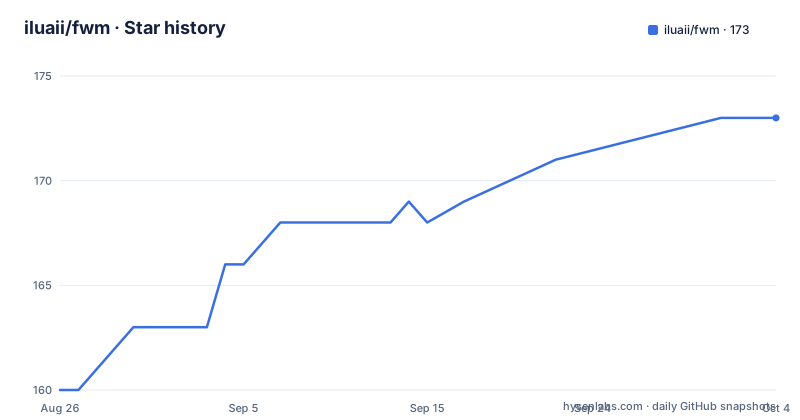
- iluaii/fwm173 ★ · +13
| Repository | 2026-08-26 | 2026-10-04 |
|---|---|---|
| iluaii/fwm | 160 | 173 |
13 Stars in the last 39 days, measured from the daily GitHub snapshot. Compare with other projects
Editorial analysis
A Compositor That Treats Windows as Physical Objects
fwm, the Physics Window Manager, is a Wayland compositor written in C using wlroots. Its defining feature is that windows are simulated as real rigid bodies by Box2D v3, giving them mass, momentum, inertia, and velocity. You can drag a window and throw it; it slides, bounces off walls, stacks under gravity, and comes to rest. This is not a visual effect layered on top. The README states windows behave as physical objects with those properties, and the simulation handles collisions, mass ratios, resting contact, and sleeping. The target user is someone who wants a desktop that feels like a physical space, not just a collection of rectangles. It is also for tinkerers who want a compositor where the physics engine is the core interaction model, not an afterthought.
How the Physics Simulation Works
The physics is powered by Box2D, an impulse-based rigid-body engine. The README lists specific parameters: restitution is 0.3, giving dull heavy bounces, and there is contact friction. Gravity modes cycle via Super+G between zero-g, space mode, and Earth gravity at 9.8 m/s², using a 100 px/m scale. There is a global speed limit, max_throw_speed, which caps how fast any dynamic window can move. The walls are swept against using continuous collision, and the README claims they can contain a throw at 96,000 px/s, fifty times the default cap. Free rotation, toggled with Super+R, hands a window's rotation to the simulation, so the collision box turns with the picture. The documentation in docs/physics.md covers units and limits, which is where you would go to understand the boundaries of the simulation. The key design choice is that physics is not a mode you turn on globally: each desktop decides whether it is a physics desktop, a BSP tiling one, or plain floating. That means the same windows can be physical objects on one desktop and neatly tiled on another.
The Desktop Strip and Built-In Tools
Beyond physics, fwm provides a full desktop environment. Ten desktops sit on one continuous strip, and the screen acts as a camera that pans across them. Moving between desktops is a pan, not a cut, and you can scroll freely mid-way. The expo view, triggered by the expo action, shows all desktops, and pressing z switches to a 3D mode where desktops become cards on a ring you can fly around. Each desktop has its own layout mode: physics, BSP tiling, or floating. Tiling is a property of the desktop, so switching it off returns windows to physical objects. The compositor includes a launcher, desktop strip, screenshots, wallpaper picker (stills or video), sound panel, and spectrum visualiser, so you do not need rofi, grim, slurp, or cava. There is also a modes menu where you can toggle tiling, floating, gravity, sound, visualiser, and even grass and wind. The grass is a lawn along the bottom edge of the monitor, with gusts travelling across it, and it has its own separate switch from wind.
Getting It Running: Build and Configuration
The README points to docs/getting-started.md for build and install instructions, and docs/configuration.md for the config file. Configuration is in config.toml, and every section is documented key by key. The keybindings and actions are in docs/keybindings.md, covering defaults, the action vocabulary, modes, mouse, and gestures. To start a session, you follow the getting-started guide, which covers the first five minutes. The compositor uses wlroots, so it depends on that library and Box2D v3. The built-in tools mean you do not need external utilities, but you still need a Wayland session manager or a way to start the compositor. The fwmctl command reads state, changes settings live without touching the config file, and streams events for scripting. This is a significant feature: you can adjust any setting at runtime, which is useful for experimenting with physics parameters without restarting.
A Known XWayland Bug and Other Limitations
The README mentions one open bug with XWayland: an invisible window that takes clicks. This is a concrete failure mode that could affect users running X11 applications. The physics simulation also has a documented limit: a very fast drag can outrun the windows it is pushing, even with the speed cap. The README points to docs/physics.md for details on this. Another limitation is that breakable windows, a mode where a window thrown hard enough destroys another, is only switched on from the modes menu, never from the config, and every session starts with it off. This suggests the feature is experimental and not meant for daily use. The physics model might also be a problem for accessibility or for users who prefer predictable window placement. A window that slides and bounces might be fun, but it is not efficient for a productivity-focused workflow. The compositor is young, with the first release in June 2026 and the Wayland port in July 2026, so expect rough edges.
Alternatives: Traditional Compositors vs. Physics-Based Ones
The most direct alternative is a traditional Wayland compositor like sway, which uses a tree-based layout and has no physics at all. Sway is built on wlroots like fwm, but its windows are static rectangles that you move and resize with keyboard shortcuts. The difference is fundamental: sway gives you predictable, deterministic control, while fwm gives you momentum and inertia. If you want tiling without physics, sway is a mature, stable option. Another alternative is a floating compositor like river, which also uses wlroots but treats windows as simple surfaces. River has tags and layouts, but no rigid-body simulation. The physics approach is unique to fwm among mainstream compositors, but it comes at the cost of complexity and potential frustration. For users who want the physics but also need reliability, fwm's per-desktop layout modes are a compromise: you can have a physics desktop for fun and a tiling desktop for work.
Maintenance, License, and Upgrade Considerations
fwm is licensed under GPL-2.0, which means any derivative work must also be GPL-2.0 or later. This is a copyleft license, so if you embed fwm code into your own project, that project must be GPL-compatible. The project is actively developed, with the last push on July 19, 2026, and releases coming every few weeks: v0.1.0 in June, v0.2.0 in July, and v0.3.0 in July. The version numbering suggests pre-1.0 instability. The README states the X11 version on the x11 branch is no longer supported, so upgrades are only for the Wayland version. The documentation includes an architecture guide for anyone changing the code, which is a good sign for maintainability. The dependency on Box2D v3 is a specific version, so upgrading Box2D could break fwm. The live IPC through fwmctl means you can change settings without restarting, which reduces the cost of experimentation, but the compositor itself is young and may require frequent updates as wlroots evolves.
Editorial conclusion
Adopt fwm if you want a compositor that makes physics a first-class interaction model and you are comfortable with a young, actively developed codebase under GPL-2.0. Do not choose it if you need a stable, minimal window manager for daily production work, or if you rely on XWayland without known bugs. Before adopting, verify the XWayland invisible-window bug, test the physics with your typical window sizes and screen resolution, and confirm the Box2D v3 dependency builds on your distribution. fwm is a bold experiment, not a conservative choice, and its value depends on whether the physics model improves your workflow or just gets in the way.
Frequently asked questions
What does fwm stand for?
Physics window manager, with the ph spelled the short way. The project says it has outgrown the second half of that name, since fwm is a compositor now and not only a physics one, but it kept the first half.
Do I need a separate launcher, screenshot tool, or audio visualiser with fwm?
No. The launcher, the desktop strip, screenshots, the wallpaper picker, the sound panel, and the spectrum visualiser are all built in, so there is no rofi, grim, slurp, or cava to install alongside. Multiple monitors, layer-shell, session lock, and XWayland are supported as well.
Can I run fwm inside my current session to try it?
Yes. fwm runs nested as a window, with `WLR_BACKENDS=wayland ./build/fwm` inside a Wayland session and `WLR_BACKENDS=x11 ./build/fwm` inside an X11 one. The one thing a nested run cannot show you is keybinds, because the outer compositor claims them first.
How do I install fwm on Arch?
Through the AUR package fwm-git, with `yay -S fwm-git && WLR_BACKENDS=wayland fwm`. The repository root also carries an install.sh and a Nix flake, and the manual has a build section that avoids a package manager entirely.
What is the difference between the main branch and the x11 branch?
The main branch is the primary, actively developed version, a Wayland compositor written in C on wlroots. The x11 branch holds the legacy X11 version, which the project states is no longer supported.
What is fwmctl used for?
It reads the compositor state, changes any setting live without touching your config file, and streams events that a script can react to. Where a keybind belongs to an external shell rather than to fwm, fwm can take it anyway.
Official sources
Add this badge to your README
If you maintain this project, the badge below links readers to this analysis and shows its maintenance status from the daily GitHub snapshot. Paste the markdown into your README; add ?metric=license or ?metric=stars to the image URL for a different field.

[](https://hysenlabs.com/projects/iluaii-fwm)Star history chart for your README
[](https://hysenlabs.com/projects/iluaii-fwm)