SpringNote lets the AI file your notes, and its first page is a comment explaining an invisible diagram
SpringNote is a note-taking tool for the lazy. Just jot things down, and AI tidies up the scattered pieces for you, making recording effortless.
At a glance
- What is it?
- A Dart desktop app where you type fragments into a home dashboard and reports assemble themselves at startup from notes that already exist, with a Memories chat over your own history and a widget that turns a daily salary into a running number. The AI wiring is unusually specific: DeepSeek's beta path, chosen for fill-in-the-middle, and a model you have to type in by hand because that endpoint will not list them.
- Who is it for?
- Use it if your note habit fails at the filing step rather than the writing step, since that is the problem it names and the automatic report pass genuinely removes it. Know what you are agreeing to first.
- Can I use it commercially?
- Yes, with strict conditions. AGPL-3.0 is a network copyleft licence: if people use a modified version over a network, for example as a hosted service, you must offer them its source code under the same licence.
- Is it still maintained?
- Yes. The repository last received commits 10 days ago.
- What is it written in?
- Mainly Dart, according to GitHub's language statistics.
Answers come from the project's GitHub data, last synced on November 15, 2026, and from our analysis. They are not legal advice.
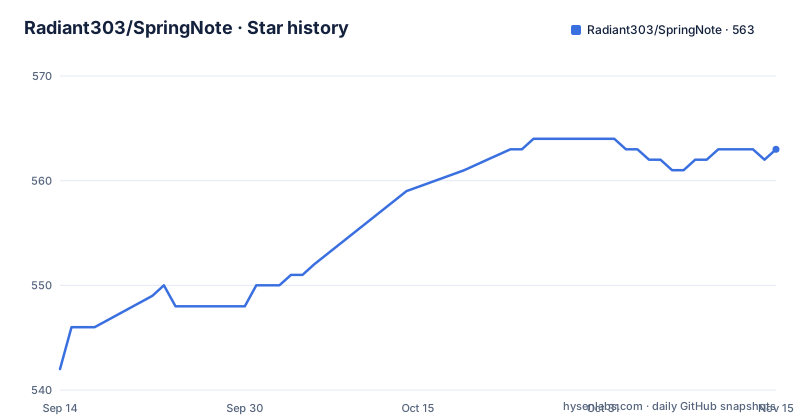
Star history
- Radiant303/SpringNote563 ★ · +21
| Repository | 2026-09-14 | 2026-11-15 |
|---|---|---|
| Radiant303/SpringNote | 542 | 563 |
21 Stars in the last 62 days, measured from the daily GitHub snapshot. Compare with other projects
Editorial analysis
The opening diagram sits inside an HTML comment and never renders
The README begins with a block comment containing the project's actual thesis and an ASCII drawing of scattered thoughts converging into a labelled diagram, followed by a parenthetical line explaining what the art depicts. Because it is a comment, none of it appears on the rendered page. What a reader sees instead is the heading, an empty anchor with no image inside it for a community link, and a language switch whose English entry points at the file you are already reading. The same pattern repeats lower down: a contributors link with an empty body, an empty centred paragraph above the star-history badge. None of it is a functional problem, but it means the page's first impression is built from elements that render as nothing, and the framing that would have explained the project in one breath is invisible unless you read the source.
The beta path is chosen for fill-in-the-middle, and models are typed by hand
Configuring AI is four steps and each one exists because of a limitation. You add a provider and set the base URL to DeepSeek's beta path, which is used specifically because of that provider's fill-in-the-middle API requirements; for any other OpenAI-compatible API you fill the base URL in from that provider's own documentation. You then add the model by name, deepseek-v4-flash, because the beta endpoint does not support listing models, so there is no discovery step to rely on. Third, you tick the completion capability option on that model by hand. Fourth, you pick it as the default, and the reason the choice is constrained is that a model without completion support never appears in the completion model list. The result is a three-way coupling between endpoint, model name, and a capability flag, all configured by hand, with no local model path described anywhere.
Notebook search only looks inside the note type you have selected
The editor supports daily, weekly, and monthly notes, with Markdown editing, a preview, code block highlighting, and AI completion suggestions. Search inside it is narrower than the word implies: it covers only the currently selected note type, so a query cannot reach across granularities in one pass. It also needs at least two characters before it will run, and clicking a result opens that note's full content rather than a preview. That combination is worth knowing before you conclude something is missing from your archive. A daily note and the weekly report derived from it are separate documents with separate searchable text, and the report is generated rather than indexed from the source, so searching for a phrase you remember typing may find the fragment and miss the summary depending on which view is active.
Missing reports are backfilled at startup from notes that already exist
The feature that defines this app is not generation but reconciliation. On startup it looks for weekly and monthly reports that do not exist and fills them in from the daily or weekly notes it already holds. That is a different design from asking a model to summarise your day, because it runs on the notes rather than on a moment, and it means the report for last Tuesday exists even if the app was closed all week. The assumption it makes is that the daily notes are the source of truth and the coarser ones are derived, which is why ISO week support arrived in the 1.0.8 release: the boundaries of a week have to be defined before an automatic fill can land in the right place. The home dashboard carries a workhorse level, an earnings figure, an activity heatmap, a quick input box, and a card summarising today, so the loop is write, then see the aggregate move.
The widget turns a daily salary into a number that ticks while you work
Workhorse Clock is the feature most likely to surprise you and the one with the clearest interaction spec. You set a custom daily salary and your work hours, and the hourly rate is derived from them. A desktop widget then shows three things: the running timer, today's accumulated work duration, and the earnings figure. It is also a remote control for the app, with left-click starting or pausing the timer, right-click opening the main window and landing on the home page, and left-drag moving the window so it does not sit where your other widgets are. The rest of the desktop surface is equally deliberate: a custom Windows title bar, a system tray icon, launch on boot, global shortcuts, a desktop status widget, and system font switching. Settings holds everything beyond the quick-start path, with fuller instructions in the documentation site.
It is a Windows desktop app and the README never says so
Windows is the only platform named anywhere in the documentation, and it is named only in passing. The custom title bar, launch on boot, the system tray, the desktop widget, and the left-drag window move are all Windows shell behaviours rather than cross-platform ones, and the primary language is Dart, which points at a Flutter desktop target rather than a mobile or web one. The Current Scope of the app is therefore narrower than the download page suggests, and there is no sentence anywhere telling a macOS or Linux user that there is no build for them. The install path reinforces this: the quick start has no command at all, just a link to the releases page, which is the shape of a project that ships one artefact per platform rather than a package manager entry.
Release notes are Chinese and the whole support channel is one QQ group
The three most recent tags are titled in Chinese. Version 1.0.9 adds the ability to send images to the AI from daily, weekly, and monthly reports. Version 1.0.8 adds a memory-book tool orchestration and ISO week support. Version 1.0.7 adds a global signature and multilingual support. The repository carries both an English and a Simplified Chinese README, so bilingual documentation is deliberate, but the changelog line a user sees on the releases page is not translated, which means the fastest signal about what changed is the one you may not read. Support is channelled the same way: a QQ group, number 463423961, linked from an empty anchor near the top of the page, with a request that bug reports include the version number, reproduction steps, whether it reproduces consistently, and screenshots or error text. There is no discussion board or issue template mentioned in the documentation.
The tree keeps a Chinese-named manual directory and an update folder
Alongside the application directory and a docs folder, the repository root holds a directory whose name is in Chinese and reads as an AI development manual, a snapshots directory, an update directory, and a changelog. Each of those implies machinery the quick-start path never mentions. A manual directory implies written conventions for working on the code, which is the first thing a contributor would want and cannot find from the English README. An update directory implies the application updates itself, which matters for an app that expects to keep working against a model provider whose endpoints can change. Snapshots imply recorded expectations for some output. The licence is AGPL-3.0, which is the strongest copyleft of the common choices and the one to read before you fork anything here, and the project counts 550 stars, 53 forks, and 4 open issues.
Editorial conclusion
Use it if your note habit fails at the filing step rather than the writing step, since that is the problem it names and the automatic report pass genuinely removes it. Know what you are agreeing to first. The reports are written by a model you configure against an OpenAI-compatible endpoint, the memories chat shows its thinking process and tool calls, and the release notes are Chinese while the interface documentation is not. And read the data directory step before your first note, because everything, images and configuration included, lands around that one folder.
Frequently asked questions
What is SpringNote and what does the AI actually do in it?
It is a desktop note app where you record fragments and the app organizes them. AI assembles daily, weekly, and monthly reports from existing notes on startup, offers completion suggestions in the editor, and powers a Memories chat over your own saved records with a visible thinking process and tool call display.
How do I configure AI in SpringNote?
Add a provider with its base URL, using the DeepSeek beta path as the worked example because of that provider's fill-in-the-middle API requirements. Then add the model by name, deepseek-v4-flash, since the beta endpoint does not support listing models, tick its completion capability option by hand, and select it as the default.
Does SpringNote search across all my notes?
Not in one pass. Notebook search covers only the currently selected note type, daily, weekly, or monthly, and requires at least two characters before it runs. Clicking a result opens that note's full content.
Which platforms does SpringNote run on?
Windows. The README names a custom Windows title bar, launch on boot, a system tray, a desktop status widget, and a left-drag to move the widget window. Installation goes through the releases page rather than a package manager, and no build is offered for macOS or Linux.
Where does SpringNote store my notes?
Around a single data directory that the first-run step asks you to confirm. Daily, weekly, and monthly notes, images, and related configuration are all saved around it, so that folder is the thing to back up.
Official sources
Add this badge to your README
If you maintain this project, the badge below links readers to this analysis and shows its maintenance status from the daily GitHub snapshot. Paste the markdown into your README; add ?metric=license or ?metric=stars to the image URL for a different field.

[](https://hysenlabs.com/projects/radiant303-springnote)Star history chart for your README
[](https://hysenlabs.com/projects/radiant303-springnote)Was this useful?