Gluegun: A Stable CLI Toolkit for TypeScript Projects That Prioritizes Convention Over Speed
GitHub describes it as A delightful toolkit for building TypeScript-powered command-line apps.. The repository metadata lists TypeScript as its primary language. The metadata lists the MIT license. This article stays within the project description and details documented in the GitHub repository README.
At a glance
- What is it?
- Gluegun bundles parameters, templates, file patching, and prompts into one dependency for building Node CLIs. It is stable and community-supported, but not actively developed, so weigh its convenience against its maintenance status.
- Who is it for?
- Adopt Gluegun if you want a single dependency that covers common CLI needs, value a declarative command structure, and can tolerate a project that is no longer actively developed. Avoid it if you need new features, want a more actively maintained framework, or require a smaller runtime footprint.
- Can I use it commercially?
- Yes. MIT is a permissive licence: you can use, modify and sell software built on it, as long as you keep its copyright and licence notices.
- Is it still maintained?
- Yes. The repository last received commits 3 days ago.
- What is it written in?
- Mainly TypeScript, according to GitHub's language statistics.
Answers come from the project's GitHub data, last synced on November 15, 2026, and from our analysis. They are not legal advice.
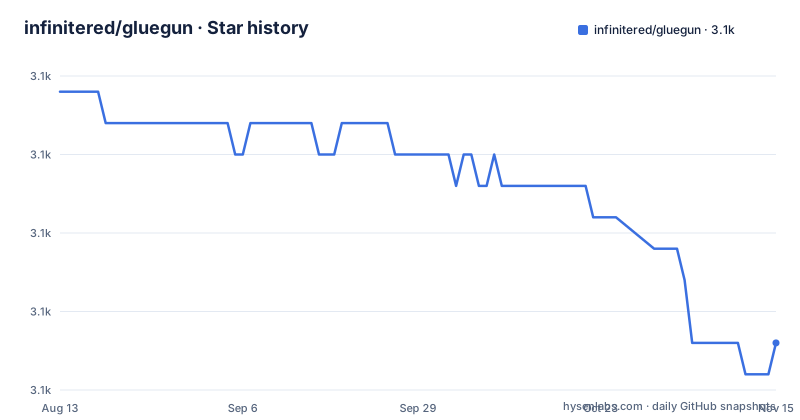
Star history
- infinitered/gluegun3,139 ★ · -8
| Repository | 2026-08-13 | 2026-11-15 |
|---|---|---|
| infinitered/gluegun | 3.1k | 3.1k |
-8 Stars in the last 94 days, measured from the daily GitHub snapshot. Compare with other projects
Editorial analysis
What Gluegun Solves and Who It Serves
Gluegun addresses a recurring problem: building a Node CLI from scratch means assembling a dozen unrelated libraries. The README lists the bundled parts: yargs-parser for arguments, enquirer for prompts, fs-jetpack for files, axios for HTTP, and several more. Instead of wiring these together yourself, Gluegun exposes them through a single toolbox object passed to each command. This is aimed at developers who want to ship a CLI quickly and do not want to spend days on argument parsing or template rendering. It is also for teams that value a consistent structure across multiple CLIs. The README names Ignite, Solidarity, and the Graph CLI as users, which suggests it is suited for tooling that accompanies a larger framework or workflow.
The Architecture: Build, Command, and Toolbox
The core mechanism is the build function. The README shows a chain: build('movie').src('./src').plugins('node_modules', { matching: 'movie-*' }).help().version().defaultCommand().create(). This creates a runtime that discovers commands from the src directory and from plugins that match a naming pattern. Each command is a plain object with a name, optional alias, and an async run function. That run function receives a toolbox object, which bundles all the utilities. The data flow is straightforward: the runtime parses process.argv, matches the command name, and invokes the run function with the toolbox. The toolbox includes parameters, template, patching, filesystem, system, http, prompt, print, semver, strings, and packageManager. This design means you do not import individual libraries inside each command; they are already available. It is a convention-based approach that trades some explicitness for speed of development.
Getting Started: Commands and Template Generation
The quick start is a single command: npx gluegun new movies. This scaffolds a new CLI project and asks whether you want TypeScript or modern JavaScript. After that, you change into the movies directory, run yarn link to make the executable available globally, and then run movies help. The generated project includes a cli.ts or cli.js file that calls build and create. From there you add commands as files in src/commands. The README gives an example command that uses system.run to execute a shell command, strings.trim and strings.kebabCase to transform the output, and filesystem.write to save a JSON file. Template generation is handled by the template toolbox, which uses ejs under the hood. The README does not show the exact template syntax, but it points to the toolbox API docs for details. For a new user, the fastest path is to generate the starter and read the generated code.
A Genuine Limitation: Maintenance Mode and Feature Freeze
The most significant limitation is stated plainly in the README: Gluegun is at a stable point and the maintainers are not planning new features. The project is community-supported, meaning pull requests are welcome but only for performance, stability, types, or similar enhancements. This is a hard constraint if you expect new capabilities, such as native ESM support or integration with the latest Node features. The README requires Node.js 12.0 or higher, which is outdated for many current environments. If your CLI needs a feature that is not already in the toolbox, you cannot wait for the maintainers to add it. You would need to fork the project or build your own extension. This is not a bug, but it is a strategic risk for long-term projects. The release history shows a version 5.2.2 in late 2025, but that is a patch release, not a signal of active development.
Alternatives: oclif and Commander Take Different Paths
The README itself lists alternatives, which is unusual and refreshing. oclif is described as very actively maintained and used by some large CLIs. Its approach is more heavyweight: it generates a full plugin architecture with topics, hooks, and a built-in update system. Gluegun is lighter in that it does not force a plugin structure on you, though it supports plugins via the matching pattern. Commander is a minimal argument parser that you combine with your own libraries. It gives you full control but requires you to choose and wire every utility yourself. Yeoman is a scaffolding tool rather than a general CLI framework, so it is a different category. The practical difference: oclif gives you a batteries-included framework with active maintenance, Commander gives you a small core and freedom, and Gluegun sits in between with a bundled toolbox but no active development. If you need long-term support, oclif is the safer bet. If you want minimal dependencies, Commander is lighter.
Maintenance and Upgrade Cost
The maintenance cost is low in the short term because Gluegun is stable and rarely changes. The README indicates that the API is unlikely to break, which is good for a CLI that you ship once. However, the upgrade cost over time could be higher if you need to migrate away. Since Gluegun bundles many dependencies, you inherit updates to those libraries only when Gluegun releases a new version. The project is on version 5.x, and the last push was November 2025, but that does not guarantee future releases. The license is MIT, which means you can fork and modify the code without legal friction, but you would be responsible for maintaining the fork. The README mentions that the community continues to send PRs, so there is some life, but it is not a committed roadmap. For a CLI that you plan to maintain for years, you should budget time to review Gluegun's dependency updates or plan a migration path.
A Trade-Off: Convenience vs. Dependency Weight
Gluegun's strength is also its weakness. It bundles a large set of libraries, which means your CLI carries code for HTTP, filesystem, prompts, and semver even if you only use a few. This increases the install size and startup time, though the README does not provide numbers. For a small utility CLI, this is overkill. You could use Commander and write a few lines of fs code instead. But for a complex CLI that needs templates, file patching, and prompts, Gluegun saves you from integrating those libraries yourself. The README's example command uses several toolbox functions in a few lines, which would require multiple imports and setup in a bare Node script. The trade-off is clear: you accept the dependency weight in exchange for a consistent, ready-to-use toolbox. If your CLI is small and focused, the weight is not justified. If it is a developer tool with many subcommands, the convenience wins.
Who Should Adopt Gluegun and What to Verify First
Gluegun is a good fit for teams building a CLI that wraps a larger workflow, such as a project generator, a build tool, or a framework companion. The README's list of users includes Ignite, a React Native CLI, and the Graph CLI, which are exactly that kind of tool. It is also fine for internal tools where you control the Node version and do not need the latest features. Before adopting, verify that your target environment runs Node 12.0 or higher, which is a low bar but still a constraint. Read the toolbox API docs to confirm that the functions you need exist and match your expectations. Check the plugin matching pattern, because if you plan to extend the CLI with plugins, the naming convention is strict. Also review the list of bundled dependencies to see if any conflict with your existing stack. If you are comfortable with the maintenance status, Gluegun is a pragmatic choice. If you are not, choose oclif for active development or Commander for minimalism.
Editorial conclusion
Adopt Gluegun if you want a single dependency that covers common CLI needs, value a declarative command structure, and can tolerate a project that is no longer actively developed. Avoid it if you need new features, want a more actively maintained framework, or require a smaller runtime footprint. Before adopting, verify that your Node version is at least 12.0, review the plugin matching pattern, and check the toolbox API docs for the exact functions you plan to use. Gluegun is stable and proven by projects like Ignite and the Graph CLI, but its future depends entirely on community pull requests.
Frequently asked questions
What is the gluegun toolkit?
A toolkit for building Node-based command-line interfaces in TypeScript or modern JavaScript. It bundles eleven modules, covering parameters, templates, patching, filesystem, system commands, HTTP, prompts, printing, semver, strings, and package management, plus a plugin system for extending a CLI.
What is the development status of gluegun?
No, and the project says so in two places. The notice states it is at a stable point with no new features planned, and the community section says it is no longer actively developed by Infinite Red. Pull requests are still released when they concern performance, stability, types, or similar improvements.
How do I scaffold a new CLI with gluegun?
Run npx gluegun new movies, choose TypeScript or modern JavaScript, change into the new folder, link it with yarn link, and then run movies help. The generated project builds its runtime with a build chain and a default command.
What should I use instead of gluegun?
The project lists its own alternatives: the Rust CLI book, for speed and for not needing a local Node engine; oclif, described as used by some large CLIs and very actively maintained; and commander with yeoman, which have large communities, though the notes say Gluegun was built to avoid commander and yeoman.
Official sources
Add this badge to your README
If you maintain this project, the badge below links readers to this analysis and shows its maintenance status from the daily GitHub snapshot. Paste the markdown into your README; add ?metric=license or ?metric=stars to the image URL for a different field.

[](https://hysenlabs.com/projects/infinitered-gluegun)Star history chart for your README
[](https://hysenlabs.com/projects/infinitered-gluegun)Was this useful?