CyberChef: A Browser-Based Data Transformation Workbench for Analysts
The Cyber Swiss Army Knife - a web app for encryption, encoding, compression and data analysis
At a glance
- What is it?
- CyberChef is an open-source web application from GCHQ that chains encoding, encryption, compression, and parsing operations into shareable recipes. It is best for quick, interactive data manipulation in the browser, but it is not a substitute for a full programming environment.
- Who is it for?
- Adopt CyberChef if you are an analyst, incident responder, or developer who needs fast, interactive data transformations without writing code, especially for one-off decoding or parsing tasks. Do not adopt it if you need to process large datasets programmatically, or require strict auditability of every transformation.
- Can I use it commercially?
- Yes. Apache-2.0 is a permissive licence: you can use, modify and sell software built on it, as long as you keep its copyright and licence notices.
- Is it still maintained?
- Yes. The repository last received commits 1 day ago.
- What is it written in?
- Mainly JavaScript, according to GitHub's language statistics.
Answers come from the project's GitHub data, last synced on November 15, 2026, and from our analysis. They are not legal advice.
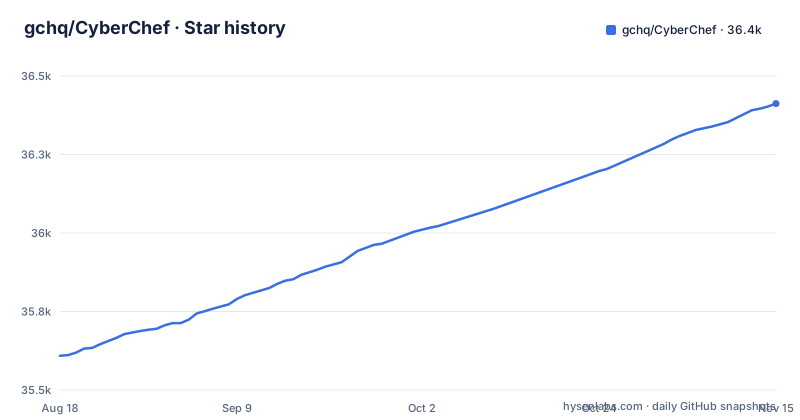
Star history
- gchq/CyberChef36,412 ★ · +803
| Repository | 2026-08-18 | 2026-11-15 |
|---|---|---|
| gchq/CyberChef | 35.6k | 36.4k |
803 Stars in the last 89 days, measured from the daily GitHub snapshot. Compare with other projects
Editorial analysis
What CyberChef Solves and Who It Serves
CyberChef addresses a recurring pain point for security analysts and anyone who handles encoded or transformed data: the need to apply a sequence of operations quickly without writing a script or installing a suite of command-line tools. The README describes it as 'a simple, intuitive web app for carrying out all manner of cyber operations within a web browser.' That includes XOR, Base64, AES, DES, Blowfish, hashing, hexdumps, compression, and parsing of formats like IPv6 and X.509. The target user is explicitly both technical and non-technical analysts. A non-programmer can drag operations into a recipe and see output immediately, while a developer can use it for ad-hoc decoding that would otherwise require a one-off Python script. The tool was built by an analyst during '10% innovation time,' which explains its focus on practical, immediate utility over academic completeness.
The Recipe Mechanism and Data Flow
The core architecture is a linear pipeline. The README describes four areas: an input box, an output box, an operations list, and a recipe area. You drag operations from the list into the recipe, configure their arguments, and the data flows from input through each operation in order. The 'Auto Bake' feature recalculates the output whenever the input or recipe changes. This is a simple and effective model for most transformations. It is not a general-purpose programming language; it is not positioned as a programming environment. There is also a 'magic' icon that attempts to automatically detect encodings. That feature uses a number of techniques, as described in a linked wiki page, but the README does not specify the exact algorithms.
Getting It Running: Docker and Source Builds
You have two main paths to run CyberChef locally. The first is Docker. The README gives a direct build command: 'docker build --tag cyberchef --ulimit nofile=10000 .' followed by 'docker run -it -p 8080:8080 cyberchef.' Alternatively, you can pull a pre-built image from 'ghcr.io/gchq/cyberchef:latest' and run it with the same port mapping. After that, you navigate to 'http://localhost:8080.' The second path is from source. You need Node.js v24, which the README notes you can manage with nvm using the project's .nvmrc file. The setup is a standard clone and 'npm install.' For development, 'npm start' runs a live-reload server. For production, 'npm run build' outputs to 'build/prod.' There is also a scaffolding script: 'npm run newop' generates a new operation via an interactive prompt, which is useful if you plan to contribute custom operations.
Operational Features: Breakpoints, Highlighting, and Sharing
Beyond simple chaining, CyberChef includes features that make it useful for debugging and collaboration. You can set breakpoints on any operation in a recipe. Execution pauses before that operation, and you can step through one operation at a time to inspect intermediate data. That is a genuine debugging aid for complex recipes. Highlighting is another practical touch: if you select text in the input, the output highlights the corresponding result, and vice versa. The README gives an example of highlighting the word 'question' to see where it appears in the output. Recipes can be saved to local storage and reloaded later. You can also copy a URL that encodes the recipe and input, which makes sharing a specific transformation as easy as sending a link. That is a strong feature for incident response where you want to hand a colleague a reproducible decoding workflow.
Limitations and Cases Where CyberChef Is the Wrong Tool
CyberChef has clear boundaries. First, it is browser-based, so performance on very large inputs is limited. The README mentions that Auto Bake can be turned off if it is affecting performance, and that files up to 2GB can be dragged in, but 'depending on your browser.' That suggests memory constraints are real. Second, it is a recipe builder, not a general-purpose programming environment. For serious data processing, you would hit a wall. Third, security is a concern. The README has a Security section and the repository includes SECURITY.md, so read them before pasting sensitive data into a web app. Finally, the web app is not a command-line tool. The package.json exposes a Node.js entry point (src/node/wrapper.js) and the README has a Node.js support section, which is where to look if you need to automate transformations.
Alternatives: Command-Line Tools and Libraries
The most direct alternative is a set of purpose-built command-line utilities. For encoding and decoding, tools like 'base64' and 'xxd' are ubiquitous. For encryption, OpenSSL provides AES, DES, and Blowfish operations. For hashing, 'sha256sum' or 'md5sum' are standard. The difference is that these tools are single-purpose and must be chained manually in a shell. CyberChef provides a graphical, interactive environment with automatic chaining and visual feedback. Another alternative is a programming language library, such as Python's 'codecs' and 'cryptography' packages. That gives you full control and automation, but requires writing code. CyberChef sits between these: it offers more convenience than a shell one-liner for complex multi-step transformations, but less power and reproducibility than a script. If your work is repetitive, a script is better; if it is exploratory and ad-hoc, CyberChef shines.
Maintenance, Licensing, and Upgrade Considerations
CyberChef is actively maintained. The last push to the repository was on 2026-11-02, and the latest release is v11.5.0, published 2026-09-18. The project is licensed under Apache-2.0, which is permissive for both commercial and personal use. That means you can integrate it into your own tools, but you should comply with the license terms, such as retaining attribution. Recent releases v11.3.0 (2026-07-24), v11.4.0 (2026-08-18) and v11.5.0 (2026-09-18) arrived roughly a month apart. That implies regular feature additions and bug fixes. For upgrades, the Docker image is published through GitHub Workflows, so pulling the latest tag is straightforward. From source, you would need to re-run 'npm install' and 'npm run build' after pulling new changes. The project also has a 'setheapsize' script to address out-of-memory errors during builds, which is a practical maintenance detail.
Editorial conclusion
Adopt CyberChef if you are an analyst, incident responder, or developer who needs fast, interactive data transformations without writing code, especially for one-off decoding or parsing tasks. Do not adopt it if you need to process large datasets programmatically, or require strict auditability of every transformation. Before relying on it for sensitive work, verify that the operations you need are present and that the browser version you use is supported, and check the project's security guidance for handling untrusted input. The project is actively maintained and Apache-2.0 licensed, but its strength is convenience, not computational power.
Frequently asked questions
What are the uses of CyberChef?
CyberChef performs encoding (Base64, XOR), encryption (AES, DES, Blowfish), compression, hashing, IPv6 and X.509 parsing, and character set conversion in a browser-based recipe builder.
Is CyberChef safe to use?
CyberChef is a browser-based web app, and the Docker image serves its static build files from nginx. For security guidance, see the Security section of the README and SECURITY.md in the repository.
Can I run CyberChef locally?
Yes, you can run it locally using Docker with `docker run -it -p 8080:8080 ghcr.io/gchq/cyberchef:latest` or build from source with Node.js 24 via `git clone`, `npm install`, and `npm start`.
How to use CyberChef magic?
When CyberChef detects a known encoding pattern, a magic wand icon appears in the output field; clicking it applies the detected operation chain automatically.
How to use CyberChef offline?
Run the pre-built Docker image `ghcr.io/gchq/cyberchef:latest` or build from source with Node.js 24; after the initial pull or clone you open it at http://localhost:8080.
Official sources
Add this badge to your README
If you maintain this project, the badge below links readers to this analysis and shows its maintenance status from the daily GitHub snapshot. Paste the markdown into your README; add ?metric=license or ?metric=stars to the image URL for a different field.

[](https://hysenlabs.com/projects/gchq-cyberchef)Star history chart for your README
[](https://hysenlabs.com/projects/gchq-cyberchef)Was this useful?