self_update: replacing a Rust binary in place from your own release page
Self updates for rust executables
At a glance
- What is it?
- The jaemk/self_update crate gives a Rust executable the ability to download and install a newer version of itself from GitHub, GitLab, Gitea, Gitee, S3 or a plain manifest file. The API is small, the backend list is wide, and the default configuration will hang a CI job on an interactive prompt unless you change two settings.
- Who is it for?
- Adopt self_update when you ship a standalone Rust binary and want the update path written once, in your own code, rather than bolted on with a shell script. Skip it when your distribution is a package manager, a container image or a library crate, since none of those need an in-place self replacement.
- Can I use it commercially?
- Yes. MIT is a permissive licence: you can use, modify and sell software built on it, as long as you keep its copyright and licence notices.
- Is it still maintained?
- Yes. The repository last received commits 12 days ago.
- What is it written in?
- Mainly Rust, according to GitHub's language statistics.
Answers come from the project's GitHub data, last synced on November 7, 2026, and from our analysis. They are not legal advice.
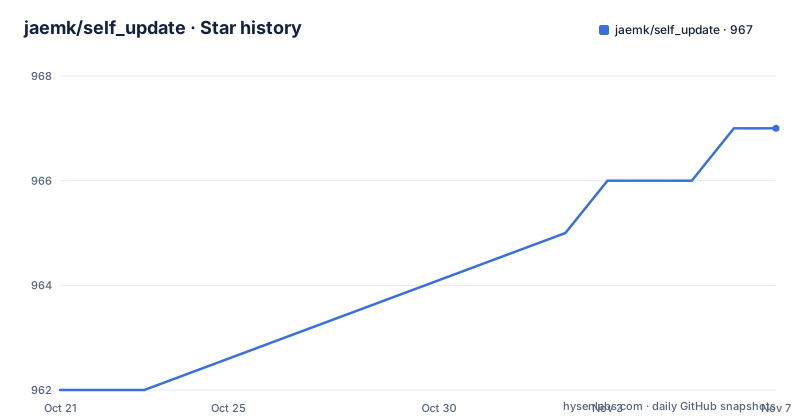
Star history
- jaemk/self_update967 ★ · +5
| Repository | 2026-10-21 | 2026-11-07 |
|---|---|---|
| jaemk/self_update | 962 | 967 |
5 Stars in the last 17 days, measured from the daily GitHub snapshot. Compare with other projects
Editorial analysis
A binary that downloads and replaces itself
self_update is a Rust library, not a tool you run from a shell. Its whole purpose is giving a compiled executable a second act: checking a release backend for a newer version, downloading the matching artifact, and replacing the running binary on disk. The crate description in Cargo.toml puts it plainly as self updates for standalone executables, and the crate documentation describes updaters for updating rust executables in-place from various release distribution backends.
The audience is teams shipping a single binary to users or to machines they do not control. A CLI utility, a daemon, an agent installed on a fleet of servers. For those cases the hard part is rarely the download; it is comparing versions, finding the artifact that matches the running platform, unpacking it, replacing a file that the operating system may hold open, and reporting failure in a way an operator can act on. self_update handles that sequence and leaves the release hosting to you.
The library is at version 1.3.1 in Cargo.toml, with edition 2024 and a rust-version floor of 1.88. Licence is MIT, so integrating it into a proprietary product carries no copyleft obligation, though you remain responsible for the licences of whatever you ship alongside it.
Every backend follows the same configure, build, update shape
The mechanism is a builder that ends in one call. You pick a backend module, configure it with the details of where your releases live, build the updater, then ask it to update. The quick start in the README shows the shortest complete version of that chain against a GitHub release:
use self_update::cargo_crate_version;

fn update() -> Result<(), Box<dyn std::error::Error>> {
    let status = self_update::backends::github::Update::configure()
        .repo_owner("jaemk")
        .repo_name("self_update")
        .bin_name("github")
        .show_download_progress(true)
        .current_version(cargo_crate_version!())
        .build()?
        .update()?;
    println!("Update status: `{}`!", status.version());
    Ok(())
}
Four inputs do the work. repo_owner and repo_name point at the repository, bin_name tells the updater which asset inside a release corresponds to the running program, and current_version is compared against the remote version to decide whether there is anything to do. The macro cargo_crate_version! reads the version out of your own crate at compile time, so you do not hardcode a version string that drifts.
Not every backend takes the same keys. The S3 backend takes a bucket_name and an asset_prefix instead of a repository, and it recognises files by the naming convention [directory/]<asset name>-<semver>-<platform/target>.<extension>, ignoring anything that does not match the pattern or the prefix. GitHub, GitLab, Gitea and Gitee each expose a ReleaseList builder alongside the Update API, which lets a program list available releases before choosing one. The manifest backend exposes Update only, since it just reads a manifest.json file from a static server.
Cargo features decide which backends exist in your build
Backend support is not runtime configuration. It is compiled in, and this is the first thing that trips people up. Only two features are on by default: github for the GitHub Releases backend and progress-bar for a terminal download indicator. gitlab, gitea, gitee, s3, manifest, the archive formats, the compression formats, signatures, checksums and async are all opt-in, and each backend needs its own feature before you can even mention its module.
The payload format is opt-in too. A binary distributed as a plain file needs none of the archive or compression features. One shipped as a tar.gz or a zip needs the matching combination, for example archive-tar with compression-tar-gz for a gzipped tarball, archive-zip with compression-zip-deflate for a deflated zip. compression-tar-xz is pure Rust with no C liblzma dependency, which matters for cross-compiled targets. Signing support, the signatures feature, expects artifacts that were signed with zipsign.
The async feature is the exception that breaks a simple rule. It adds *_async update methods next to the unchanged blocking API, it is tokio-only, and it requires reqwest. ureq and reqwest can coexist, with reqwest serving the async path and the sync API preferring reqwest when both are present.
The default update() call blocks on a yes/no prompt
This is the failure mode to plan for. The defaults are interactive: show_output is true and no_confirm is false, so update() prints a release status block to stdout and then waits on a yes/no prompt reading from stdin. In a daemon, a service manager or a CI job with no terminal attached, that call stalls or aborts. The fix is explicit, and the crate documentation states it plainly: set no_confirm(true) to skip the prompt, and usually show_output(false) to silence the status block.
Two details matter. The defaults themselves are unchanged, so every caller opts in to the non interactive behaviour rather than inheriting it. And the status block is printed before the confirmation prompt, so suppressing one does not suppress the other. If you only call show_output(false) and leave no_confirm at its default, your log output stays quiet and the process still hangs. Both settings are required.
The blocking API also has an async twin, but it is gated behind the async feature and reqwest. A team that wants non blocking updates in an existing tokio application can reach for it, while a plain synchronous binary can stay on the default path.
A build with no HTTP client does not compile
The transport layer is chosen at compile time, and the crate refuses to build without one. Disabling default features and enabling only a TLS feature, for example features = ["rustls"], fails with the message no HTTP client selected - enable at least one of the reqwest (default) or ureq features. The supported combinations are reqwest, which is the default, and ureq, which can sit alongside reqwest or replace it by turning default features off.
TLS is a separate axis. rustls is the default pure Rust stack, and it does not support 32-bit macOS. native-tls opts into native or OpenSSL TLS, and native-tls-vendored builds OpenSSL from source and links it statically, which suits targets where a usable system OpenSSL is awkward, such as musl or some cross-compiles. native-tls-vendored implies native-tls and applies to the reqwest client.
One trap is worth spelling out. Enabling a client with neither TLS feature compiles, and plain http release hosts stay reachable, but any https URL then fails at request time with a transport error. The failure appears when the updater runs, not when the project builds, so a green build is not proof that https works.
Checksums and zipsign signatures verify what gets installed
Downloading a binary over the network and running it is a supply chain decision, and the crate offers two verification paths behind features. The checksums feature verifies a downloaded artifact against a SHA-256 or SHA-512 checksum before installing it. It can do that automatically against the digest GitHub publishes per release asset, and it can also check against a known checksum you pass in, for example one taken from a SHA256SUMS file.
The signatures feature verifies .zip and .tar.gz artifacts using zipsign. The assumption is explicit in the crate documentation: artifacts are expected to have been signed using zipsign in the first place. If you enable this feature for artifacts that were signed with something else, the verification will not do what you hoped.
Neither feature is enabled by default, and both depend on the matching archive or compression feature being present for the format you publish. A reasonable order of work is to ship plain artifacts first with checksums, since that requires no extra tooling on the publishing side, and add signatures once the release pipeline signs its artifacts with zipsign.
The examples replace your binary for real
The repository ships one runnable example per backend, including examples for gitea, gitee, gitlab, manifest and s3, plus custom.rs and embedded_key.rs for the non standard cases. The crate documentation gives the command for the GitHub one, and the gitlab equivalent shows the pattern of swapping the backend name and adding its feature:
cargo run --example github --features "signatures archive-tar compression-tar-gz"cargo run --example gitlab --features "gitlab archive-tar compression-tar-gz"The first command builds and runs the github example with signing support and gzipped tar handling. The second does the same for the gitlab backend, with the gitlab feature turned on so the module is compiled in.
Read the Makefile comment before you run any of them, because there is a warning that is easy to miss. Running one of these examples performs a real self update, with a network request and a replacement of the binary on disk, so the repository build targets build the examples rather than run them. The same Makefile defines feature set targets per client, since the HTTP transport is an object safe trait seam and the two clients and two TLS backends are no longer mutually exclusive, with cargo build --all-features proving that both clients, both TLS stacks and the async API coexist.
Release tags stopped years ago while commits kept coming
The maintenance picture needs two separate readings. The repository is not archived and the last push was on 2026-10-17, so work is still landing. The recorded releases, however, are v9.9.10 from 2018-11-16 and v9.9.9 from 2017-07-27, and neither matches the current crate version of 1.3.1 in Cargo.toml.
The practical consequence is that you should take the version from crates.io rather than from the release tags on the repository, because the tags describe a different numbering scheme and a much older state of the code. The crate documentation links to the crates.io listing and the docs.rs build as the two reference points, and that is where the 1.x line, with its migration guides from 0.x to 1.0, lives.
For the wider project layout, the repository is not just src. There are docs with migration guides, an examples directory, tests, ci, scripts, a specs directory, a Makefile, a CHANGELOG.md, a CONTRIBUTING.md and AGENTS.md, plus agent configuration directories such as .agents and .claude and a .cursorrules file. That is a sign of a project with an active contributor workflow around it, even though its GitHub release tags have not moved in years.
Editorial conclusion
Adopt self_update when you ship a standalone Rust binary and want the update path written once, in your own code, rather than bolted on with a shell script. Skip it when your distribution is a package manager, a container image or a library crate, since none of those need an in-place self replacement. Before you wire it in, check two things: the crate version in Cargo.toml is 1.3.1 with edition 2024 and rust-version 1.88, and your CI and service environments set no_confirm(true), because the default update() call blocks on stdin.
Frequently asked questions
How do I add self_update to a Rust project and check for a new release?
Add the crate and pick a backend module such as self_update::backends::github::Update, configure the repository owner, repository name and bin_name, then call build() and update(). Passing cargo_crate_version!() as current_version lets the crate compare the running version against the remote release.
Why does my self_update call hang in CI?
The defaults are interactive: show_output is true and no_confirm is false, so update() prints a status block and then blocks on a yes/no prompt waiting on stdin. Set .no_confirm(true) and usually .show_output(false) for any non interactive caller.
Which cargo features do I need for the GitLab, Gitea, Gitee, S3 or manifest backend?
Each backend needs its own feature: gitlab, gitea, gitee, s3 or manifest. Only github and progress-bar are enabled by default, and the s3-auth feature for signed S3 requests implies s3.
Can self_update verify the artifacts it downloads?
Yes, behind opt-in features. The checksums feature verifies a downloaded artifact against a SHA-256 or SHA-512 digest, either the one GitHub publishes per release asset or one you supply from a SHA256SUMS file, and the signatures feature verifies .zip and .tar.gz artifacts signed with zipsign.
Official sources
Add this badge to your README
If you maintain this project, the badge below links readers to this analysis and shows its maintenance status from the daily GitHub snapshot. Paste the markdown into your README; add ?metric=license or ?metric=stars to the image URL for a different field.

[](https://hysenlabs.com/projects/jaemk-self-update)Star history chart for your README
[](https://hysenlabs.com/projects/jaemk-self-update)Was this useful?