JBChartView: A UIKit-Style Charting Library for iOS 6 and Beyond
GitHub describes it as iOS-based charting library for both line and bar graphs.. The repository metadata lists Objective-C as its primary language. The metadata lists the NOASSERTION license. This article stays within the project description and details documented in the GitHub repository README.
At a glance
- What is it?
- JBChartView is Jawbone's Objective-C library for line and bar charts, modeled after UITableView. It offers a familiar delegate/data source pattern, animated reloads, and a drop-in UIView, but its age and lack of a clear license require scrutiny before adoption.
- Who is it for?
- Adopt JBChartView if you maintain a legacy Objective-C app targeting iOS 6 or later, need a simple UITableView-style chart API, and can tolerate its dated design and missing license metadata. Avoid it if you are starting a new Swift project, require modern iOS features, or need a chart library with active maintenance and a clear open-source license.
- Can I use it commercially?
- Check first. The repository uses a licence we do not classify automatically, so read its LICENSE file before any commercial use.
- Is it still maintained?
- Probably not. The repository last received commits 99 months ago, on August 6, 2018.
- What is it written in?
- Mainly Objective-C, according to GitHub's language statistics.
Answers come from the project's GitHub data, last synced on October 22, 2026, and from our analysis. They are not legal advice.
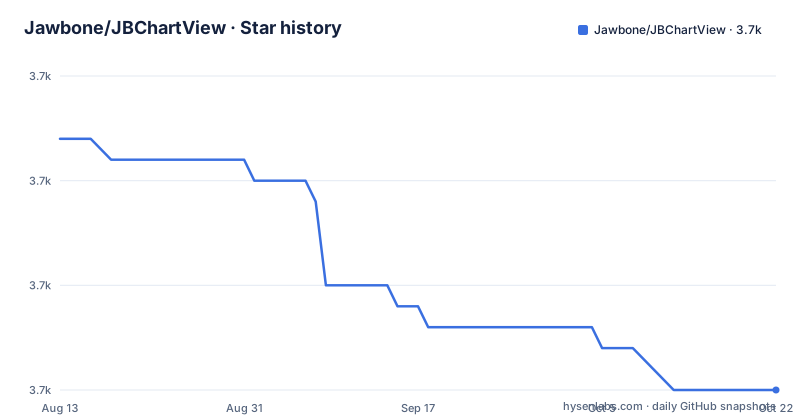
Star history
- Jawbone/JBChartView3,690 ★ · -12
| Repository | 2026-08-13 | 2026-10-22 |
|---|---|---|
| Jawbone/JBChartView | 3.7k | 3.7k |
-12 Stars in the last 70 days, measured from the daily GitHub snapshot. Compare with other projects
Editorial analysis
What JBChartView Solves and Who It Serves
JBChartView addresses a narrow but real problem: adding line and bar charts to an iOS app without pulling in a heavyweight framework. It is a drop-in UIView subclass, so you add it to a view hierarchy like any other view. The library is aimed at developers who already know UITableView, because the data source and delegate pattern is deliberately modeled after that control. If you have written a UITableViewController, you can guess most of the API. The target audience is clearly iOS developers working in Objective-C, with a nod to Swift projects via a bridging header. The README stresses ease of setup and customization, and the demo project shows both chart types. This is not a charting toolkit for complex dashboards; it is a focused component for apps that need a clean line or bar chart with minimal ceremony.
The UITableView-Style Data Flow
The core mechanism is a pair of protocols that mirror UITableView. For JBBarChartView, you implement numberOfBarsInBarChartView: and barChartView:heightForBarViewAtIndex:. The library then normalizes those heights across the chart, so you provide raw values and it handles scaling. For JBLineChartView, you provide numberOfLinesInLineChartView:, lineChartView:numberOfVerticalValuesAtLineIndex:, and lineChartView:verticalValueForHorizontalIndex:atLineIndex:. The y-positions are normalized too. A notable detail: you can return NAN for missing values. The README says the line starts at the first non-NAN value, ends at the last non-NAN value, and interpolates in between, so the line is not interrupted. This is a useful feature for sparse data sets. The data flow is straightforward: set the data source and delegate, set the frame, call reloadData. The README warns that changing the frame afterward does not trigger a reload; you must call reloadData again. That is a small trap but easy to remember.
Getting It Running: Podfile, Bridging Header, and Setup
Installation is covered for two paths. The recommended route is CocoaPods. You add a line to your Podfile: platform :ios, '6.0' and pod 'JBChartView'. The old school way is to drag the /Classes folder into your Xcode project, optionally renaming it. For Swift, you need a bridging header that imports UIKit, JBChartView.h, JBBarChartView.h, and JBLineChartView.h. The usage examples are minimal. For a bar chart, allocate a JBBarChartView, set dataSource and delegate, add it as a subview, then implement the two required methods. For a line chart, you implement three methods. You must also set the frame and call reloadData. The README includes a dealloc example that sets delegate and dataSource to nil, which is standard practice for avoiding dangling pointers. There is no mention of package managers other than CocoaPods, and no Carthage or Swift Package Manager support. That limits integration options for modern workflows.
Animated Reloads and Their Hidden Costs
Both chart types support animated reloads via reloadDataAnimated:. The library calculates the delta between the old and new data models and animates bars or lines shrinking, expanding, or morphing. That is a genuinely useful feature for live data. However, the README lists several constraints. Line fills, both solid and gradient, cannot be animated because of limitations in Quartz Core's CAShapeLayer. They snap into place while the rest of the chart animates. During an animated reload, state changes are ignored, and subsequent calls to reloadData or reloadDataAnimated are ignored until the current reload finishes. All touch events are ignored during the reload. You can check the read-only property reloading to see if an animation is in progress. The default duration is about 0.25 seconds and is independent of data model size. These restrictions only apply to animated reloads; non-animated reloads are synchronous. This is a clear trade-off: smooth animation comes at the cost of responsiveness during the reload window.
Limitations: Age, License, and Scope
The most obvious limitation is the project's age. It requires iOS 6, which is long obsolete. The README references Xcode 5 and a pre-release Swift bridging header document. This library will not take advantage of newer iOS features like Auto Layout improvements or modern Swift interoperability without extra work. The license field in the repository metadata reads NOASSERTION, which means the license is not clearly identified. That is a legal red flag for commercial adoption. You cannot assume it is open source under a permissive license. The README does not mention a license at all. Another limitation is scope: it only does line and bar charts. There is no pie chart, scatter plot, or axis customization beyond what the protocols offer. The README mentions customization but does not detail it. If you need advanced charting, this library is the wrong tool. The NAN interpolation is a nice touch, but it also means the library makes assumptions about your data that you must verify.
Alternatives and the Difference in Approach
A real alternative is Charts, an open-source iOS charting library that is actively maintained and supports a wide range of chart types. The key difference is that Charts uses a modern, data-driven architecture with a dedicated data entry class, ChartDataEntry, and a view that takes a ChartData object. You do not implement a data source protocol; you build a data array and assign it. That is a different mental model. JBChartView follows the UITableView pattern, so it is more familiar to developers who have worked with table views. Charts also supports Swift natively and has a permissive license. Another alternative is Core Plot, which is a more powerful, older library focused on scientific plotting. Core Plot uses a hosting view and a more complex architecture. The difference is that Core Plot is heavier and more flexible, while JBChartView is lighter and simpler. If you need just a line or bar chart and you are already in Objective-C, JBChartView's protocol approach may be easier to adopt than learning a new data model.
Maintenance and Upgrade Cost
The repository shows no archived status, but the last push is unknown and there are no recent releases retrieved. The README points to a CHANGELOG.md for feature history, which suggests there was a period of active development, but the lack of recent activity is a concern. The library depends on UIKit and Quartz Core, so it will continue to compile as long as those frameworks exist, but you will not get bug fixes or new features. Upgrading to a newer iOS version is unlikely to break the library because it uses standard APIs, but the iOS 6 requirement means it was not designed with modern SDKs in mind. The CocoaPods integration is simple, but if you use a newer dependency manager, you will have to vendor the source files manually. The license ambiguity is the highest cost: if you cannot confirm the license, you may not be able to use it in a commercial product at all. Before adopting, you should check the repository for a LICENSE file and read the CHANGELOG to see how long it has been dormant.
The Verdict: A Legacy Component for Legacy Apps
JBChartView is a competent charting library for its time. The UITableView-style protocols make it approachable, and the animated reload feature is a differentiator. The NAN handling for missing values is a thoughtful touch. But the project's age is not just cosmetic; it means the library was written before Swift existed, before modern Auto Layout, and before the current iOS ecosystem. The missing license is a dealbreaker for many teams. If you are working on a legacy Objective-C app that already targets older iOS versions, and you need a simple line or bar chart, JBChartView can do the job. If you are starting anything new, choose a maintained library like Charts. The concrete next step is to open the repository and look for a LICENSE file. If it is absent, treat the library as unsupported and unlicensed, and do not ship it in a commercial product without legal review.
Editorial conclusion
Adopt JBChartView if you maintain a legacy Objective-C app targeting iOS 6 or later, need a simple UITableView-style chart API, and can tolerate its dated design and missing license metadata. Avoid it if you are starting a new Swift project, require modern iOS features, or need a chart library with active maintenance and a clear open-source license. Before integrating, verify the actual license terms in the repository, test the animated reload behavior on your target devices, and confirm that the NAN interpolation and non-animated line fills meet your requirements.
Frequently asked questions
What does JBChartView need before I can use it in an app?
iOS 6 or later and Automatic Reference Counting. CocoaPods is the recommended install, adding `pod 'JBChartView'` to a Podfile whose platform line reads `:ios, '6.0'`. The alternative is dragging the Classes folder into the project, which the README suggests renaming to something like Jawbone - JBChartView. For Swift targets you add a bridging header importing the three headers.
How do I draw a bar chart with JBChartView?
Create a JBBarChartView, set its dataSource and delegate, and add it as a subview. The data source implements numberOfBarsInBarChartView, and the delegate implements barChartView:heightForBarViewAtIndex:, whose values are normalized across the chart for you. Then set the frame and call reloadData at least once; changing the frame later does not reload the chart.
How do I leave a gap in a JBLineChartView series?
Return NAN instead of a CGFloat from the delegate, using [[NSNumber numberWithFloat:NAN] floatValue]. The line then starts at the first non-NAN value and ends at the last, and NAN values in between are interpolated, so the line is drawn through the gap rather than interrupted.
What happens during a JBChartView animated reload?
The delta between the old and new data models is animated, so bars and lines shrink, expand or morph. State changes during the reload are ignored, further reload calls before it completes are ignored, and touch events are ignored too. The read-only reloading property reports the state, the default duration is about 0.25 seconds regardless of data size, and line fills cannot be animated so they snap into place.
Official sources
Add this badge to your README
If you maintain this project, the badge below links readers to this analysis and shows its maintenance status from the daily GitHub snapshot. Paste the markdown into your README; add ?metric=license or ?metric=stars to the image URL for a different field.

[](https://hysenlabs.com/projects/jawbone-jbchartview)Star history chart for your README
[](https://hysenlabs.com/projects/jawbone-jbchartview)