Jellify: a native-feeling music client for a Jellyfin server
A cross-platform, free and open source music player for Jellyfin, powered by React Native
At a glance
- What is it?
- Jellify is a React Native app that acts as the music player for a Jellyfin media server, with an interface designed to look like the big streaming services and curation driven by Jellyfin's own Instant Mix and Suggestions APIs. It suits a self-hosted library owner who wants CarPlay and Android Auto support, and it needs a Jellyfin server to do anything at all.
- Who is it for?
- Jellify fits someone running their own Jellyfin server who wants their music library to feel like a commercial streaming app on a phone and in the car, because the curation is driven by Jellyfin's own Instant Mix and Suggestions APIs rather than by a proprietary catalogue.
- Can I use it commercially?
- Yes. MIT is a permissive licence: you can use, modify and sell software built on it, as long as you keep its copyright and licence notices.
- Is it still maintained?
- Yes. The repository received new commits within the last day.
- What is it written in?
- Mainly TypeScript, according to GitHub's language statistics.
Answers come from the project's GitHub data, last synced on November 7, 2026, and from our analysis. They are not legal advice.
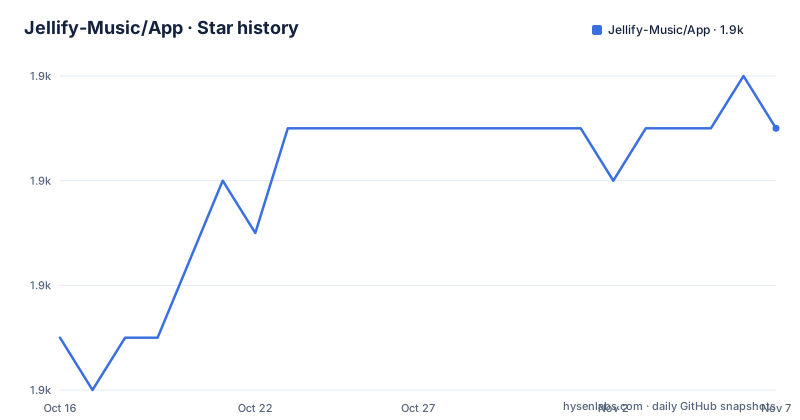
Star history
- Jellify-Music/App1,863 ★ · +4
| Repository | 2026-10-16 | 2026-11-07 |
|---|---|---|
| Jellify-Music/App | 1.9k | 1.9k |
4 Stars in the last 22 days, measured from the daily GitHub snapshot. Compare with other projects
Editorial analysis
A front end for a server you already run
Jellify is a free and open source music player for the Jellyfin Media Server, built with React Native and available for both iOS and Android.
The dependency is stated without euphemism. Jellify requires a connection to a Jellyfin Media Server to work. There is no offline mode without a server, no demo content and no account with the developer. This is a client, and its entire value is what it does with a library you already host.
What it does with it is worth describing precisely. It showcases the artwork of your library, and it has a user interface congruent to what the big guys do. The word congruent is doing interesting work there, since it is a claim about parity of behaviour rather than of appearance, and the screenshots in the documentation are of the Home, Library, Search and Player screens on an iPhone 15 Pro Max.
The library section is organised the way a music service organises one, with Artists, Albums and Tracks views, an artist view with a Similar Artists section, album views including a multiple artists album, and an offline album view. There are track options and an add to playlist screen, a search screen, and a player with a queue.
On top of the browsing, Jellify provides algorithmic curation of your music, driven by Jellyfin's Instant Mix and Suggestions APIs. That is the interesting engineering decision in the project, because it means the recommendations are not a separate recommendation engine with its own model and its own catalogue. They are the server's own endpoints, which means the recommendations work on the specific recordings in your library, including the ones you ripped yourself, and they work with no third party service in the loop.
The name is a joke, with the definition given: jellify, a verb, to make gelatinous.
The origin story is more revealing than the joke. The app was designed with the author and their dad in mind, as a one stop shop for live recordings of bands, and CarPlay and Android Auto support was a must because both of them use CarPlay religiously.
CarPlay and Android Auto are a first class requirement
The car integration is not an afterthought here, and the repository topics list android-auto and carplay alongside the other markers.
That is unusual for a self-hosted client, and the reason is stated in the background section. The interface was designed so that the author and their dad would find it instantly familiar and useful, and CarPlay and Android Auto support was also a must for us, as we both use CarPlay religiously.
The practical consequence is that the phone app has to behave the way a car system expects, which is a different design brief from a phone app. The controls available while driving are fewer, the screen is a different shape, and the queue and skip behaviour have to be reliable at speed. A client that only works on the handset is not much use in a car, and for a family listening to live recordings on a drive, the car is the primary surface.
It also explains the presence of specific dependencies in the project. The topics list react-native-track-player for the audio pipeline, react-native-mmkv for fast key value storage, blurhash for the placeholder artwork that keeps the interface from flashing empty boxes while images load, tamagui for the UI layer, zustand for state and tanstack-query for server data. The track player library is what makes the car integration and the lock screen and notification controls possible, since those platforms require a specific kind of media session rather than a component playing audio.
The Fastlane scripts in the package manifest, with entries for the iOS build, the match and beta lanes, and separate Android build and deploy lanes, confirm that this is released as a real app through the stores rather than as a development artefact.
Getting the build, in four different ways
The distribution options are unusually thorough, and each one exists because a different kind of user has a different constraint.
On Android there is the Google Play listing, and a direct.APK download from the GitHub releases. There is also Obtanium, and the instructions are specific. Click Add App, put the repository URL as the source URL, and on the next screen toggle prereleases, and you will then be able to keep your local copy in sync with new releases.
Obtanium is the option for someone who wants to be on the very latest build the day it is tagged, which is a reasonable thing to want for a self-hosted client where the server side moves quickly. The cost is that you are running a prerelease.
On iOS there is the App Store listing, and two alternatives. The TestFlight way is to join the TestFlight programme and install the latest version from there, which is the cleanest option for anyone who is not a developer. The sideloading way is to head to the releases and download the required.IPA directly, and install it via Altstore or your favourite sideloading utility.
That sideload route exists because a self-hosted community on iOS often needs a build that is not in the App Store yet, and because sideloading is a normal practice in that community rather than an exception.
The release history shows a steady cadence. Versions 1.2.9, 1.2.10 and 1.2.11 came out on 2026-09-01, 2026-09-02 and 2026-10-05, and the last push was on 2026-10-19, so the project is actively worked on.
The repository is MIT licensed and the project is supported through a set of sponsorship and tipping links, with Patreon, Ko-fi and a GitHub sponsors badge, plus a Discord community.
The ecosystem you install around it does much of the work
The most useful section in the documentation is the list of projects that are not required but are recommended, because it tells you what Jellyfin alone does not do and what a complete setup looks like.
There are six of them. The Apple Music Plugin is described as really good at fetching missing artist artwork for obscure or less popular artists, which is a specific problem for a self-hosted library where the metadata came from your own tagging. The LrcLib Plugin is available in the default plugins catalog and is really good at fetching song lyrics.
Jellyfin Rewind gives a recap of your year in music listening similar to other music streaming services, and a hosted version is provided. Spotify Playlist Imports imports a user's Spotify playlists into Jellyfin and can run as a scheduled task, which is the migration path for someone whose music library is organised as Spotify playlists.
AudioMuse-AI and its associated plugin performs sonic analysis on your music and creates smart playlists based on tempo and mood. Jellyfin-RPC displays the content you are currently playing on Discord.
Taken together, that list describes the gap between a bare Jellyfin install and what people expect from a streaming service. Metadata and artwork, lyrics, year in review, playlist import and mood based radio are all separate plugins rather than features of the server or the app.
The design consequence is that Jellify's own feature set is deliberately focused on the player and the library experience, with curation delegated to the server's Instant Mix and Suggestions APIs and the rest of the streaming service parity left to plugins. For a user comfortable installing plugins, that is a good division. For a user who wants everything working out of the box, it means the first hour with Jellify is spent in the Jellyfin plugin catalogue, and it is worth reading that section before deciding the app is missing something.
Building the app from source
The repository is a React Native project with the usual structure, and the package manifest shows a toolchain that is worth reading before you clone it.
The package is named `jellify`, version 1.2.11, and the package manager is bun, with a `bun.lock` at the top level. The scripts are organised around the two platforms. `init-android` runs `bun i`, and `init-ios` runs `bun i` and then the pod install. The run scripts are the standard React Native ones, `react-native run-android` and `react-native run-ios`, with `react-native start` for the Metro bundler.
The iOS side uses CocoaPods with Bundler, since there is a `Gemfile` at the top level and the pod install script runs `bundle install` before `bundle exec pod install`. The clean scripts deintegrate the pods, which is the reliable way to recover from a native dependency that has gone wrong.
There is a `codegen` script that runs React Native's codegen with the Metro debug flag, and a `patches/` directory at the top level, which in a React Native project means patched versions of dependencies are applied. That directory is a signal: the project patches something, and a patch is maintenance that has to be reapplied when the upstream version moves.
The release tooling is in the scripts. There are Fastlane lanes for the iOS build, match and beta, and for the Android build and deploy. The Android build script runs `./gradlew clean` and then `./gradlew assembleRelease`, and prints a note to find the apk in the Android app build outputs directory. There are scripts to create a release bundle for each platform, with the Android one writing to an App-Bundles directory under android and the iOS one to ios/App-Bundles with main.jsbundle, and a send OTA script for Android, which is the mechanism for shipping a JavaScript-only update to already installed apps without going through the store.
Testing is set up with jest, and there is a `maestro/` directory, which is an end to end test framework for mobile, alongside a `jest/` directory. There is a `renovate.json` for dependency updates, husky for git hooks, and a `globals.js` and a `gesture-handler.js` with a native counterpart, which are the usual entry points for patching a library's initialisation in a React Native app.
Where this client stops making sense
The limits here are real and they come from the same place the value does.
The first is the hard requirement for a server. Jellify without Jellyfin is an empty shell, and Jellyfin is a project you have to run, secure and keep updated yourself. If your music is in a service you pay for, a native client for that service is simpler and does the same job. The case for Jellify is that your library is already yours, and it is in Jellyfin because you want it there.
The second is that the car integration and the visual design are the same project's priorities, and both depend on a lot of native libraries working together. react-native-track-player, react-native-mmkv, the blurhash based artwork handling, tamagui, and the CarPlay and Android Auto bridges are a wide surface for a mobile app, and each is a potential source of a build that fails or a bug that only appears on one platform. The `patches/` directory is the visible cost of that.
The third is that the parity with the big streaming services is a moving target. The interface is described as congruent to what the commercial services do, and the commercial services ship continuously, so the gap never closes. The curation being server-driven helps, since Instant Mix and Suggestions improve as Jellyfin does, but the interface will always be a reimplementation of something that is being actively redesigned elsewhere.
The alternative approaches are worth naming. Jellyfin's own clients, including the web client and the third party ones, cover the same ground. The difference in approach is that Jellify commits to a specific visual and interaction design, prioritising the car and the artwork, where the built-in clients prioritise working everywhere.
A fourth alternative is to use the server's own web client in a browser on the phone, which needs no app install at all, at the cost of background playback reliability and of no car integration.
The community dependency is the last thing to weigh. The app depends on Jellyfin, and a meaningful part of the experience depends on community plugins, and the app is maintained by a small team with sponsorship support. It is a well loved project with real polish, and it is also a project where the maintainers' continued interest is a reasonable thing to hope for and a poor thing to assume.
On maintenance, the project is current. The last push was on 2026-10-19, the most recent release is 1.2.11 from 2026-10-05, the repository is not archived and the licence is MIT.
Editorial conclusion
Jellify fits someone running their own Jellyfin server who wants their music library to feel like a commercial streaming app on a phone and in the car, because the curation is driven by Jellyfin's own Instant Mix and Suggestions APIs rather than by a proprietary catalogue. Skip it if you do not run Jellyfin, since the app requires a connection to a Jellyfin Media Server to work, and skip it if you want offline-first playback with no server, because the offline features here are downloads from a server you control. Before you rely on it, note that the recommended Jellyfin plugins that make it feel complete, the Apple Music artwork plugin, the lyrics plugin, Spotify playlist import and the smart playlist tooling, are separate projects you install yourself. The last push was on 2026-10-19 with version 1.2.11 released on 2026-10-05.
Frequently asked questions
What is Jellify and what does it need to work?
It is a free and open source music player for the Jellyfin Media Server, built with React Native for iOS and Android. It requires a connection to a Jellyfin server to work, and its curation is driven by Jellyfin's Instant Mix and Suggestions APIs.
Does Jellify support CarPlay and Android Auto?
Yes. CarPlay and Android Auto support was a stated must for the author and their dad, who both use CarPlay religiously, and both android-auto and carplay are listed as repository topics.
How do I install Jellify on Android without the Play Store?
Download the .APK directly from the GitHub releases, or add the repository to Obtanium by clicking Add App, entering the repository URL as the source URL and toggling prereleases on the next screen, which keeps the install in sync with new releases.
Which Jellyfin plugins are recommended alongside Jellify?
The Apple Music Plugin for missing artist artwork, the LrcLib Plugin for lyrics, Jellyfin Rewind for a year in review, Spotify Playlist Imports, AudioMuse-AI for sonic analysis and smart playlists, and Jellyfin-RPC for Discord now playing.
What is the licence on Jellify?
MIT. The app is free and open source, with the code, the releases and the store listings all available from the project.
Official sources
Add this badge to your README
If you maintain this project, the badge below links readers to this analysis and shows its maintenance status from the daily GitHub snapshot. Paste the markdown into your README; add ?metric=license or ?metric=stars to the image URL for a different field.

[](https://hysenlabs.com/projects/jellify-music-app)Star history chart for your README
[](https://hysenlabs.com/projects/jellify-music-app)Was this useful?