tapflow: self-hosted iOS and Android simulator streaming for browser-based QA
Self-hosted iOS & Android simulator streaming for the whole team. A self-hosted Appetize / BrowserStack alternative for mobile QA teams Run iOS simulators and Android emulators in any browser, no toolchain setup, no device pool, no cloud uploads.
At a glance
- What is it?
- tapflow streams iOS simulators and Android emulators from your own Macs into any browser, with outbound-only connections and no WebDriverAgent. It is a practical, MIT-licensed alternative to Appetize or BrowserStack for teams that want to keep builds on their own infrastructure.
- Who is it for?
- Adopt tapflow if your team already runs Macs with Xcode or Android Studio and needs to give backend developers, product managers, and designers browser access to live simulators without uploading builds to a third-party cloud. Skip it if you need a full device farm, external automation frameworks like Appium, or Windows-based agents.
- Can I use it commercially?
- Yes. MIT is a permissive licence: you can use, modify and sell software built on it, as long as you keep its copyright and licence notices.
- Is it still maintained?
- Yes. The repository received new commits within the last day.
- What is it written in?
- Mainly TypeScript, according to GitHub's language statistics.
Answers come from the project's GitHub data, last synced on November 15, 2026, and from our analysis. They are not legal advice.
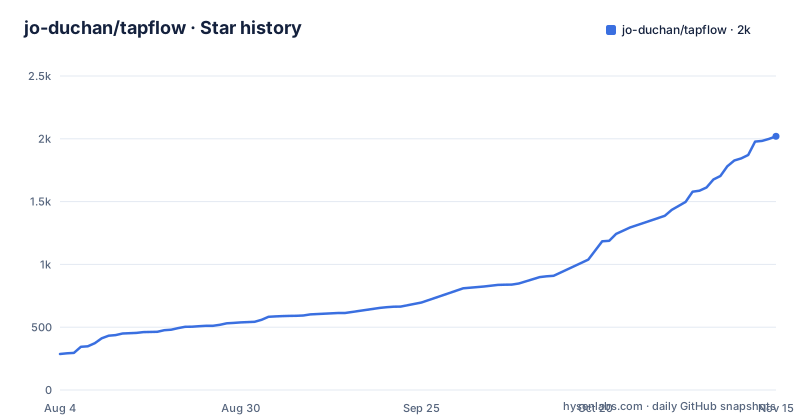
Star history
- jo-duchan/tapflow2,020 ★ · +1,733
| Repository | 2026-08-04 | 2026-11-15 |
|---|---|---|
| jo-duchan/tapflow | 287 | 2k |
1,733 Stars in the last 103 days, measured from the daily GitHub snapshot. Compare with other projects
Editorial analysis
The problem: uneven access to simulators and emulators
Mobile QA typically depends on a small number of people who can run Xcode or Android Studio on a Mac. Backend developers, product managers, and designers end up asking a mobile developer to install a build or check a layout. Physical devices add cost, availability, and OS-version coverage problems. Cloud services like Appetize or BrowserStack solve access but require uploading internal builds to a third party and paying for remote devices while your own Macs sit idle. tapflow targets exactly this gap: it makes the simulators and emulators that already run on your Macs available to the whole team through a browser, without forcing anyone to install a mobile toolchain.
Architecture: relay, outbound agent, and browser dashboard
tapflow connects three components. A self-hosted relay server runs on Linux or macOS and also serves the dashboard on the same port, so there is no separate web server. A macOS agent drives the iOS Simulator and Android emulator. The agent connects outbound to the relay, which means no inbound firewall rules are needed on the Mac. The browser dashboard lets teammates pick an available device and interact with it in real time. The data flow is: Browser to Relay over WebSocket, then Relay to Mac Agent over WebSocket. This outbound-only design is a deliberate choice to simplify deployment in corporate networks that block inbound connections. The README also notes that the agent injects iOS touch directly, without WebDriverAgent, which removes a common point of setup friction.
Setup: from npm install to first admin account
Getting started is a two-command process on a Mac that will run an agent. First, install the global CLI: `npm install -g tapflow`. Then run `tapflow setup` to install simulator and emulator prerequisites. On a relay-only Linux server, skip the setup step. Next, run `tapflow start`, which starts both the relay and the agent on the same Mac in local mode. The README shows the expected output: relay on http://localhost:4000 and an iOS agent connected with three simulators available. Open that URL in a browser, and tapflow redirects to `/setup` to create the admin account. For a headless server, use `tapflow admin init` instead. If something goes wrong, `tapflow doctor` re-checks prerequisites. The relay requires Node.js 22 or later and about 512 MB RAM. Agents must be macOS only, with Xcode for iOS or Java and Android SDK with an AVD for Android.
Streaming: H.264 with a zero-buffer decoder and codec fallback
The core technical claim is browser streaming at about 30 fps without any extra app on the simulator or emulator. The README explains that both iOS and Android stream H.264 through a 2-tier decoder: WebCodecs on secure contexts, and WASM/tinyh264 on plain HTTP. This removes the media-element buffer from the decode path, which is meant to reduce latency. Resolution adapts to the connection, native on a secure context and downscaled on plain-HTTP LAN. There is also a codec fallback: the stream negotiates the codec per client and falls back to JPEG when neither hardware nor WASM decoder is available, so older browsers still work. This is a thoughtful approach because it avoids the common dependency on Media Source Extensions and gives a graceful degradation path. The README points to a latency log file for measurements.
What tapflow is not: boundaries and trade-offs
The README is explicit about what tapflow does not do. It does not replace native mobile development tools; mobile developers still use Xcode and Android Studio. It is not a device farm, so it will not give you a pool of physical devices. External automation frameworks like WebDriverAgent or Appium are out of scope. Instead, tapflow ships its own minimal deterministic flow runner and an MCP server for LLM agents. This is a significant boundary: if your QA automation is already built on Appium, tapflow will not integrate with it. You would need to rework your tests or run them separately. The trade-off is that tapflow avoids the complexity of WebDriverAgent, but you lose compatibility with the wider Appium ecosystem. For teams that only need manual browser-based testing, this is fine. For teams with existing automation suites, it is a real limitation.
Alternative: Appetize or BrowserStack versus self-hosting
The README names Appetize and BrowserStack as the primary alternatives. The difference in approach is fundamental: those are cloud services where you upload your build and pay per minute of device usage. They handle scaling, device variety, and network reliability, but your internal build leaves your infrastructure. tapflow inverts that model. You keep the build on your own Macs, and the relay serves it to your team over your network. There is no per-minute cost and no upload, but you take on the operational burden: you must maintain the Macs, keep Xcode and Android SDK updated, ensure the relay is reachable, and manage user accounts. The README positions this as a cost and data-control win, but it is also a shift in responsibility. If your team has no spare Macs or no one to maintain them, the cloud alternative may still be the better fit.
Maintenance and license considerations
The project is MIT licensed, which means you can use, modify, and redistribute it freely, including in commercial products, as long as you preserve the copyright notice. It is at version 0.x and the README says it is actively developed, with backward compatibility by default and breaking changes noted in the changelog. The last push was August 2026, and releases are frequent, about every two weeks. This cadence is a double-edged sword: you get fixes and features, but you also need to track updates. The `tapflow doctor` command helps verify prerequisites after updates. There is no mention of a migration path between versions, so you should read the changelog before upgrading. The relay runs on Linux or macOS, but agents are macOS only, so if your CI or QA infrastructure is Linux-only, you cannot run agents there. The outbound-only connection reduces firewall configuration, but you still need to ensure the relay is reachable from the browser side.
Editorial conclusion
Adopt tapflow if your team already runs Macs with Xcode or Android Studio and needs to give backend developers, product managers, and designers browser access to live simulators without uploading builds to a third-party cloud. Skip it if you need a full device farm, external automation frameworks like Appium, or Windows-based agents. Before rollout, verify your Macs meet the Node.js 22 and Xcode/Android SDK requirements, and confirm that the outbound-only agent connection works with your network policy. The project is at v0.x with active development, so review the changelog for breaking changes and test `tapflow doctor` on each agent Mac first.
Frequently asked questions
What does tapflow do?
It makes iOS simulators and Android emulators that are already running on your Macs reachable from a browser, so the whole team can do manual mobile testing without a toolchain, a device pool, or uploading builds to a third-party cloud service. Mobile developers still use their own native build tools.
What are the three components?
A self-hosted relay that also serves the dashboard on the same port, an agent running on the Mac that drives the simulators and emulators, and a browser dashboard for everyone else. The agent connects outbound to the relay rather than accepting inbound connections, so no inbound firewall rules are needed on developer machines.
How does it avoid the lag that makes remote device streaming frustrating?
By decoding the video stream with zero buffering instead of using the browser's standard media streaming path, which is built to buffer ahead for playback. It publishes latency measurements in a document linked from the readme, so the performance claim can be checked rather than taken on trust.
Can I automate tests with it?
Not with the standard frameworks. It deliberately does not accept the conventional mobile automation stack and ships its own small deterministic flow runner plus an interface server for language model agents. If your pipeline depends on those frameworks, this is a way to watch a device rather than to drive it.
What are the system requirements?
The relay needs a current Node.js runtime on Linux or macOS and about half a gigabyte of memory. The agents run on macOS only, because they drive simulators, with specific operating system and development tool versions for iOS and a Java plus SDK install for Android. A one-command setup installs the prerequisites, and a diagnostic command rechecks them at any time.
Is it ready for production use?
It is labelled as pre one point zero and under active development, claiming backward compatibility by default with breaking changes noted in a changelog. With roughly fifty open issues, verify that claim against your own use rather than taking it on trust, and read the security document before exposing a relay.
Official sources
Where developers are discussing it
Posts on Hacker News, dev.to and Lobsters that link to this repository, found by our scan of those communities. 2 in the last 30 days; newest first.
- # Where a UI regression test starts mattersdev.to · Nov 15, 2026 · 6 points · 0 comments
- Watch an AI agent test a mobile appdev.to · Oct 20, 2026 · 6 points · 0 comments
Add this badge to your README
If you maintain this project, the badge below links readers to this analysis and shows its maintenance status from the daily GitHub snapshot. Paste the markdown into your README; add ?metric=license or ?metric=stars to the image URL for a different field.

[](https://hysenlabs.com/projects/jo-duchan-tapflow)Star history chart for your README
[](https://hysenlabs.com/projects/jo-duchan-tapflow)Was this useful?