Appwrite: A Self-Hosted Backend Bundle With a Docker-First Install
Appwrite® - complete cloud infrastructure for your web, mobile and AI apps. Including Auth, Databases, Storage, Functions, Messaging, Hosting, Realtime and more
At a glance
- What is it?
- Appwrite packages auth, databases, storage, functions, messaging, and hosting into one containerized platform. This review covers what the repository actually delivers, how the install works, and where the trade-offs sit for teams considering self-hosting.
- Who is it for?
- Adopt Appwrite if you want a single self-hosted platform that covers auth, databases, storage, functions, messaging, and hosting without stitching together separate services. Skip it if you need fine-grained control over each backend component or if you cannot run Docker reliably in your environment.
- Can I use it commercially?
- Yes. BSD-3-Clause is a permissive licence: you can use, modify and sell software built on it, as long as you keep its copyright and licence notices.
- Is it still maintained?
- Yes. The repository received new commits within the last day.
- What is it written in?
- Mainly TypeScript, according to GitHub's language statistics.
Answers come from the project's GitHub data, last synced on November 13, 2026, and from our analysis. They are not legal advice.
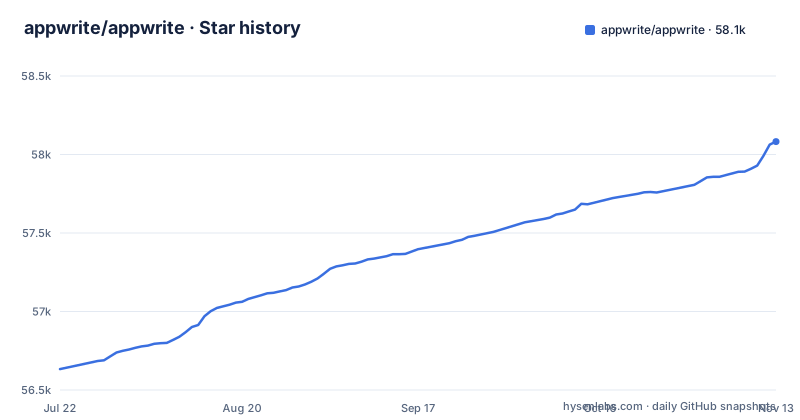
Star history
- appwrite/appwrite58,082 ★ · +1,449
| Repository | 2026-07-22 | 2026-11-13 |
|---|---|---|
| appwrite/appwrite | 56.6k | 58.1k |
1,449 Stars in the last 114 days, measured from the daily GitHub snapshot. Compare with other projects
Editorial analysis
What Appwrite Actually Bundles
Appwrite is not a single service. It is a suite of backend products that run together inside a containerized environment. The README lists nine products: Auth, Databases, Storage, Functions, Sites, Messaging, Firewall, Realtime and MCP. Auth covers email, SMS, OAuth, anonymous sessions, and magic URLs. Databases let you model, query, and scale with Appwrite databases or managed PostgreSQL and MySQL. Storage offers compression, encryption, image transformations, and access control. Functions deploy serverless functions with secure isolated runtimes and event-driven execution. Messaging sends emails, SMS, and push notifications. Sites deploys static, SSR, and CSR frontends from Git with instant previews. The README's pitch is that modular products stay unified from the first prototype to production scale.
The Docker-First Install Path
The README is explicit that Appwrite is designed for a containerized environment. The recommended install is a single docker run command. On Unix, that command publishes port 20080, mounts the Docker socket, and mounts a local directory for Appwrite's code. The entrypoint is set to install. The same pattern applies on Windows CMD and PowerShell, with minor syntax differences. The install writes files to a local appwrite directory and then starts the server. After installation, you access the console at http://localhost. The README warns that on non-Linux native hosts, the server might take a few minutes to start. This is a one-command install, which is attractive for quick trials. But it also means Docker is a hard requirement. If you are on a host where Docker is not available or not permitted, Appwrite is not the right tool.
A Known Failure Mode: Docker API Version Mismatch
The README documents a specific install failure. If you see an error like client version 1.52 is too new. Maximum supported API version is 1.42, it means the Docker CLI inside the Appwrite image is newer than your host Docker Engine. The workaround is to pass an environment variable DOCKER_API_VERSION set to the maximum API version from the error, for example 1.42. You must use the same flag with the upgrade entrypoint. This is a concrete limitation that can trip up anyone with an older Docker host. It also signals that Appwrite's install tooling is tightly coupled to the Docker API version. The README also points to public docker-compose.yml and .env files for setting up an environment manually.
Upgrade and Migration Overhead
Upgrading from an older Appwrite version is not just a matter of pulling a new image. The README states that after upgrading, you should use the Appwrite migration tool. That tool is not described in detail in the README, but its existence implies that data structures or configuration change between versions. Recent releases include 2.6.2 and 1.9.10, both published on 2026-10-24, so a 2.x line and a 1.9.x line are both being released. For a self-hosted deployment, you must plan for migration steps, not just a container swap. The README also points to public docker-compose.yml and .env files for advanced production setups, which means the default install is a convenience layer over a more configurable system. But that configurability comes with the cost of understanding the environment variables and compose file.
Architecture and Runtime Dependencies
Appwrite runs as a set of Docker containers; the repository's docker-compose.yml defines services such as traefik and appwrite. The install command creates a local directory and writes the compose configuration there. The setup wizard listens on port 20080, published on localhost only, and after installation the console is at http://localhost. The reliance on the Docker socket means Appwrite manages its own containers from within a container. That is a common pattern for self-hosted platforms, but it has security implications. The container that runs the install has access to the host's Docker daemon. Anyone who compromises that container could control the host's containers. This is a real consideration for production deployments.
Self-Hosting vs. Managed Cloud
Appwrite is available as a managed cloud platform at cloud.appwrite.io, and the README says the easiest way to get started is to sign up for Appwrite Cloud. Cloud includes a Free plan so you can start building immediately, with paid plans when you need to scale. For teams that do not want to manage infrastructure, that is the simpler path. Self-hosting is for those who need control over their data or want to avoid vendor lock-in. The README also lists one-click setups through pre-configured marketplace apps for instant setup. The trade-off is clear: managed cloud removes the Docker API version problem and the migration overhead, but it puts your data on someone else's infrastructure. Self-hosting keeps data in your control but requires you to handle upgrades, migrations, and Docker compatibility yourself.
Licensing and Maintenance Considerations
Appwrite is licensed under BSD-3-Clause, a permissive open-source license. That means you can use, modify, and distribute the code with minimal restrictions, as long as you preserve the copyright notice. For commercial use, this is a favorable license compared to copyleft options. The repository is actively maintained, with the last push on 2026-11-02. Both 2.6.2 and 1.9.10 were released on 2026-10-24, with 1.9.9 on 2026-10-21, so pick a line deliberately and follow the README's migration instructions when moving between them. The maintenance cost is not trivial: you must track releases, run migration tools, and handle Docker API changes. The README does not provide a detailed upgrade guide beyond pointing to the docs, so you should verify the migration steps for your specific version before upgrading.
Editorial conclusion
Adopt Appwrite if you want a single self-hosted platform that covers auth, databases, storage, functions, messaging, and hosting without stitching together separate services. Skip it if you need fine-grained control over each backend component or if you cannot run Docker reliably in your environment. Before committing, decide between the 2.6.2 and 1.9.10 release lines, follow the README's migration instructions when upgrading, and check the Docker API version on your host, since the README documents a known mismatch that can break installs.
Frequently asked questions
What is Appwrite used for?
It is a backend platform that gives an application Auth, Databases, Storage, Functions, Messaging, Realtime, Hosting and a network Firewall, either as the managed Appwrite Cloud or self-hosted. Agents can also drive a live project through the hosted MCP server, which Cloud includes with no local install.
Is Appwrite completely free?
Appwrite Cloud includes a free plan you can start on, with paid plans when you need to scale, and the software itself is released under BSD-3-Clause. Self-hosting runs on your own infrastructure, where the costs are the server and your time.
Is Appwrite SQL or NoSQL?
Both routes are offered. Appwrite Databases can be used as they are, or you can use managed PostgreSQL and MySQL, and the project frames that choice as matching your use case and team needs.
How do I install Appwrite locally?
Run the docker run command with the entrypoint set to install and the image pinned to appwrite/appwrite:2.6.2, then open the URL printed in the terminal, which includes a one-time secret, to complete the setup wizard. The console is at http://localhost afterwards, and on non-Linux native hosts the server can take a few minutes to start.
How do I install the Appwrite CLI?
The README's self-hosting install is a Docker command with --entrypoint="install", which installs the server. For upgrades the same shape is used with --entrypoint="upgrade", plus the DOCKER_API_VERSION flag if the host engine is older than the CLI in the image.
How do I use Appwrite Functions?
Functions deploy serverless code into isolated runtimes and can be triggered by events.
Official sources
Where this project is recommended
Where developers are discussing it
Posts on Hacker News, dev.to and Lobsters that link to this repository, found by our scan of those communities. 2 in the last 30 days; newest first.
- Keeping track of your agent's workdev.to · Oct 26, 2026 · 7 points · 1 comments
- My agent has two Playwrightsdev.to · Oct 26, 2026 · 5 points · 1 comments
Add this badge to your README
If you maintain this project, the badge below links readers to this analysis and shows its maintenance status from the daily GitHub snapshot. Paste the markdown into your README; add ?metric=license or ?metric=stars to the image URL for a different field.

[](https://hysenlabs.com/projects/appwrite-appwrite)Star history chart for your README
[](https://hysenlabs.com/projects/appwrite-appwrite)Was this useful?