astro-seo: Centralized SEO Metadata for Astro
Makes it easy to add information that is relevant for SEO to your Astro app.
At a glance
- What is it?
- astro-seo is an Astro component for generating search, canonical, robots, Open Graph, and Twitter metadata in a shared document head. It suits teams that want repeatable page metadata, but it does not replace content strategy or search-console validation.
- Who is it for?
- Adopt astro-seo when an Astro site uses layout components and needs repeatable metadata for titles, canonical URLs, robots directives, and social previews. Do not adopt it as a substitute for search-console checks, content work, or a site-wide metadata policy.
- Can I use it commercially?
- Yes. MIT is a permissive licence: you can use, modify and sell software built on it, as long as you keep its copyright and licence notices.
- Is it still maintained?
- Yes. The repository last received commits 72 days ago.
- What is it written in?
- Mainly Astro, according to GitHub's language statistics.
Answers come from the project's GitHub data, last synced on November 7, 2026, and from our analysis. They are not legal advice.
Star history
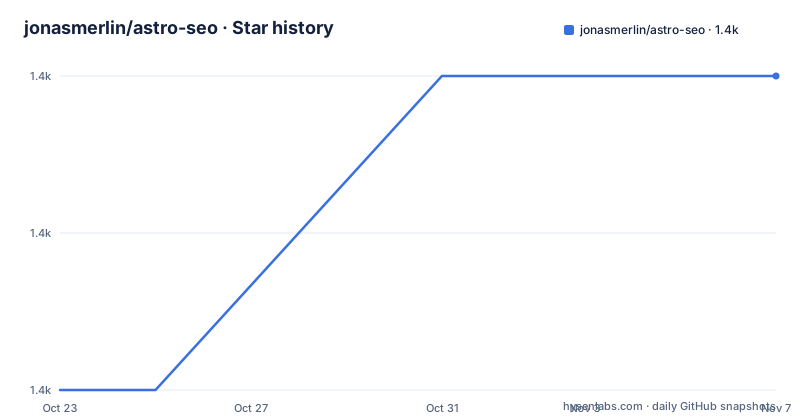
- jonasmerlin/astro-seo1,424 ★ · +2
| Repository | 2026-10-23 | 2026-11-07 |
|---|---|---|
| jonasmerlin/astro-seo | 1.4k | 1.4k |
2 Stars in the last 15 days, measured from the daily GitHub snapshot. Compare with other projects
Editorial analysis
astro-seo and the Fragmented Astro Head Problem
astro-seo addresses a repetitive part of building an Astro site: each page head can accumulate title, description, canonical, robots, Open Graph, and Twitter metadata. Without a shared component, those tags may be copied into individual pages or maintained in a layout that quickly develops inconsistent omissions. The README positions the package as a "one-stop shop for most of your SEO needs when developing Astro sites." That is a component-level promise, not a complete search strategy. It generates and organizes metadata, but the repository documentation does not claim that it improves rankings, discovers keywords, audits content, or submits pages to search engines.
The intended user is an Astro developer who owns the document head, especially someone using a reusable layout for multiple routes. The layout example makes the intended architecture explicit. Pages pass `title` and an optional `description` through Astro props, while `Layout.astro` renders one `SEO` component inside `<head>`. This is useful when every route shares a baseline metadata policy but still needs page-specific values.
The package also fits projects that need explicit control over duplicate-content handling and indexing. Its documented props include `canonical`, `noindex`, `nofollow`, `noarchive`, `nocache`, and `robotsExtras`. Those controls matter for pages such as staging environments, parameter URLs, utility routes, or alternate-language pages. However, the component cannot determine whether a URL deserves indexing or whether a canonical target is semantically correct. Those decisions remain with the site owner.
Astro Props Flow into a Shared SEO Component
The documented data flow is based on Astro's standard component props pattern. A page supplies metadata to a layout, the layout reads those values from `Astro.props`, and `SEO` renders the resulting tags inside `<head>`. Keeping the component in the layout means route authors can change page-level text without repeating the full set of metadata tags in every page.
The central `title` prop is required in the layout example, while `description` is optional. The component also supports `titleTemplate`, `titleDefault`, `charset`, and an array of language alternates. According to the prop table, `%s` in a title template is replaced with the supplied title. If no title is supplied, `titleDefault` provides the fallback. This behavior can enforce a site-wide naming convention, although the README does not document how invalid or conflicting values are resolved.
Canonical generation has a useful default. When `canonical` is omitted or set to `undefined`, the documentation says the component uses `Astro.url.href`. Passing `null` omits the canonical link. That gives normal Astro pages an automatic URL-based default while preserving an explicit escape hatch. It does not validate whether that default URL is the preferred public URL, especially when the deployed site differs from the URL seen during local development.
The `extend` property supplies additional `link` and `meta` entries. The README example uses it for a favicon and Twitter metadata. This is the documented extension point when a page needs a tag outside the component's standard props. It adds entries to the rendered head rather than requiring a second separate metadata system.
Installing and First Using astro-seo in Astro
The README documents installation with either npm or yarn. Install the package in the Astro project where the component will be used.
npm install astro-seoFor a project managed with yarn, the documented command is:
yarn add astro-seoAfter installation, import `SEO` in an Astro page and place it inside `<head>`. This first example supplies a title, description, Open Graph basics, Twitter creator, and extension entries.
---
import { SEO } from "astro-seo";
---

<html lang="en">
  <head>
    <SEO
      title="A Very Descriptive Title"
      description="A heavily optimized description full of well-researched keywords."
      openGraph={{
        basic: {
          title: "A Very Descriptive Title",
          type: "A type.",
          image: "https://user-images.githubusercontent.com/5182256/131216951-8f74f425-f775-463d-a11b-0e01ad9fce8d.png",
        }
      }}
      twitter={{
        creator: "@jonasmerlins1"
      }}
      extend={{
        link: [{ rel: "icon", href: "/favicon.ico" }],
        meta: [
          { name: "twitter:image", content: "https://user-images.githubusercontent.com/5182256/131216951-8f74f425-f775-463d-a11b-0e01ad9fce8d.png" },
          { name: "twitter:title", content: "Tinker Tailor Soldier Spy" },
          { name: "twitter:description", content: "Agent" },
        ],
      }}
    />
  </head>
</html>
The package manifest lists `astro-seo` version `1.2.0` and exposes `./index.ts` through its package `exports`. The README does not document a post-install setup command, so no additional configuration step should be assumed.
Layout-Based Configuration for Per-Page Metadata
For a multi-page site, the documented layout approach is less repetitive than placing `SEO` in every route. The layout defines the props it accepts, reads them through `Astro.props`, and renders `SEO` once.
---
import { SEO } from "astro-seo";

interface Props {
  title: string;
  description?: string;
}

const { title, description } = Astro.props;
---

<html lang="en">
  <head>
    <SEO
      title={title}
      description={description}
    />
  </head>
  <body>
    <slot />
  </body>
</html>
A route then supplies its own values:
---
import Layout from "../layouts/Layout.astro";
---

<Layout title="Homepage" description="Welcome to my site">
  <h1>Hello!</h1>
</Layout>
This structure centralizes head rendering while keeping visible page content in the slot. It also makes omissions visible during route review because each page must decide whether to provide the optional `description`. The README does not explain whether pages can supply canonical, robots, Open Graph, or language alternates through the same layout example, so teams should treat those as explicit extension work unless their own component interfaces provide them.
The package's repository includes `src/SEO.astro` and `src/components` in the published `files` list, along with `index.ts` and `src/index.ts`. Based on that layout, the package is delivered as Astro and TypeScript source rather than as a conventional separately generated runtime bundle. The README does not discuss compiled-output compatibility or framework-version support, so consumers should verify those details against their Astro setup before standardizing the package.
Open Graph, Twitter, and Extension Rules
Open Graph metadata is organized into `openGraph.basic` and `openGraph.optional`. The basic properties are `title`, `type`, `image`, and `url`. The documentation imposes an all-or-nothing rule for these fields. Defining one requires the other basic properties, with the exception of `url`, which defaults to `Astro.request.url.href` when the other three basic values are present. This is a concrete integration constraint: adding an Open Graph title can force an application to provide a valid type and image as well.
The optional group includes `audio`, `description`, `determiner`, `locale`, `localeAlternate`, `siteName`, and `video`. Its documented locale default is `en_US`, while `determiner` defaults to an empty string. The component therefore supplies defaults for selected fields, but it does not infer the correct locale from page language or select a social image based on route content. Those values still need to come from the site.
Twitter metadata supports a `creator` property in the README example. The broader prop table is truncated in the README, so it would be unsafe to claim that every Twitter field behaves in a particular way. The `extend` arrays provide a documented fallback for extra Twitter names, as shown by the explicit `twitter:image`, `twitter:title`, and `twitter:description` entries. That fallback is useful for custom tags, but it also means teams can end up with both package-generated tags and extension-generated tags. The README does not define duplicate-tag handling, so teams should inspect the resulting head for each page type.
Where astro-seo Can Fail to Match Site Policy
The largest limitation is the gap between metadata generation and metadata correctness. A component can emit a title and description, but it cannot decide whether the description is accurate, whether the canonical URL points to the preferred page, or whether a page should be indexed. The `robotsExtras` prop accepts a comma-separated string for directives such as `max-snippet:-1` and `max-image-preview:large`; it does not validate the syntax or explain how multiple directives interact with the boolean props.
Duplicate metadata is another concrete risk. A developer can define values through `openGraph`, `twitter`, and `extend.meta` at the same time. The README presents extension as additive, but it does not state whether later or manually supplied tags replace generated tags. A site with unusual social metadata requirements should review the rendered head rather than assuming that every tag is automatically merged or deduplicated.
The package is also not a complete alternative to a full metadata system. It does not document JSON-LD support, structured data generation, sitemap creation, feed metadata, hreflang validation, or search-engine submission. The supported language-alternate prop covers a defined list of alternate links, but the README does not claim that it resolves regional URL relationships. For sites with extensive international SEO or structured-data policies, the component may cover only the head-metadata portion.
Manual Head Markup as the Alternative Approach
The direct alternative is to write Astro metadata tags by hand in a layout. That approach uses the same underlying `<head>` element and Astro props, but it does not introduce a package-specific `SEO` component or its Open Graph and Twitter configuration shape. It can be preferable when a site has unusual tag requirements, strict duplicate handling, structured data, or metadata that must be assembled from several application services. It is also a simpler dependency choice for a very small site that already has a clear metadata convention.
The trade-off is maintenance. Manual markup puts the site owner in charge of every title, canonical, robots, Open Graph, and Twitter field. It avoids relying on undocumented merge behavior, but it can produce inconsistent pages when several layouts or routes define the head separately. `astro-seo` reduces that repetition through a named interface and documented defaults. Its cost is an additional dependency, a package-specific configuration model, and an upgrade path tied to `v1.2.0`.
The MIT license permits use, modification, distribution, and reuse under its terms, subject to the license file's conditions. This is a licensing summary rather than legal advice. For teams choosing between the component and manual tags, the relevant decision is operational: choose `astro-seo` when centralized conventions matter more than maximum control over each emitted tag.
astro-seo Release Cadence and Upgrade Surface
The repository is not archived, and its last push was on 2026-08-28. The documented release history lists `v1.2.0` on 2026-08-28, `v1.1.0` on 2026-01-13, and `v0.8.4` on 2024-06-01. These dates indicate a recent release after a longer gap between the two earlier listed versions. The repository information does not establish a fixed maintenance schedule or a commitment to future releases.
Upgrade cost is likely to depend on the metadata surface already in use. Projects relying on title templates, canonical defaults, Open Graph groups, extension arrays, or robots directives should review the `CHANGELOG.md` and compare their component usage with the new prop definitions before changing versions. The README does not document a migration command, a compatibility matrix, or a rollback procedure. The package manifest exposes the TypeScript entry `./index.ts`, which makes reviewing the installed source and the package's build configuration a relevant part of an upgrade assessment.
For routine checks, the repository defines `npm run build`, `npm run check`, `npm run dev`, and `npm run start` scripts. The documented `build` script runs `astro check`, TypeScript compilation with `tsc --noEmit`, and `astro build`; these are project maintenance commands, not a claim that any particular Astro application has passed them.
Editorial conclusion
Adopt astro-seo when an Astro site uses layout components and needs repeatable metadata for titles, canonical URLs, robots directives, and social previews. Do not adopt it as a substitute for search-console checks, content work, or a site-wide metadata policy. Before adoption, verify that its generated Open Graph and Twitter tags match the metadata policy for your pages, and review migration effort when upgrading from `v1.1.0` to `v1.2.0`.
Frequently asked questions
How do I install and use astro-seo in an Astro project?
Install it with `npm install astro-seo` or `yarn add astro-seo`, then import `SEO` from "astro-seo" and place the component inside the `<head>` section of an Astro page or layout.
What is the default canonical URL in astro-seo?
When `canonical` is omitted or set to `undefined`, the README says the component uses `Astro.url.href`. Pass `null` when the canonical link should be omitted.
Can astro-seo add favicon and custom meta tags?
Yes. The documented `extend` prop accepts additional `link` and `meta` entries. The README uses this to add a favicon and custom Twitter metadata.
Official sources
Add this badge to your README
If you maintain this project, the badge below links readers to this analysis and shows its maintenance status from the daily GitHub snapshot. Paste the markdown into your README; add ?metric=license or ?metric=stars to the image URL for a different field.

[](https://hysenlabs.com/projects/jonasmerlin-astro-seo)Star history chart for your README
[](https://hysenlabs.com/projects/jonasmerlin-astro-seo)Was this useful?