SyncNet: measuring whether the lips and the audio actually line up
Out of time: automated lip sync in the wild
At a glance
- What is it?
- syncnet_python is the demo code for SyncNet, an audio-to-video synchronisation network that estimates the temporal offset between an audio track and a face crop, and can pick out which of several faces is speaking. It is a research release with a conda environment, a pretrained model download and a three stage pipeline.
- Who is it for?
- syncnet_python suits a researcher or engineer who needs a measurable answer to whether an audio track is synchronised with a face, whether for dubbing pipelines, forensics, or dataset cleaning, and the three stage pipeline makes it usable on real multi-face video rather than only on a single clip.
- Can I use it commercially?
- Yes. MIT is a permissive licence: you can use, modify and sell software built on it, as long as you keep its copyright and licence notices.
- Is it still maintained?
- Activity is slowing. The repository last received commits 6 months ago.
- What is it written in?
- Mainly Python, according to GitHub's language statistics.
Answers come from the project's GitHub data, last synced on November 7, 2026, and from our analysis. They are not legal advice.
Star history
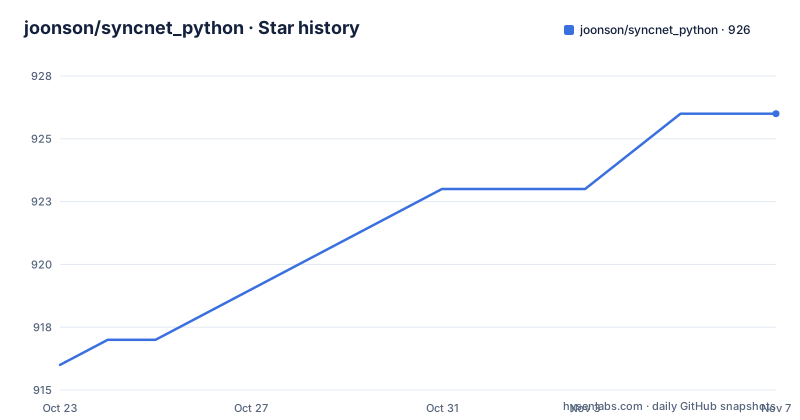
- joonson/syncnet_python926 ★ · +10
| Repository | 2026-10-23 | 2026-11-07 |
|---|---|---|
| joonson/syncnet_python | 916 | 926 |
10 Stars in the last 15 days, measured from the daily GitHub snapshot. Compare with other projects
Editorial analysis
Two questions: is it in sync, and who is talking
syncnet_python contains the demo for the audio-to-video synchronisation network called SyncNet. The stated uses are audio-visual synchronisation tasks, and the readme names two.
The first is removing temporal lags between the audio and visual streams in a video. The second is determining who is speaking amongst multiple faces in a video.
That second capability is the more interesting one, and it is what makes the project more than a lip reading tool. A face crop that is out of sync with the audio produces a poor match; a face crop that is in sync while the others are not identifies the speaker. The same measurement used to check synchronisation is what makes speaker attribution possible, and that is why the pipeline includes a detection and tracking stage at all.
The project is the demo for a published model rather than a general purpose package. The readme asks that the paper be cited if you make use of the software, and gives the reference: Chung, J. S. and Zisserman, A., Out of time: automated lip sync in the wild, from the Workshop on Multi-view Lip-reading at ACCV in 2016.
That citation request has a practical consequence for anyone considering this repository. It is a research artefact with an associated paper, and the code layout reflects that, with scripts named run_pipeline.py, run_syncnet.py and run_visualise.py rather than a library with an importable API. You use it by running stages over a video file and reading the output files.
The three stage pipeline and the files it leaves behind
The full pipeline runs three stages: face detection and tracking, sync offset estimation, and visualisation. Each is a separate script taking the same three arguments, the input video, a reference name and an output directory.
python run_pipeline.py --videofile /path/to/video.mp4 --reference name_of_video --data_dir /path/to/output
python run_syncnet.py --videofile /path/to/video.mp4 --reference name_of_video --data_dir /path/to/output
python run_visualise.py --videofile /path/to/video.mp4 --reference name_of_video --data_dir /path/to/output
The reference name is what ties the stages together, and the data directory is where the intermediate state lives between them. The first stage writes cropped face tracks, and the second reads the video and produces the output video that the third stage visualises.
The documented outputs are two directories under the data directory.
$DATA_DIR/pycrop/$REFERENCE/*.avi - cropped face tracks
$DATA_DIR/pyavi/$REFERENCE/video_out.avi - output video (as shown below)
So the face tracking stage writes one AVI per tracked face, which is exactly what the speaker attribution task needs: each track becomes a candidate whose audio-visual alignment can be scored separately.
There is also a shorter path for a quick check, through demo_syncnet.py.
python demo_syncnet.py --videofile data/example.avi --tmp_dir /path/to/temp/directoryThat script works on a single example file and writes into a temporary directory rather than the staged data directory. The readme says to check that it returns approximately these values, with minor differences expected depending on platform and package versions.
AV offset:      3
Min dist:       5.353
Confidence:     10.021
Those three numbers are the output of the network. AV offset is the lag in frames between the audio and the video, min dist is the distance measure of the best alignment, and confidence is how sure the model is. The offset is the value you would use to correct a synchronisation problem; the other two tell you whether to trust it.
Setting up: conda, a model download, and a CPU path
The environment is defined in conda YAML files, with one for GPU and one for CPU only.
conda env create -f environment.ymlconda env create -f environment-cpu.ymlThe readme states that the code automatically detects and uses a CUDA GPU if available and falls back to CPU otherwise. So the two files exist for environment setup convenience rather than because the two paths behave differently once running.
That fallback matters more than it sounds. The model is a neural network, and the practical constraint for anyone trying this is usually the hardware rather than the code. Being able to run the demo on CPU means you can confirm the pipeline works end to end on a laptop before you commit a machine with a GPU to a dataset run.
The second setup step is the pretrained model, which is fetched by a shell script in the repository root.
sh download_model.shThe model is not vendored in the repository, so this step is mandatory before the demo will do anything useful. The repository also contains a .gitignore, which is consistent with a weights file being generated locally rather than tracked.
The source layout is small and readable. SyncNetModel.py holds the model definition and SyncNetInstance.py the inference wrapper, demo_feature.py and demo_syncnet.py are the two entry points for trying features out, and a detectors/ directory holds the face detection and tracking code. The LICENSE.md file at the root carries the MIT licence, and the img/ directory holds the example images.
What the network actually measures, and where it breaks
The core idea is a learned comparison between audio and video, trained so that a synchronised pair scores better than an offset one. The distance and confidence the demo prints are the output of that comparison.
Two limitations follow from the design, and both are worth understanding before you build a pipeline on top of it.
The first is the input assumption. The network works on a face crop and the matching audio, which is why the pipeline has a detection and tracking stage and why the crops are written out as separate AVI files. It does not take a raw video and decide whether it is in sync. That means the quality of the upstream detection and tracking determines the quality of the answer, and a track that drifts or loses the face produces a confident-looking measurement of the wrong thing.
The second is the frame granularity and the fixed reporting format. The offset is reported in frames, so converting it to a real time offset depends on the frame rate of the input, and the readme reports approximately 3 for the example file. There is no confidence threshold in the documented usage, which means the burden of deciding whether a given confidence value is good enough falls on you.
The appropriate alternative depends on which question you are actually asking. If you need to know whether a specific edit is in sync, and you control both the audio and the picture, then measuring the offset in the renderer or the editing tool is exact and free, and a learned network is the wrong tool. If you need to know which of several faces is speaking in footage you did not control, there is no deterministic method, and that is where a learned synchronisation model is the right approach. The interesting boundary is between those two cases, and the demo gives you the numbers without telling you which side of it you are on.
Editorial conclusion
syncnet_python suits a researcher or engineer who needs a measurable answer to whether an audio track is synchronised with a face, whether for dubbing pipelines, forensics, or dataset cleaning, and the three stage pipeline makes it usable on real multi-face video rather than only on a single clip. It does not suit a production media tool, because the repository is a demo accompanying a paper rather than a packaged library, and it does not perform lip rewriting itself, it measures alignment. Before adopting it, check that you can satisfy the conda environment and the model download, note that the environment files are split into a CUDA and a CPU variant, and read the paper citation requirement in the readme if your work is published, since the authors ask you to cite it.
Frequently asked questions
What does syncnet_python do?
It contains the demo for the SyncNet audio-to-video synchronisation network, which can be used to remove temporal lags between the audio and visual streams of a video and to determine who is speaking among multiple faces. The code automatically uses a CUDA GPU when available and falls back to CPU otherwise.
How do I set up the syncnet_python environment?
Create a conda environment with conda env create -f environment.yml for the GPU setup, or conda env create -f environment-cpu.yml for CPU only, then run sh download_model.sh to fetch the pretrained model before running any of the scripts.
What are the three stages of the syncnet_python pipeline?
Face detection and tracking via run_pipeline.py, sync offset estimation via run_syncnet.py, and visualisation via run_visualise.py. Each takes --videofile, --reference and --data_dir, and the outputs are cropped face tracks under pycrop and the output video under pyavi.
What do the AV offset, min dist and confidence values mean?
They are the outputs of the network for the demo script, which the readme says should return approximately AV offset 3, min dist 5.353 and confidence 10.021 for the example file, with minor differences expected depending on platform and package versions. The offset is the lag between audio and video.
What licence is syncnet_python released under?
The repository carries an MIT licence in the LICENSE.md file at the root. The readme also asks that the SyncNet paper, Out of time: automated lip sync in the wild by Chung and Zisserman, be cited if you make use of the software.
Official sources
Add this badge to your README
If you maintain this project, the badge below links readers to this analysis and shows its maintenance status from the daily GitHub snapshot. Paste the markdown into your README; add ?metric=license or ?metric=stars to the image URL for a different field.

[](https://hysenlabs.com/projects/joonson-syncnet-python)Star history chart for your README
[](https://hysenlabs.com/projects/joonson-syncnet-python)Was this useful?