Amphion: six audio generation tasks, one pinned CUDA image
Amphion (/æmˈfaɪən/) is a toolkit for Audio, Music, and Speech Generation. Its purpose is to support reproducible research and help junior researchers and engineers get started in the field of audio, music, and speech generation research and development.
At a glance
- What is it?
- Amphion is an MIT-licensed Python research toolkit for audio, music and speech generation. Text to speech, singing voice synthesis, voice conversion, accent conversion, singing voice conversion and text to audio are marked supported while text to music is marked developing. There is no package metadata to install from, the build runs through a Dockerfile pinned to CUDA 11.8 and Python 3.9.15, and the training data mixes a non-commercial license with a permissive one.
- Who is it for?
- Amphion fits a reader who already has an NVIDIA machine, has picked one of the six supported tasks, and is willing to read a per-task README instead of expecting a quickstart. It does not fit someone who wants a pip-installable package, a finished text to music path, or a checkpoint whose license follows from the repository license.
- Can I use it commercially?
- Yes. MIT is a permissive licence: you can use, modify and sell software built on it, as long as you keep its copyright and licence notices.
- Is it still maintained?
- Activity is slowing. The repository last received commits 7 months ago.
- What is it written in?
- Mainly Python, according to GitHub's language statistics.
Answers come from the project's GitHub data, last synced on November 15, 2026, and from our analysis. They are not legal advice.
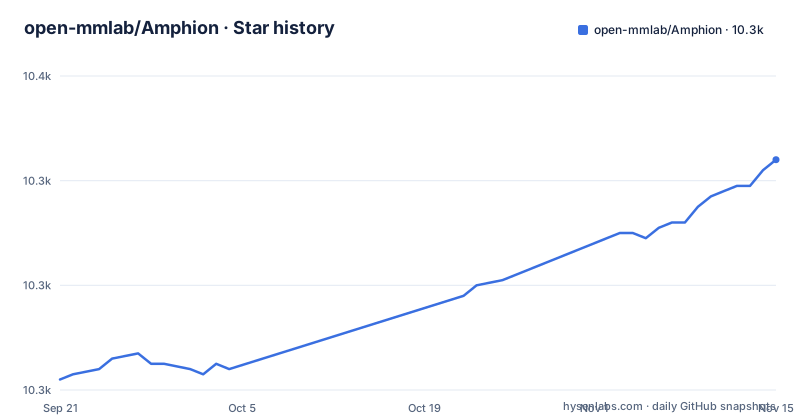
Star history
- open-mmlab/Amphion10,344 ★ · +42
| Repository | 2026-09-21 | 2026-11-15 |
|---|---|---|
| open-mmlab/Amphion | 10.3k | 10.3k |
42 Stars in the last 55 days, measured from the daily GitHub snapshot. Compare with other projects
Editorial analysis
Six tasks carry the supported marker and text to music does not
Amphion opens with a task grid, and that grid is the maturity signal the README gives for each task. Text to speech, singing voice synthesis, voice conversion, accent conversion, singing voice conversion and text to audio all sit on the supported line. Text to music sits below them on the developing line, and the list closes with an ellipsis instead of a count.
For a reader this narrows the decision early. If your input is text and your output is music, the project is telling you that no finished recipe exists to copy, and you will be assembling one out of the directories that do have examples. If your task is one of the other six, the grid promises an example, and the next question becomes which example, because the top-level README hands you to separate documents under egs/ instead of to a single command.
No package metadata at the top level, so the Dockerfile is the installer
The top-level listing holds .github/, .gitignore, Dockerfile, LICENSE, README.md, bins/, config/, egs/, env.sh, evaluation/, imgs/, models/, modules/, optimizer/, preprocessors/, pretrained/, processors/, schedulers/, text/, utils/ and visualization/. No pyproject.toml, no setup.py and no requirements.txt appear in it, and the repository ships a Dockerfile:
FROM nvidia/cuda:11.8.0-cudnn8-devel-ubuntu18.04

ARG DEBIAN_FRONTEND=noninteractive
ARG PYTORCH='2.0.0'
ARG CUDA='cu118'
ARG SHELL='/bin/bash'
ARG MINICONDA='Miniconda3-py39_23.3.1-0-Linux-x86_64.sh'
The base image tag pins the CUDA and cuDNN generation, and the build args default PyTorch to 2.0.0 against CUDA cu118. The interpreter comes from a conda environment created under a fixed name:
RUN conda create -y --name amphion python=3.9.15After that the Dockerfile sets WORKDIR /app, copies env.sh into it and marks it executable.
The build repoints apt at a Tencent mirror and deletes the CUDA list
The mirror rewrite is unconditional. Both archive.ubuntu.com and security.ubuntu.com are replaced with mirrors.cloud.tencent.com, and the CUDA apt list is deleted outright, so the CUDA runtime has to come from the base image rather than from a package repository:
RUN sed -i 's/archive.ubuntu.com/mirrors.cloud.tencent.com/g' /etc/apt/sources.list \
    && sed -i 's/security.ubuntu.com/mirrors.cloud.tencent.com/g' /etc/apt/sources.list \
    && rm /etc/apt/sources.list.d/cuda.list \
    && apt-get update \
    && apt-get -y install \
    python3-pip ffmpeg git less wget libsm6 libxext6 libxrender-dev \
    build-essential cmake pkg-config libx11-dev libatlas-base-dev \
    libgtk-3-dev libboost-python-dev vim libgl1-mesa-glx \
    libaio-dev software-properties-common tmux \
    espeak-ng
There is no build argument that switches the mirror back, so anyone building from a network that reaches that host slowly has to edit those two lines before anything installs. The package list is also the closest thing the project has to a dependency spec: ffmpeg for audio handling, build-essential with cmake and pkg-config for compiling extensions, tmux for long runs, and espeak-ng for speech. Together with the ubuntu18.04 base tag and a Python 3.9 installer, the stack is pinned to one older generation of the toolchain, and moving any single piece means rebuilding the image by hand.
Six task documents stand in for a first-run command
The top-level README links egs/tts/README.md, egs/svc/README.md, egs/tta/README.md, egs/vocoder/README.md, egs/metrics/README.md and models/vc/vevo/README.md. The 2026/03/25 Vevo2 entry points at models/svc/vevo2/README.md, DualCodec at models/codec/dualcodec/README.md, Vevo1.5 at models/svc/vevosing/README.md and MaskGCT at models/tts/maskgct/README.md.
What that costs you is orientation. You pick a task, then a model, then read the document attached to that pair, and the arguments you need live in that file rather than in the page you started from. A reader following an older example can end up in models/vc/vevo while the newest framework sits next door under models/svc/vevo2, and the difference between a voice conversion recipe and a unified speech and singing recipe is only visible once you open the right file.
Every release tag is from February 2024 while main moved in March 2026
Amphion has three release tags and all three landed on the same day: v0.1.0-alpha, v0.1.0 and v0.1.1-alpha, each dated 2024-02-23. The default branch was pushed to on 2026-03-25 and the repository is not archived, so what separates the tags from the current code is a tagging gap rather than an abandoned project. The news entries in between are dense: Vevo2 on 2026/03/25, DualCodec on 2025/05/26, Vevo1.5 on 2025/04/12, Metis and Emilia-Large on 2025/02/26, the Amphion v0.2 technical report on 2025/01/30, and ICLR 2025 acceptances for MaskGCT and Vevo on 2025/01/23.
Two consequences follow for anyone reproducing a number. Pinning v0.1.1-alpha gets you a February 2024 tree with no Vevo, no MaskGCT, no Metis, no DualCodec and no Vevo2 in it, and the technical report calls the 2024 state of the project v0.2 while every tag still reads 0.1.x. Working from the branch gets you all of the above and puts the burden on you, because the tip of main is whatever it contains on the day you build. Record the commit, not the version name, when a result has to be reproduced later.
Emilia-Large joins a non-commercial corpus to a permissive one
The training data and the licensing story are the same story here. The 101k-hour Emilia set is licensed CC BY-NC 4.0, the 114k-hour Emilia-YODAS set that joined it is licensed CC BY 4.0, and the 2025/02/26 entry presents the union as Emilia-Large with over 200,000 hours of audio. That entry names both component licenses in the same breath and stops there. It does not state a single term for the combined release.
This is where a commercial plan has to stop and read. The MIT license covers the code in this repository, not the audio, and anything trained on the Emilia half may carry a non-commercial term with it. Before you publish a model, check the license attached to the exact dataset you downloaded rather than to the dataset family name, because the family mixes a restrictive component with a permissive one and the announcement does not resolve the mix for you.
Checkpoints sit outside the tree and one sits outside the Amphion org
The tree carries a pretrained/ directory, but the weights named in the announcements are hosted outside it. MaskGCT, Metis and Vevo sit in the Amphion Hugging Face organisation; MaskGCT also has ModelScope mirrors and a hosted space; Vevo2 sits under a personal account at RMSnow/Vevo2 with its own project page.
The consequence is that the MIT license at the root of the repository does not travel with any of those files. Each model repository carries its own terms, and the organisation name is not a usable signal either, because the newest framework is not filed under the organisation that holds the older ones. A reader who needs a defensible license chain for a checkpoint has to read the license file in the specific model repository that was downloaded..
Visualizations are the stated specialty and the README names no command
Visualizations of classic models and architectures are the feature the project names as its own, offered as help for junior researchers who want to understand how a model works. The tree reserves a visualization/ directory for that work and an imgs/ directory for images, and the news links SingVisio, accepted by Computers & Graphics, per the 2024/08/20 news entry, as a separate piece of work.
Editorial conclusion
Amphion fits a reader who already has an NVIDIA machine, has picked one of the six supported tasks, and is willing to read a per-task README instead of expecting a quickstart. It does not fit someone who wants a pip-installable package, a finished text to music path, or a checkpoint whose license follows from the repository license. Check three things before you start: the license of the exact dataset you plan to train on, the license of the specific model repository you download, and whether your driver matches the CUDA 11.8 base image the Dockerfile pins. If all three hold, the research program behind the repository is coherent, because the task grid, the example directories and the published papers all point the same way.
Frequently asked questions
What does Amphion mean in this repository?
Here the name belongs to a research toolkit, not to a person or a product line. Amphion describes itself as a toolkit for audio, music and speech generation whose purpose is to support reproducible research and to give junior researchers and engineers a starting point. The README gives the pronunciation as /æmˈfaɪən/ and covers six supported tasks plus text to music in development.
Is Amphion related to studio monitors at all?
No. open-mmlab/Amphion is Python source for audio, music and speech generation research, not a hardware product.
Can I pip install Amphion?
There is no pyproject.toml, setup.py or requirements.txt in the top-level listing, so there is no package to install. The repository ships a Dockerfile: the image is based on nvidia/cuda:11.8.0-cudnn8-devel-ubuntu18.04 and creates a conda environment named amphion with Python 3.9.15, then copies env.sh into /app and marks it executable.
Which Amphion version should I pin?
The newest tag is v0.1.1-alpha, dated 2024-02-23, alongside v0.1.0 and v0.1.0-alpha from the same day. The default branch was last pushed on 2026-03-25, so no tag matches the current code and pinning a tag excludes Vevo2, Vevo1.5, DualCodec and Metis.
Is text to music finished in Amphion?
No. Text to music is the one task in the grid that carries the developing marker, while text to speech, singing voice synthesis, voice conversion, accent conversion, singing voice conversion and text to audio carry the supported marker.
Can I use Emilia-Large for a commercial product?
Resolve it before you train. Emilia-Large combines the 101k-hour Emilia set licensed CC BY-NC 4.0 with the 114k-hour Emilia-YODAS set licensed CC BY 4.0, giving over 200,000 hours, and the announcement states both component licenses without naming a single term for the combined release. The repository license of MIT covers the code only, not the audio.
Official sources
Add this badge to your README
If you maintain this project, the badge below links readers to this analysis and shows its maintenance status from the daily GitHub snapshot. Paste the markdown into your README; add ?metric=license or ?metric=stars to the image URL for a different field.

[](https://hysenlabs.com/projects/open-mmlab-amphion)Star history chart for your README
[](https://hysenlabs.com/projects/open-mmlab-amphion)Was this useful?