Pi-hole manual companion scripts: DNS blocking, DoH defense, and SD card backup files
files referred to in my pihole installation manual
At a glance
- What is it?
- jpgpi250/piholemanual is a small Shell repository that backs a set of Pi-hole installation and hardening PDFs. It holds scripts for whitelisting Google ads, catching DNS bypass attempts, and resizing partitions for backups, plus DoH-related files for pfSense.
- Who is it for?
- Adopt this repository if you run Pi-hole on a Raspberry Pi and want the exact scripts referenced in the author's PDF manuals, especially for whitelisting Google ads, resizing partitions before SD card backup, or blocking DoH with pfSense. Do not adopt it as a standalone or actively maintained tool: the README shows no release history, no license identifier, and no recent push data, so you must verify each script against your own IP addresses and network setup.
- Can I use it commercially?
- Not without permission. GitHub finds no licence file in the repository, and without a licence all rights are reserved by default: you may read the code but not reuse it. Check the README, or ask the authors, before using it.
- Is it still maintained?
- Yes. The repository received new commits within the last day.
- What is it written in?
- Mainly Shell, according to GitHub's language statistics.
Answers come from the project's GitHub data, last synced on October 22, 2026, and from our analysis. They are not legal advice.
Star history
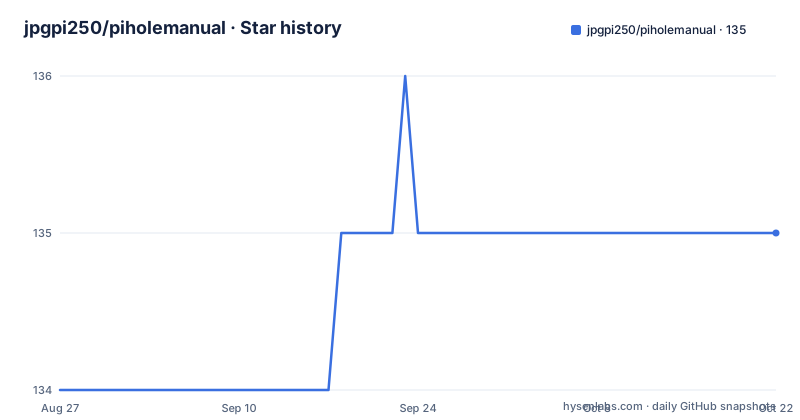
- jpgpi250/piholemanual135 ★ · +1
| Repository | 2026-08-27 | 2026-10-22 |
|---|---|---|
| jpgpi250/piholemanual | 134 | 135 |
1 Stars in the last 56 days, measured from the daily GitHub snapshot. Compare with other projects
Editorial analysis
What this repository actually contains
The audience is narrow: a Raspberry Pi owner who has already decided to run Pi-hole and wants to replicate the author's specific setup. The scripts are not packaged, documented in code comments, or versioned. They are raw material for a tutorial. That is a legitimate use, but it means the repository has no value as a standalone tool.
The Google Ads whitelist script and its version lock
The README also warns that some scripts contain IP addresses that need editing. That is a maintenance hazard. If the script hard-codes your network's IP range or your Pi-hole's address, it will not work on another machine without manual changes. The author acknowledges this, but it means the script is not portable out of the box.
SD card backup: why partition resizing is the core problem
The backup-related files address a specific Pi-hole deployment pain point. When you clone an SD card with Win32DiskImager, the image often includes the full partition size, not just the used space. If your card is 32 GB but you only use 2 GB, the clone will be 32 GB, which is wasteful and can fail if the target card is smaller. The manual 'Manually resize partition for Backup' presumably explains how to shrink the partition before imaging. The repository likely contains a script or fdisk commands to do that resizing. The README does not show the script contents, so the exact mechanism is not visible from the material. But the existence of this file points to a real, practical problem: backing up a Pi-hole SD card is not a simple copy operation. If you skip the resize step, you may end up with an unusable backup or a card that does not boot. This is a case where the repository's value is tied to a specific Windows tool, Win32DiskImager, which limits its audience to Windows users, not Linux or macOS.
Catching DNS bypass attempts: firewall redirects and DoH
The repository includes a script for catching DNS requests that bypass Pi-hole, presumably by being redirected through a firewall. The README links to a PDF titled 'Catching Firewall redirected DNS requests'. The idea is that some clients, like smart TVs or IoT devices, have hard-coded DNS servers that ignore your Pi-hole's DHCP settings. A firewall rule can redirect outbound DNS traffic to Pi-hole, but you need to detect when that redirect is actually happening. The script likely parses firewall logs or Pi-hole's query log to identify clients that are using non-standard DNS. The README does not specify the mechanism. For DoH, the repository has files explained in 'Block DOH with pfsense'. DNS-over-HTTPS is a harder problem because it uses port 443, the same as normal HTTPS traffic, so you cannot simply block a port. The manual apparently covers pfSense configuration, plus two additional layers: Unbound response policy zones (RPZ) and Suricata rules. RPZ lets you override DNS responses for known DoH domains, while Suricata can inspect TLS SNI fields to detect DoH connections. These are advanced techniques that require a pfSense setup and a willingness to maintain rules. The repository is not a turnkey solution; it is a set of references for a pfSense user who wants to close the DoH hole.
Getting it running: what you actually need to do
The README gives no install command, no package list, and no execution steps. The only concrete action it mentions is editing IP addresses in some scripts. To use any file, you must first clone the repository or download the PDFs from the GitHub Pages links. The manuals are the real entry point. For the Google Ads script, you would read the PDF, copy the script to your Pi-hole host, edit the IP addresses, and run it with shell. For the backup resize, you would follow the manual's steps, likely involving fdisk or a similar tool on the SD card image before writing it with Win32DiskImager. For the DoH files, you would configure pfSense and possibly Unbound or Suricata. None of this is automated. The repository is a starting point, not a package. If you expect a 'make install' or a Docker image, this is not it.
Licence and maintenance: two gaps you must weigh
The README includes a 'Terms of Services' section that grants CC0 (No Rights Reserved) for scripts and datasets, allowing commercial and non-commercial use without limitation. However, the repository metadata shows 'License: (unknown)', meaning the author did not attach a standard license file or a LICENSE identifier to the repo. The ToS text in the README is not a formal license in the usual sense, though it does state an intent. This is a legal ambiguity. If you plan to redistribute or modify the scripts, you should treat the README's CC0 statement as the author's intent, but verify it with the actual files. The repository has no release history, no recent push date in the material, and no archived flag. That suggests low maintenance activity. The scripts target Pi-hole v5, which is no longer the latest major version as of the knowledge cutoff. Pi-hole v6 changed configuration formats, so these scripts may require updates. The README also warns about IP addresses, which means every user must review the code before running it. That is a cost, and it is not one-time: network changes or Pi-hole upgrades may break the scripts again.
Alternatives: official docs and active projects
The README itself points to the official Pi-hole documentation at docs.pi-hole.net. That is the primary alternative for installation and configuration. The official docs cover Pi-hole v6, include current API references, and are maintained by the Pi-hole team. For DoH blocking, the official docs may not have a specific pfSense guide, but there are other open-source projects like dnscrypt-proxy or stubby that handle DoH on the client side, though they take a different approach: they encrypt your own DNS traffic rather than blocking others' DoH. For SD card backup, tools like `dd` and `pishrink.sh` are common alternatives that automate partition shrinking on Linux, whereas this repository assumes Win32DiskImager on Windows. The difference is approach: this repository is a set of tutorial-specific scripts, while the alternatives are general-purpose tools with active maintenance and broader user bases. If you want a solution that works out of the box, the alternatives are stronger. If you want to follow a specific author's manual, this repository is the only source.
Editorial conclusion
Adopt this repository if you run Pi-hole on a Raspberry Pi and want the exact scripts referenced in the author's PDF manuals, especially for whitelisting Google ads, resizing partitions before SD card backup, or blocking DoH with pfSense. Do not adopt it as a standalone or actively maintained tool: the README shows no release history, no license identifier, and no recent push data, so you must verify each script against your own IP addresses and network setup. Before using anything, read the linked PDFs, edit the hard-coded IP addresses, and check the scripts against your Pi-hole version, since the README warns about IP edits and the project targets Pi-hole v5 specifically.
Frequently asked questions
What is in the piholemanual repository?
The files referred to in the author's Pi-hole installation manual: a set of shell scripts for tasks like AdGuard Team configuration, IPv6 checking, NextDNS, clients, blocklists and a status page, a directory of DNS-over-HTTPS material, and the PDF documents that explain each one.
Do the piholemanual scripts work without editing?
Not necessarily. The README warns that some scripts contain IP addresses which need to be edited for correct processing, so the committed files point at the author's own network rather than yours.
How does piholemanual handle DNS over HTTPS?
With three layers. A document covers blocking DoH with a firewall distribution, and the README adds two supplementary approaches: response policy zones in Unbound, and Suricata rules documented in a section of the firewall document. DNS-level blocking alone cannot stop encrypted lookups.
What licence are the piholemanual files under?
CC0, described as no rights reserved, covering both commercial and non-commercial use without limitation. They are provided as they are on a best-effort basis, and the author states they cannot be held liable for false positives or damage caused by their use.
How do I find out whether a client is bypassing Pi-hole?
A document in the repository covers catching firewall-redirected DNS requests. A client that resolves somewhere else never reaches Pi-hole, so the detection has to happen at the network layer rather than in the blocking software.
Is there anything in piholemanual about backing up the SD card?
Yes, a document on manually resizing a partition for backup, described as necessary to clone the SD card successfully with a particular disk imaging tool. The repository links the official Pi-hole documentation for installation itself.
Official sources
Add this badge to your README
If you maintain this project, the badge below links readers to this analysis and shows its maintenance status from the daily GitHub snapshot. Paste the markdown into your README; add ?metric=license or ?metric=stars to the image URL for a different field.

[](https://hysenlabs.com/projects/jpgpi250-piholemanual)Star history chart for your README
[](https://hysenlabs.com/projects/jpgpi250-piholemanual)