jrottenberg/ffmpeg Docker image for repeatable media builds
Docker build for FFmpeg on Ubuntu / Alpine / Centos / Scratch / nvidia / vaapi
At a glance
- What is it?
- jrottenberg/ffmpeg packages compiled FFmpeg builds for Ubuntu, Alpine, Scratch, VAAPI, NVIDIA, and Intel QSV environments. It suits teams that need predictable container tags for encoding jobs, but image size, hardware requirements, and update policy depend on the selected variant.
- Who is it for?
- Adopt jrottenberg/ffmpeg when containerized FFmpeg execution matters and the required variant matches your operating system and hardware. Do not choose it when you need a minimal image without managing runtime libraries, or when unsupported FFmpeg versions and manually selected tags do not fit your deployment policy.
- Can I use it commercially?
- Yes. Apache-2.0 is a permissive licence: you can use, modify and sell software built on it, as long as you keep its copyright and licence notices.
- Is it still maintained?
- Yes. The repository last received commits 6 days ago.
- What is it written in?
- Mainly Python, according to GitHub's language statistics.
Answers come from the project's GitHub data, last synced on November 6, 2026, and from our analysis. They are not legal advice.
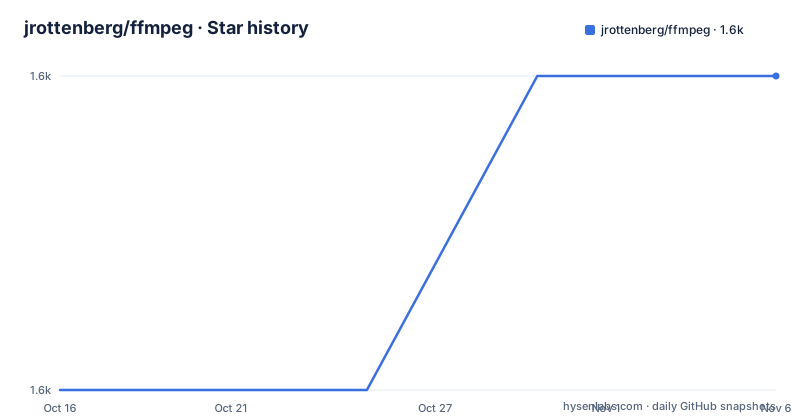
Star history
- jrottenberg/ffmpeg1,647 ★ · +1
| Repository | 2026-10-16 | 2026-11-06 |
|---|---|---|
| jrottenberg/ffmpeg | 1.6k | 1.6k |
1 Stars in the last 21 days, measured from the daily GitHub snapshot. Compare with other projects
Editorial analysis
What the FFmpeg image solves
This repository packages FFmpeg as container images so media processing does not depend on the libraries already installed on a host. The README says the project prepares a minimalist Docker image and compiles FFmpeg from source. That approach is aimed at developers, operators, and encoding services that want a repeatable FFmpeg environment across machines and operating systems. The image can also serve as the base for an encoding farm.
The repository distinguishes ordinary software builds from hardware-oriented builds. Ubuntu images install external libraries from operating system packages where possible, while edge images build FFmpeg support libraries and FFmpeg itself from source. Alpine variants use vendor libraries, and Scratch variants build the libraries from source while removing packages and symbols from the base distribution. Separate variants enable VAAPI, NVIDIA hardware acceleration, or Intel Quick Sync Video through oneVPL.
This is an image distribution project rather than a new media-processing application. Its value is the combination of a selected FFmpeg release, a selected operating system, a selected CPU architecture, and optional hardware support. The repository metadata identifies Python as the primary language, while the visible repository files include Docker image definitions, templates, source-generation scripts, and update tooling.
Image tags and variant selection
The README defines the naming pattern as `ffmpeg-<version>-<os variant and version>`. Current examples include `ffmpeg-9.0-ubuntu2404`, `ffmpeg-9.0-alpine320`, and `ffmpeg-9.0-scratch320`. The supported FFmpeg versions listed in the documentation are `8.0`, `8.1`, and `9.0`. The Ubuntu 24.04 and Alpine 3.20 examples list `amd64` and `arm64`, while the VAAPI, NVIDIA, and QSV examples list `amd64`.
The ordinary Ubuntu 24.04 build uses Ubuntu support libraries where possible, including packages such as `libx264-dev`. The project describes that choice as a way to avoid tying the image to a support-library version and to make a future Ubuntu base update less disruptive. The `ubuntu2404-edge` build compiles the support libraries as well as FFmpeg, which provides more control but is harder to update.
The tags are therefore operational choices, not interchangeable aliases. A container scheduled on `arm64` cannot be assumed to work with a tag documented only for `amd64`. Likewise, an NVIDIA image requires the appropriate NVIDIA hardware path, while VAAPI and QSV target different acceleration ecosystems. The README does not document a universal runtime command for every variant, so tag selection should be tied to the host architecture and the media pipeline.
Installing the image and running a first job
The following command pulls the latest build documented for Ubuntu LTS from GitHub Container Registry:
docker pull ghcr.io/jrottenberg/ffmpeg:latestFor Docker Hub, the repository gives the equivalent naming form:
docker pull jrottenberg/ffmpeg:latestThe documentation does not give a universal first-use FFmpeg command, so it would be inaccurate to invent a transcode invocation. A real first use should run the selected container with the FFmpeg arguments required by the source and destination formats. Before using `latest`, replace it with a documented version and variant when repeatability matters. For example, the available table names `9.0`, `ubuntu2404`, and `alpine320`, but it does not claim that every combination is available for every version.
The image is intended to be consumed as a container command or as a Docker base image. The repository README does not document a separate application CLI, configuration file, or environment variable for this project.
Build architecture and maintenance implications
The repository layout shows that image definitions are organized under `docker-images/`, with templates, source-download helpers, FFmpeg version generation scripts, and update tooling at the top level. `build_source.sh`, `download_tarballs.sh`, `install_ffmpeg.sh`, `update.py`, and the image-generation scripts indicate that the published images are assembled through repository automation rather than as a simple wrapper around an existing FFmpeg binary.
The maintenance cost depends on the variant. The Ubuntu 24.04 build can usually depend on distribution packages for external libraries, so changing the base operating system is part of the project's stated design. The edge build compiles more components from source, which gives greater control over release details but makes updates harder. Scratch images add another constraint: the base has no installed packages, and the project reduces size by stripping symbols from installed libraries.
The repository is not archived, and its last push was on 2026-09-28. That is recent activity, but the README still limits supported FFmpeg versions to `8.0`, `8.1`, and `9.0` and says support should not exceed the project's end-of-life boundary. Operators should not assume that every historical tag receives new security or compatibility work. The project uses the Apache-2.0 license. That license governs the repository and its distributed code, while separate obligations may apply to FFmpeg, codecs, operating system packages, and other included components. The README does not provide a legal analysis of those dependencies.
Constraints and the right alternative
The main limitation is that this is a family of images, not one universally suitable FFmpeg distribution. A Scratch image can reduce installed packages, but that minimalism comes with fewer diagnostics and runtime conveniences. An edge image can build support libraries from source, but the README explicitly describes that path as harder to keep updated. Hardware variants also narrow their usefulness. NVIDIA builds target NVIDIA's encoding and decoding APIs, VAAPI builds enable the Video Acceleration API, and QSV builds use Intel Quick Sync Video through oneVPL.
A real alternative is using the operating system's native FFmpeg package or a separately maintained codec distribution. The native package may be easier to update through the OS package manager and may already match the host's hardware drivers. The trade-off is less control over FFmpeg build details and codec-library versions. `jrottenberg/ffmpeg` is more appropriate when a container tag must preserve a chosen build across hosts. A generic application container with FFmpeg installed during each build is another approach, but it does not provide this project's published variant matrix or the same prebuilt image boundary.
The project should not be chosen solely because a tag contains `edge`, `scratch`, `nvidia`, `vaapi`, or `qsv`. Those labels describe build choices and hardware targets. The README does not claim that every FFmpeg codec, filter, or FFmpeg CLI option is identical across all variants.
Editorial conclusion
Adopt jrottenberg/ffmpeg when containerized FFmpeg execution matters and the required variant matches your operating system and hardware. Do not choose it when you need a minimal image without managing runtime libraries, or when unsupported FFmpeg versions and manually selected tags do not fit your deployment policy. Verify the exact tag, CPU architecture, hardware API, codec support, and available image updates before adoption.
Frequently asked questions
How do I install the jrottenberg/ffmpeg Docker image?
The README documents pulling a versioned image from GitHub Container Registry or Docker Hub, for example `docker pull ghcr.io/jrottenberg/ffmpeg:latest`. It also provides `docker pull jrottenberg/ffmpeg:latest` for the Docker Hub form.
Which jrottenberg/ffmpeg image should I use for hardware encoding?
The README lists `vaapi2404` for Video Acceleration API, `nvidia2404` for NVIDIA hardware-accelerated encoding and decoding, and `qsv2404` for Intel Quick Sync Video through oneVPL. The host hardware and runtime must match the selected variant.
Does jrottenberg/ffmpeg provide every FFmpeg codec and option?
The documentation does not claim identical codec, filter, or FFmpeg option support across every image variant. It describes differences in operating system, external libraries, source builds, and hardware APIs, so feature availability should be checked for the selected tag.
Official sources
Add this badge to your README
If you maintain this project, the badge below links readers to this analysis and shows its maintenance status from the daily GitHub snapshot. Paste the markdown into your README; add ?metric=license or ?metric=stars to the image URL for a different field.

[](https://hysenlabs.com/projects/jrottenberg-ffmpeg)Star history chart for your README
[](https://hysenlabs.com/projects/jrottenberg-ffmpeg)Was this useful?