lite-youtube Web Component for Faster YouTube Embeds
The fastest little YouTube web component on this side of the internet. The shadow dom web component version of Paul's lite-youtube-embed.
At a glance
- What is it?
- lite-youtube is a dependency-free Shadow DOM web component that shows a YouTube thumbnail before loading the iframe. It suits developers who need deferred embeds, keyboard access, localization, playlists, and CSP-related controls.
- Who is it for?
- Adopt lite-youtube when embedded videos should remain unloaded until interaction and your application can accommodate a custom element and its fallback link. Do not adopt it when an immediately available direct iframe or non-JavaScript player is mandatory.
- Can I use it commercially?
- Yes. MIT is a permissive licence: you can use, modify and sell software built on it, as long as you keep its copyright and licence notices.
- Is it still maintained?
- Activity is slowing. The repository last received commits 6 months ago.
- What is it written in?
- Mainly TypeScript, according to GitHub's language statistics.
Answers come from the project's GitHub data, last synced on November 6, 2026, and from our analysis. They are not legal advice.
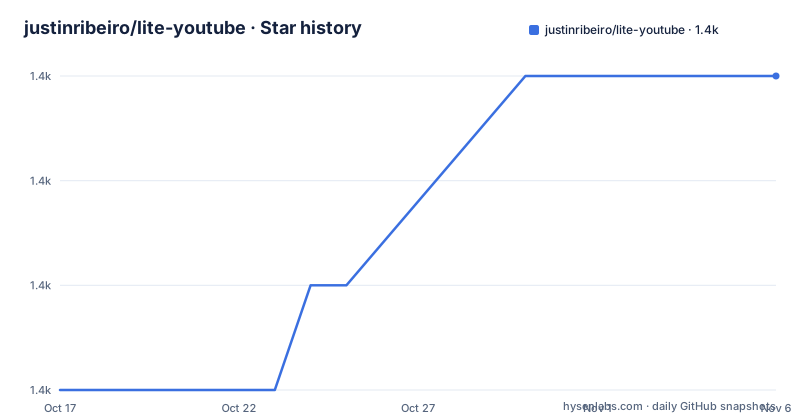
Star history
- justinribeiro/lite-youtube1,377 ★ · +3
| Repository | 2026-10-17 | 2026-11-06 |
|---|---|---|
| justinribeiro/lite-youtube | 1.4k | 1.4k |
3 Stars in the last 20 days, measured from the daily GitHub snapshot. Compare with other projects
Editorial analysis
Why lite-youtube defers YouTube embeds
lite-youtube addresses a specific browser cost: a direct YouTube embed creates an iframe and loads YouTube content before the visitor has chosen to watch a video. This project instead renders a thumbnail-based preview inside a custom element. The iframe appears after the visitor activates the preview. The README describes it as a web component that renders YouTube embeds faster and identifies it as the ShadowDom version of Paul's lite-youtube-embed concept.
The intended users are developers placing videos in articles, documentation, product pages, and other web interfaces. It is a front-end embed component, not a video host, transcoder, or YouTube management service. Its responsibility is to control when YouTube's iframe enters the page while retaining a direct video link for environments where the component cannot run.
The project also treats failure paths as part of normal markup. The README documents a fallback link for the period before initialization, disabled JavaScript, failed or missing scripts, and browsers without web component support. That fallback sends the visitor to YouTube instead of leaving a thumbnail without a usable destination.
How lite-youtube changes from poster to iframe
The initial state uses a poster image and a play control rather than an iframe. The README states that the placeholder uses WebP with a Jpeg fallback. The component has a responsive 16:9 presentation by default, and it is described as keyboard accessible. The `videotitle` attribute supplies information used for ARIA, while `videoplay` can hold a translated play label.
When activated, the component loads a YouTube iframe for the video identified by `videoid`. The README does not publish the complete event and lifecycle implementation, so it does not establish which internal function performs every DOM transition. The repository layout identifies `lite-youtube.ts` as the main source file and separates examples and tests into `demo/` and `test/`.
The loading strategy can change through attributes. `autoload` uses Intersection Observer when available to load the iframe as the component enters the viewport. `autoPause` pauses playback after the video scrolls out of view. `nocookie` changes the embed host to `youtube-nocookie.com`, and `credentialless` supports the documented COEP case. A `nonce` attribute is supported through `window.liteYouTubeNonce` for CSP 2/3 deployments.
Installing lite-youtube and rendering a video
The npm package is `@justinribeiro/lite-youtube`, and the package metadata identifies it as an ES module. Install it with npm, then import it from the application's JavaScript entry point. The README gives these commands:
npm i @justinribeiro/lite-youtube
# or
yarn add @justinribeiro/lite-youtube
The following import registers the custom element so the browser recognizes `<lite-youtube>`:
import '@justinribeiro/lite-youtube';A page can then render the documented video ID. Before activation, the visitor should see the component's thumbnail presentation rather than a YouTube iframe:
<lite-youtube videoid="guJLfqTFfIw"></lite-youtube>For a paste-and-go page without package-manager integration, the README documents this CDN module. Its URL uses the major version tag `@1`:
<script type="module" src="https://cdn.jsdelivr.net/npm/@justinribeiro/lite-youtube@1/lite-youtube.min.js"></script>The package has no runtime dependencies. Its published files are `lite-youtube.d.ts`, `lite-youtube.js`, and `lite-youtube.js.map`. Application consumers do not need the repository's build scripts for the documented installation path.
Fallback links when the component cannot run
A thumbnail-only implementation fails when its script is absent or its browser lacks custom-element support. lite-youtube addresses this with light-DOM fallback content. The README uses the following anchor inside the component:
<lite-youtube videoid="guJLfqTFfIw">
  <a class="lite-youtube-fallback" href="https://www.youtube.com/watch?v=guJLfqTFfIw">Watch on YouTube: "Sample output of devtools-to-video cli tool"</a>
</lite-youtube>
The link can remain visible before component initialization, when JavaScript is disabled, when the component script fails to load or execute, and when the browser does not support web components. It is not an alternative player. It takes the visitor to the standard YouTube watch page.
The README also gives CSS that expands the fallback to the YouTube player's aspect ratio, centers its content, and gives the focus state a visible outline. Consumers can adopt that exact styling or build their own presentation around the documented `.lite-youtube-fallback` class. This matters for sites that need a meaningful destination rather than a broken player frame.
Version 1.7 added a light-DOM noscript injector for search indexing, and version 1.7.1 added `disablenoscript` to disable it. The README does not describe this as general server-side rendering of the YouTube player.
Configuring playlists, titles, start times, and Shorts
The `videoid` attribute supplies the video used by the basic embed. A title can be added through `videotitle`, which the README also associates with ARIA configuration. Localization is handled separately through `videoplay`. This Spanish example shows both values:
<lite-youtube
  videoplay="Mirar"
  videotitle="Mis hijos se burlan de mi español"
  videoid="guJLfqTFfIw"
>
</lite-youtube>
Playback can begin at a documented point with `videoStartAt`:
<lite-youtube videoid="guJLfqTFfIw" videoStartAt="5"></lite-youtube>Playlist playback requires both `videoid` and `playlistid`. The video ID remains necessary because the README says YouTube does not return a playlist thumbnail through its API:
<lite-youtube
  videoid="VLrYOji75Vc"
  playlistid="PL-G5r6j4GptH5JTveoLTVqpp7w2oc27Q9"
></lite-youtube>
For mobile Shorts interaction, the README documents an experimental `short` mode:
<lite-youtube videoid="vMImN9gghao" short></lite-youtube>The README calls this interaction experimental. Applications should therefore verify it against their supported devices and YouTube behavior rather than treating it as a guaranteed permanent interface.
Controlling viewport loading, privacy, and posters
The normal interaction model waits for a visitor to activate the component. With `autoload`, the iframe is instead loaded when the element enters view through Intersection Observer:
<lite-youtube videoid="guJLfqTFfIw" autoload> </lite-youtube>This changes page behavior. Explicit activation requires intent before the iframe loads, while viewport loading can trigger YouTube traffic as a reader scrolls. The README says Intersection Observer is used when available but does not provide a browser support matrix for that fallback path.
Poster loading has separate controls. Version 1.3 added `loading=lazy` for the placeholder image and the `posterloading` attribute for applications that want eager loading. The documented poster quality override is:
<lite-youtube
  videoid="guJLfqTFfIw"
  posterquality="maxresdefault"
></lite-youtube>
Applications that need complete control over the poster can place an image in the named `image` slot:
<lite-youtube videoid="guJLfqTFfIw">
  <img slot="image" src="my-poster-override.jpg">
</lite-youtube>
The `nocookie` attribute selects `youtube-nocookie.com` for the iframe URI. This is an embed-host choice documented by the project, not a claim that the page makes no YouTube requests. Likewise, `credentialless` addresses the documented COEP use case but does not replace the application's cross-origin isolation policy.
Styling the Shadow DOM poster and frame
Shadow DOM encapsulates the component's internal markup, while the host page retains control over layout, aspect ratio, frame shadow, and the play-button part. The README says width and height are responsive. Its basic sizing example sets the containing element to 400 pixels:
<style>
  .styleIt {
    width: 400px;
    margin: auto;
  }
</style>
<div class="styleIt">
  <lite-youtube videoid="guJLfqTFfIw"></lite-youtube>
</div>
The default player shape is 16:9. Applications can override it with the documented CSS custom property:
lite-youtube {
  --lite-youtube-aspect-ratio: 2 / 3;
}
A flat frame can disable the shadow through another custom property:
lite-youtube {
  /* No Shadow */
  --lite-youtube-frame-shadow-visible: no;
}
Since version 1.8, the play button can be styled through its exposed part:
lite-youtube::part(playButton) {
  /* You custom style */
}
These controls are specific, but they are not a general visual theme API. The README does not document additional named parts or a complete set of internal CSS variables. Version 1.6 added the aspect ratio property, shadow control, custom image slot, and `credentialless` support. Version 1.9 added playlist thumbnail support.
Maintenance limits and direct-iframe alternative
The repository is not archived, and its last push was on 2026-04-21. The listed releases are v1.9.0 from 2025-10-28, v1.8.2 from 2025-05-20, and v1.8.1 from 2025-05-01. This does not establish that future YouTube changes will remain compatible.
The package declares the MIT license in both `package.json` and the repository's `LICENSE` file. Its published package consists of compiled JavaScript, a declaration file, and a source map. The repository scripts support `build`, linting, and browser tests, but the README does not provide a formal migration policy for consumers. Changes to attributes or embed behavior should therefore be checked against the relevant release notes and the application's fallback and accessibility tests.
A direct YouTube iframe is the direct alternative when the player must load immediately, when a framework or server already owns the embed markup, or when deferred loading has no value. Another alternative is a plain thumbnail that links to YouTube, which avoids a custom-element dependency but cannot provide the same interactive poster, loading states, or styling controls. lite-youtube is the wrong choice when an always-present player is mandatory, its documented fallback link is insufficient, or the application cannot execute JavaScript but still requires inline playback.
Editorial conclusion
Adopt lite-youtube when embedded videos should remain unloaded until interaction and your application can accommodate a custom element and its fallback link. Do not adopt it when an immediately available direct iframe or non-JavaScript player is mandatory. First verify the documented attributes, fallback markup, Content Security Policy, privacy requirements, and target browsers against your application.
Frequently asked questions
How do I install and use lite-youtube?
Install `@justinribeiro/lite-youtube` with npm or Yarn, then import `@justinribeiro/lite-youtube`. Add a `<lite-youtube>` element and set its `videoid` attribute.
Does lite-youtube load the YouTube iframe immediately?
The documented default shows a thumbnail until interaction. The `autoload` attribute uses Intersection Observer to load the iframe when the component scrolls into view.
Can lite-youtube play a YouTube playlist?
Yes. Set both `playlistid` and `videoid`. The video ID is still required for the placeholder thumbnail because YouTube does not return a playlist thumbnail through the API used by the project.
What happens if JavaScript or web components are unavailable?
The README documents a fallback link inside the element for disabled JavaScript, script failure, initialization failure, and unsupported browsers. The fallback opens the video on YouTube rather than providing an inline player.
How does lite-youtube support localization and accessibility?
The README states that the component supports keyboard access and can set ARIA information through `videotitle`. The `videoplay` attribute accepts a translated play label.
Official sources
Add this badge to your README
If you maintain this project, the badge below links readers to this analysis and shows its maintenance status from the daily GitHub snapshot. Paste the markdown into your README; add ?metric=license or ?metric=stars to the image URL for a different field.

[](https://hysenlabs.com/projects/justinribeiro-lite-youtube)Star history chart for your README
[](https://hysenlabs.com/projects/justinribeiro-lite-youtube)Was this useful?