Happy: the CLI wrapper that hands Claude Code and Codex sessions to your phone
Mobile and Web client for Codex and Claude Code, with realtime voice, encryption and fully featured
At a glance
- What is it?
- Happy installs a global npm CLI that wraps Claude Code and Codex so the same session can be driven from an iOS, Android, web or macOS client through a sync server. It is a remote control layer rather than a model runner, and the encryption claim is the part worth examining closely.
- Who is it for?
- Take Happy when you want Claude Code or Codex sessions reachable from a phone and accept that you are handing remote control of an agent that executes commands in your working tree. Pass on it when your threat model cannot put a third party sync server in the path, or when you need reproducible pinning of the clients, since the mobile and desktop apps arrive through app stores and a separate repository rather than version tags.
- Can I use it commercially?
- Yes. MIT is a permissive licence: you can use, modify and sell software built on it, as long as you keep its copyright and licence notices.
- Is it still maintained?
- Yes. The repository received new commits within the last day.
- What is it written in?
- Mainly TypeScript, according to GitHub's language statistics.
Answers come from the project's GitHub data, last synced on November 14, 2026, and from our analysis. They are not legal advice.
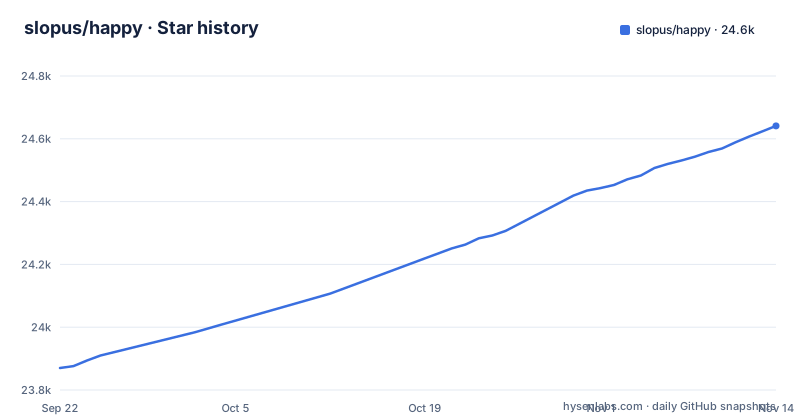
Star history
- slopus/happy24,641 ★ · +771
| Repository | 2026-09-22 | 2026-11-14 |
|---|---|---|
| slopus/happy | 23.9k | 24.6k |
771 Stars in the last 53 days, measured from the daily GitHub snapshot. Compare with other projects
Editorial analysis
A wrapper binary takes over the claude and codex entry points
Install one global package, then type `happy` in front of whichever agent you use. The whole getting started path is two commands:
npm install -g happy# Start Claude Code
happy claude
# Or start Codex
happy codexNeither line is a plugin or a hook registered inside the agent. The stated explanation is that you start your AI through Happy's wrapper, so `happy claude` runs the agent with that wrapper sitting between you and it, and the wrapper is the part that knows how to hand the session to a phone.
The package name is recent, which matters if you have an older install on the same machine. The install note records a migration from the `happy-coder` package and credits @franciscop with donating the `happy` name on npm.
The npm package is the CLI, while the repository is a pnpm workspace
`npm install -g happy` does not pull the repository root. That root `package.json` is named `monorepo`, is marked `"private": true`, and lists its packages under `workspaces.packages`, starting with `packages/happy-app` and `packages/happy-agent`. What lands on your PATH is the published CLI package, not the workspace you see in the tree.
That split sorts readers into two groups. If you only intend to drive sessions, the npm package is the entire surface. If you intend to read the source, you are now inside a pnpm workspace carrying a `patches/` directory at the root and another under `packages/happy-app`, so some dependencies are patched in tree rather than consumed as published.
The Dockerfile's dependency stage installs with the happy-wire build skipped:
SKIP_HAPPY_WIRE_BUILD=1 pnpm install --frozen-lockfileThe server build passes `--fail-if-no-match` to its filters, which tells you the project treats a filter that matches nothing as an error worth catching. One more thing runs before you read anything: a `postinstall` hook pointing at `./scripts/postinstall.cjs`.
Remote mode restarts the session, and the keyboard is the way back
The original CLI wraps the Claude Code and Codex harnesses in your terminal and lets you continue from your phone; the README says that when you leave your desk the same sessions are already on your phone, and that you can invite someone into a session where either of you can steer the agent.
The weight of that is easy to underrate. What is being controlled is a coding agent running commands in your working tree, which is the argument for reading what the sync server can see before you point any of this at a private repository.
The repository also ships `packages/happy-agent`, described as remote session control for the original Happy CLI, which is not the Happy Agent runtime that lives in `slopus/happy-agent`.
Only the CLI carries version tags, and the apps arrive through two stores
The recent releases in this repository are CLI releases: `cli-1.2.6-beta.1` and `cli-1.2.6-beta.0` on 2026-10-09, preceded by `cli-1.2.5` on 2026-09-22. The last push to the repository was on 2026-11-02.
The three clients do not share that tagging. The iOS app is distributed through the App Store, the Android build through Google Play under `com.ex3ndr.happy`, and the desktop app for macOS, Windows and Linux is not in this repository at all. It lives in a separate `slopus/happy-desktop` project. No tag in the list above pins any of them.
For a team that versions its dependencies, that asymmetry is the real cost of the setup. The CLI moves when you move it. The phone app moves when a store review finishes, and the desktop binary moves when somebody downloads it. If you need a reproducible client for an evaluation or an audit, record the versions by hand, because nothing in the repository lines the four up in one manifest.
The encryption claim is a README bullet and the tree does not spell out the mechanism
End to end encryption is the headline. The README says the same sessions follow you to your phone and that what moves between your devices is encrypted, alongside an open source line inviting you to read the code, fork it and ship your own build. The project is MIT licensed and ships a PRIVACY.md next to the README.
What the repository does not do is explain the mechanism behind that claim. No key exchange, no cipher choice, no statement of which device holds the keys, no note on what the server can read. `happy-server` gets one line, describing it as the relay server for encrypted sync, which confirms session data passes through the server and says nothing about the form that data takes.
Voice is where the gap sharpens. The repository description advertises realtime voice, the README feature list does not mention voice at all, and the standalone server image installs ffmpeg in its runtime stage. A product whose headline is that your code stays encrypted owes a clear answer about where recorded audio is processed, and neither the README nor the visible server configuration supplies one.
So treat the encryption as a property to verify rather than a guarantee to lean on. The `happy-server` and `happy-wire` packages are where the answer lives, and the documentation at happy.engineering/welcome/ are the first place to look for it.
The standalone server is one container with an embedded Postgres and no Redis
Self hosting is the part of this project you can read most concretely, because the Dockerfile states its own constraints in its first comment lines: a standalone happy-server, a single container, no external dependencies, PGlite for embedded Postgres, local filesystem storage, and no Redis.
ENV NODE_ENV=production
ENV DATA_DIR=/data
ENV PGLITE_DIR=/data/pglite
Those two paths are where the runtime is told to keep its data directory and its embedded database, which makes a backup a file copy rather than a replica configuration exercise. The build runs three stages on Node 24, and the runtime stage adds ffmpeg and curl to a `node:24-slim` base. Two sibling Dockerfiles sit next to it, `Dockerfile.server` and `Dockerfile.webapp`.
The Dockerfile describes this image as having no external dependencies, so read the embedded database as the intended deployment for this image rather than a development shortcut.
A contributor needs a running stack, seeded data and sometimes Tailscale
Developers do not work from the published package. The root scripts are organised around an environment manager: `env:up` to bring a stack up, `env:down` to tear it down, `env:seed` to populate it, and `env:up:authenticated`, which feeds the `authenticated-empty` template into `env:up`. Per target launchers exist too, `env:server`, `env:web`, `env:ios`, `env:android` and `env:cli`, each routed through `packages/dev-environments/environments.ts` with tsx.
One of those scripts is `env:tailscale`. A contributor workflow carrying a Tailscale entry point tells you the local stack is expected to be reachable from a phone on a private network, which is the same use case the shipped clients serve.
The root also holds `.agents/` and an `AGENTS.md` beside its own build, and store screenshots are generated from `scripts/app-store`. Setup lives in `docs/CONTRIBUTING.md`. None of that is one command onboarding, so expect to read that file before the first `pnpm` invocation rather than after it fails.
Editorial conclusion
Take Happy when you want Claude Code or Codex sessions reachable from a phone and accept that you are handing remote control of an agent that executes commands in your working tree. Pass on it when your threat model cannot put a third party sync server in the path, or when you need reproducible pinning of the clients, since the mobile and desktop apps arrive through app stores and a separate repository rather than version tags. Before installing anything globally, read the documentation at happy.engineering/welcome/ and confirm from the happy-server and happy-wire packages who can decrypt a stored session.
Frequently asked questions
What is Happy and what does the CLI do to Claude Code?
It is a global npm package installed with `npm install -g happy`. Running `happy claude` or `happy codex` starts the agent through Happy's wrapper instead of calling `claude` or `codex` directly.
Is Happy's end to end encryption documented in the README?
The README states that what moves between your devices is encrypted, but it does not name a cipher, describe key exchange, or say which device holds the keys. The server package is described only as the relay server for encrypted sync, and the documentation site is happy.engineering/welcome/.
What happens to a Happy session when I take control from my phone?
The README says the same sessions are already on your phone when you leave your desk, and that you can invite a colleague or friend into a session, where either of you can steer the agent.
Can I run the Happy server myself?
The repository ships a Dockerfile for a standalone happy-server that uses PGlite for embedded Postgres, local filesystem storage and no Redis. The runtime is told to keep data under DATA_DIR and PGLITE_DIR.
How do I pin versions of the Happy mobile and desktop apps?
You cannot do it from repository tags. The releases listed are CLI releases such as cli-1.2.6-beta.1 from 2026-10-09, while the iOS and Android apps come through the App Store and Google Play and the desktop app for macOS, Windows and Linux lives in the separate slopus/happy-desktop project.
Official sources
Add this badge to your README
If you maintain this project, the badge below links readers to this analysis and shows its maintenance status from the daily GitHub snapshot. Paste the markdown into your README; add ?metric=license or ?metric=stars to the image URL for a different field.

[](https://hysenlabs.com/projects/slopus-happy)Star history chart for your README
[](https://hysenlabs.com/projects/slopus-happy)Was this useful?