jwilder/dockerize: templating, log tailing and service waits for container entrypoints
Utility to simplify running applications in docker containers
At a glance
- What is it?
- dockerize is a single Go binary that wraps your container's start command. It renders config templates from environment variables, tails log files into stdout and stderr, and waits for TCP, HTTP(S) or unix endpoints before exec'ing the real process.
- Who is it for?
- Adopt dockerize when your image has a config file that cannot read environment variables directly, or an app that writes logs to files instead of stdout, and you want the wait-for-dependency logic inside the image rather than in a Compose healthcheck. Do not adopt it if your application already reads env vars at startup and logs to stdout, or if you need a wait mechanism that survives the main process exiting.
- Can I use it commercially?
- Yes. MIT is a permissive licence: you can use, modify and sell software built on it, as long as you keep its copyright and licence notices.
- Is it still maintained?
- Yes. The repository last received commits 25 days ago.
- What is it written in?
- Mainly Go, according to GitHub's language statistics.
Answers come from the project's GitHub data, last synced on November 15, 2026, and from our analysis. They are not legal advice.
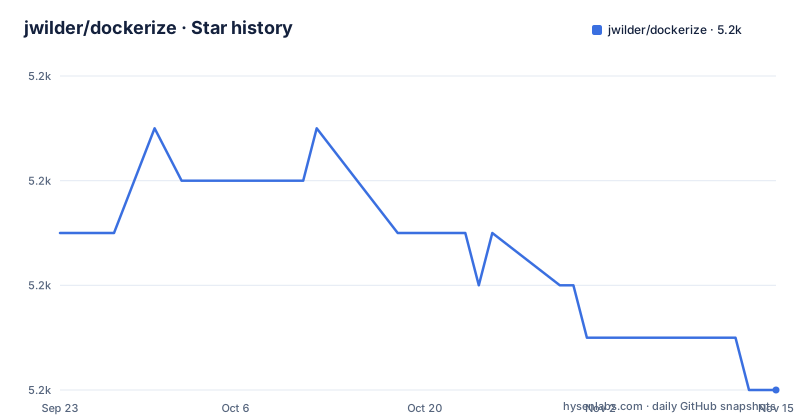
Star history
- jwilder/dockerize5,204 ★ · -3
| Repository | 2026-09-23 | 2026-11-15 |
|---|---|---|
| jwilder/dockerize | 5.2k | 5.2k |
-3 Stars in the last 53 days, measured from the daily GitHub snapshot. Compare with other projects
Editorial analysis
The entrypoint problem dockerize was written to solve
Many applications predate twelve-factor conventions. A Python service using Sqlalchemy expects its database URL in a settings file under a name like SQLALCHEMY_DATABASE_URI, not in the environment. Nginx writes to /var/log/nginx/access.log and /var/log/nginx/error.log, so docker logs shows nothing useful. And when a container starts alongside a database container, the database process may not be listening yet even though the container itself has started, which is the race condition that pushes people into shell script retry loops. dockerize addresses all three from one binary that sits in front of your application and is invoked through ENTRYPOINT or CMD. The README frames the target user plainly: someone who has an application with one or more configuration files and wants to control some of the values using environment variables. It is a startup shim, not a supervisor. It runs, does its preparation, and then hands off to the command you gave it.
How the template, tail and wait mechanisms fit together
The binary exposes three independent capabilities that can be combined in a single invocation. Templating reads a Go template file, expands it against the container environment, and writes the result to a destination path or to stdout when no destination is given. The repository layout reflects this split directly: template.go, tail.go and exec.go sit at the top level of the module, with matching _test.go files beside each. Tail watches log files and forwards their contents to stdout or stderr, using inotify by default with a -poll fallback for containers where inotify does not work. Wait blocks until a dependency answers over TCP, HTTP(S) or unix. Templating also supports directories: when the source is a directory, every file inside is processed as a template and written under the same name into the destination directory, in the sorted order returned by os.ReadDir. The template engine pulls in Masterminds/sprig, so the function set available inside templates is wider than the standard library's, and gojq is present as a dependency for JSON handling in templates. The wait check runs before the wrapped command starts, which is the ordering the README's nginx example shows: template rendering, log tailing setup, wait, then nginx.
Installing dockerize in an image and running a first template
The project ships prebuilt tarballs per version and architecture rather than a package repository. The README lists linux/amd64, linux/armel, linux/arm64, linux/armhf, alpine/amd64, darwin/amd64 and darwin/arm64. For a Debian or Ubuntu base, the documented install downloads the tarball and extracts the binary into /usr/local/bin, then removes wget to keep the layer small. The version is pinned through an environment variable so the same snippet can be bumped in one place.
ENV DOCKERIZE_VERSION v0.15.1

RUN apt-get update \
    && apt-get install -y wget \
    && wget -O - https://github.com/jwilder/dockerize/releases/download/$DOCKERIZE_VERSION/dockerize-linux-amd64-$DOCKERIZE_VERSION.tar.gz | tar xzf - -C /usr/local/bin \
    && apt-get autoremove -yqq --purge wget && rm -rf /var/lib/apt/lists/*
The Alpine snippet installs openssl alongside wget. The documented Alpine snippet uses the alpine-linux-amd64 tarball and removes wget afterwards.
ENV DOCKERIZE_VERSION v0.15.1

RUN apk update --no-cache \
    && apk add --no-cache wget openssl \
    && wget -O - https://github.com/jwilder/dockerize/releases/download/$DOCKERIZE_VERSION/dockerize-alpine-linux-amd64-$DOCKERIZE_VERSION.tar.gz | tar xzf - -C /usr/local/bin \
    && apk del wget
There is also a published base image, jwilder/dockerize, built on gcr.io/distroless/static, in which dockerize is already on the PATH. The README's example for it is a FROM line followed by an ENTRYPOINT that begins with dockerize. Once the binary is present, the smallest useful invocation renders one template and starts the application. Passing a source and a destination separated by a colon writes the rendered output to that file; omitting the destination sends the rendered template to stdout instead.
dockerize -template /etc/nginx/nginx.tmpl:/etc/nginx/nginx.conf nginxAfter the container starts, the file at /etc/nginx/nginx.conf contains the template with environment values substituted, and nginx runs as the process dockerize execs into. If the destination file already exists, dockerize overwrites it unless you pass -no-overwrite.
Waiting for dependencies and tailing logs without a shell script
The wait flag accepts a protocol-prefixed address and can be repeated to gate startup on several services. The README's nginx example waits for the web host to respond on tcp 8000 before starting nginx, and the flag table lists -timeout and -wait-retry-interval as options that only take effect alongside -wait.
Log tailing is the third piece. Any file passed to -stdout is followed and its new lines are written to the container's stdout; -stderr does the same for stderr. Both flags can be repeated, so an access log and an error log from the same application can be split across the two streams in the way docker logs expects.
dockerize -stdout info.log -stdout perf.log -pollThe -poll flag is the fallback for containers where inotify is unavailable, which is common on some mounted volume types and in certain sandboxed runtimes. It trades latency for compatibility.
Template delimiters, HTTP headers and the overwrite default
Three details in the flag set are worth knowing before you commit to this tool. First, templates use double braces by default, and if the configuration file itself contains that syntax, rendering will mangle it. The -delims flag changes the escape characters, for example to angle-bracket-percent form. Second, the wait check for http and https can carry a header, which the README demonstrates with a Basic authorization value passed through -wait-http-header. That is enough to poll an endpoint behind simple authentication, and the README's flag table also lists -timeout and -wait-retry-interval, both of which require -wait. Third, overwriting is the default for template destinations. That is convenient for regenerating a config on every container start, and dangerous if the destination is a path you expected to persist across restarts. The -no-overwrite flag is the documented way to opt out. None of these are hidden, but each one is a place where a careless CMD line produces a container that starts successfully and behaves incorrectly.
Where dockerize is the wrong tool
dockerize does not supervise. It renders, tails and waits, then execs your command. If the wrapped process exits, the container exits; there is no restart loop inside the binary. If your application already reads configuration from environment variables and writes logs to stdout, adding dockerize buys you nothing except an extra binary in the image and an extra process in the startup path. Teams that need readiness gating, dependency ordering and restart policy should look at what the orchestrator already provides rather than encoding it in the entrypoint. The README itself notes that relying on Docker Compose links is often not enough, which is a signal that the maintainers see this as filling a gap rather than replacing platform features. There is also a practical constraint on installation: the published artifacts are tarballs for specific architectures, so an unusual platform means building from source with the Go toolchain, and the Dockerfile in the repository shows that build path.
Alternatives and how their approach differs
The closest alternative in spirit is a shell entrypoint script that runs envsubst or sed against a config file and loops on nc or curl until a port opens. That approach has no extra binary and no template language to learn, but it also has no directory templating, no sprig function set, no structured wait protocols beyond what you script, and no log tailing at all. A second alternative is to push the work into the orchestrator: Docker Compose healthchecks with depends_on conditions, or Kubernetes init containers and readiness probes. Those keep the image clean and put the logic where the platform can observe it, but they only work on the platform in question. A Compose healthcheck does not help someone running the image with plain docker run, and an init container does not exist outside Kubernetes. dockerize's trade-off is the inverse: the behaviour travels with the image, so the same CMD works under Compose, Kubernetes, Nomad or a bare docker run, at the cost of an extra binary and a startup step that the platform cannot see. The README's own framing supports that reading: the tool exists because relying on container links alone leaves the service inside the container potentially unready.
Maintenance, licence and upgrade cost
The repository is not archived, and the last push was on 2026-10-21, the same day as the v0.16.0 release. The release history shows v0.15.2 on 2026-10-11 and v0.15.1 on 2026-09-12, so the project has shipped three releases in roughly six weeks. The licence is MIT, which permits use, modification and redistribution provided the copyright notice and permission notice are retained; that is a statement about the licence text, not legal advice, and anyone embedding the binary in a distributed product should read the LICENSE file in the repository rather than rely on this summary. Upgrade cost is low by design. The version is pinned in one place in a Dockerfile, the tarball URL contains the version, and the flag surface described in the README is small. The main upgrade risk is the template engine: the module depends on Masterminds/sprig v3 and gojq, so a change in either can alter what a template renders. Building from source requires Go 1.27.3 per go.mod, and the Makefile drives lint, race-enabled tests and install.
Editorial conclusion
Adopt dockerize when your image has a config file that cannot read environment variables directly, or an app that writes logs to files instead of stdout, and you want the wait-for-dependency logic inside the image rather than in a Compose healthcheck. Do not adopt it if your application already reads env vars at startup and logs to stdout, or if you need a wait mechanism that survives the main process exiting. Before rolling it out, verify three things: that your base image architecture matches one of the published tarballs, that the template syntax does not collide with your config file's own use of double braces, and that your -timeout value is long enough for your slowest dependency to accept connections.
Frequently asked questions
What does jwilder/dockerize actually do?
It is a utility that simplifies running applications in Docker containers by generating configuration files from templates and environment variables, tailing log files to stdout or stderr, and waiting for TCP, HTTP(S) or unix services before starting the main process. It wraps your application through the ENTRYPOINT or CMD directive.
How do I install jwilder/dockerize in a Dockerfile?
The README downloads the release tarball for your architecture and extracts the binary into /usr/local/bin, using wget on Ubuntu and wget plus openssl on Alpine. Alternatively, the jwilder/dockerize base image, built on gcr.io/distroless/static, already has dockerize on the PATH.
Can I use jwilder/dockerize to wait for a database before starting my app?
Yes. The -wait flag waits for services over TCP, HTTP(S) or unix before the main process starts, as in the README's -wait tcp://web:8000 example, and -timeout and -wait-retry-interval tune it.
What happens if my config file already uses double braces?
Templates use double braces by default, so a file that contains that syntax will be affected during rendering. The -delims flag changes the template escape characters, for example to angle-bracket-percent form.
Does jwilder/dockerize overwrite existing files when rendering templates?
Yes, if the destination file already exists dockerize overwrites it. The -no-overwrite flag overrides this behaviour.
Official sources
Add this badge to your README
If you maintain this project, the badge below links readers to this analysis and shows its maintenance status from the daily GitHub snapshot. Paste the markdown into your README; add ?metric=license or ?metric=stars to the image URL for a different field.

[](https://hysenlabs.com/projects/jwilder-dockerize)Star history chart for your README
[](https://hysenlabs.com/projects/jwilder-dockerize)Was this useful?