pgweb: one binary, zero dependencies, and an image that listens on 8081
Cross-platform client for PostgreSQL databases
At a glance
- What is it?
- pgweb is a Go web front end for PostgreSQL, MIT licensed and shipped as a single 64bit binary for Mac, Linux and Windows. It connects with flags or a connection URL, keeps multiple sessions behind a flag, and its Docker image publishes 8081 on every interface, so what you learn from the README is mostly about running it, not about securing it.
- Who is it for?
- Use pgweb when you want a single file to inspect a PostgreSQL 9.6 or newer database, especially over SSH tunnels or a unix socket, and you can run it on a host you control. Do not expose its port to a network you do not trust without checking what protects the web interface yourself, since the README describes no login for it.
- Can I use it commercially?
- Yes. MIT is a permissive licence: you can use, modify and sell software built on it, as long as you keep its copyright and licence notices.
- Is it still maintained?
- Yes. The repository last received commits 111 days ago.
- What is it written in?
- Mainly Go, according to GitHub's language statistics.
Answers come from the project's GitHub data, last synced on November 14, 2026, and from our analysis. They are not legal advice.
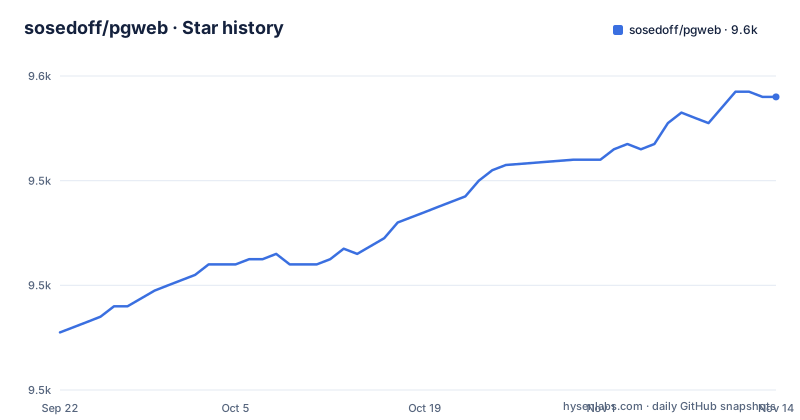
Star history
- sosedoff/pgweb9,556 ★ · +45
| Repository | 2026-09-22 | 2026-11-14 |
|---|---|---|
| sosedoff/pgweb | 9.5k | 9.6k |
45 Stars in the last 53 days, measured from the daily GitHub snapshot. Compare with other projects
Editorial analysis
Zero dependencies at runtime, but the source needs Go 1.25
The zero dependency claim is about the artifact you run. pgweb is distributed as a simple binary for Mac, Linux and Windows on 64bit machines, with precompiled binaries offered on the releases page. Building it yourself is where the requirements appear: go.mod declares `go 1.25` with `toolchain go1.25.4`, and the Dockerfile compiles in a `golang:1.25-trixie` stage. That stage also sets `CGO_ENABLED` to 0 by default as a build argument, so the resulting binary does not lean on the C library of the machine that built it, and the release stage is a plain debian:trixie-slim image rather than a Go image. Practical consequence: on a workstation with an older Go toolchain the source will not build, and the Makefile install target, which runs `go install -ldflags '${LDFLAGS}'`, is out of reach. The single binary is the easy path; the build environment is the part with a floor.
A connection is named by flags or by a URL that carries the password
The whole startup surface is one binary and a handful of arguments:
pgwebAdding a host, user and database is the same command with flags:
pgweb --host localhost --user myuser --db mydbThe URL form carries the same information plus the ssl mode:
pgweb --url postgres://user:password@host:port/database?sslmode=[mode]
pgweb --url "postgres:///database?host=/absolute/path/to/unix/socket/dir"
The second URL is the interesting one, because it shows the host is not required to be a hostname: it can be an absolute path to a unix socket directory, with the database named after the slash. The cost of the URL form is that the password becomes part of your shell history and of the process arguments, and nothing in the usage section describes an environment variable or a password file as the safer alternative for that. So the choice is between readable flags and a single string you have to treat as a secret.
Multiple sessions are opt in, and in a container the env var is your only switch
Multiple database sessions, one of the listed features, are not on by default. You turn them on with a flag:
pgweb --sessionsor with an environment variable:
PGWEB_SESSIONS=1 pgwebThe two forms matter more than they look, because the container image fixes its own arguments. The Dockerfile entrypoint is `/usr/bin/pgweb` with `--bind=0.0.0.0` and `--listen=8081`, so any additional flag has to be appended to that command or supplied some other way. The environment variable is what survives that arrangement, which is how the compose file configures a different axis: it passes `PGWEB_DATABASE_URL` rather than flags. Consequence for anyone assembling their own deployment: setting PGWEB_SESSIONS in the service definition turns sessions on without touching the entrypoint arguments.
The image publishes 8081 on every interface and names no web login
The release stage of the image runs the binary as a user created with `useradd --uid 1000 --no-create-home --shell /bin/false pgweb`, so the process has no shell and a fixed non root uid, and it exposes 8081 with the entrypoint binding `0.0.0.0`. The compose file publishes 8081:8081 and adds a healthcheck that runs `nc -vz 127.0.0.1 8081` every five seconds, and pgweb itself waits on the postgres service reaching a healthy state. What the README does not describe is any authentication on the web interface: the feature list covers sessions, bookmarks, history, exports and SSH tunnels, but nothing about who may connect to the page. Combine that with a port bound to every interface and the consequence is direct. A pgweb container reachable from the network is a database explorer reachable from the network, with the database credentials already configured inside it through PGWEB_DATABASE_URL.
Compose puts postgres on 5433 while the test suite insists on 5432
Two port conventions live in the same repository. The compose file runs a `postgres:18` service published on 5433 mapping to 5432, with a named volume `pgweb_postgres` and credentials of pgweb for user, password and database, then hands pgweb a URL of `postgres://pgweb:pgweb@pgweb-postgres:5432/pgweb?sslmode=disable`. The testing section instead requires a PostgreSQL server already running on the `localhost:5432` interface, plus a `postgres` user that can create new databases, and states that the pgweb server should not be running at the same time. Contributors then run:
make testand, if they are on Docker, can run the suite against all supported PostgreSQL versions with a single command:
make test-allConsequence: the compose stack is for looking at data, not for running tests; its postgres is published on 5433, not the 5432 the tests expect, and the README asks that no pgweb server be running during tests.
Tests cover ./pkg/... with the race detector and need create database rights
The test target is a single Go invocation:
make testwhich runs `go test -v -race -cover ./pkg/...`. Two details follow from the command itself. The race detector has to be supported by the platform you test on, and the package pattern stops at `./pkg/...`, so main.go and the top level wiring sit outside what this target exercises. The wider target calls two shell scripts, `./script/test_all.sh` and `./script/test_cockroach.sh`, so a contributor's machine reaches beyond plain PostgreSQL into the compatible database the project also tests. The cost of contributing is therefore a local superuser capable of creating databases, not just a checkout.
Version strings exist only when you build through the Makefile
Build metadata is stamped in at link time. LDFLAGS starts as `-s -w` and then appends three `-X` assignments into `pkg/command`: GitCommit from `git rev-parse --short=8 HEAD`, BuildTime from `date -u`, and GoVersion from `go version`. The container tags come from the same repository state, with the release tag built from `git describe --abbrev=0 --tags` and the leading v stripped, and a separate `latest` tag. The Dockerfile copies `.git/` into the build stage before running `make build`, so the metadata exists only because the git directory travels with the source. Consequence: a plain `go build`, or a tarball exported without git history, yields a binary with no commit, no build time and no Go version to report, and `git describe` cannot resolve a release tag without tags present. The clean target compounds it by removing `./pgweb` and everything under bin, so a mistyped make target costs you the artifact you were about to test.
Editorial conclusion
Use pgweb when you want a single file to inspect a PostgreSQL 9.6 or newer database, especially over SSH tunnels or a unix socket, and you can run it on a host you control. Do not expose its port to a network you do not trust without checking what protects the web interface yourself, since the README describes no login for it. Before you build, note that the Go module requires 1.25 and that version strings only exist if you build through the Makefile.
Frequently asked questions
how to install pgweb
The README points to precompiled binaries on the GitHub releases page for supported operating systems, and links to a wiki Installation page for more options. Because pgweb is distributed as a single binary with zero dependencies, the binary route needs nothing else installed; building from source requires Go 1.25, as go.mod declares.
Is pgweb easy to learn?
The startup surface is one binary: run pgweb with no arguments for defaults, or pass --host, --user and --db, or a full --url. A live demo is offered at https://pgweb-demo.fly.dev/ and the repository links a wiki for extra documentation, while the overview section stays short and leaves detail to the wiki.
How do I turn on multiple database sessions in pgweb?
Start the server with pgweb --sessions, or set the environment variable PGWEB_SESSIONS=1 in front of the command. In the container image the entrypoint already passes --bind and --listen, so the environment variable is the simplest way to turn sessions on there.
Does pgweb need anything besides its binary?
Not on your machine: it is a single 64bit binary with zero dependencies that works with PostgreSQL 9.6 and newer. The container image is different, since its release stage installs ca-certificates, openssl, netcat-openbsd, curl and postgresql-client from the PostgreSQL apt repository before running the binary as uid 1000 with a /bin/false shell.
Which PostgreSQL versions does pgweb support?
PostgreSQL 9.6 and newer, on Mac, Linux and Windows. The compose file in the repository runs postgres:18 published on 5433, and the test suite can be executed against all supported PostgreSQL versions with make test-all, which also runs a script for CockroachDB.
Official sources
Add this badge to your README
If you maintain this project, the badge below links readers to this analysis and shows its maintenance status from the daily GitHub snapshot. Paste the markdown into your README; add ?metric=license or ?metric=stars to the image URL for a different field.

[](https://hysenlabs.com/projects/sosedoff-pgweb)Star history chart for your README
[](https://hysenlabs.com/projects/sosedoff-pgweb)Was this useful?