Kafbat UI: a web console for Apache Kafka clusters
Open-Source Web UI for managing Apache Kafka clusters
At a glance
- What is it?
- Kafbat UI is the Apache-2.0 continuation of the Provectus Kafka UI codebase, written in TypeScript and Java and distributed as a Docker image. It is useful for browsing topics and consumer lag without a Kafka client, but its README documents no rollback path and no upgrade procedure.
- Who is it for?
- Adopt Kafbat UI if you need a browser view of topics, partitions, consumer group lag and message payloads, and you can run a container next to the cluster. Do not adopt it if you need a signed release process, a documented rollback path or a support contract; the repository does not describe any of those.
- Can I use it commercially?
- Yes. Apache-2.0 is a permissive licence: you can use, modify and sell software built on it, as long as you keep its copyright and licence notices.
- Is it still maintained?
- Yes. The repository last received commits 1 day ago.
- What is it written in?
- Mainly TypeScript, according to GitHub's language statistics.
Answers come from the project's GitHub data, last synced on November 21, 2026, and from our analysis. They are not legal advice.
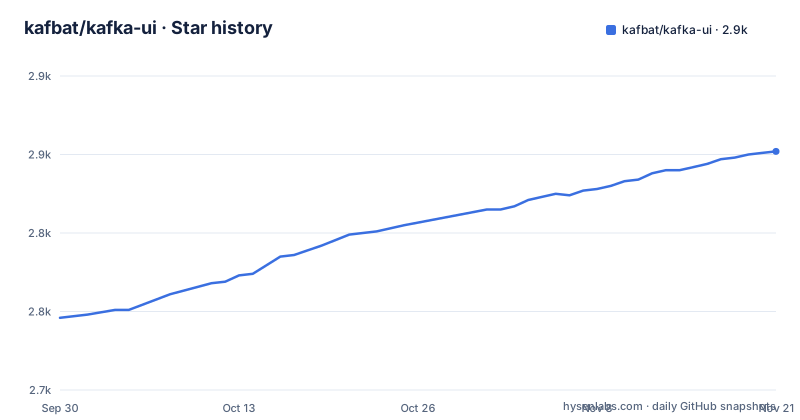
Star history
- kafbat/kafka-ui2,852 ★ · +106
| Repository | 2026-09-30 | 2026-11-21 |
|---|---|---|
| kafbat/kafka-ui | 2.7k | 2.9k |
106 Stars in the last 52 days, measured from the daily GitHub snapshot. Compare with other projects
Editorial analysis
What Kafbat UI replaces in a Kafka workflow
Kafka ships command line tools. Checking consumer lag means running kafka-consumer-groups.sh with a bootstrap server and a group name, and reading a table in a terminal. Inspecting a message means another command, another set of flags, and output that is hard to hand to a colleague. Kafbat UI puts those operations in a browser: brokers, topics, partitions, production and consumption are listed in one dashboard, and the README describes the intended audience as people who want their data flows observable and issues found faster.
The project is not a Kafka distribution and not a broker. It is a separate process that talks to your clusters over the Kafka protocol and renders what it finds. That distinction matters for where you deploy it: the UI container needs network reachability to every broker it is configured against, and it needs credentials that are at least as broad as the operations you want to perform through it.
The README states that Kafbat UI carries forward the legacy of the UI for Apache Kafka project and that the Kafbat team includes contributors from the project's inception. That history explains the shape of the codebase: a Java backend under api/ and serde-api/, a TypeScript frontend under frontend/, Gradle build files at the repository root, and contract/ plus contract-typespec/ directories holding API definitions.
How the UI, the API and the clusters fit together
The repository layout shows three cooperating parts. The frontend/ directory holds the TypeScript application that the browser loads. The api/ directory holds the backend that serves it, and contract/ plus contract-typespec/ describe the HTTP surface between them. serde-api/ is a separate module for serializer and deserializer plugins, which is why the README can list custom SerDe support next to built-in ones such as AWS Glue and Smile.
Configuration flows in through a dynamic config file. The README's persistent example mounts a host file at /etc/kafkaui/dynamic_config.yaml and sets DYNAMIC_CONFIG_ENABLED to 'true'. When that variable is enabled, the UI can write cluster configuration back to that file, which is how the configuration wizard and dynamic topic management work without restarting the container. Turn the variable off and the file becomes read-only input.
Message browsing is the part with the most moving pieces. The README says messages can be explored in JSON, plain text or Avro encoding, that live view is supported, and that user-defined CEL message filters can be applied. Filtering by value therefore happens in the UI process after messages are read, not on the broker. On a high-throughput topic that is a real cost, and it is the main reason to point the UI at a topic you actually need rather than leaving a live view open.
Authentication is pluggable rather than built in. The README lists OAuth 2.0 through GitHub, GitLab or Google, LDAP, and basic authentication, plus GCP IAM, Azure IAM and AWS IAM for cloud identity. Role-based access control and data masking are documented features with their own pages, which suggests they are configured rather than assumed.
Installing Kafbat UI with Docker and opening it
The README gives a demo command that starts the container on port 8080 with two environment variables enabled. Run it, then open http://localhost:8080 in a browser.
docker run -it -p 8080:8080 -e DYNAMIC_CONFIG_ENABLED=true -e SWAGGER_UI_ENABLED=true ghcr.io/kafbat/kafka-uiThe README describes this as sufficient to try things out. With no cluster configured you land on an empty state; the point of the demo run is to confirm the image starts and the interface loads before you commit to a configuration file.
For a persistent installation the README shows a Compose service that pins the image, publishes the same port, keeps both environment variables and mounts a host configuration file into the container.
services:
  kafbat-ui:
    container_name: kafbat-ui
    image: ghcr.io/kafbat/kafka-ui:latest
    ports:
      - 8080:8080
    environment:
      DYNAMIC_CONFIG_ENABLED: 'true'
      SWAGGER_UI_ENABLED: 'true'
    volumes:
      - ~/kui/config.yml:/etc/kafkaui/dynamic_config.yaml
After the container starts, the README points to the configuration page for the cluster settings that belong in that file. SWAGGER_UI_ENABLED is what exposes the built-in API specification; leave it off if the UI is reachable from anywhere you do not fully control. The README also notes that the project can be built from source as a jar or an image, which is the path to take if you cannot pull from ghcr.io.
Where Kafbat UI is the wrong tool
The README does not document a rollback procedure and does not document an upgrade procedure. There is no migration note between the listed releases, and the persistent example uses the latest tag rather than a pinned version. If you deploy it that way, a container restart can move you to a version whose dynamic_config.yaml keys you have not checked. Pin a version tag instead, and read the release notes before moving.
The second limitation is scope. This is a UI. It does not replace alerting, and the README's metrics dashboard is a view, not a monitoring system with thresholds and notification routing. If your problem is that nobody is paged when consumer lag grows, a dashboard that someone has to open does not solve it.
The third is exposure. The demo command publishes port 8080 on all interfaces with no authentication configured. On a laptop that is fine. On a shared network it hands anyone who can reach the port the same cluster access the container holds. The README treats authentication as a configuration step, so the burden is on you to complete it before the port is reachable.
Finally, message browsing reads payloads. Data masking is a documented feature, but it has to be configured; by default the UI shows what the topic contains. If your topics carry personal data, decide on masking before the first person opens the message browser.
Kafbat UI compared with AKHQ and with Provectus Kafka UI
AKHQ is the other well-known open source Kafka web interface, and the comparison people actually search for. Both give you topics, consumer groups and message browsing in a browser. The difference is lineage and packaging: Kafbat UI is the continuation of the UI for Apache Kafka codebase by contributors from that project, distributed from ghcr.io/kafbat/kafka-ui, and its feature list is organised around managed cloud services, specifically Azure EventHub, Google Cloud Managed Service for Apache Kafka and AWS MSK in both server-based and serverless forms. If your clusters live on those services, that support is the deciding factor. If they do not, the two tools overlap heavily and the choice comes down to which one your team already runs.
The Provectus comparison is a naming question rather than a feature question. The README states plainly that Kafbat UI carries forward the legacy of the UI for Apache Kafka project and thanks Provectus for past support. The Kafbat repository is the one with the 2026 releases listed on this page. Anyone still pulling the older image is running a different artefact with a different maintainer, and the two will diverge over time.
A third option worth naming: doing nothing and staying on the command line tools. That is a legitimate choice for a team that already has alerting and only occasionally needs to inspect a topic. Kafbat UI earns its place when several people need the same view without each installing a Kafka client and learning the scripts.
Maintenance, licensing and what to check before upgrading
The repository is not archived and the last push was on 2026-09-21, days before this writing. The most recent release listed is v1.5.0 from 2026-04-20, following v1.4.2 and v1.4.1 in November 2025. That gap between the last release and the last commit is normal for a project that merges work continuously, but it means the main branch is ahead of the newest tagged image. If you pin to v1.5.0 you are running code from April 2026, not the code at the tip of main.
The licence is Apache-2.0, held in the LICENSE file at the repository root. That permits commercial use and modification, and it requires that you keep the licence and notice files when you redistribute. It does not give you a warranty or a support commitment, and the README links to GitHub Sponsors and an AWS Marketplace listing rather than a support contract. This is not legal advice; if you are embedding the UI in a product you ship, have your own counsel read LICENSE alongside the notice files in the frontend and API modules.
Upgrade cost is where the documentation is thinnest. The README does not describe version compatibility between the UI and Kafka brokers, does not describe what happens to an existing dynamic_config.yaml when new keys appear, and does not describe a downgrade path. The practical sequence is to pin a tag, keep a copy of your configuration file, and read the release notes for the version you are moving to before you change the image reference.
Editorial conclusion
Adopt Kafbat UI if you need a browser view of topics, partitions, consumer group lag and message payloads, and you can run a container next to the cluster. Do not adopt it if you need a signed release process, a documented rollback path or a support contract; the repository does not describe any of those. Before putting it in front of production, verify that DYNAMIC_CONFIG_ENABLED is set to 'true' only when you intend to let the UI write cluster configuration, and confirm which authentication provider you will attach, because the README lists OAuth 2.0, LDAP and basic authentication as separate options rather than a default.
Frequently asked questions
What are the differences between Kafbat UI and Kafka UI?
They are the same codebase under different maintainers. The README states that Kafbat UI carries forward the legacy of the UI for Apache Kafka project and thanks Provectus for past support, and that the Kafbat team includes contributors from the project's inception.
How do I install Kafbat UI?
The README gives a Docker command that runs the ghcr.io/kafbat/kafka-ui image with port 8080 published and DYNAMIC_CONFIG_ENABLED and SWAGGER_UI_ENABLED set to true. For a persistent setup it shows a Compose service that mounts a host file at /etc/kafkaui/dynamic_config.yaml.
How do I access Kafbat UI after starting it?
The README says to open http://localhost:8080 in a browser after the container starts. In the persistent example the container publishes port 8080 on the host.
How do I use the message filter in Kafbat UI?
The README lists user-defined CEL message filters as part of the message browser, alongside JSON, plain text and Avro encoding support and live view. It does not document the filter syntax itself.
Is Kafbat UI dead?
No. The repository is not archived, the last push was on 2026-09-21, and the most recent release listed is v1.5.0 from 2026-04-20.
Official sources
Add this badge to your README
If you maintain this project, the badge below links readers to this analysis and shows its maintenance status from the daily GitHub snapshot. Paste the markdown into your README; add ?metric=license or ?metric=stars to the image URL for a different field.

[](https://hysenlabs.com/projects/kafbat-kafka-ui)Star history chart for your README
[](https://hysenlabs.com/projects/kafbat-kafka-ui)Was this useful?