db-scheduler: a persistent Java scheduler for clustered applications
Persistent cluster-friendly scheduler for Java
At a glance
- What is it?
- db-scheduler embeds persistent, recurring, and one-time Java task scheduling in an application that already has a relational database. It offers a simpler cluster coordination model than Quartz, but requires Java 17 and one shared scheduling table.
- Who is it for?
- Adopt db-scheduler when a Java application needs embedded recurring or one-time jobs, already has a compatible relational database, and prefers database-backed coordination to configuring Quartz. Do not choose it when you need in-memory scheduling without a database.
- Can I use it commercially?
- Yes. Apache-2.0 is a permissive licence: you can use, modify and sell software built on it, as long as you keep its copyright and licence notices.
- Is it still maintained?
- Yes. The repository last received commits 2 days ago.
- What is it written in?
- Mainly Java, according to GitHub's language statistics.
Answers come from the project's GitHub data, last synced on November 6, 2026, and from our analysis. They are not legal advice.
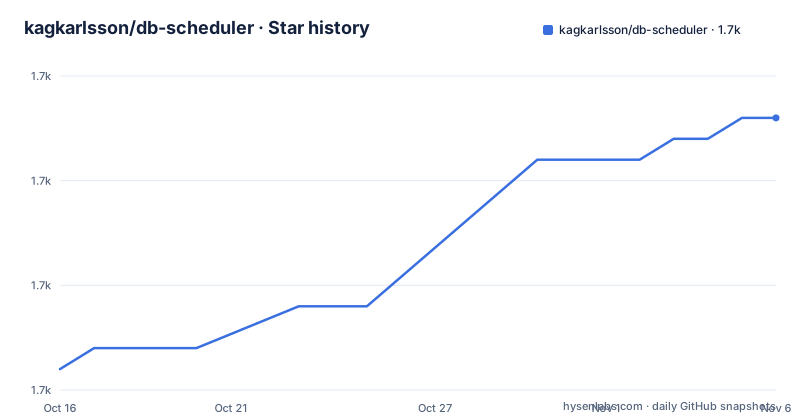
Star history
- kagkarlsson/db-scheduler1,678 ★ · +12
| Repository | 2026-10-16 | 2026-11-06 |
|---|---|---|
| kagkarlsson/db-scheduler | 1.7k | 1.7k |
12 Stars in the last 21 days, measured from the daily GitHub snapshot. Compare with other projects
Editorial analysis
Why db-scheduler replaces a clustered ScheduledExecutorService
db-scheduler addresses a specific distributed-application problem: several application instances need to schedule work without each instance independently executing the same job. The project describes itself as a persistent, cluster-friendly task scheduler inspired by the need for a clustered `java.util.concurrent.ScheduledExecutorService` that would be simpler than Quartz. It is intended for Java teams embedding scheduling inside an existing application.
The central benefit is operational containment. `Scheduler.create(dataSource)` works from an application `DataSource`, and persistence uses one `scheduled_tasks` relational table. Recurring tasks can be registered during scheduler construction. One-time tasks can be submitted at runtime through `SchedulerClient` or the scheduler API. That makes the library relevant to background maintenance, delayed application work, and recurring jobs in systems that already depend on SQL databases.
The README says execution is guaranteed by a single scheduler instance in a cluster. That guarantee is about cluster coordination, not exactly-once business processing. The documentation excerpt does not describe transaction boundaries between task execution and a caller’s database update, so applications should not infer transactional delivery of arbitrary side effects from this feature alone.
The project also claims minimal dependencies, naming only `slf4j`, and lists `2k - 10k executions / second` as a tested performance range with a link to `docs/performance.md`.
Java 17, Maven, and the scheduled_tasks table
The current version line requires Java 17 or newer. The README’s getting-started example uses Maven and version `16.11.0`. The README explicitly tells adopters to replace its example version with the latest version shown by the Maven Central badge. For a reproducible integration, the version should therefore be chosen explicitly rather than copied indefinitely from the example.
The central Maven coordinates are `com.github.kagkarlsson:db-scheduler`. Add the dependency to the application module that constructs the scheduler:
<dependency>
    <groupId>com.github.kagkarlsson</groupId>
    <artifactId>db-scheduler</artifactId>
    <version>16.11.0</version>
</dependency>
After resolving the dependency, create the `scheduled_tasks` table in the application database schema. The README points to its database compatibility section for engine-specific DDL. Copying DDL for a different database engine would be unsafe, so the first setup task is to find the matching definition in the repository documentation.
This database prerequisite affects containerized, test, and local development environments. Each environment must have the table available before the scheduler starts. Automatic schema creation, migration ownership, and rollback behavior should be checked in the selected engine’s documentation and the project’s `UPGRADING.md` before production rollout.
Starting the first recurring job
A recurring task combines a unique task name, a `FixedDelay`, and an execution function. The following is the README’s minimal setup. It assumes that `dataSource` is configured for the application’s relational database and that the `scheduled_tasks` DDL has already been applied.
RecurringTask<Void> hourlyTask = Tasks.recurring("my-hourly-task", FixedDelay.ofHours(1))
        .execute((inst, ctx) -> {
            System.out.println("Executed!");
        });

final Scheduler scheduler = Scheduler
        .create(dataSource)
        .startTasks(hourlyTask)
        .build();

scheduler.start();
Registering `hourlyTask` through `startTasks(hourlyTask)` associates the definition with the scheduler. The README states that this recurring task is scheduled on startup if it is not already started in the database. The printed `Executed!` text is the expected visible sign that the task function has run, although an empty task list or database connectivity failure would instead be diagnosed through application and logging configuration.
The example uses a one-hour fixed delay. Once an execution completes, the task is rescheduled according to that schedule. For business-critical timing, inspect the relevant schedule documentation and test the chosen schedule type.
The scheduler is built separately and then started explicitly. Calling `start()` is therefore a required first-use step in the shown flow, not an incidental detail.
Scheduling one-time instances with SchedulerClient
One-time tasks differ from recurring tasks because each instance has a single execution time and requires an instance ID unique within that task. The ID can encode application metadata, such as a numeric identifier, while the task data can carry a serializable Java object. This supports deferred work whose parameters must travel with the persisted execution.
Define and register the implementation first:
TaskDescriptor<MyTaskData> MY_TASK =
    TaskDescriptor.of("my-onetime-task", MyTaskData.class);

OneTimeTask<MyTaskData> myTaskImplementation =
    Tasks.oneTime(MY_TASK)
        .execute((inst, ctx) -> {
            System.out.println("Executed! Custom data, Id: " + inst.getData().id);
        });

final Scheduler scheduler = Scheduler
    .create(dataSource, myTaskImplementation)
    .registerShutdownHook()
    .build();

scheduler.start();
At runtime, schedule one instance for a time five seconds after the current `Instant`:
scheduler.schedule(
    MY_TASK
        .instance("1045")
        .data(new MyTaskData(1001L))
        .scheduledTo(Instant.now().plusSeconds(5)));
The unique constraint is operational as well as conceptual. Reusing the same instance ID for a logical execution can conflict with the scheduler’s identity rules. Applications that need retriable or editable one-time work should not assume those semantics from this example.
For bulk work, the README exposes `scheduleBatch`:
Stream<TaskInstance<?>> taskInstances = Stream.of(
    MY_TASK.instance("my-task-1", 1),
    MY_TASK.instance("my-task-2", 2),
    MY_TASK.instance("my-task-3", 3));

scheduler.scheduleBatch(taskInstances, Instant.now());
The three stream elements become separate task instances with distinct IDs, while `Instant.now()` is their shared execution time.
Database coordination and cluster ownership
The visible architecture is deliberately small: application code embeds `Scheduler`, the scheduler uses a relational `DataSource`, and task state is persisted in the `scheduled_tasks` table. Multiple application instances can therefore point schedulers at the same database. The README states that only one scheduler instance guarantees execution of a task within the cluster, which addresses duplicate execution caused by every JVM independently running the same schedule.
That design has two clear consequences. First, the relational database becomes part of task scheduling infrastructure rather than merely application storage. Database availability, schema compatibility, and access latency can affect scheduling behavior. Second, all nodes that coordinate through the same table must use compatible scheduler and schema versions. The repository has a dedicated `UPGRADING.md`.
The architecture is a practical alternative to Quartz, not a feature-for-feature replacement statement. The README positions db-scheduler as simpler to handle because it is embedded and depends on a `DataSource`. Quartz is not presented through configuration details here, so claims about Quartz migration should remain limited to the project’s own stated scope.
Consequently, the specific locking, leasing, polling, retry, or recovery protocol cannot be confirmed. Before depending on recovery semantics during database failover, inspect that repository section and the database-specific notes.
Limits, maintenance, and the Spring Boot boundary
The clearest limitation is infrastructure coupling. db-scheduler requires Java 17 or newer, a relational database, and one `scheduled_tasks` table. It is the wrong choice when those requirements are absent or when a process-local executor is sufficient. The cluster guarantee also does not establish exactly-once effects for external side effects such as messages, files, or third-party APIs.
The repository is not archived. Its last push was on 2026-10-13. Recent releases listed in the repository metadata are `v16.12.0` from 2026-05-29, `v16.11.0` from 2026-05-26, and `v16.10.0` from 2026-05-20. Upgrade planning should include review of `UPGRADING.md` and any database DDL changes rather than assuming a Java dependency version bump has no schema impact.
The project is licensed under `Apache-2.0`. That license identifier permits reuse and modification under its terms and conditions, including notice and patent provisions, but an organization should review the actual `LICENSE` file and dependency notices for its compliance process. This is identification of the declared license, not legal advice.
A `db-scheduler-spring-boot-starter-parent` directory and a `spring-boot-example` are visible in the repository layout, and the README directs Spring Boot users to a Spring Boot usage section. Plain Java remains the documented path that can be stated completely.
Editorial conclusion
Adopt db-scheduler when a Java application needs embedded recurring or one-time jobs, already has a compatible relational database, and prefers database-backed coordination to configuring Quartz. Do not choose it when you need in-memory scheduling without a database. Before adoption, verify Java 17 compatibility, apply the DDL for the selected database, and test the exact task failure and recovery behavior required by the application.
Frequently asked questions
What are the Java and database requirements for db-scheduler?
The README requires Java 17 or newer, a relational database, and one `scheduled_tasks` table. Engine-specific compatibility and DDL are referenced through the database compatibility documentation.
How do I add db-scheduler to a Maven project?
Add the `com.github.kagkarlsson` artifact with artifact ID `db-scheduler`, then select the version to use. The README example uses `16.11.0` and says to replace it with the latest version shown by its Maven Central badge.
How does db-scheduler coordinate jobs across multiple Java instances?
The project describes itself as cluster-friendly and says it guarantees execution by a single scheduler instance. Its schedulers persist task state through a shared relational database.
Official sources
Add this badge to your README
If you maintain this project, the badge below links readers to this analysis and shows its maintenance status from the daily GitHub snapshot. Paste the markdown into your README; add ?metric=license or ?metric=stars to the image URL for a different field.

[](https://hysenlabs.com/projects/kagkarlsson-db-scheduler)Star history chart for your README
[](https://hysenlabs.com/projects/kagkarlsson-db-scheduler)Was this useful?