Karmada: multi-cluster Kubernetes orchestration without changing your manifests
Open, Multi-Cloud, Multi-Cluster Kubernetes Orchestration
At a glance
- What is it?
- Karmada is a CNCF graduated project that runs Kubernetes workloads across several clusters and clouds through native APIs. This review covers the control plane architecture, the local-up install path, and where the project's own documentation stops short.
- Who is it for?
- Adopt Karmada when the requirement is placing the same Kubernetes manifests across several clusters or clouds under one policy API and you already run Kubernetes at the level of a platform team. Do not adopt it as a GitOps replacement or as the first stop for a two-cluster setup that a single Argo CD instance already handles.
- Can I use it commercially?
- Yes. Apache-2.0 is a permissive licence: you can use, modify and sell software built on it, as long as you keep its copyright and licence notices.
- Is it still maintained?
- Yes. The repository last received commits 3 days ago.
- What is it written in?
- Mainly Go, according to GitHub's language statistics.
Answers come from the project's GitHub data, last synced on November 15, 2026, and from our analysis. They are not legal advice.
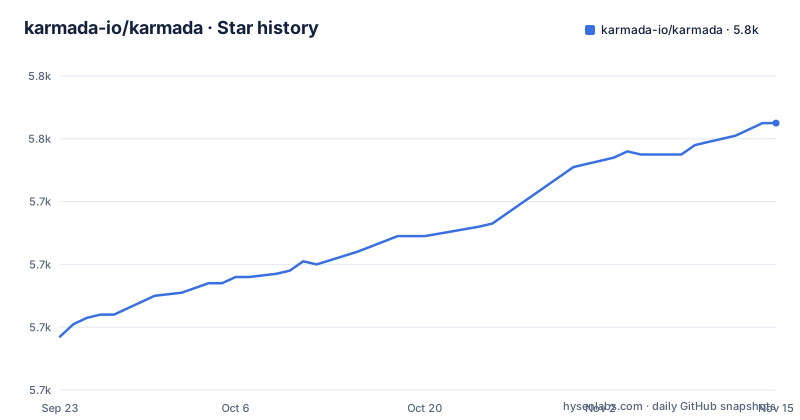
Star history
- karmada-io/karmada5,765 ★ · +68
| Repository | 2026-09-23 | 2026-11-15 |
|---|---|---|
| karmada-io/karmada | 5.7k | 5.8k |
68 Stars in the last 53 days, measured from the daily GitHub snapshot. Compare with other projects
Editorial analysis
The problem Karmada addresses: placement, not delivery
Running one application in one cluster is a solved problem. Running the same application in three clusters across two clouds is a scheduling problem, and Kubernetes has no built-in answer for it. The README states the project's goal directly: "run your cloud-native applications across multiple Kubernetes clusters and clouds, with no changes to your applications." That word, placement, is what separates Karmada from a deployment pipeline. It does not build images and it does not watch a Git repository. It takes resource templates you already write in Kubernetes YAML and decides which member clusters receive them.
The intended user is a platform team operating more than one cluster, typically across providers or regions. The README lists the scenarios it targets: active-active, remote disaster recovery, and geo redundancy. Those are not the concerns of a team with a single staging and a single production cluster. They are the concerns of a team that has to answer what happens when an availability zone or a provider region goes away, and that has already accepted the operational cost of running several clusters.
One piece of history matters for evaluating the design. The README notes the project is "developed in continuation of Kubernetes Federation v1 and v2," and that some basic concepts are inherited from them. Karmada is therefore not a fresh interpretation of multi-cluster management. It builds on two earlier Kubernetes federation projects and inherits some of their basic concepts.
How the Karmada control plane turns a policy into Work objects
The architecture section of the README describes three core components: the Karmada API Server, the Karmada Controller Manager, and the Karmada Scheduler. ETCD stores Karmada API objects. The API Server is the REST endpoint that all other components talk to. The Controller Manager watches those objects and then talks to the underlying clusters' API servers to create regular Kubernetes resources.
The flow is worth tracing because it explains what you will actually debug. A PropagationPolicy selects resources matching its resourceSelector and produces a ResourceBinding for each single resource object. The Binding Controller then creates one Work object per target cluster, each holding a single resource manifest. The Execution Controller watches Work objects and distributes the resources to member clusters. A separate Cluster Controller attaches clusters and manages their lifecycle by creating cluster objects.
That layering is the design decision to weigh. The Work object is the unit of truth for what a given member cluster should contain, so the control plane is the single place to inspect what each member cluster should contain. You also get a single control plane whose availability now matters to every member cluster. The README lists high availability and failure recovery as features, but the quick start installs the control plane components in a host cluster, so the host cluster's own resilience is a question you have to answer yourself.
Two APIs sit alongside propagation. The Propagation Policy API is described as a standalone placement API, with a 1:n mapping of policy to workload so users do not repeat scheduling constraints for every application. The Override Policy API handles cluster-specific configuration, and the README gives two concrete examples: overriding an image prefix according to member cluster region, and overriding StorageClass according to cloud provider. Override policies are where multi-cloud work usually turns ugly, and giving them a separate API rather than burying them in templates is a reasonable split.
Installing Karmada locally with hack/local-up-karmada.sh
The README's quick start targets a host cluster that runs the Karmada control plane, a member cluster joined to it, and one propagated application. Prerequisites are listed as Go at the version in go.mod, kubectl v1.19 or later, and kind v0.14.0 or later. The go.mod file in the repository declares go 1.26.10 with a comment to keep it in sync with .go-version, so read that file rather than trusting a version number quoted anywhere else.
Start by cloning the repository and entering it:
git clone https://github.com/karmada-io/karmada
cd karmada
The quick start then runs a single script. According to the README, it starts a Kubernetes cluster to host the control plane, builds the Karmada components from the current codebase, deploys them, and creates and joins member clusters:
hack/local-up-karmada.shWhat you should see at the end is a working control plane plus member clusters. The README says the script output ends with "Local Karmada is running." and instructions to export KUBECONFIG="$HOME/.kube/karmada.config" for the karmada-host and karmada-apiserver contexts, and KUBECONFIG="$HOME/.kube/members.config" for the member1, member2 and member3 clusters.
For anything beyond a laptop, the repository carries a charts directory for Helm-based deployment and an operator directory, and the Makefile builds the component images. The Makefile defines the image targets explicitly: karmada-aggregated-apiserver, karmada-controller-manager, karmada-scheduler, karmada-descheduler, karmada-webhook, karmada-agent, karmada-scheduler-estimator, karmada-search, karmada-operator, and karmada-metrics-adapter, plus the karmadactl and kubectl-karmada CLI targets. The default registry is docker.io/karmada. Building a single component is a make invocation against one of those target names, for example make karmada-controller-manager, and the Makefile passes GOOS and GOARCH through to hack/build.sh.
Where Karmada is the wrong tool
Karmada assumes you have clusters to orchestrate. If your workloads live in one cluster, the entire control plane is overhead: an additional API Server, an additional ETCD, a controller manager, and a scheduler, all of which must stay available for member clusters to keep receiving updates.
The second boundary is custom resources. The repository contains an examples/customresourceinterpreter directory and a karmada-interpreter-webhook-example target in the Makefile, which tells you that propagating a custom resource is not automatic. It requires a resource interpreter to tell Karmada how to read and write that resource. For a platform built on operators and CRDs, that is real integration work per resource type. The examples directory is where you would start, not the README.
The third boundary is that Karmada is not a GitOps controller. It has no repository sync loop, no drift correction against a Git commit, and no manifest rendering. A team that wants declarative delivery from Git keeps that tool and puts Karmada in front of the resulting manifests. Treating Karmada as the thing that reconciles your Git state will not work, because propagation is driven by policy objects in the Karmada API, not by a commit.
Finally, before a production rollout, ask how rollback of a control plane upgrade works and what happens to Work objects when the control plane is unreachable for an extended period.
Karmada compared with OCM and Argo CD
The most common comparison for Karmada is Open Cluster Management, and the difference is in where the scheduling intelligence lives. Karmada keeps a central control plane with its own API Server, scheduler, and ETCD, and pushes Work objects down to member clusters. OCM is built around a hub-and-spoke model with a klusterlet agent on each managed cluster and placement defined through its own APIs. Both attach clusters and both schedule workloads. Karmada's distinguishing choice is the standalone PropagationPolicy and OverridePolicy pair with a 1:n mapping of policy to workload, which lets one policy cover many applications without repeating constraints. If your requirement is a single policy object governing a fleet of workloads, that mapping is the feature to evaluate.
Against Argo CD the comparison is easier to settle because the two solve different halves of the problem. Argo CD reconciles a cluster's state against a Git repository. Karmada decides which clusters should receive a resource and keeps them in that state. The question "karmada vs argocd" is therefore usually a question about which layer is missing. If your manifests already reach every cluster through Git and the remaining problem is that a human writes the target list, Karmada is the layer you lack. If your problem is that a cluster drifts from its declared state, Argo CD is the layer you lack, and Karmada will not close that gap.
A third option is to do nothing and manage clusters with separate pipelines. That is a legitimate choice at two or three clusters, and the cost of Karmada's control plane is real. The break-even point is roughly where the number of clusters or the number of policies makes per-cluster pipelines unmaintainable, and that point differs by team.
Release cadence, licence and the cost of staying current
The repository's last push was on 2026-11-02, and it is not archived. The most recent releases are v1.20.0-beta.0, v1.19.1, and v1.18.4, all dated 2026-10-31. Patch releases for two older minor lines on the same day as a new beta indicates a backport policy that keeps older minors alive rather than forcing an immediate jump to the newest minor. For an operator, that is the relevant fact: you can stay on a previous minor and still receive fixes, at least while those lines are in support.
The upgrade cost is dominated by Kubernetes API skew. The go.mod file pins k8s.io/api, k8s.io/apimachinery, k8s.io/apiserver, k8s.io/client-go and related modules at v0.37.1, and the project tracks the upstream Kubernetes release train closely. A Karmada control plane built against one Kubernetes minor expects member clusters within the supported skew, so a fleet containing a cluster several minors behind is a constraint to check before upgrading Karmada, not after. The .go-version file and the go directive in go.mod are the two places to read the toolchain expectation.
On licensing, the repository carries an Apache-2.0 licence, and the README's badge row links to the LICENSE file at the repository root. Apache-2.0 is a permissive licence with an explicit patent grant, and it is the same licence Kubernetes itself uses, which removes most friction for redistribution inside a commercial platform. This is a description of the licence file, not legal advice; a company that embeds Karmada in a product should have its own counsel review the third-party obligations, particularly given the vendored dependency tree in the vendor directory.
Editorial conclusion
Adopt Karmada when the requirement is placing the same Kubernetes manifests across several clusters or clouds under one policy API and you already run Kubernetes at the level of a platform team. Do not adopt it as a GitOps replacement or as the first stop for a two-cluster setup that a single Argo CD instance already handles. Before committing, verify the Karmada control plane version against your host cluster's Kubernetes version, confirm that your member clusters fall inside the supported upstream skew, and read the resource interpreter requirement if you intend to propagate custom resources rather than built-in ones.
Frequently asked questions
What is Karmada used for?
Karmada runs cloud-native applications across multiple Kubernetes clusters and clouds without changing the applications themselves. It provides a control plane with a scheduler and policy APIs that decide which member clusters receive each resource.
Who uses Karmada?
The README describes the project as jointly initiated by organizations in internet, finance, manufacturing, telecom and cloud provider sectors, and the repository carries an ADOPTERS.md file listing adopters.
What is Karmada in Kubernetes terms?
It is a Kubernetes management system that speaks Kubernetes-native APIs. Its control plane consists of a Karmada API Server, a Karmada Controller Manager and a Karmada Scheduler, with ETCD storing the Karmada API objects.
How does Karmada compare with Argo CD?
They operate at different layers. Argo CD reconciles a cluster against a Git repository, while Karmada selects which member clusters receive a resource and creates Work objects to distribute it. Karmada's README does not describe a Git sync loop.
How does Karmada compare with Open Cluster Management?
Both attach clusters and schedule workloads, but Karmada keeps a central control plane with its own API Server, scheduler and ETCD, and pushes Work objects to member clusters. Karmada's placement is expressed through standalone PropagationPolicy and OverridePolicy APIs.
What are the alternatives to Karmada for multi-cluster management?
The README positions Karmada as continuing the work of Kubernetes Federation v1 and v2, both of which are now retired. Open Cluster Management and Argo CD are common comparisons, and each covers a different part of the problem.
Official sources
Add this badge to your README
If you maintain this project, the badge below links readers to this analysis and shows its maintenance status from the daily GitHub snapshot. Paste the markdown into your README; add ?metric=license or ?metric=stars to the image URL for a different field.

[](https://hysenlabs.com/projects/karmada-io-karmada)Star history chart for your README
[](https://hysenlabs.com/projects/karmada-io-karmada)Was this useful?