kartoza/docker-qgis-desktop: Running QGIS in a Container, with Deprecation Caveats
A docker project that will run your QGIS desktop app inside a docker container
At a glance
- What is it?
- This Docker image runs the QGIS desktop application inside a container, sharing the host's X11 socket for display. It is deprecated in favor of a successor project, and its setup relies on insecure xhost permissions and a specific X11 configuration.
- Who is it for?
- Adopt this image only if you need a quick, disposable QGIS environment on a local Linux machine and accept the deprecation and X11 security trade-offs. Do not adopt it for production, multi-user setups, or macOS without an X11 server and SOCAT.
- Can I use it commercially?
- Yes, with conditions. GPL-2.0 is a copyleft licence: if you distribute software that includes it, you must release that software's source code under the same licence. Running it internally without distributing it does not trigger that obligation.
- Is it still maintained?
- Yes. The repository last received commits 134 days ago.
- What is it written in?
- Mainly Shell, according to GitHub's language statistics.
Answers come from the project's GitHub data, last synced on October 4, 2026, and from our analysis. They are not legal advice.
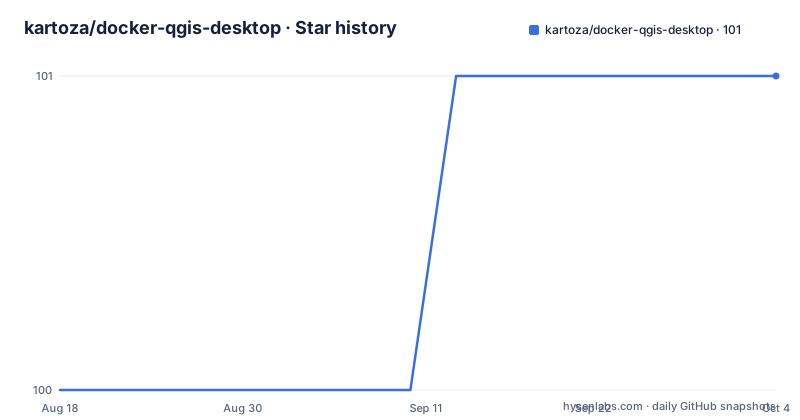
Star history
- kartoza/docker-qgis-desktop101 ★ · +1
| Repository | 2026-08-18 | 2026-10-04 |
|---|---|---|
| kartoza/docker-qgis-desktop | 100 | 101 |
1 Stars in the last 47 days, measured from the daily GitHub snapshot. Compare with other projects
Editorial analysis
What This Image Actually Solves
The project packages QGIS, the open-source GIS application, into a Docker image. That lets you run a desktop GUI without installing QGIS directly on the host. The intended audience is developers and GIS users who want an isolated, reproducible QGIS environment, or who need a base image for other projects like the QGIS-Server Docker image. The README positions it as experimental and not optimal, which is an honest framing. For someone who needs a clean QGIS install on a machine they do not want to pollute, this image offers a path. But the deprecation notice at the top changes the calculus: the maintainers have moved on, and new users should look at the replacement repo first.
How It Works: X11 Forwarding and Volume Mounts
The core mechanism is X11 socket sharing. The container mounts the host's /tmp/.X11-unix directory and sets the DISPLAY environment variable. The README example uses DISPLAY=unix:1, while the run script uses DISPLAY=unix$DISPLAY, which resolves to something like unix:0. That socket connection lets the GUI render on the host display. The container also mounts the user's home directory with -v ${HOME}:/home/${USER}, giving QGIS access to local files. For additional directories, the README says to add more -v flags. This is a straightforward pattern, but it depends on the host having an X server running and on the X11 permissions allowing the container to connect. The README explicitly warns that xhost + is used, which opens the display to all remote hosts. That is a real security concern, especially on shared networks.
Getting It Running: Commands and Config
You can pull the image directly with docker pull kartoza/qgis-desktop. The README also offers a docker-compose example that links a PostGIS database container and mounts a ./gis directory. That example sets DISPLAY=unix:1 and runs /usr/bin/qgis as the command. For a manual run, the script run-qgis-master-in-docker.sh contains the exact docker run command: it starts with xhost +, mounts the home directory, mounts the X11 socket, sets the display, and uses --rm to clean up. You can copy that script to /usr/local/bin and install a desktop shortcut using the provided .desktop file. If you want to build the image yourself, the README says to clone the repo, cd into a version directory like master, and run ./build.sh. That script creates the launcher and shortcut automatically. The alternative build command, docker build -t kartoza/qgis-desktop git://github.com/kartoza/docker-qgis-desktop, requires you to set up the launcher manually.
Real Limitations: Deprecation, X11 Security, and macOS
The most obvious limitation is the deprecation notice. The README states the project is deprecated and points to a replacement. That means no active development is expected, and the image may not track new QGIS releases. The README also lists specific limitations: the Qt4 theme is not carried over nicely, and xhost + is insecure. The security issue is not hypothetical; it allows any remote host to display windows on your X display. For a local network, the README says it is probably fine, but that is a weak guarantee. On macOS, you need to install XQuartz and SOCAT to tunnel the connection, which adds complexity. The README does not provide the exact commands for that setup, only a link to a blog post. If QGIS crashes, it can leave an orphan container, and you have to manually find and remove it with docker ps and docker rm. These are not edge cases; they are the everyday friction of using this image.
When This Is the Wrong Tool
This image is the wrong choice for anyone needing a secure, multi-user environment. The xhost + approach is a deal-breaker for any shared or untrusted network. It is also wrong for users who expect a maintained, up-to-date QGIS. Since the project is deprecated, you will likely miss new QGIS features and bug fixes. For headless or server-side GIS processing, this desktop image is irrelevant; you would use the QGIS-Server image instead. The README notes that this image is the base for docker-qgis-server, but that does not mean you should run desktop QGIS in a container for batch processing. If you need a desktop GUI on a remote server, you would be better off with a VNC-based approach, but that is not what this project offers. The deprecation alone should push most new users away, unless they have a specific reason to use this exact image.
Alternatives: The Successor and Manual Installs
The README names the direct alternative: https://github.com/kartoza/qgis-desktop-docker. That is the replacement project, and it likely addresses some of the limitations listed here, though the README does not detail how. The key difference is that the successor is actively maintained, whereas this repo is frozen. Another alternative is to install QGIS directly on the host using your distribution's package manager, which avoids Docker and X11 forwarding entirely. That approach gives you native performance and easier integration with system libraries, but sacrifices the isolation that a container provides. For users who want containerization without the X11 hassle, a VNC-based Docker image would be a different approach, but that is not mentioned in the README. The choice comes down to whether you need the isolation or the convenience of a native install.
Maintenance and License Implications
The project is licensed under GPL-2.0, which means if you distribute modifications, you must make the source available under the same license. That is a standard copyleft obligation, but it matters if you plan to build a commercial product on top of this image. The maintenance cost is effectively zero because the project is deprecated; there is no active upkeep. That also means you inherit any bugs in the image without expectation of fixes. The build process itself is simple, but the README warns that the approach is experimental and not optimal. Upgrading QGIS would require rebuilding the image from the version directories, but without new releases, you are stuck with what is there. The deprecation is the single biggest maintenance factor: you are adopting a project that the maintainers have explicitly abandoned.
Editorial conclusion
Adopt this image only if you need a quick, disposable QGIS environment on a local Linux machine and accept the deprecation and X11 security trade-offs. Do not adopt it for production, multi-user setups, or macOS without an X11 server and SOCAT. Before using, verify the successor project at https://github.com/kartoza/qgis-desktop-docker, and check whether your QGIS version needs are met by the available tags. The project is deprecated, so plan to migrate to the replacement or build your own image.
Frequently asked questions
What is QGIS used for in this container?
The container runs the QGIS desktop application itself, wired in the example to a PostGIS database and to a host directory of data mounted at /gis. The related project in the same organisation, kartoza/docker-qgis-server, covers the server side of the same software.
What is Docker Desktop and what is it used for?
Nothing in this repository concerns Docker Desktop, the desktop application. Everything here uses the docker command line and docker-compose directly, and the desktop entries that do appear are X11 desktop shortcut files copied into the desktop applications directory so a launcher icon appears.
What is Docker and why would I use it here?
The repository's own stated reason is narrow: pulling the published image consumes the most bandwidth for the initial build but is easy to update afterwards. It also qualifies the approach as still experimental and not the most optimal way to run QGIS desktop, and points at a replacement project instead.
What is the point of Docker Desktop?
There is no discussion of that product anywhere in this project, because it is not what the project uses. The commands documented are docker pull, docker build, docker run, docker stop, docker rm, docker ps and docker-compose up, all run from a shell.
Official sources
Add this badge to your README
If you maintain this project, the badge below links readers to this analysis and shows its maintenance status from the daily GitHub snapshot. Paste the markdown into your README; add ?metric=license or ?metric=stars to the image URL for a different field.

[](https://hysenlabs.com/projects/kartoza-docker-qgis-desktop)Star history chart for your README
[](https://hysenlabs.com/projects/kartoza-docker-qgis-desktop)