Amaze File Manager bundles an app manager, four readers, and one warning about KitKat SD cards
Material design file manager for Android
At a glance
- What is it?
- An open source Android file manager on the GPL-3.0, whose feature list runs from AES file encryption to a root explorer, and whose README still carries a data loss warning about external memory on KitKat. The signing rules in the vendor section matter as much as the feature list if you plan to ship it preinstalled.
- Who is it for?
- Amaze File Manager suits an Android user who wants archive handling, an app manager, and local file encryption in one open source package with no ads and no in-app purchases, and who is willing to install a separate plug-in for cloud accounts. Check the KitKat external memory warning before trusting cut and paste on an SD card.
- Can I use it commercially?
- Yes, with conditions. GPL-3.0 is a copyleft licence: if you distribute software that includes it, you must release that software's source code under the same licence. Running it internally without distributing it does not trigger that obligation.
- Is it still maintained?
- Yes. The repository last received commits 2 days ago.
- What is it written in?
- Mainly Kotlin, according to GitHub's language statistics.
Answers come from the project's GitHub data, last synced on November 14, 2026, and from our analysis. They are not legal advice.
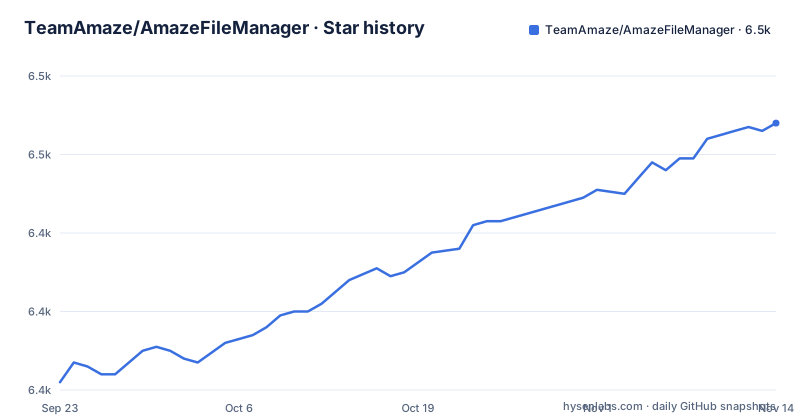
Star history
- TeamAmaze/AmazeFileManager6,468 ★ · +66
| Repository | 2026-09-23 | 2026-11-14 |
|---|---|---|
| TeamAmaze/AmazeFileManager | 6.4k | 6.5k |
66 Stars in the last 52 days, measured from the daily GitHub snapshot. Compare with other projects
Editorial analysis
The feature list leans on two plug-in boundaries and one ancient Android version
Two capabilities carry a version caveat inside the list itself. AES encryption and decryption of files is marked for Jellybean v4.3 and above, and cloud services support is marked for the same range while also requiring an additional plug-in. The rest of the list has no such qualifier: cut, copy, delete, compress, extract, multiple tabs at once, multiple themes, a navigation drawer, history, bookmarks, search, and a root explorer for advanced users.
Then there is the app manager, which opens, backs up, or directly uninstalls any app. Inbuilt readers cover a database, Zip and Rar archives, APKs, and text.
What this buys you is a single open source package with no ads and no in-app purchases. What it does not buy you is cloud access, which sits behind a separate purchase: the Cloud Plugin supports Google Drive, Dropbox, OneDrive, and Box accounts.
The warning about KitKat SD cards is a data loss notice, not a footnote
The README carries a warning section that deserves to be read before anything else. Basic read and write operations might not work on external memory on KitKat devices. The instruction is blunt: do not use cut or paste from or to an external SD card, because you might lose your files.
The same warning section states that under the license the authors are not responsible for damages. There is a separate privacy policy page in the project wiki for anyone who needs to know what the app collects.
A different digital signature breaks the plug-ins
The vendor section addresses device vendors and ROM developers directly. Vendors and ROM developers are free to include the Amaze APK pre-installed in the system, with no fee required, but they must comply with the license, which the README points at as the GNU GPL v3 or newer.
The signature is where that freedom runs into a wall. The project strongly recommends using an APK signed by them, meaning either the Play Store version or the build from the Android File Host link, so that users can update directly from the Play Store after distribution. Furthermore, a change in digital signature will break plug-ins.
What that means in practice is that a vendor who rebuilds from source and signs with their own key gets the app working and the plug-ins broken. The README does not document a re-signing procedure for a self built APK, so the documented path is to use the maintainers' signature rather than to work around it.
Five download channels and one shared application id
The APK is reachable through five separate channels: the Play Store, F-Droid, the IzzyOnDroid index, the releases page on the code host, and Android File Host.
That spread is the reason the signature advice matters more than it looks. The package name com.amaze.filemanager appears in the Play Store, F-Droid and IzzyOnDroid links, while the companion utility app uses its own id, com.amaze.fileutilities.
For a vendor bundling the app into a system image, the practical question is not which channel to link but which signature. Only two of these channels are described as carrying an APK the maintainers signed.
The repository is split into feature modules rather than one app directory
The top level of the repository is worth a look if you intend to build it. Beyond the expected `app/` module there are `file_operations/`, `commons_compress_7z/`, and `portscanner/`, each of which is a separate module in the Gradle build. The archive handling and the port scanning live outside the application module, and the code that moves files is not mixed in with the screens that trigger it.
Build tooling is conventional Gradle with a wrapper checked in as both `gradlew` and `gradlew.bat`, alongside `build.gradle`, `settings.gradle`, `gradle.properties`, and `project.properties`. Release plumbing has its own directory in `fastlane/`, and translation work is configured through `transifex.yml` and a `.tx/` directory.
There is also a `testShared/` directory, which says shared test fixtures are factored out, and `scripts/` for repository scripts. Nothing in the tree describes a build you can run without the Android SDK.
Translations, lint, and agent files sit next to the license text
The repository carries the usual project governance files and a few that are less common. `CONTRIBUTING.md` is linked directly as the code contribution path, and there is a separate `CODE_OF_CONDUCT.md`, a `SECURITY.md`, and an `AGENTS.md` alongside a `CLAUDE.md`. An `opencollective.svg` and a `paypal.svg` sit at the top level next to the license text.
Translation is structured as two projects rather than one: the README points contributors at the Transifex page for Amaze File Manager and at a Crowdin project for Amaze Utilities. The `.tx/` directory and `transifex.yml` are what wire that up.
Code style is enforced through Spotless, and the custom license header the project applies to its own files is kept in `amaze.license.spotless.txt`. The copyright block in the README lists five named contributors with years running from 2014 to 2024.
The release tags and the default branch tell different stories
The repository is not archived, and the last recorded push to the default branch `release/4.0` came on 31 October 2026. The release tags tell a different story. The most recent is v3.11.4 from 15 October 2026, before that v3.11.3 from 30 July 2026, and v3.11.2 from 28 December 2025.
So the default branch is named for a version that has not been tagged, and the most recent tag is a 3.x release. Nobody documents what state 4.0 is in, and the README has no build instructions, no minimum Android version beyond the Jellybean references in the feature list, and no Gradle or SDK version requirement.
What you cannot take from these dates is stability. A recent push to an untagged 4.0 branch and the v3.11.4 tag from 15 October 2026 describe two different things: where development happens, and what you can install from a channel today.
What the feature list does not tell you
Several things a file manager is normally judged on are absent from what is written down.
There is no statement about how large the APK is, no memory figure, no battery figure, and no startup time. There is no list of which archive formats the inbuilt Zip and Rar reader handles, and the separate `commons_compress_7z/` module suggests 7z support exists without the README saying which side owns it. The database reader does not name a format or a viewer.
There is no documentation of SMB, and no description of how the cloud plug-in authenticates or which features it unlocks beyond naming four providers. The encryption feature does not state which cipher, which key storage, or whether encrypted archives are interoperable with anything else. And there is no accessibility statement and no comparison with any other file manager.
None of that is a defect on its own. It does mean the README is an advertisement and a license summary, and the code in the repository is where the answers are.
Editorial conclusion
Amaze File Manager suits an Android user who wants archive handling, an app manager, and local file encryption in one open source package with no ads and no in-app purchases, and who is willing to install a separate plug-in for cloud accounts. Check the KitKat external memory warning before trusting cut and paste on an SD card. If you ship it preinstalled in a ROM, use the maintainers' signed APK, because a different signature breaks the plug-ins.
Frequently asked questions
Is the Amaze app free?
The README states no ads or in-app purchases in the app itself. Cloud services support is separate, through a paid Cloud Plugin that covers Google Drive, Dropbox, OneDrive, and Box accounts.
Is the Amaze app safe?
The project is open source under the GNU GPL v3, distributes builds through the Play Store and F-Droid, and publishes a privacy policy in its wiki. The README also states that under the license the authors are not responsible for damages.
What is the safest file manager for Android?
The README makes no ranking against other file managers. It states that Amaze is open source, has no ads or in-app purchases, and offers AES encryption and decryption of files on Jellybean v4.3 and above.
what is amaze file manager
It describes itself as a simple and attractive file manager for Android built along design guidelines, written in Kotlin under the GPL-3.0. The default branch is release/4.0 and the homepage is teamamaze.xyz.
amaze file manager vs mixplorer
The README names no competitor and offers no comparison. Its own differentiators listed there are AES file encryption, an app manager that can uninstall apps, and inbuilt readers for databases, archives, APKs, and text.
amaze file manager alternative
No alternatives are named in the README. It does point to a companion app, Amaze File Utilities, which groups and sorts media, analyses storage for junk and duplicate files, and transfers files between two devices on the same wifi network.
Official sources
Add this badge to your README
If you maintain this project, the badge below links readers to this analysis and shows its maintenance status from the daily GitHub snapshot. Paste the markdown into your README; add ?metric=license or ?metric=stars to the image URL for a different field.

[](https://hysenlabs.com/projects/teamamaze-amazefilemanager)Star history chart for your README
[](https://hysenlabs.com/projects/teamamaze-amazefilemanager)Was this useful?