OptiKey turns eye movements into Windows keystrokes
OptiKey - Full computer control and speech with your eyes
At a glance
- What is it?
- A GPL-3.0 on-screen keyboard written in C# for people with Motor Neuron Disease, built to sit between an eye-tracking device and Windows, free where the commercial AAC products it competes with are not.
- Who is it for?
- OptiKey is unusual among GitHub projects in that its value is not measured in features but in whether it works on the specific machine of the person using it, which makes the WPF and Windows-only design a requirement rather than a limitation. If you are evaluating it, the decisive step is reading the wiki's installation and system requirements page rather than the README, because that is where per-tracker setup lives.
- Can I use it commercially?
- Yes, with conditions. GPL-3.0 is a copyleft licence: if you distribute software that includes it, you must release that software's source code under the same licence. Running it internally without distributing it does not trigger that obligation.
- Is it still maintained?
- Yes. The repository last received commits 50 days ago.
- What is it written in?
- Mainly C#, according to GitHub's language statistics.
Answers come from the project's GitHub data, last synced on October 23, 2026, and from our analysis. They are not legal advice.
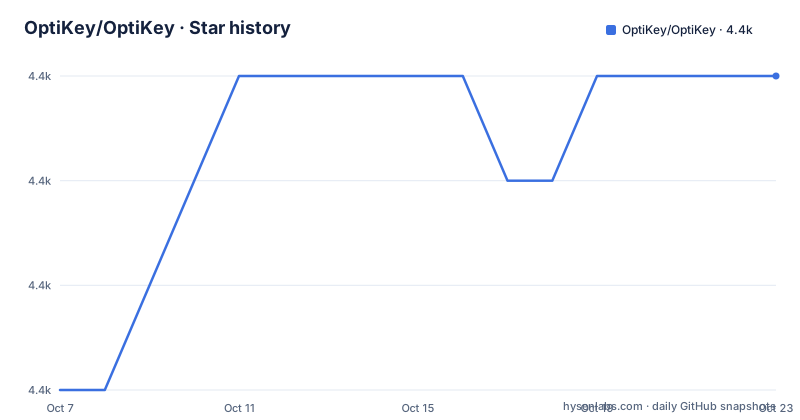
Star history
- OptiKey/OptiKey4,425 ★ · +3
| Repository | 2026-10-07 | 2026-10-23 |
|---|---|---|
| OptiKey/OptiKey | 4.4k | 4.4k |
3 Stars in the last 16 days, measured from the daily GitHub snapshot. Compare with other projects
Editorial analysis
What the project is actually for
The README is specific about the audience, which is worth honoring precisely rather than paraphrasing. OptiKey is an on-screen keyboard designed to help Motor Neuron Disease patients interact with Windows computers. When paired with an eye-tracking device, its on-screen keyboard lets those users complete tasks such as email composition using only their eyes. It also works with a mouse or a webcam, which matters because not every user has an eye tracker and some users are still testing whether one suits them.
That places OptiKey in the Alternative and Augmentative Communication space, and the README makes a direct claim about its competitive position: unlike expensive and unreliable AAC products that are difficult to use, OptiKey is free, reliable and easy to use. That is the project's own framing, not an independent finding, and there is no benchmark or study in the repository behind it. What the repository does contain is the software itself, its installer tooling, and a wiki.
Two downstream projects in the README are worth noting because they show how the design is extended rather than forked. EyeMine is described as a fork of OptiKey for playing Minecraft with eye movement, from the Special Effect organization. BlinkTalk is a separate tool for typing sentences and speaking using an eye or facial gesture, or a helper's tap. Both point the same way: the on-screen keyboard plus a gaze signal is a general input pipeline, not a single application.
Point source plugins are the extension point that matters
The most consequential change in the recent release history is the arrival of point source plugins, added in version 4.1.0 on 2024-04-09. A point source is whatever supplies the coordinates of the user's attention: a commercial eye tracker's SDK, a webcam-based tracker, a mouse, a head tracker. Making that a plugin interface means a new input device no longer requires patching the core application.
That matters more than the average changelog line suggests, because the history of eye tracking is a history of vendor SDKs. Devices differ in whether they report a gaze point, a gaze ray, or a fixation with noise estimates, and in how they express calibration and confidence. Isolating all of that behind plugins is what allows the on-screen keyboard and its prediction and dwell behaviour to stay device-agnostic. Anyone writing a tracker integration is plugging into the same contract the built-in sources use.
The tradeoff is that the repository does not document the plugin contract in the README. It points contributors to the wiki, and the tree does contain a `src/` directory with the solution alongside a separate `KeyboardValidator/` project and an `ext/` directory, so the interfaces are discoverable in code but not written down in the files a new reader sees first.
A WPF desktop app, not a modern cross-platform project
The supported-platforms section is three lines long and unambiguous: OptiKey uses the .Net 4.6 Framework and is designed to run on Windows 8, Windows 8.1 and Windows 10. Everything else in the repository follows from that. `OptiKey.sln` is a Visual Studio solution, `build-unsigned.ps1` is a PowerShell build script, and `installer/` plus a file named `Build and deploy with AdvancedInstaller.md` describe a Windows installer pipeline. Free code signing for Windows builds comes from SignPath.io, with the certificate provided by the SignPath Foundation, and `.signpath/` in the tree is the configuration for it.
There is no web build, no container recipe and no Linux path. If you are a developer who runs a modern cross-platform stack, that is a hard boundary: the interesting engineering here is in WPF, eye-tracking device handling and Windows input injection, none of which are portable to a browser.
The version numbering also deserves a note. The tags include `v3.2.6_pre-release-2` from 2023-08-14, a pre-release built to test a single pull request, followed by 4.1.0 in 2024. Pre-release tags in the 3.x line look like an in-flight test build rather than a supported destination, and nothing in the README tells you which line to install, so the wiki's system requirements page is the thing to read before downloading.
Where the documentation actually lives, and where the URLs point
The README's Getting Started section delegates almost everything: user guides, installation and system requirements, and additional support information are all in the OptiKey Wiki on GitHub, with an introduction video linked from YouTube for orientation. For an accessibility tool that depends on per-device calibration and per-user comfort settings, that split makes sense, since a single README could not carry per-hardware setup instructions.
It also creates a wrinkle worth knowing about. The wiki link points at `github.com/OptiKey/OptiKey/wiki`, and the issue tracker link points at `github.com/OptiKey/OptiKey/issues`, but the installer download link in the same section points at `github.com/JuliusSweetland/OptiKey/releases/latest`. The repository's contact section also offers `<[email protected]>` and `[email protected]`, and the contributing invitation links to the wiki page under the old owner path. So the project has moved to the `OptiKey` organization while several links in its own README still address the personal `JuliusSweetland` namespace. Both resolve in practice, but a reader pinning an automation to the release URL would be following a path the project no longer nominally owns.
The issue reporting guidance, by contrast, is genuinely good and worth copying for accessibility work of any kind: how OptiKey was being used, what was expected, what actually happened, steps to reproduce, and any supporting material such as screenshots. Asking for expected versus observed behaviour is what makes an intermittent eye-tracking bug actionable.
Localization as a shipping feature, not an afterthought
Version 4.1.0 did two things that read as small in a changelog and are large in practice for the users this software serves. It added Chinese, and it fixed a bug where installing on Windows with Chinese as the default UI language failed. Version 4.1.1, published 2024-09-21, re-released the same code specifically to push existing users onto it.
That is worth understanding as a pattern. An assistive tool gets installed once, often by a carer rather than the user, and a language that is not the machine's default can surface as an install failure rather than as a missing translation. Fixing the default-language case and then re-cutting the release to make sure installed copies actually receive the fix is exactly the right response, and it is the kind of thing release notes written by maintainers of typical software omit.
Neither release notes a translation framework, and the README says only that contributions to translate OptiKey into another language are welcome via the contributing page. Given that the keyboard layout and prediction behaviour are user-visible for every input, a translation is a correctness change, not cosmetic work. There is no `resources/` or `.resx` listing in the shallow tree view to confirm the mechanism, so the wiki's contributing page is the place to look.
What the repository tells you and what it does not
The repository is not archived, it is licensed under the GNU General Public License version 3 dated 29 June 2007 with the text in `LICENSE.txt`, and GitHub reports 4,419 stars. The last push was recorded on 2026-09-03, with 126 open issues. Topic tags point clearly at the domain: `assistive-technology`, `accessibility`, `aac`, `als`, `mnd`, `eye-tracking`, `screen-keyboard`, `communication`, `disabilities`. Note that the topic list includes both `disabilities` and the misspelled `disabilty`, which suggests the tags accumulated over time rather than being curated, and that `eye-tracker` and `eye-tracking` both appear.
What is not in the repository is any technical documentation. There is no `doc/` or `docs/` architecture tour in the shallow tree, no API description, no configuration reference, and no explanation of the dwell and prediction behaviour that a user would need to tune. There is `NOTES AND DISCLAIMER.txt`, `CODE_OF_CONDUCT.md`, `CONTRIBUTING.md`, `release.py`, `update_version.py`, `KeyboardValidator/`, `docs/`, `ext/` and `installer/`, which is a complete release engineering skeleton but no user-facing technical narrative beyond the README.
The consequence for an outside reader is that the project's centre of gravity sits in a wiki and in the code rather than in the repository page. That is a normal shape for end-user software, and it is also the right thing to know before deciding whether this is a project you can evaluate from what is published here.
Editorial conclusion
OptiKey is unusual among GitHub projects in that its value is not measured in features but in whether it works on the specific machine of the person using it, which makes the WPF and Windows-only design a requirement rather than a limitation. If you are evaluating it, the decisive step is reading the wiki's installation and system requirements page rather than the README, because that is where per-tracker setup lives. Two repository facts deserve attention alongside the code: the README still points installer downloads at the older `JuliusSweetland/OptiKey` release URLs even though the project now sits under the `OptiKey` organization, and the newest published release is 4.1.1 from 2024 despite pushes continuing into September 2026, so the release page alone will not tell you how current the build is.
Frequently asked questions
Do eye trackers actually work well enough to type with?
OptiKey exists because for some users they are, with the design pointing at an on-screen keyboard that predicts intent and relies on dwell rather than discrete clicks. The README says an eye-tracking device lets MND patients compose email using only their eyes, and that the tool also accepts a mouse or webcam, so the same setup can be tried before committing to a tracker.
What is OptiKey and who is it built for?
It is a GPL-3.0 on-screen keyboard for Windows, written in C# on .Net 4.6, designed so that people with Motor Neuron Disease can operate a computer using an eye-tracking device, a mouse or a webcam. The project's homepage is www.optikey.org and its wiki holds the user guides and system requirements.
Can I add support for a new eye-tracking device?
Version 4.1.0 added point source plugins, which is the extension point for input devices, so a new tracker is implemented as a plugin rather than by patching the application. The plugin contract is not described in the README, so you will need the wiki and the solution source in `src/`.
Does OptiKey run on macOS or Linux?
No. The README states OptiKey uses the .Net 4.6 Framework and is designed for Windows 8, 8.1 and 10, and the repository is a Visual Studio solution with a Windows installer built through AdvancedInstaller and PowerShell.
Official sources
Add this badge to your README
If you maintain this project, the badge below links readers to this analysis and shows its maintenance status from the daily GitHub snapshot. Paste the markdown into your README; add ?metric=license or ?metric=stars to the image URL for a different field.

[](https://hysenlabs.com/projects/optikey-optikey)Star history chart for your README
[](https://hysenlabs.com/projects/optikey-optikey)Was this useful?