Kaspresso Android UI Testing Setup and Architecture
Android UI test framework
At a glance
- What is it?
- Kaspresso combines Espresso and UI Automator behind Kotlin DSL wrappers for Android UI tests. It fits teams seeking readable screen abstractions, Compose support, cross-application interaction, and richer failure artifacts, at the cost of an extra abstraction layer.
- Who is it for?
- Kaspresso is appropriate for Android teams that want a shared Kotlin DSL across Espresso and UI Automator, especially with page objects, Compose, ADB, Allure, or cross-application scenarios. It is a weaker fit for a small suite that only needs direct Espresso calls and has no use for the extra DSL and artifact layers.
- Can I use it commercially?
- Yes. Apache-2.0 is a permissive licence: you can use, modify and sell software built on it, as long as you keep its copyright and licence notices.
- Is it still maintained?
- Yes. The repository last received commits 25 days ago.
- What is it written in?
- Mainly Kotlin, according to GitHub's language statistics.
Answers come from the project's GitHub data, last synced on November 7, 2026, and from our analysis. They are not legal advice.
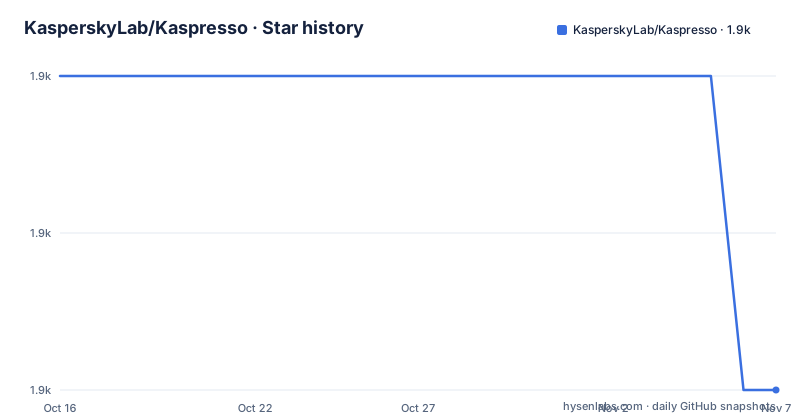
Star history
- KasperskyLab/Kaspresso1,929 ★ · -2
| Repository | 2026-10-16 | 2026-11-07 |
|---|---|---|
| KasperskyLab/Kaspresso | 1.9k | 1.9k |
-2 Stars in the last 22 days, measured from the daily GitHub snapshot. Compare with other projects
Editorial analysis
Kaspresso's Android UI Testing Scope
Kaspresso addresses Android UI tests that otherwise require developers to coordinate Espresso, UI Automator, and Kotlin-specific test organization. It is aimed at Android engineering teams writing instrumented UI tests, particularly teams that want screen abstractions and consistent expressions across application and system boundaries. Based on the repository layout, its modules include the core `kaspresso` library, `kautomator`, Compose support, ADB support, Allure support, artifact handling, static analysis, samples, and a page-object code generator.
The framework builds on two existing Android testing technologies. Espresso remains available for interactions with application views, while UI Automator supports interactions with other applications, system elements, and interfaces. Kaspresso places Kotlin DSL wrappers over both paths. Its named wrappers are Kakao for Espresso and Kautomator for UI Automator. Their similar APIs let a suite retain a similar structure when code moves between view-level controls and broader system interactions.
Kaspresso also addresses test organization. The README lists built-in flaky-test protection, a page object pattern, and another DSL for setup, named steps, and teardown. It also describes logs, screenshots, video, view hierarchy data, and automatic artifact retrieval. These additions make Kaspresso more than a set of action wrappers, although the DSLs remain its most visible interface for developers.
How Espresso and UI Automator Requests Flow
Kaspresso does not replace the underlying Android testing engines. It organizes access to them. Kakao wraps Espresso operations such as locating a view and checking its effective visibility. Kautomator wraps UI Automator operations such as obtaining an `Instrumentation`, creating a `UiDevice`, waiting for an object with `By.res`, assigning text, and checking the result.
The README compares a direct UI Automator sequence with a Kautomator block that operates through `MainScreen` and `simpleEditText`. The wrapper expresses the same documented interaction through `replaceText("Kaspresso")` and `hasText("Kaspresso")`. This does not remove device waits or cross-application behavior from the underlying technology. It changes how the test code exposes those operations.
Kaspresso adds a further DSL around test stages. A test can place state preparation in `beforeTest`, state cleanup in `afterTest`, and actions inside named `step` blocks. The README's scan-test example divides the flow into opening a simple screen, clicking `button_1`, and checking subsequent controls. That structure can make a long test easier to scan and gives report readers named stages.
For asynchronous checks, the README uses `flakySafely(timeoutMs = 7000)`. It calls this part of Kaspresso's flaky-test protection. However, the README does not document the complete retry policy, default timeout values, or classification of retry failures. Those details require verification before a suite depends on particular retry behavior.
Installing Kaspresso with Gradle
Kaspresso's integration instructions tell users to include `mavenCentral()` in the root `build.gradle` file when that repository is absent. This is the documented source for resolving its Maven artifacts.
allprojects {
    repositories {
        mavenCentral()
    }
}
The core dependency belongs in the `androidTestImplementation` configuration. The README uses `<latest_version>` rather than prescribing a version in its dependency template. Release information lists 1.6.1 as the latest named release, but the first integration should still follow the project's own version policy and dependency verification process.
dependencies {
    androidTestImplementation 'com.kaspersky.android-components:kaspresso:<latest_version>'
    // Allure support
    androidTestImplementation "com.kaspersky.android-components:kaspresso-allure-support:<latest_version>"
    // Jetpack Compose support
    androidTestImplementation "com.kaspersky.android-components:kaspresso-compose-support:<latest_version>"
}
Optional support should not be added automatically. `kaspresso-allure-support` is for Allure integration, while `kaspresso-compose-support` is for Jetpack Compose. The dependency block above shows the available modules, but a suite that does not use either capability can start with the core dependency.
For projects using the old Android Support libraries, the README recommends migration to AndroidX and identifies `kaspresso:1.5.3` as the last version with Android Support libraries.
dependencies {
    androidTestImplementation 'com.kaspersky.android-components:kaspresso:1.5.3'
}
That statement defines an older compatibility boundary. It does not make Android Support integration a preferred choice for a new project.
Writing a First Kakao Screen Test
The README presents Kakao as a Kotlin DSL wrapper for Espresso. This changes test syntax, but it does not eliminate the need for screen abstractions. The example expects `mainScreen` and `toFirstFeatureButton` to exist, while the repository includes samples and a `page-object-code-gen` module.
Given those wrappers, the documented Kakao test checks that a feature button is visible and clicks it:
@Test
fun testFirstFeature() {
    mainScreen {
        toFirstFeatureButton {
            isVisible()
            click()
        }
    }
}
The test body does not expose `onView`, `withId`, `ViewAssertions`, or `ViewMatchers`. Kakao places that Espresso detail inside the screen wrapper. This can reduce repetition when a suite has several tests operating on the same screen, since each test can use the same named interaction while the wrapper owns the lower-level calls.
The Kautomator comparison follows the same organization. The direct implementation obtains instrumentation, creates a device, waits for an object, assigns text, and asserts the result. Kautomator replaces that sequence with `MainScreen` and `simpleEditText`. The architectural trade-off is clear: screen wrappers reduce test clutter, but developers also need to understand where locators and framework operations are defined.
The README links to a separate step-by-step tutorial for learning the framework. It does not document the full lifecycle of generated page objects or show how a wrapper file is organized.
Compose, ADB, and Failure Artifact Choices
Kaspresso separates several optional capabilities into modules. Compose tests depend on `kaspresso-compose-support`. Allure reporting depends on `kaspresso-allure-support`. Repository entries also show dedicated `adb-server`, `artifacts`, `allure-support`, and `kautomator` directories, corresponding to the README's listed support for ADB, artifact retrieval, reporting, and UI Automator.
The documented diagnostic output includes logs, view hierarchy data, screenshots, and video. Screenshot testing is described as native, with dark mode support. These artifacts can help engineers inspect a failed test without reproducing the entire device state manually. They also raise storage and data-handling questions. The README does not specify retention periods, default artifact destinations, compression behavior, or controls for sensitive screen content.
Kaspresso also claims that some UI Automator commands run "10 times faster" with the framework. The README does not identify the command set, device configuration, application, or benchmark procedure behind that claim. It is therefore unsuitable as a guaranteed performance target for a particular suite. Execution time should instead be checked against the application's devices and CI environment.
Robolectric support is listed as well. The README does not explain which Kakao, Kautomator, Compose, ADB, or artifact behavior works under Robolectric. A project mixing local tests with device tests needs to confirm that boundary before using the same wrappers across both.
Kaspresso Versus Direct Espresso
The most direct alternative is ordinary Espresso without Kaspresso. Direct Espresso keeps matcher, view, assertion, and action calls close to each test and avoids learning the Kakao and test-stage DSLs. That can be simpler for a small suite with few screens and no cross-application checks.
Kaspresso offers a different structure. It preserves Espresso as the underlying mechanism while adding Kakao wrappers, a Kautomator API with similar syntax, named test stages, page object support, flaky-test handling, and artifact collection. Its case is strongest when a team needs both in-application views and system-level interaction, or when it wants one Kotlin style across those boundaries. Compose, ADB, Allure, and cross-application scenarios are additional reasons to consider it.
The cost is an abstraction layer. Screen wrappers need to be defined, maintained, and understood alongside the underlying Android APIs. A suite that never crosses the Espresso and UI Automator boundary may receive less benefit from that design. Kaspresso says migration from Espresso is easy, but the README does not document compatibility for every custom matcher, test rule, or custom Espresso interaction. Migration should therefore include compilation and device-level verification rather than relying on the general claim alone.
Kaspresso should also be compared with writing direct UI Automator tests. Direct UI Automator avoids Kautomator but requires more low-level setup in each test. The practical decision is whether a suite values shared screen DSLs and diagnostics enough to accept another abstraction.
Repository Maintenance and Release Boundaries
Kaspresso is distributed under Apache-2.0. The repository includes `LICENSE.txt`, `CLA.md`, and `AUTHORS.md`. This review does not interpret the obligations of that license. An adopting organization should review those files and determine whether its release, notice, and contribution processes introduce separate requirements.
The repository is not archived. Its last push was on 2026-10-13. Release 1.6.1 was published on 2026-04-08, following v.1.6.0 from 2025-01-17 and v.1.5.4 from 2024-02-16. These dates show recent development, but the README does not publish a long-term support policy or a compatibility matrix for Android build tools, Kotlin, Compose, or optional modules.
Contributors can run the checks exposed by the repository Makefile. Static analysis invokes `detektAll` and `lint`.
./gradlew detektAll lintThe unit-test target runs the Gradle `test` task.
./gradlew testCompilation combines application and Android test assembly.
./gradlew assemble assembleAndroidTestThese are repository maintenance commands. They do not install Kaspresso into an application. For adopters, the recurring cost is compatibility work when Android build dependencies, Kotlin code, Compose, or optional modules change. Verify the exact dependency set and inspect generated test artifacts before changing the CI toolchain.
Editorial conclusion
Kaspresso is appropriate for Android teams that want a shared Kotlin DSL across Espresso and UI Automator, especially with page objects, Compose, ADB, Allure, or cross-application scenarios. It is a weaker fit for a small suite that only needs direct Espresso calls and has no use for the extra DSL and artifact layers. Before adoption, verify dependency compatibility with the project's Android build, confirm which optional modules are required, and inspect a real failure package containing screenshots, video, logs, and view hierarchy output. The project uses Apache-2.0, and its last push was on 2026-10-13.
Frequently asked questions
What is Kaspresso used for?
Kaspresso is an Android UI test framework built on Espresso and UI Automator. It provides Kotlin DSL wrappers, screen-oriented tests, flaky-test protection, and support for Compose, ADB, Allure, and diagnostic artifacts.
How do I install Kaspresso in an Android project?
Add `mavenCentral()` to the repositories and declare `com.kaspersky.android-components:kaspresso` with `androidTestImplementation`. Compose and Allure have separate support modules.
Does Kaspresso support Jetpack Compose and migration from Espresso?
The project provides `kaspresso-compose-support` for Jetpack Compose and describes migration from Espresso as easy. The README does not provide a complete migration guide for every Espresso rule or matcher.
Official sources
Add this badge to your README
If you maintain this project, the badge below links readers to this analysis and shows its maintenance status from the daily GitHub snapshot. Paste the markdown into your README; add ?metric=license or ?metric=stars to the image URL for a different field.

[](https://hysenlabs.com/projects/kasperskylab-kaspresso)Star history chart for your README
[](https://hysenlabs.com/projects/kasperskylab-kaspresso)Was this useful?