terraform-aws-modules/terraform-aws-eks v21: Auto Mode, access entries and hybrid nodes in one Terraform module
Terraform module to create Amazon Elastic Kubernetes (EKS) resources 🇺🇦
At a glance
- What is it?
- The terraform-aws-modules EKS module creates Amazon EKS clusters, node groups and related IAM from Terraform. This article follows the v21 inputs that change cluster behaviour and the places where Terraform and the EKS API disagree.
- Who is it for?
- Use this module if you want EKS clusters, node groups and access entries declared in Terraform with a version pinned to ~> 21.0. Do not use it as a substitute for EKS or Kubernetes knowledge, and read the v21 upgrade guide and the Auto Mode disable procedure before touching an existing cluster.
- Can I use it commercially?
- Yes. Apache-2.0 is a permissive licence: you can use, modify and sell software built on it, as long as you keep its copyright and licence notices.
- Is it still maintained?
- Yes. The repository last received commits 38 days ago.
- What is it written in?
- Mainly HCL, according to GitHub's language statistics.
Answers come from the project's GitHub data, last synced on November 15, 2026, and from our analysis. They are not legal advice.
Star history
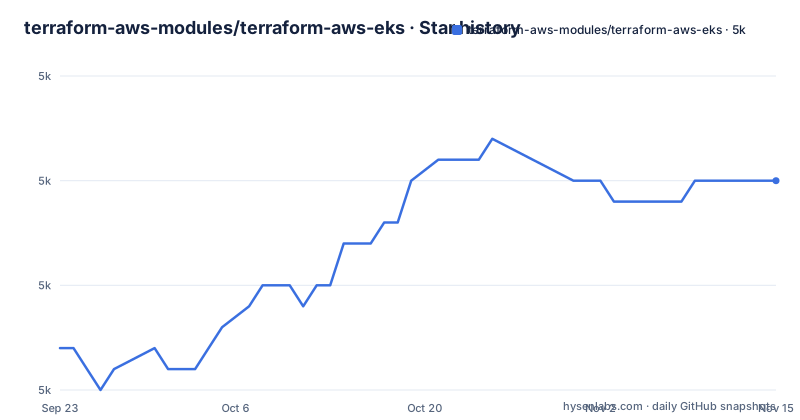
- terraform-aws-modules/terraform-aws-eks5,015 ★ · +8
| Repository | 2026-09-23 | 2026-11-15 |
|---|---|---|
| terraform-aws-modules/terraform-aws-eks | 5k | 5k |
8 Stars in the last 53 days, measured from the daily GitHub snapshot. Compare with other projects
Editorial analysis
Removing compute_config does not turn EKS Auto Mode off
The sharpest edge in the module is how Auto Mode is disabled. The README puts a caution on it: because of the current EKS Auto Mode API, you have to set the flag explicitly.
compute_config = {
  enabled = false
}
If you try to disable Auto Mode by simply removing the compute_config block, the change fails to disable it. Only after applying with enabled = false can you then remove the compute_config block from your configuration. In practice that is two applies, not one, and a pull request that just deletes the block will look correct in review while leaving Auto Mode running. The enabling side is short: the example sets enabled = true with node_pools = ["general-purpose"], next to name, kubernetes_version, vpc_id and subnet_ids.
Custom node pools get only the IAM resources through create_auto_mode_iam_resources
A second Auto Mode example is aimed at people who bring their own node pools. Instead of naming node_pools, it sets one flag and enables compute without a pool list:
# Create just the IAM resources for EKS Auto Mode for use with custom node pools
create_auto_mode_iam_resources = true
compute_config = {
  enabled = true
}
The split matters because the module then creates the IAM side of Auto Mode and leaves pool definitions to you, so node pools themselves are not something this block provisions. Both Auto Mode examples share the same optional settings: endpoint_public_access = true, and enable_cluster_creator_admin_permissions = true, which adds the current caller identity as an administrator via a cluster access entry. Leave the second one out and nothing grants the identity running Terraform cluster admin through that path.
Provisioned Control Plane is picked from five named tiers
For larger workloads the module exposes EKS Provisioned Control Plane, which provisions a control plane with increased capacity. The input is control_plane_scaling_config with a tier, and the valid values are standard, tier-xl, tier-2xl, tier-4xl and tier-8xl.
control_plane_scaling_config = {
  tier = "tier-xl"
}
The example sets it on a cluster named my-cluster with kubernetes_version = "1.33". The module only passes the tier through. It carries no sizing guidance, so choosing between tier-xl and tier-8xl is a decision you make from AWS documentation, which the module's own docs explicitly leave to AWS. Any tier outside those five names is not a documented value.
Managed node group addons can be ordered ahead of compute with before_compute
The managed node group example introduces an addons map, where each key is an add-on name and the value is a config object. The README shows coredns and kube-proxy as empty objects, and gives eks-pod-identity-agent and vpc-cni a flag:
addons = {
  coredns                = {}
  eks-pod-identity-agent = {
    before_compute = true
  }
  kube-proxy             = {}
  vpc-cni                = {
    before_compute = true
  }
}
before_compute = true marks the add-ons that need to exist before compute is created. The networking plugin and the pod identity agent are the two chosen in the example, which tells you which ones the authors considered ordering-sensitive. The example is cut off after the first lines of the vpc_id setting, so the node group definition itself lives in examples/eks-managed-node-group, and in docs/compute_resources.md.
Access entries replace aws-auth, and older clusters expose a creator entry that was always there
Cluster access is handled through access entries. With authentication_mode = "API_AND_CONFIG_MAP", EKS automatically creates an access entry for the IAM roles used by managed node groups and Fargate profiles, and the module adds the entry itself for self-managed node groups and the Karpenter sub-module. You do not need to do anything extra for those.
The surprise sits on older clusters. On clusters created before cluster access management support, there is already an access entry for the cluster creator. It was not visible while you used the aws-auth ConfigMap, but it becomes visible once access entries are enabled, so a first plan can show an entry nobody in your team wrote. For your own principals you pass access_entries, with a principal_arn and a policy_associations map. The example attaches AmazonEKSViewPolicy through the policy ARN arn:aws:eks::aws:cluster-access-policy/AmazonEKSViewPolicy, scoped to type = "namespace" with namespaces = ["default"].
Hybrid nodes want RFC 1918 ranges and a separate hybrid-node-role submodule
EKS Hybrid Nodes are configured outside the main module call. The example defines locals first: a remote_network_cidr of 172.16.0.0/16, then a remote_node_cidr and a remote_pod_cidr carved from it with cidrsubnet(local.remote_network_cidr, 2, 0) and cidrsubnet(local.remote_network_cidr, 2, 1). A comment notes that RFC 1918 IP ranges are supported, so public ranges are not the intended input.
The IAM role comes from a submodule addressed as terraform-aws-modules/eks/aws//modules/hybrid-node-role, versioned with ~> 21.0 like the parent. A second comment says SSM and IAM Roles Anywhere are supported, with SSM as the default. The hybrid example in the README is truncated after the role module's tags, so how the cluster side references those CIDRs is in examples/eks-hybrid-nodes, and in docs/network_connectivity.md for the connectivity part.
The ~> 21.0 pin guards you against v22, and v21 itself ships fast
Every example pins version = "~> 21.0" with source = "terraform-aws-modules/eks/aws". The repository has published upgrade guides for v17, v18, v19, v20 and v21 under docs/, which tells you each major version carried changes big enough to need a guide. The most recent releases are v21.28.0, v21.28.1 and v21.29.0, tagged within about an hour of each other on 2026-10-07, and the last push was on 2026-10-08. The repository is not archived and uses the Apache-2.0 license, with a default branch of master.
The README also declines to teach EKS itself: documentation about EKS, managed and self-managed node groups, Fargate profiles and Kubernetes features is left to AWS and Kubernetes sources. This module documents how to configure Terraform inputs, so it will not explain what a node group is or when Auto Mode suits your workload.
Editorial conclusion
Use this module if you want EKS clusters, node groups and access entries declared in Terraform with a version pinned to ~> 21.0. Do not use it as a substitute for EKS or Kubernetes knowledge, and read the v21 upgrade guide and the Auto Mode disable procedure before touching an existing cluster.
Frequently asked questions
How to create EKS with the terraform-aws-eks module?
Call module "eks" with source = "terraform-aws-modules/eks/aws" and version = "~> 21.0", then set name, kubernetes_version, vpc_id and subnet_ids, plus either compute_config for Auto Mode or node group inputs.
Can Terraform and Kubernetes be used together with terraform-aws-eks?
The module is Terraform code that creates Amazon EKS (Kubernetes) resources, so Terraform builds the cluster, node groups and access entries. Kubernetes features themselves are left to the Kubernetes documentation.
How is EKS different from Kubernetes in terraform-aws-eks?
The module's documentation does not explain the difference. It covers configuring the module and sends readers to the AWS EKS documentation and the Kubernetes documentation for the platforms themselves.
Official sources
Add this badge to your README
If you maintain this project, the badge below links readers to this analysis and shows its maintenance status from the daily GitHub snapshot. Paste the markdown into your README; add ?metric=license or ?metric=stars to the image URL for a different field.

[](https://hysenlabs.com/projects/terraform-aws-modules-terraform-aws-eks)Star history chart for your README
[](https://hysenlabs.com/projects/terraform-aws-modules-terraform-aws-eks)Was this useful?