AutoSocial Studio for Local TikTok, Instagram, and YouTube Workflows
Local social media automation dashboard for TikTok, Instagram, and YouTube.
At a glance
- What is it?
- AutoSocial Studio is a local dashboard for managing multi-account video queues, browser login sessions, scheduled posts, downloads, and FFmpeg processing. It suits creators who want local browser automation, but it has no authentication and exposes no official API integration.
- Who is it for?
- Adopt AutoSocial Studio when a creator or small team needs local browser-session automation, isolated account queues, and local video processing. Do not adopt it for unattended public hosting, shared multi-user access, or workflows that require documented official APIs.
- Can I use it commercially?
- Yes. MIT is a permissive licence: you can use, modify and sell software built on it, as long as you keep its copyright and licence notices.
- Is it still maintained?
- Yes. The repository last received commits 151 days ago.
- What is it written in?
- Mainly JavaScript, according to GitHub's language statistics.
Answers come from the project's GitHub data, last synced on November 7, 2026, and from our analysis. They are not legal advice.
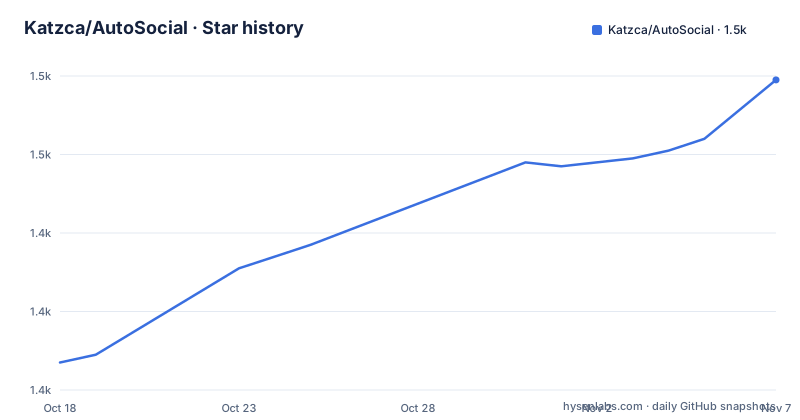
Star history
- Katzca/AutoSocial1,479 ★ · +72
| Repository | 2026-10-18 | 2026-11-07 |
|---|---|---|
| Katzca/AutoSocial | 1.4k | 1.5k |
72 Stars in the last 20 days, measured from the daily GitHub snapshot. Compare with other projects
Editorial analysis
AutoSocial Studio's Local Creator Operations Boundary
AutoSocial Studio addresses a specific distribution problem: moving prepared short-form videos into posting workflows across several accounts without sending account sessions to a hosted automation service. Its intended users are indie product builders, AI application creators, small teams, and maintainers who repeatedly publish launch clips, demonstrations, product updates, or community content.
The repository presents this as a local workstation application, not as a hosted SaaS dashboard. An Express server, browser automation, filesystem queues, schedulers, and media utilities run on the same local system. That design can reduce one class of trust problem because account sessions remain under `.profiles/<account>/<platform>` on disk. It does not make the software multi-user software, however. The dashboard has no authentication layer, so anyone who can reach its listening address can potentially operate its controls.
The project also rejects mass posting and engagement automation as its purpose. Its documented workflow centers on organizing accounts, preparing video queues, scheduling uploads, reusing captions, downloading reference material, and processing media. Platform compliance remains the operator's responsibility. The README does not document permission checks for every media file, nor does it replace official APIs where those APIs are available.
This boundary makes AutoSocial Studio more appropriate for an operator-controlled workstation than for a shared automation service. A creator with several social identities and a controlled set of videos may find the local model useful. An organization needing centralized roles, audit trails, tenant isolation, or supported API integrations would need capabilities beyond what the repository currently documents.
Account-Aware Queues and Browser Session Storage
The central data structure is an account-aware queue tree rather than a hosted content database. Each account has separate directories for TikTok, Instagram, and YouTube:
queue/<account>/tiktok/pending
queue/<account>/instagram/pending
queue/<account>/youtube/pending
Accepted video extensions are `.mp4`, `.mov`, `.webm`, `.avi`, and `.mkv`. A caption can accompany a video through a sidecar file with the same base filename and either a `.description` or `.txt` extension. According to the README, successful uploads move into `posted`, while failed uploads move into `failed`. This file movement gives the operator a visible processing state and leaves the queue folders available for inspection.
Account isolation also extends to Playwright profiles. Login sessions are stored below `.profiles/<account>/<platform>` and reused between runs. This is meaningful for organizations that do not want a hosted service holding social account credentials, but it creates a local secret-management responsibility. The files must remain protected from untrusted local users, backups, synchronization tools, and accidental commits. The repository's `.gitignore` covers `.profiles/`, `.env`, queue data, downloads, and several runtime state paths.
Scheduling is driven by separate cron expressions for TikTok, Instagram, and YouTube, with daily times and instant-post mode also documented. Other timing controls include `POST_DELAY_MS`, `POST_PUBLISH_HOLD_MS`, and `FAILURE_HOLD_MS`. These delays likely govern browser interaction timing, but the README does not promise that any particular delay is accepted by every platform. Platform interface changes can still break a Playwright upload flow even when local queue handling remains correct.
Playwright Upload Paths and Scheduler Configuration
AutoSocial Studio combines local queue processing with Playwright-driven browser upload flows. The platform destinations are defined in `.env.example`: TikTok uses `TIKTOK_UPLOAD_URL`, Instagram uses `INSTAGRAM_UPLOAD_URL`, and YouTube uses `YOUTUBE_UPLOAD_URL`. Defaults point to TikTok Studio, Instagram Create, and YouTube Studio. The scheduler variables are also platform-specific:
CRON_EXPRESSION=0 */2 * * *
INSTAGRAM_CRON_EXPRESSION=0 */2 * * *
YOUTUBE_CRON_EXPRESSION=0 */2 * * *
TZ=UTC
BROWSER_LOCALE=en-US
HEADLESS=false
The defaults schedule work every two hours according to the configured timezone. `HEADLESS=false` keeps browser behavior visible during local setup. That is useful when an account requires human login or when a platform changes its upload interface, but it also means the browser can need access to the workstation desktop session.
The README does not document a versioned API contract for these upload pages. The dashboard and CLI are automating browser interfaces, so compatibility depends on external pages outside the repository. This is the main architectural difference between AutoSocial Studio and an official-API publishing tool. Browser automation can reproduce existing web workflows without documented platform APIs, but it is more exposed to selector, login, anti-automation, and interface changes.
The distinction between dashboard and CLI support also matters. Instagram and YouTube posting are managed through the dashboard. The `login`, `post`, and `daemon` CLI flows remain TikTok-specific, despite the broader multi-platform description.
First Local Setup with Node.js and the Setup View
The documented installation starts with Node.js 18 or later, npm, Playwright Chromium, FFmpeg, and ffprobe. `yt-dlp` is optional and is needed for downloader features. Windows is the primary target for the bundled `yt-dlp.exe` workflow, although the dashboard itself uses ordinary Node.js services.
Install the locked dependencies and browser binary, then run the repository's diagnostic command:
npm ci
npx playwright install chromium
npm run doctor
`npm ci` installs the dependency set recorded in `package-lock.json`. Playwright installs Chromium, while `npm run doctor` checks local setup conditions. The README does not specify the exact textual output of `doctor`, so use it to identify missing or invalid local dependencies rather than assuming every optional integration is configured.
On PowerShell, create the local configuration file:
Copy-Item .env.example .envThen start the Express dashboard:
npm run dashboardOpen `http://127.0.0.1:3000` and use the `Setup` view. According to the README, it checks dependencies and displays pending folders where videos should be placed for each platform. This is the first useful operational step because it connects dependency validation with the account-specific queue locations rather than starting scheduled uploads blindly.
First Real Account Setup and Captioned Queue
Before placing a video in a queue, open `Accounts` in the dashboard and start a login session for each platform that will be used. The browser session is then persisted under the relevant `.profiles/<account>/<platform>` directory. Keep the dashboard bound to `127.0.0.1` during this setup because it does not provide user authentication.
A TikTok login can also be initiated from the CLI, although that command remains TikTok-specific:
npm run loginFor the first queue item, select the account and platform folders shown by `Setup`. Copy one supported video into the matching `pending` directory. To add a caption without changing the video filename, create a `.description` or `.txt` sidecar with the same base filename. The README does not document a separate dashboard command for injecting a caption, so filesystem placement is the clearest documented first use.
If a common caption is desired, `.env` can define it as a quoted value so hashtag text remains intact:
DEFAULT_CAPTION="#mybrand #shorts"The sample configuration leaves this and several other workflow values blank. Before enabling scheduled posting, confirm that the scheduled expressions are intentional, the queue contains only approved content, and browser sessions are attached to the correct accounts. The documentation states that Instagram and YouTube posting is dashboard-managed, so those first uploads should be initiated there rather than through the TikTok-only `post` command.
FFmpeg Uniquification and yt-dlp Download Pipelines
AutoSocial Studio extends beyond browser uploads. Its FFmpeg-based video uniquifier can run from the dashboard or CLI and accepts an optional user-provided logo overlay. The sample configuration exposes `UNIQUIFY_INPUT_DIR`, `UNIQUIFY_OUTPUT_DIR`, `UNIQUIFY_LOGO_IMAGE`, `UNIQUIFY_INTRO_SECONDS`, and `UNIQUIFY_END_HOLD_SECONDS`. Both `uniquify` and `video-info` require FFmpeg and ffprobe in `PATH`.
The repository provides commands for media inspection and processing:
npm run uniquify
npm run video-info -- --video "C:\path\video.mp4"
The video path in this example follows the README's command form. A user-provided logo is optional and belongs under local user assets rather than application source. The documentation does not define the exact transformations applied by every uniquification setting, so operators should inspect output before distribution.
The downloader side uses `yt-dlp` and can fetch recent TikTok videos or scan TikTok profiles. Profile downloads are directed into `autodownload/profile_downloads`. Optional watcher settings include `WATCH_CHANNEL`, `WATCH_INTERVAL`, `WATCH_MAX_VIDEOS`, and `WATCH_MIN_VIEWS`, while `AUTO_POST_PLATFORMS` controls the listed targets:
npm run autodownloadThis creates an ingestion path from external material to local queues, but it also introduces rights and policy questions. The README explicitly disclaims permission to download or publish material the operator does not own or have permission to use. It also advises avoiding unauthorized scraping and checking platform limits. These constraints matter because the downloader is tightly connected to TikTok behavior and can feed automated publication across all configured targets.
Local Dashboard Security and Browser Automation Limits
The dashboard defaults to `127.0.0.1` on port `3000`. Mutating requests include a same-origin guard, which the README describes as protection against random websites blindly triggering local actions through the browser. Binding to a non-local address is blocked unless `DASHBOARD_ALLOW_REMOTE=true` is supplied. The project documentation is direct about the consequence: any person who can reach the dashboard may control the local automation.
This is not an access-control system. There are no documented user accounts, roles, or per-user permissions. Changing the host setting does not add authentication. Remote binding should therefore remain outside the intended setup, and the README's recommendation to keep sessions local is part of the operating model rather than an optional hardening suggestion.
Browser automation has a second limitation. TikTok, Instagram, and YouTube can change login challenges, upload controls, or anti-automation behavior without a repository release. AutoSocial Studio has no GitHub releases, so there is no documented release channel or compatibility matrix. Its last push was on 2026-06-10.
AutoSocial Studio Compared with Official API Publishing
The clearest alternative is a publishing system built around official platform APIs. The practical difference is the control surface. AutoSocial Studio drives the existing browser interfaces with Playwright, stores reusable browser profiles, and can combine download, processing, queueing, and posting in one local application. An official-API workflow submits supported operations through documented platform interfaces and normally makes platform entitlements, tokens, scopes, and quotas explicit.
Browser automation may be useful when a creator needs an existing Studio workflow and no suitable official upload operation is documented in the project. Its trade-off is dependency on external interfaces. Selectors can stop matching, login behavior can change, and a platform may treat scheduled browser activity differently from an approved API client. AutoSocial Studio's README itself says to prefer official APIs where available.
AutoSocial Studio should also be compared with a simple filesystem-and-manual-upload process. If the operator publishes only a few videos, the dashboard's Playwright, scheduler, profiles, downloader, and media pipeline add more moving parts than necessary. The local queue remains understandable, but ongoing maintenance includes monitoring browser changes, dependencies, account sessions, and media tools. The package has an MIT license, which permits reuse and modification under that license's terms, but the license does not grant access rights to social platforms or ownership of downloaded content.
Dependency and Maintenance Costs for AutoSocial Studio
The project has no archived status and its last push was on 2026-06-10. The repository has no GitHub releases, so operators cannot use tagged releases as a documented upgrade path. The `package.json` identifies version `0.1.0` and requires Node.js `>=18`. Routine maintenance is likely to involve dependency installation, Playwright browser updates, platform interface changes, and review of local runtime files. The README provides `npm run check`, `npm audit --omit=dev`, and `npm run clean:debug` for local checks, tests, dependency auditing, and debug-file cleanup.
The tests focus on local behavior rather than live platform access. The documented scope includes queue handling, sidecars, filesystem archiving, scheduler time logic, and config parsing. That is useful coverage for filesystem and timing logic, but it does not prove that TikTok, Instagram, or YouTube uploads still work. A prospective operator should treat live platform compatibility as an external acceptance requirement.
The MIT license reduces friction for internal modification and reuse, subject to the license terms. It does not resolve platform terms of service, copyright, account authorization, or local privacy law. Runtime data is deliberately excluded from version control, including `.env`, `.profiles/`, `queue/`, `downloads/`, and `autodownload/profile_downloads/`. Before publishing a fork, the README specifically recommends checking both `git status --short` and `git status --ignored` to identify tracked changes and ignored local data.
Editorial conclusion
Adopt AutoSocial Studio when a creator or small team needs local browser-session automation, isolated account queues, and local video processing. Do not adopt it for unattended public hosting, shared multi-user access, or workflows that require documented official APIs. Verify first that each target platform permits the intended automation, that every required login session persists correctly, and that the local dashboard address remains restricted to the workstation.
Frequently asked questions
What is AutoSocial Studio used for?
AutoSocial Studio is a local dashboard for organizing multi-account TikTok, Instagram, and YouTube video queues, browser sessions, schedules, downloads, and FFmpeg processing. It is intended for local creator and product-marketing workflows, not a hosted multi-user service.
How do I install and start AutoSocial Studio?
Install Node.js 18 or later, npm, Playwright Chromium, FFmpeg, and ffprobe, then run `npm ci`, `npx playwright install chromium`, and `npm run doctor`. Copy `.env.example` to `.env`, run `npm run dashboard`, and open `http://127.0.0.1:3000`.
Does AutoSocial Studio support Instagram and YouTube from the CLI?
The README says Instagram and YouTube posting are managed through the dashboard. The `login`, `post`, and `daemon` CLI flows are documented as TikTok-specific.
Is the AutoSocial Studio dashboard secure for remote access?
The dashboard has no authentication layer and binds to `127.0.0.1` by default. Remote binding requires `DASHBOARD_ALLOW_REMOTE=true`, but anyone who can reach the dashboard may operate its automation controls.
Where are AutoSocial Studio video queues stored?
Queues are account-aware and use paths such as `queue/<account>/tiktok/pending`, `queue/<account>/instagram/pending`, and `queue/<account>/youtube/pending`. Successful uploads move to `posted`, while failed uploads move to `failed`.
What license does AutoSocial Studio use?
The repository identifies the project as licensed under the MIT License. That license covers the software under its terms, but it does not grant permission to use social accounts or media owned by someone else.
Official sources
Add this badge to your README
If you maintain this project, the badge below links readers to this analysis and shows its maintenance status from the daily GitHub snapshot. Paste the markdown into your README; add ?metric=license or ?metric=stars to the image URL for a different field.

[](https://hysenlabs.com/projects/katzca-autosocial)Star history chart for your README
[](https://hysenlabs.com/projects/katzca-autosocial)Was this useful?