Transformer Explainer: GPT-2 running live in the page, and the repo details that decide who can reuse it
Transformer Explained Visually: Learn How LLM Transformer Models Work with Interactive Visualization
At a glance
- What is it?
- Transformer Explainer puts a live GPT-2 model in the browser so readers can type text and watch next-token prediction step by step. It is a teaching tool pinned to one model, with a git clone install, a deploy script that points at a personal repository, and type checking that never runs with lint.
- Who is it for?
- Transformer Explainer earns a place in a lecture or a self-study session for anyone who needs to see a Transformer's forward pass rather than read about it, and it is the wrong tool for anyone comparing current chat models or looking for coverage of diffusion and CNNs.
- Can I use it commercially?
- Yes. MIT is a permissive licence: you can use, modify and sell software built on it, as long as you keep its copyright and licence notices.
- Is it still maintained?
- Yes. The repository last received commits 162 days ago.
- What is it written in?
- Mainly JavaScript, according to GitHub's language statistics.
Answers come from the project's GitHub data, last synced on November 15, 2026, and from our analysis. They are not legal advice.
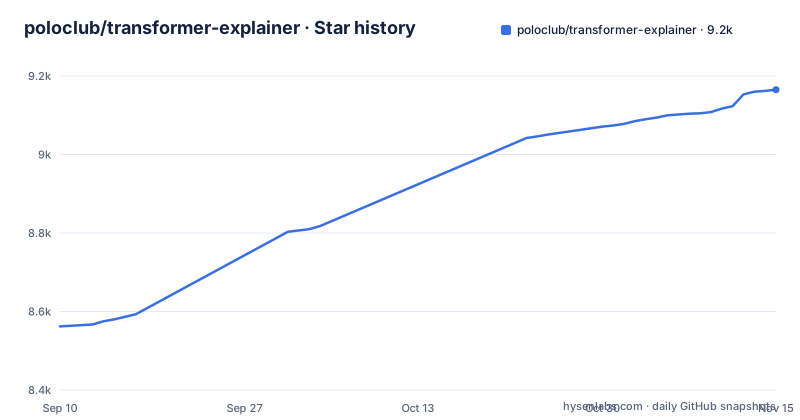
Star history
- poloclub/transformer-explainer9,165 ★ · +603
| Repository | 2026-09-10 | 2026-11-15 |
|---|---|---|
| poloclub/transformer-explainer | 8.6k | 9.2k |
603 Stars in the last 66 days, measured from the daily GitHub snapshot. Compare with other projects
Editorial analysis
GPT-2 runs in the page, so the token trace belongs to a real forward pass
Transformer Explainer runs a live GPT-2 model inside the page instead of replaying a recorded animation. The promise is specific: you bring your own text, and the internal components and operations of the Transformer are shown working together to predict the next tokens as they happen. Nothing on screen is a scripted sequence, so when a token surprises you, the trace belongs to the model that produced it. The limit follows from the choice of model. Everything the page shows describes GPT-2, so the attention weights and token probabilities on screen are that model's, not those of a current chat model. A demo video on YouTube (https://youtu.be/TFUc41G2ikY) walks through the same thing for anyone who would rather watch once before clicking around.
Inference rides on onnxruntime-web, and there is no knob to swap the model
Two runtime dependencies carry the model: `@xenova/transformers` at ^2.17.1 and `onnxruntime-web` at ^1.23.0. The other two, `gsap` ^3.12.5 and `katex` ^0.16.10, are animation and math typesetting. Because the forward pass runs in the visitor's browser, there is no server for you to host and no API key to configure, but the cost moves to the reader: every page load asks that machine to execute the model, so restricted classroom wifi or a locked-down network is the failure mode to check before you build a lesson around the page. What the project cannot do is change models. The README names GPT-2 and nothing else, package.json exposes no model path in any script, and the top-level tree has no models directory, so another checkpoint means forking the source rather than editing a setting.
Node 20 and npm 10 are floors, and the dev server answers on port 5173
The local path is four commands and two version floors. Node.js v20 or higher and NPM v10 or higher are the listed prerequisites, and package.json repeats the first one in its engines field with node set to `>=20.0.0`.
git clone https://github.com/poloclub/transformer-explainer.git
cd transformer-explainer
npm install
npm run dev
The dev server then answers on http://localhost:5173, which is Vite's default port rather than one this project picked. The stack underneath is SvelteKit with `@sveltejs/kit` ^2.53.3, `svelte` ^5.53.5, `vite` ^5.4.21, Tailwind ^3.4.1, `flowbite-svelte` ^0.46.1, and d3 with d3-sankey for the flow diagram. An install on an older Node is the case to settle first, since both the prerequisites list and the engines field require Node 20 or higher.
The deploy-temp script still aims at a personal staging repository
Publishing goes through `gh-pages`, and one of the two deploy scripts is not usable as written. `deploy` publishes the `build` directory with `--nojekyll`, which lines up with the GitHub Pages site at poloclub.github.io. The other one hardcodes somebody else's working repository:
"deploy": "gh-pages -d build --nojekyll",
"deploy-temp": "gh-pages -d build --nojekyll --repo https://github.com/aereeeee/te-temp.git"
Anyone who forks the project and runs `npm run deploy-temp` unchanged is aiming at a foreign staging repo rather than their own pages site. Read that line before running it. The other thing to know is that `build` has to exist first: its contents come from `vite build`, and no script chains the two steps, so a deploy run straight after a fresh clone has nothing to publish.
One release tag from 2024 sits next to code that has moved since
The version field tells the whole story: package.json says `0.0.1`, and v0.0.1 dated 2024-06-11 is the only release tag in the repository. That tag is a poor measure of the current code, because commits have landed on the default branch since, the most recent on 2026-06-06, and the CHI paper appeared in 2026. Practically, there is nothing to upgrade to and nothing to pin: cloning the default branch is the only route the documentation offers, and no published package name appears in it. The single tag also means there is no changelog to diff when you want to know what changed under you between one visit and the next.
svelte-check runs types, and eslint never does
Type checking and linting are separate commands, and only one of them repeats itself while you work. `lint` is `prettier --check. && eslint .`, so it never looks at types at all. Types come from `check`, which runs `svelte-kit sync && svelte-check --tsconfig ./tsconfig.json`, and `check:watch` adds `--watch` to that same pair. The order inside the script matters: `svelte-kit sync` regenerates the project's type definitions before the checker reads them, so the checker works against freshly generated definitions. tsconfig.json sits at the top level next to svelte.config.js, vite.config.ts, tailwind.config.js and postcss.config.js, which means four configuration files stand between a component and behaving the way you expected.
The paper title is spelled two ways and the citation key is the fixed one
The research paper behind the tool is written two ways in the same file, and the difference matters if you cite it. The link text reads Transformer Explainer: Learning LLM Transformers with Interactive Visual Explanation and Experimentations, while the citation block gives the title with Experimentation. The citation key is `cho2026transformer`, the venue is the Proceedings of the 2026 CHI Conference on Human Factors in Computing Systems, and the pages field reads 1--21. Take the key and the venue from the citation rather than from the sentence above it. The author list there is also longer than the credits section, which names eight contributors at the Georgia Institute of Technology and stops there, while the paper adds Minsuk Kahng.
Model families outside GPT-2 are pointed at sibling explainers, not covered here
Scope ends at one model family. The list of sibling projects covers exactly the ground this repository does not: Diffusion Explainer for how Stable Diffusion transforms a text prompt into an image, CNN Explainer, and GAN Lab for playing with generative adversarial networks in the browser. Each lives at its own address on poloclub.github.io, so nothing in this repository explains diffusion, convolution or adversarial training. For a reader who arrives wanting to understand a current chat model, or wanting to know how an image generator turns a prompt into pixels, this page cannot answer either question. It shows one architecture with real numbers from one forward pass, and the rest of the menu is in the other explainers.
Editorial conclusion
Transformer Explainer earns a place in a lecture or a self-study session for anyone who needs to see a Transformer's forward pass rather than read about it, and it is the wrong tool for anyone comparing current chat models or looking for coverage of diffusion and CNNs. Before building on it, check the Node and npm floors on your own machine, read the deploy-temp line before running any deploy script, and assume you are tracking main with a single 0.0.1 tag and no changelog behind it.
Frequently asked questions
what is transformer explainer
Transformer Explainer is an interactive visualization tool that runs a live GPT-2 model right in your browser, so you can experiment with your own text and watch the internal components and operations of the Transformer predict the next tokens in real time. The code is MIT licensed and the authors are at the Georgia Institute of Technology.
Can you explain transformers in a simple way?
The tool's approach is to show the computation rather than describe it: a live GPT-2 runs in the page, and the components of the Transformer are tied to the step that produces the next token. A demo video at https://youtu.be/TFUc41G2ikY covers the same walkthrough for people who prefer watching first.
How do you explain transformers to someone?
Point them at the deployed page, or run it yourself: Node.js v20 or higher and NPM v10 or higher, then git clone, npm install and npm run dev, and open http://localhost:5173. Nothing needs to be configured server side, since the model runs in the browser.
Can you explain the storyline of transformers?
The paper behind the tool, Transformer Explainer: Learning LLM Transformers with Interactive Visual Explanation and Experimentation, appeared in the Proceedings of the 2026 CHI Conference on Human Factors in Computing Systems, authored by Aeree Cho, Grace C. Kim, Alexander Karpekov, Seongmin Lee, Alec Helbling, Benjamin Hoover, Zijie J. Wang, Minsuk Kahng and Duen Horng Chau.
Official sources
Add this badge to your README
If you maintain this project, the badge below links readers to this analysis and shows its maintenance status from the daily GitHub snapshot. Paste the markdown into your README; add ?metric=license or ?metric=stars to the image URL for a different field.

[](https://hysenlabs.com/projects/poloclub-transformer-explainer)Star history chart for your README
[](https://hysenlabs.com/projects/poloclub-transformer-explainer)Was this useful?