infinite-canvas writes your lens settings into the prompt, and its example environment ships a default admin password
An open-source AI creative workbench integrating an infinite canvas, agents, a director's console, panoramas, AI image generation, image editing, video generation, and canvas orchestration, compatible with the OpenAI API and various other API services.
At a glance
- What is it?
- An AGPL creation workbench pairing a Go backend with a Next.js canvas, where the interesting mechanism is that camera, focal length and aperture are injected into the generation prompt text and travel with the node. The rest is worth reading for the seams: three install paths, a cross-compiled native bridge, and a default JWT secret set to the same literal string as the default admin password.
- Who is it for?
- infinite-canvas suits someone iterating on images and video who wants blocking, camera parameters and generation in one canvas rather than three tools, since the director's console feeds a screenshot back as an image node and the lens values ride along in the prompt. It is a poor fit for anything that needs stable stored data, because the project states outright that historical data compatibility is not guaranteed and that database structures may be adjusted directly.
- Can I use it commercially?
- Yes, with strict conditions. AGPL-3.0 is a network copyleft licence: if people use a modified version over a network, for example as a hosted service, you must offer them its source code under the same licence.
- Is it still maintained?
- Yes. The repository last received commits 1 day ago.
- What is it written in?
- Mainly TypeScript, according to GitHub's language statistics.
Answers come from the project's GitHub data, last synced on November 20, 2026, and from our analysis. They are not legal advice.
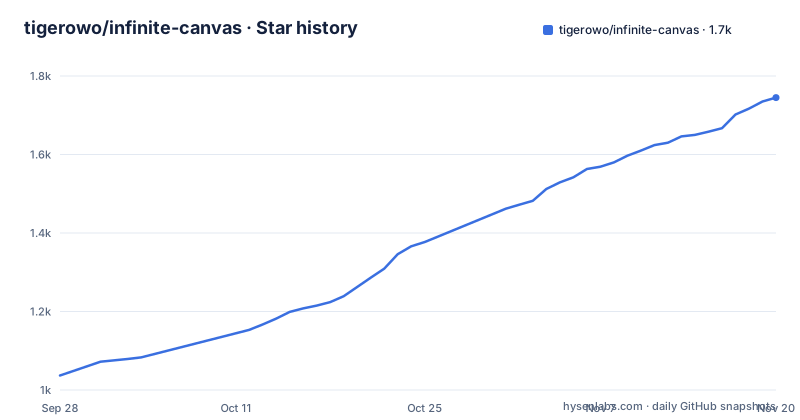
Star history
- tigerowo/infinite-canvas1,745 ★ · +708
| Repository | 2026-09-28 | 2026-11-20 |
|---|---|---|
| tigerowo/infinite-canvas | 1k | 1.7k |
708 Stars in the last 53 days, measured from the daily GitHub snapshot. Compare with other projects
Editorial analysis
Lens parameters are injected into the prompt text and travel with the node
The camera feature is the one worth understanding before anything else. Image, video and generation-config nodes each carry their own camera, lens, focal length and aperture settings, independently of each other. Those values are not stored beside the prompt and passed to the model as structured fields; they are written into the generation prompt as text, and they are saved and copied along with the node. So a focal length is a prompt token that happens to be produced by a UI control rather than typed. That has an obvious consequence: copying a node copies its optics, and the optics travel into the prompt whether or not the receiving model interprets them. The surrounding loop is built to feed this. Panoramas can be generated from text or a reference image, or imported from a local 2:1 file, and they serve as the environment background for the director's console, an independent 3D scene where characters, models, environment and camera positions are arranged, shots are managed, and a screenshot can be taken. That camera frame is then sent back automatically as a connected image node, so a 3D blocking decision becomes an image input without a manual export step.
Three install paths, and the default compose file is set to pull rather than build
There are three documented ways to run it. The Docker path clones, copies the example environment file and brings the stack up:
git clone https://github.com/tigerowo/infinite-canvas.git
cd infinite-canvas
cp .env.example .env
# 修改默认账号密码等信息
docker compose up -d --build
The non-Docker development path runs the Go backend and the frontend in two terminals:
cp .env.example .env
go run .

# 另开一个终端窗口
cd web
bun install
bun run dev
The third is a source build through a different compose file, `docker compose -f docker-compose.local.yml up -d --build`. What makes the first path worth reading closely is the compose file itself. It declares both an image, `ghcr.io/tigerowo/infinite-canvas:latest`, and a build context pointing at the local Dockerfile, and it sets `pull_policy: always`. So the published image and a local build are both wired up, and the documented command passes `--build` anyway, which means a first-time installer following the quick start compiles the whole thing locally rather than pulling the image that is already there. The compose file publishes only port 3000, keeps the backend port inside the container, and mounts a single volume, `./data:/app/data`. After startup the prompt library is fetched through an admin page at port 3000, and a `render.yaml` at the root adds a fourth path for one-click deployment on that platform.
The example environment gives the admin account and the JWT secret the same string
The example environment file is where the security posture starts, and it starts in the open. `ADMIN_USERNAME` ships as `admin` and `ADMIN_PASSWORD` as `infinite-canvas`, with a comment noting that the admin account is created automatically on first start. `JWT_SECRET` ships as `infinite-canvas` too, with `JWT_EXPIRE_HOURS` at 168, which is a week, and a comment saying to change the secret for a real deployment. The quick start's own inline comment tells you to modify the default account and password, so the instruction exists; what is easy to miss is that the two defaults are the same literal value, so a deployment that changes one and forgets the other still ships a known signing key. The port split is deliberate and documented: the backend listens on 8080, the Docker image fixes the frontend at 3000 so it cannot overwrite that, and the frontend dev proxy points at `http://127.0.0.1:8080` unless `API_BASE_URL` is set. Storage defaults to SQLite at `data/infinite-canvas.db`, with a warning to use an absolute path under Docker so a working directory change does not write a throwaway database.
A native ComfyUI bridge is cross-compiled for three targets and dropped into the web directory
The Dockerfile has four stages and the first one has nothing to do with the web app. A `golang:1.25-alpine` stage builds a separate program from `canvas-agent/native/comfy-bridge` three times with CGO disabled: Windows on amd64 producing an `.exe`, Linux on amd64, and Linux on arm64. Those binaries are then copied into the web build's public directory, and an environment flag, `CANVAS_PREBUILT_BRIDGE=1`, tells the frontend build that the native artifact is already present rather than something it should compile. So the browser-facing app ships a native helper it fetches at runtime, and the supported targets are decided by that one cross-compile line. No macOS target appears in it, while the front page advertises a Windows installer that needs no build from source. The toolchain is pinned at three places at once: Alpine Go 1.25 for both build stages, Bun 1.3.14 for the frontend build, and a Debian-based `node:22-bookworm-slim` runtime. The final image also copies in the `VERSION` file and the changelog, so the application can report which build it is.
A WebDAV client and a cron scheduler are dependencies the feature list never mentions
The Go module declares `go 1.25.0` and a direct dependency list that describes more than the documentation does. Storage is reached through GORM with three drivers wired in: a pure-Go SQLite driver, plus MySQL and Postgres drivers, and it also pulls both the MySQL driver and the Postgres driver directly alongside pgx. Two entries have no counterpart anywhere in the feature list. `studio-b12/gowebdav` is a WebDAV client, and the documented storage options are SQLite, browser IndexedDB, S3-compatible object storage and Cloudflare R2, so a WebDAV target is compiled in and undocumented. `robfig/cron/v3` is a scheduler, and no scheduled behaviour is described on any page, not even the kind of background cloud sync the merger note implies was added. Two more entries explain the configuration conventions rather than the features: `joho/godotenv` and `caarlos0/env/v11`, which together are why the settings live in an environment file with a commented alternative for each database driver. Token issuing comes from `golang-jwt/jwt/v5`, which is what the week-long `JWT_EXPIRE_HOURS` default is expressed in.
Agent skills are picked per task and pinned by a lockfile at the root
The Agent feature is scoped to the canvas rather than to the whole application. It analyses, plans and generates images or video around the selected node and its upstream nodes, and the task can be guided by choosing a Skill, with results inserted back into the canvas as nodes. The tree supports that reading. Alongside `canvas-agent/` there is an `AGENTS.md`, an `.agents/` directory and `skills-lock.json`, a single file at the repository root whose only plausible job is pinning the skills the agent may use. That is a stronger guarantee than a prose instruction, because a locked skill set changes on a schedule someone decided rather than whenever a directory is repopulated. The same directory holds the native bridge the Dockerfile cross-compiles, so the agent's local execution helper and its prompt-side instructions are versioned together. The rest of the canvas is more conventional: multi-canvas projects, node dragging and zooming, connections, a minimap, undo and redo, and import and export. Generation itself is reached through OpenAI-compatible Images and Responses interfaces, image-to-image, reference-image editing, streaming and Base64 returns, with one named vendor path for Seedance 2.0 through a Volcengine Agent Plan.
Three stability caveats sit directly under an AGPL licence
The caution notice above the feature list is unusually specific, and it is the first thing to read before deploying. The project states it is in development, does not guarantee compatibility of historical data, and that database structures and storage formats may be adjusted directly. It then advises anyone who needs a stably maintained branch of their own to fork and develop independently, and asks that secondary development and pull requests preserve the original author information and the frontend page identifier. Alongside that sits the licence, the GNU Affero General Public License v3.0. So the reuse terms are strong and the data guarantees are weak, which is a combination that suits experimentation and suits archiving badly. The lineage explains the shape of the codebase: the project is built on a pure-frontend original by one author, merged with an image-generation-enhanced fork by another, with the video and generation logic reworked and a backend cloud sync added so it no longer depends on being frontend-only.
The sponsor block sits above the project description, with registration links attached
The first substantial block on the page is not the project. It is a sponsor table with three rows, placed above the description of what the software does. One row pairs a product community with a multi-model gateway that offers token subsidies and a developer programme to lower early model costs. A second is a model aggregator listing image models, video models and speech capabilities, with the pitch that one canvas links the whole chain from copy to image to edit to video and voice. A third is a video generation service quoting per-second prices for two output resolutions, with audio and picture synchronisation, an API compatible with the OpenAI protocol, and ComfyUI support so no GPU has to be provisioned. All three rows attach a dedicated registration link to a signup bonus, which means the page is partly an advertisement for other people's inference endpoints. The page then asks for advertising sponsorship on a long-term basis and lists a contact email and a WeChat test group. Below all of that, the results table is six rows of two cells each, and every cell is empty.
Editorial conclusion
infinite-canvas suits someone iterating on images and video who wants blocking, camera parameters and generation in one canvas rather than three tools, since the director's console feeds a screenshot back as an image node and the lens values ride along in the prompt. It is a poor fit for anything that needs stable stored data, because the project states outright that historical data compatibility is not guaranteed and that database structures may be adjusted directly. Before deploying it, change three things in the example environment file: the admin password, the JWT secret, and the database path if you are deploying with Docker. And if you use the New API auto-configuration, read where that hosted endpoint sits before pasting a key into it, since the mechanism sends your key and base URL to a third-party instance.
Frequently asked questions
Is Infinite Canvas open-source?
Yes. The project is released under the GNU Affero General Public License v3.0, with the terms in the LICENSE file at the repository root. It also states plainly that it is in development and does not guarantee compatibility of historical data.
What are the default admin credentials in infinite-canvas?
The example environment file ships `ADMIN_USERNAME=admin` and `ADMIN_PASSWORD=infinite-canvas`, and the admin account is created automatically on first start. The quick start's own comment tells you to change the default account and password, and `JWT_SECRET` ships with the same literal value.
How do I run infinite-canvas without Docker?
Copy `.env.example` to `.env`, run `go run .` for the backend, then in a second terminal run `bun install` and `bun run dev` inside `web`. The backend listens on 8080 by default and the frontend dev proxy points at 127.0.0.1:8080 unless you set `API_BASE_URL`.
What is the ComfyUI bridge that the Docker build produces?
It is a separate Go program under the agent directory, cross-compiled with CGO disabled for Windows amd64, Linux amd64 and Linux arm64. The binaries are copied into the web public directory so the frontend can fetch one at runtime, with `CANVAS_PREBUILT_BRIDGE=1` telling the build they are already there.
Does infinite-canvas ship a build for macOS?
The front page advertises a Windows installer that needs no build from source, and the bridge in the Dockerfile is cross-compiled for Windows and Linux targets only. No macOS package or bridge target is named anywhere on the page.
Official sources
Add this badge to your README
If you maintain this project, the badge below links readers to this analysis and shows its maintenance status from the daily GitHub snapshot. Paste the markdown into your README; add ?metric=license or ?metric=stars to the image URL for a different field.

[](https://hysenlabs.com/projects/tigerowo-infinite-canvas)Star history chart for your README
[](https://hysenlabs.com/projects/tigerowo-infinite-canvas)Was this useful?