PandaWiki: An AGPL Wiki System That Puts AI Features Behind a Docker Installer
PandaWiki 是一款 AI 大模型驱动的开源知识库搭建系统,帮助你快速构建智能化的 产品文档、技术文档、FAQ、博客系统,借助大模型的力量为你提供 AI 创作、AI 问答、AI 搜索等能力。.
At a glance
- What is it?
- PandaWiki is an open source, AI-driven knowledge base system for product docs, technical docs, FAQs, and blogs. It bundles AI-assisted writing, Q&A, and search, but the AGPL license and a Docker-first install path set clear boundaries for adopters.
- Who is it for?
- Adopt PandaWiki if you run your own Linux server with Docker 20.x or later, need a self-hosted wiki that can import from URLs, sitemaps, or RSS, and want AI features without building them from scratch. Do not adopt it if you need a permissive license, plan to offer the system as a hosted service without releasing your modifications, or cannot tolerate a setup that requires an external AI model provider.
- Can I use it commercially?
- Yes, with strict conditions. AGPL-3.0 is a network copyleft licence: if people use a modified version over a network, for example as a hosted service, you must offer them its source code under the same licence.
- Is it still maintained?
- Yes. The repository last received commits 9 days ago.
- What is it written in?
- Mainly TypeScript, according to GitHub's language statistics.
Answers come from the project's GitHub data, last synced on November 13, 2026, and from our analysis. They are not legal advice.
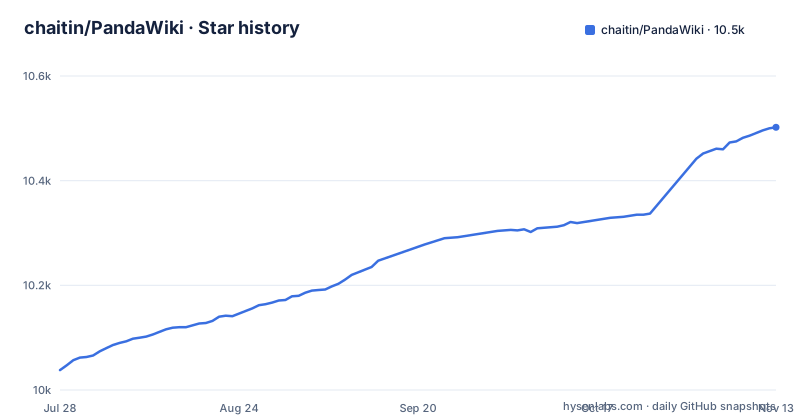
Star history
- chaitin/PandaWiki10,502 ★ · +464
| Repository | 2026-07-28 | 2026-11-13 |
|---|---|---|
| chaitin/PandaWiki | 10k | 10.5k |
464 Stars in the last 108 days, measured from the daily GitHub snapshot. Compare with other projects
Editorial analysis
What PandaWiki Actually Solves
PandaWiki targets teams that want to publish product documentation, technical manuals, FAQs, or a blog without wiring together a separate CMS, a search index, and an AI chatbot. The README positions it as an AI-model-driven knowledge base system: you create a knowledge base, PandaWiki turns it into a wiki website, and then AI-assisted creation, Q&A, and search operate on top of that content. The intended user is someone who has a Linux server, can run Docker, and wants a self-hosted alternative to hosted documentation platforms. The project does not claim to be a general-purpose CMS; it is specifically about documents that can be learned by an AI model and queried by visitors.
How the Data Flow Works
The repository layout and README reveal a two-part architecture: a control console for managing knowledge bases and a public wiki front end for each knowledge base. The README states that each knowledge base is a collection of documents, and PandaWiki creates a separate wiki website for each one. Content can enter through several channels: importing by webpage URL, by website sitemap, by RSS subscription, or by offline files. Once documents are uploaded, the system 'learns' them, which is the prerequisite for AI Q&A and AI search. The AI features depend on a configured model; the README warns that without an AI model configured, creation, Q&A, and search will not work. In short, documents are imported, learned by the system, and then used by the AI Q&A and AI search features.
Getting It Running: Docker and a One-Line Script
Installation is Docker-centric. The README requires a Linux system with Docker 20.x or above and root access. The command is a single curl pipe: bash -c "$(curl -fsSLk https://release.baizhi.cloud/panda-wiki/manager.sh)". The -k flag skips certificate verification, which is worth noting for security-conscious adopters. The script runs for several minutes and then prints access URLs, a default username of admin, and a generated password. The console is served on port 2443 over HTTP, not HTTPS, based on the sample output. After login, the first-run flow prompts you to configure an AI model. There are two options: one-click automatic configuration or manual custom configuration. The README recommends the Baizhi Cloud model marketplace, which offers a free 5 yuan credit, and links to a documentation page for further model configuration details.
AI Features Depend Entirely on an External Model
The biggest constraint is that PandaWiki is a shell for AI capabilities. Without an AI model configured, the core differentiators, AI creation, AI Q&A, and AI search, are dead. The README states this plainly: '在未配置大模型的情况下 AI 创作、AI 问答、AI 搜索 等功能无法正常使用.' This means your operating cost and data privacy are tied to whatever model provider you pick. If you use a cloud provider, your documents likely leave your server. The project does not document any on-premises model option in the README. For teams with strict data residency requirements, this could be a deal-breaker. Also, the README recommends Baizhi Cloud's model marketplace for quick setup, which may be convenient but ties you to that vendor unless you configure a different model manually.
Export and Integration Features Have Limits
The README lists rich text editing that is compatible with Markdown and HTML, and export to Word, PDF, and Markdown. That is useful for documentation teams that need to distribute content outside the wiki. Integration options include embedding as a web widget on other sites and turning the knowledge base into chatbots for DingTalk, Feishu, and WeCom. These are concrete features, but the README does not specify how the widget is embedded or what the chatbot protocol looks like. There is no mention of an API for programmatic content management, which means large-scale content migration might only work through the import channels listed. The import options are solid for pulling existing web content, but offline file import is not detailed beyond 'offline files', so you cannot tell which formats are accepted.
Licensing: AGPL-3.0 Is Not Optional
PandaWiki is licensed under AGPL-3.0. The README explicitly calls out the obligations: you can use, modify, and distribute the software, but you must release your modifications under the same license, and if you provide the service over a network, you must open-source your code. This is a strong copyleft license. For internal use behind a firewall, the network clause may not trigger, but for any SaaS offering built on PandaWiki, the source code of your modifications must be made available to users. This is a significant factor for commercial adopters. The README does not offer a commercial license or dual licensing, so there is no paid path to avoid AGPL. If your organization is not prepared to open-source derivative work, this project is the wrong choice.
Maintenance and Upgrade Considerations
The repository shows active development. The last push was 2026-10-21, with release v3.87.5 on the same day, and previous releases v3.87.4 (2026-10-09) and v3.87.3 (2026-09-30) in the weeks before. That cadence suggests frequent updates, which is good for bug fixes but implies a maintenance burden. The README does not describe an upgrade procedure, database migration steps or backup procedures. You should plan to test upgrades in a staging environment, because the README does not guarantee backward compatibility. The project is not archived, which is a positive signal, but the heavy reliance on an external AI provider means your upgrade testing must also cover model configuration changes.
Alternatives and How They Differ
A conventional self-hosted wiki would need a separate AI service or chatbot integrated. PandaWiki bundles AI creation, Q&A, and search out of the box, which saves integration work but ties you to its model configuration. Another alternative is a headless CMS like Strapi, which gives you full control over content modeling and an API, but you would have to build the wiki front end and AI features yourself. PandaWiki's advantage is that it provides a ready-made wiki website per knowledge base, so you do not have to design a front end. The trade-off is that you get less flexibility in how content is structured and presented.
Who Should Skip PandaWiki
Teams that need a permissive license, such as MIT or Apache-2.0, to embed a wiki in a proprietary product should avoid PandaWiki. Also, anyone who wants AI features without sending content to a third-party model provider will find the project lacking, because there is no documented local model option. If your documentation is highly structured with custom fields, or you need a full REST API for content management, PandaWiki's import-based model may feel limiting. The project is best suited for small to mid-sized teams that want a quick, self-hosted documentation site with AI Q&A and are comfortable with the AGPL terms. Before adopting, verify that the installer works in your network environment, since it uses a curl command with -k and a third-party release server, and confirm that the AI model you plan to use is compatible with the manual configuration interface.
Editorial conclusion
Adopt PandaWiki if you run your own Linux server with Docker 20.x or later, need a self-hosted wiki that can import from URLs, sitemaps, or RSS, and want AI features without building them from scratch. Do not adopt it if you need a permissive license, plan to offer the system as a hosted service without releasing your modifications, or cannot tolerate a setup that requires an external AI model provider. Before committing, verify the AI model configuration path (one-click or manual) against your provider, confirm the AGPL obligations for your use case, and test the import and export workflows on a small knowledge base.
Frequently asked questions
What operating system and Docker version does PandaWiki need?
Installation requires a Linux system with Docker 20.x or newer, and the instructions start with logging in to the server as root. No Windows or macOS route is documented.
What happens in PandaWiki if I never configure an AI model?
The first login prompts you to configure a model, with one-click and manual options. The project states that AI creation, AI Q&A and AI search cannot be used normally until a model is in place.
Does PandaWiki have to be installed, or is there a hosted option?
There is a SaaS version at https://ragcloud.app.baizhi.cloud/ that needs no deployment, alongside the self-hosted Docker route on a Linux host. The vendor's model marketplace at https://baizhi.cloud/ is the recommended way to connect a model.
What does PandaWiki's AGPL-3.0 license require from me?
You must open source your modifications under the same license, and providing the software as a service over the network also requires you to open source your code. The project notes that commercial use carries the same open source requirement.
How do documents get into a PandaWiki knowledge base?
Documented import routes are a single web page URL, a site Sitemap, an RSS subscription, and offline files. The editor handles Markdown and HTML and can export to word, pdf or markdown, and every knowledge base gets its own wiki site.
Official sources
Add this badge to your README
If you maintain this project, the badge below links readers to this analysis and shows its maintenance status from the daily GitHub snapshot. Paste the markdown into your README; add ?metric=license or ?metric=stars to the image URL for a different field.

[](https://hysenlabs.com/projects/chaitin-pandawiki)Star history chart for your README
[](https://hysenlabs.com/projects/chaitin-pandawiki)Was this useful?